
arkrocket AR-WB01
arkrocket 200 Wall-O-Matic Table Jukebox
Model: AR-WB01 User Manual
ആമുഖം
This manual provides comprehensive instructions for the setup, operation, and maintenance of your arkrocket 200 Wall-O-Matic Table Jukebox. Please read this manual thoroughly before using the product to ensure proper function and longevity.

Figure 1: The arkrocket 200 Wall-O-Matic Table Jukebox, designed to complement retro American diner aesthetics.
സുരക്ഷാ വിവരങ്ങൾ
- മഴയോ ഈർപ്പമോ യൂണിറ്റ് തുറന്നുകാട്ടരുത്.
- യൂണിറ്റ് ഡിസ്അസംബ്ലിംഗ് ചെയ്യരുത്. എല്ലാ സേവനങ്ങളും യോഗ്യതയുള്ള ഉദ്യോഗസ്ഥരെ ഏൽപ്പിക്കുക.
- പവർ അഡാപ്റ്റർ അനുയോജ്യമായ ഒരു പവർ സ്രോതസ്സുമായി ശരിയായി ബന്ധിപ്പിച്ചിട്ടുണ്ടെന്ന് ഉറപ്പാക്കുക.
- നേരിട്ടുള്ള സൂര്യപ്രകാശം, താപ സ്രോതസ്സുകൾ, അമിതമായ പൊടി എന്നിവയിൽ നിന്ന് യൂണിറ്റിനെ അകറ്റി നിർത്തുക.
- ഭാരമുള്ള വസ്തുക്കൾ യൂണിറ്റിന് മുകളിൽ വയ്ക്കുന്നത് ഒഴിവാക്കുക.
ബോക്സിൽ എന്താണുള്ളത്
അൺപാക്ക് ചെയ്യുമ്പോൾ, ഇനിപ്പറയുന്ന എല്ലാ ഇനങ്ങളും ഉൾപ്പെടുത്തിയിട്ടുണ്ടെന്ന് ദയവായി ഉറപ്പാക്കുക:
- arkrocket 200 Wall-O-Matic Table Jukebox Unit
- പവർ അഡാപ്റ്റർ
- ഉപയോക്തൃ മാനുവൽ (ഈ പ്രമാണം)
- Song List Cards
സജ്ജമാക്കുക
- പ്ലേസ്മെൻ്റ്: Place the jukebox on a stable, flat surface. Ensure adequate ventilation around the unit. The unit can also be wall-mounted using the mounting points on the back.
- പവർ കണക്ഷൻ: Connect the provided power adapter to the 'DC IN' port on the side of the jukebox and then plug it into a standard electrical outlet.
- പ്രാരംഭ പവർ ഓൺ: Locate the power switch, typically on the side or back, and switch it to the 'ON' position. The display on top should illuminate.
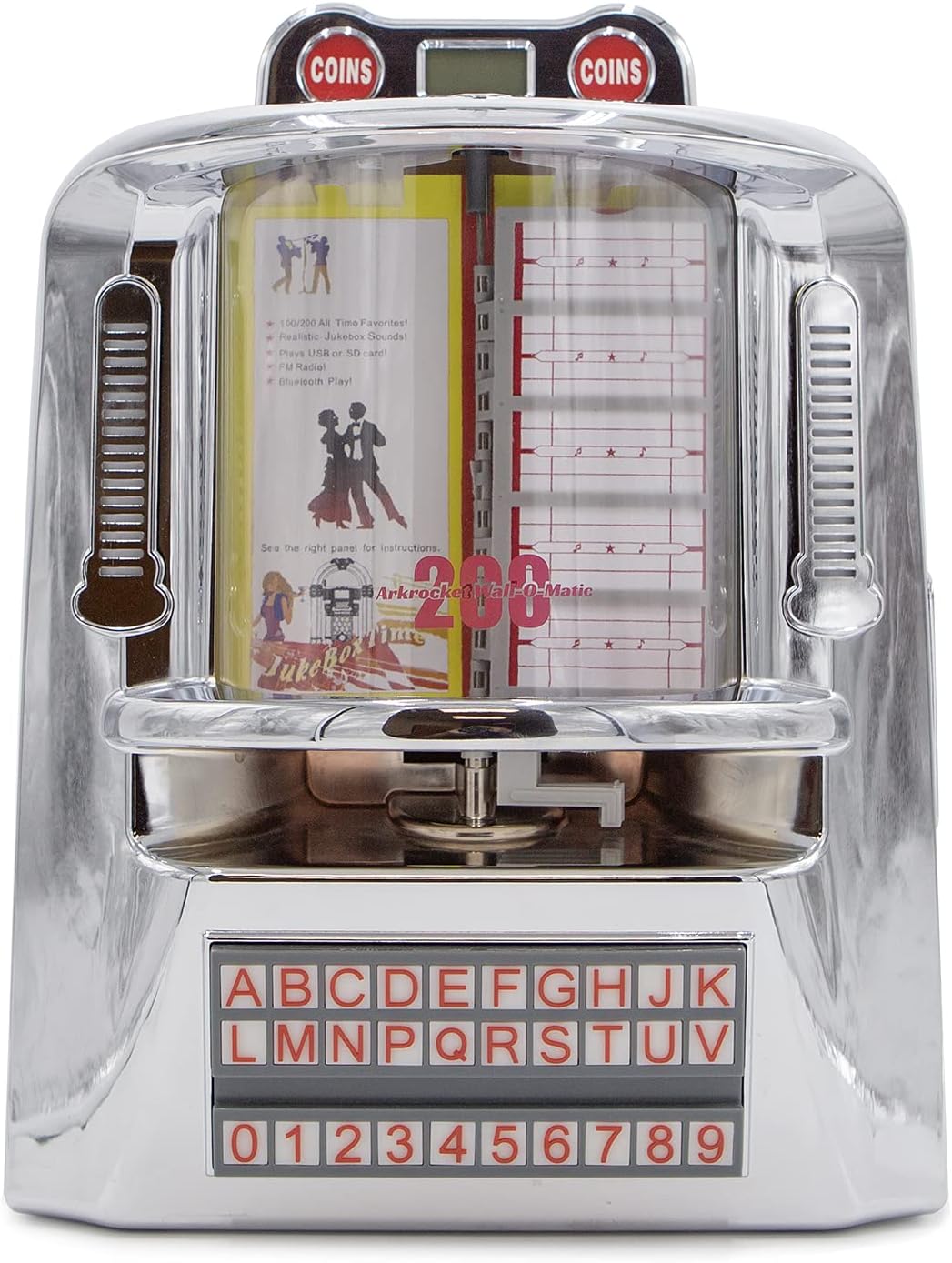
ചിത്രം 2: മുൻഭാഗം view of the jukebox, highlighting its classic design.

Figure 3: Dimensions of the jukebox for proper placement and fitting.
പ്രവർത്തന നിർദ്ദേശങ്ങൾ
നിയന്ത്രണ പാനൽ ഓവർview
The main control panel is located on the right side of the unit. It features various buttons and ports for different functions.

Figure 4: Side control panel with various input and control options.
മോഡ് തിരഞ്ഞെടുക്കൽ
Press the 'MODE' button on the control panel to cycle through available input modes: Bluetooth (BT), FM Radio, USB, and SD Card. The top LED display will indicate the currently selected mode.
ബ്ലൂടൂത്ത് ജോടിയാക്കൽ
- Switch the jukebox to 'BT' mode using the 'MODE' button. The LED display will show 'BLUE'.
- നിങ്ങളുടെ മൊബൈൽ ഉപകരണത്തിൽ, ബ്ലൂടൂത്ത് പ്രവർത്തനക്ഷമമാക്കി ലഭ്യമായ ഉപകരണങ്ങൾക്കായി തിരയുക.
- Select 'arkrocket 200' from the list. Once paired, the jukebox will emit an audible confirmation.
- You can now play audio from your device through the jukebox speakers.
എഫ്എം റേഡിയോ ഓപ്പറേഷൻ
- Switch the jukebox to 'FM' mode using the 'MODE' button. The LED display will show the frequency.
- Use the 'PREV' and 'NEXT' buttons (left and right arrows) to tune to different radio stations.
USB/SD കാർഡ് പ്ലേബാക്ക്
- Insert a USB drive into the 'USB' port or an SD card into the 'SD' slot on the control panel.
- നിങ്ങളുടെ സംഗീതം ഉറപ്പാക്കുക files are in MP3 format. The jukebox supports up to 199 songs.
- The unit will automatically switch to USB or SD mode and begin playback.
- Use the 'PLAY/PAUSE', 'PREV', and 'NEXT' buttons to control playback. The 'RPT' button allows for repeat playback.

Figure 5: USB drive and SD card slots for playing digital music files.
Jukebox Song Selection (Physical Cards)
The jukebox features a classic song selection interface with physical cards.
- To access the song list cards, gently lift the top chrome cover near the 'COINS' display.
- Carefully pull out the transparent sleeves containing the song list cards.
- Write your desired song titles and artists on the provided cards, corresponding to the track numbers on your USB/SD media.
- Slide the sleeves back into place and close the chrome cover.
- Use the alphabet and number buttons on the front panel to select a song (e.g., A1, B2). The selected song will begin playing immediately if in USB/SD mode.

Figure 6: Top section of the jukebox where song list cards are housed.

Figure 7: The illuminated alphabet and number buttons for song selection.
ആംബിയൻ്റ് ലൈറ്റിംഗ്
The jukebox features ambient lighting that enhances its retro aesthetic. To control the lighting:
- Locate the 'LIGHT' switch on the side control panel.
- Toggle the switch to 'ON' to activate the lights.
- The side lights are designed to react to the music, creating a dynamic visual effect.

Figure 8: The jukebox with its ambient lighting activated, adding to the retro atmosphere.
Aux In / Line Out
- ഓക്സ് ഇൻ: Connect external audio devices (e.g., smartphones, MP3 players) to the 'AUX IN' port using a 3.5mm audio cable. Switch the jukebox to 'AUX' mode.
- ലൈൻ Uട്ട്: Connect the 'LINE OUT' port to an external amplifier or speaker system for enhanced audio output.
മെയിൻ്റനൻസ്
- വൃത്തിയാക്കൽ: Use a soft, dry cloth to clean the exterior of the jukebox. For stubborn marks on the chrome, a slightly damp cloth followed by immediate drying is recommended. Do not use abrasive cleaners or solvents.
- സംഭരണം: യൂണിറ്റ് ദീർഘനേരം സൂക്ഷിക്കുകയാണെങ്കിൽ, വൈദ്യുതിയിൽ നിന്ന് വിച്ഛേദിച്ച് നേരിട്ടുള്ള സൂര്യപ്രകാശത്തിൽ നിന്നും കടുത്ത താപനിലയിൽ നിന്നും അകന്ന് തണുത്തതും വരണ്ടതുമായ സ്ഥലത്ത് സൂക്ഷിക്കുക.
ട്രബിൾഷൂട്ടിംഗ്
| പ്രശ്നം | സാധ്യമായ കാരണം | പരിഹാരം |
|---|---|---|
| ശക്തിയില്ല | പവർ അഡാപ്റ്റർ ബന്ധിപ്പിച്ചിട്ടില്ല; ഔട്ട്ലെറ്റ് സജീവമല്ല. | പവർ അഡാപ്റ്റർ യൂണിറ്റിലേക്കും പ്രവർത്തിക്കുന്ന ഒരു ഇലക്ട്രിക്കൽ ഔട്ട്ലെറ്റിലേക്കും സുരക്ഷിതമായി പ്ലഗ് ചെയ്തിട്ടുണ്ടെന്ന് ഉറപ്പാക്കുക. |
| ശബ്ദമില്ല | Volume too low; incorrect mode selected; external device issue. | Increase volume using VOL+ button. Verify correct mode (BT, USB, SD, FM, AUX). Check external device connection/volume. |
| ബ്ലൂടൂത്ത് ജോടിയാക്കുന്നില്ല | Jukebox not in BT mode; device too far; previous connection active. | Ensure jukebox is in 'BT' mode. Move device closer. Disconnect from other Bluetooth devices. |
| USB/SD കാർഡ് പ്ലേ ചെയ്യുന്നില്ല | തെറ്റാണ് file ഫോർമാറ്റ്; കാർഡ്/ഡ്രൈവ് ശരിയായി ചേർത്തിട്ടില്ല; കേടായി files. | ഉറപ്പാക്കുക files are MP3. Reinsert USB/SD card. Try a different USB/SD card or reformat. |
| ലൈറ്റുകൾ പ്രവർത്തിക്കുന്നില്ല | Light switch off. | Toggle the 'LIGHT' switch to 'ON'. |
സ്പെസിഫിക്കേഷനുകൾ
| ഫീച്ചർ | വിശദാംശങ്ങൾ |
|---|---|
| ബ്രാൻഡ് | arkrocket |
| മോഡലിൻ്റെ പേര് | 200 Wall-O-Matic |
| മോഡൽ നമ്പർ | AR-WB01 |
| മെറ്റീരിയൽ | Chrome |
| നിറം | സിൽവർ ക്രോം |
| ഉൽപ്പന്ന അളവുകൾ | 6"D x 11"W x 16"H |
| ഇനത്തിൻ്റെ ഭാരം | 7 പൗണ്ട് |
| സ്പീക്കർ തരം | ഘടകം |
| സ്പീക്കർ വലിപ്പം | 5 ഇഞ്ച് |
| സ്പീക്കർ പരമാവധി ഔട്ട്പുട്ട് പവർ | 40 വാട്ട്സ് |
| ഓഡിയോ put ട്ട്പുട്ട് മോഡ് | സ്റ്റീരിയോ |
| കണക്റ്റിവിറ്റി ടെക്നോളജി | ഓക്സിലറി, ബ്ലൂടൂത്ത്, യുഎസ്ബി |
| വയർലെസ് കമ്മ്യൂണിക്കേഷൻ ടെക്നോളജി | ബ്ലൂടൂത്ത് |
| ബ്ലൂടൂത്ത് ശ്രേണി | 10 മീറ്റർ |
| പ്രത്യേക സവിശേഷതകൾ | Bluetooth, FM Radio, SD card, USB Port, Ambient Lighting |
| പവർ ഉറവിടം | കോർഡഡ് ഇലക്ട്രിക് |
| വാറൻ്റി തരം | 1 വർഷം |
വാറൻ്റി & പിന്തുണ
Your arkrocket 200 Wall-O-Matic Table Jukebox comes with a 1-വർഷ പരിമിത വാറൻ്റി വാങ്ങിയ തീയതി മുതൽ. സാധാരണ ഉപയോഗത്തിലുള്ള നിർമ്മാണ വൈകല്യങ്ങളും പ്രവർത്തനക്ഷമതയും ഈ വാറന്റി ഉൾക്കൊള്ളുന്നു.
For warranty claims, technical support, or any inquiries regarding your product, please visit the official arkrocket website or contact their customer service directly. Please have your model number (AR-WB01) and proof of purchase ready when seeking support.
Ask a question about this manual
Ask about setup, troubleshooting, compatibility, parts, safety, or missing instructions. Manuals+ will review the question and use this page’s manual context to help answer it.