
VEEZOOM WS-KN808P-50BS#ITFBA
VEEZOOM 5MP PoE Camera Surveillance Kit User Manual
Model: WS-KN808P-50BS#ITFBA | Brand: VEEZOOM
1. ആമുഖം
This manual provides essential information for the installation, operation, and maintenance of your VEEZOOM 5MP PoE Camera Surveillance Kit. This system is designed to provide reliable security monitoring with high-definition video quality and intelligent features.
The VEEZOOM 5MP PoE Camera Surveillance Kit offers 2560x1920 Ultra HD clarity day and night, with ultimate night vision up to 100 feet. This Plug & Play PoE system provides stable power and video signals through its 8-port NVR, supporting up to 8*8MP/6MP/5MP/4MP/2MP IP cameras. It features intelligent motion detection alerts sent to your smartphone via the Veezoompro app. A 2TB hard drive is pre-installed for 24/7 continuous recording. The IP66 waterproof rating ensures reliable operation in all weather conditions, from -35°C to 55°C.
2. ബോക്സിൽ എന്താണുള്ളത്?
താഴെ ലിസ്റ്റ് ചെയ്തിരിക്കുന്ന എല്ലാ ഇനങ്ങളും നിങ്ങളുടെ പാക്കേജിൽ ഉൾപ്പെടുത്തിയിട്ടുണ്ടെന്ന് ദയവായി പരിശോധിക്കുക:
- 1 x 8CH 8MP NVR (Network Video Recorder)
- 4 x 5MP PoE IP Cameras
- 4 x 18m Network Cables
- 1 x യുഎസ്ബി മൗസ്
- 1 x HDMI കേബിൾ
- 1 x 1.5മീ നെറ്റ്വർക്ക് കേബിൾ
- 1 x Quick Instruction Guide
- 1 x എൻവിആർ വൈദ്യുതി വിതരണം

This image displays the VEEZOOM 8-channel NVR unit along with four 5MP PoE bullet-style IP cameras and a 2TB hard drive, illustrating the complete surveillance system.
3. സജ്ജീകരണ ഗൈഡ്
The VEEZOOM PoE system is designed for easy plug-and-play installation. Follow these steps to set up your surveillance system:
- NVR കണക്റ്റുചെയ്യുക: Connect the NVR to a power source using the provided power adapter. Connect the NVR to your router using the 1.5m network cable for internet access.
- ക്യാമറകൾ ബന്ധിപ്പിക്കുക: Connect each 5MP PoE IP camera to an available PoE port on the NVR using the 18m network cables. The cameras will receive both power and video signal through these cables.
- ഡിസ്പ്ലേ ബന്ധിപ്പിക്കുക: Connect the NVR to a monitor or TV using the HDMI cable to view the camera feeds and configure settings.
- മൊബൈൽ ആപ്പ് ഇൻസ്റ്റാൾ ചെയ്യുക: Download the "Veezoompro" application from the App Store (for iOS) or Google Play Store (for Android) on your smartphone.
- റിമോട്ട് Viewing: Follow the in-app instructions to add your NVR device and begin viewലൈവ് ഫൂtagഇ വിദൂരമായി.

This diagram shows how the PoE cameras connect directly to the NVR via a single Ethernet cable for both power and video, simplifying installation. It also depicts downloading the Veezoompro app and viewലൈവ് ഫൂtagഒരു സ്മാർട്ട്ഫോണിൽ.
4. പ്രവർത്തന നിർദ്ദേശങ്ങൾ
4.1. തത്സമയം View ഒപ്പം റെക്കോർഡിംഗ്
സിസ്റ്റം സജ്ജീകരിച്ചുകഴിഞ്ഞാൽ, നിങ്ങൾക്ക് കഴിയും view live feeds on your connected monitor or through the Veezoompro app. The pre-installed 2TB hard drive enables 24/7 continuous recording for all connected cameras.

This image displays a monitor showing live feeds from four cameras, and below it, the NVR unit with an indication that up to 8 cameras can be connected for continuous recording, including the pre-installed 2TB HDD.
4.2. 5MP Ultra HD Vision
The cameras provide 5-megapixel resolution (2560x1920) for clear and detailed images. They are equipped with advanced night vision technology to ensure visibility up to 100 feet in low-light or no-light conditions.

This image demonstrates the camera's ability to capture clear Ultra HD footage during the day in full color and at night using infrared technology for black and white vision.
4.3. സ്മാർട്ട് മോഷൻ ഡിറ്റക്ഷൻ
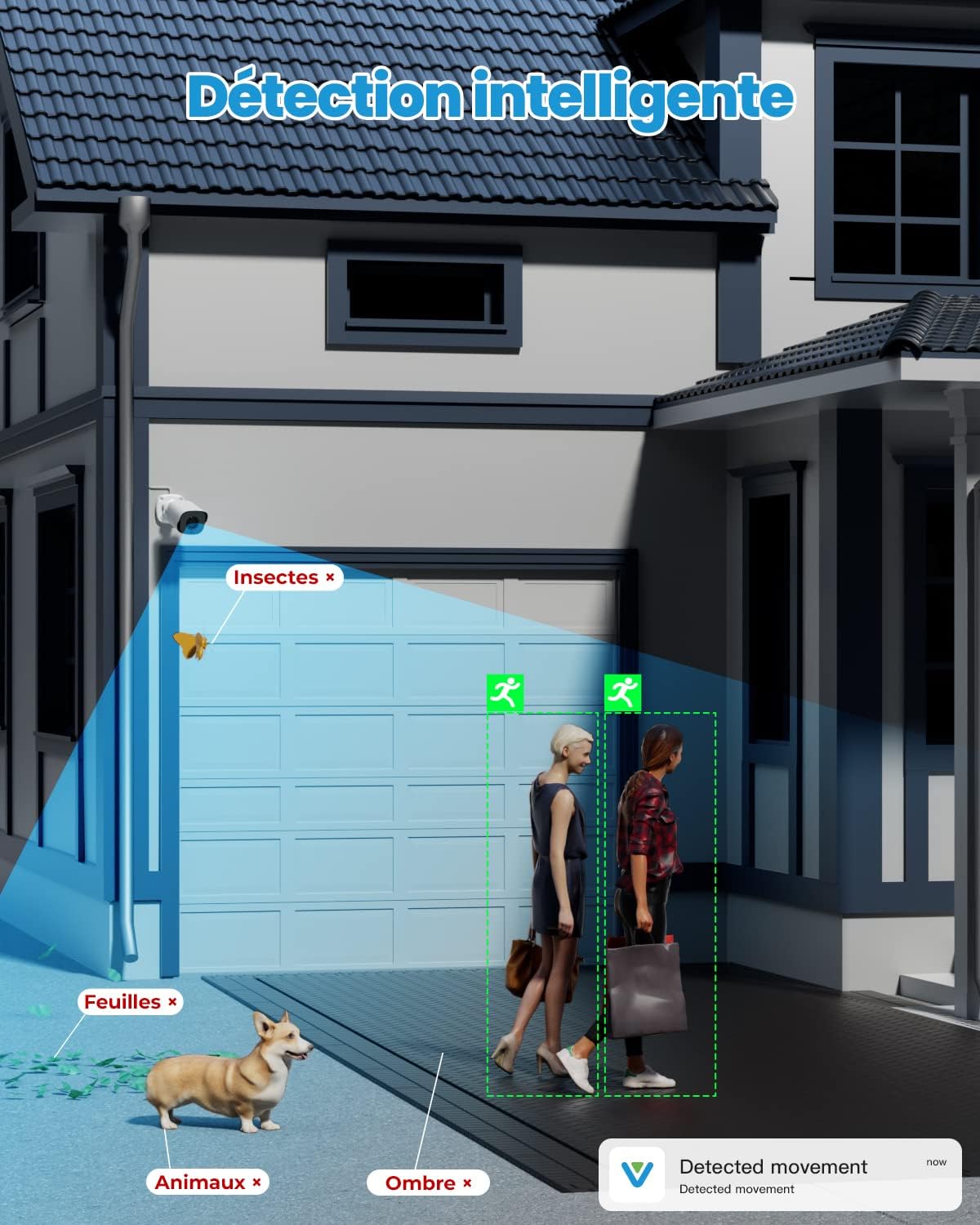
The system features intelligent motion detection that can distinguish human movement from other objects like insects, leaves, or shadows, reducing false alarms. When a suspicious event occurs, smart notifications with images will be sent to your smartphone via the Veezoompro app.

This graphic illustrates the intelligent motion detection feature, highlighting how the system accurately identifies human movement while filtering out irrelevant triggers like insects, leaves, or shadows.
4.4. റിമോട്ട് ആക്സസ്
Access your surveillance system from anywhere, at any time, using the Veezoompro mobile application on your smartphone, tablet, or computer. This allows for live viewing, റെക്കോർഡ് ചെയ്ത foo പ്ലേബാക്ക്tage, and system management on the go.

This image illustrates the remote access functionality, showing a user viewing live camera feeds on a smartphone, tablet, and laptop, enabled by the Veezoompro application.
5. പരിപാലനം
Regular maintenance ensures optimal performance and longevity of your VEEZOOM surveillance system.
- ക്യാമറകൾ വൃത്തിയാക്കൽ: ക്യാമറ ലെൻസുകൾ ഇടയ്ക്കിടെ മൃദുവായ, ഡി-ടച്ച് ഉപയോഗിച്ച് വൃത്തിയാക്കുക.amp തടസ്സമാകുന്ന പൊടി, അഴുക്ക് അല്ലെങ്കിൽ വെള്ളക്കെട്ടുകൾ നീക്കം ചെയ്യുന്നതിനുള്ള തുണി view. അബ്രാസീവ് ക്ലീനറുകൾ ഒഴിവാക്കുക.
- കണക്ഷനുകൾ പരിശോധിക്കുക: Ensure all network cables and power connections are secure and free from damage. Loose connections can lead to signal loss or power interruptions.
- സോഫ്റ്റ്വെയർ അപ്ഡേറ്റുകൾ: Check the Veezoompro app or VEEZOOM's official website for any available firmware or software updates for your NVR and cameras. Keeping your system updated ensures the latest features and security patches.
- ഹാർഡ് ഡ്രൈവ് ആരോഗ്യം: While the 2TB HDD is pre-installed, it is good practice to periodically check its health through the NVR's system settings to ensure continuous recording functionality.
This image shows a VEEZOOM camera being exposed to rain, emphasizing its IP66 weather-resistant design, suitable for outdoor use in various conditions from -35°C to 55°C.
6. പ്രശ്നപരിഹാരം
If you encounter issues with your VEEZOOM surveillance system, refer to the following common troubleshooting steps:
- വീഡിയോ ഫീഡ് ഇല്ല:
- Ensure the NVR is powered on and connected to a display.
- Check that all cameras are properly connected to the NVR's PoE ports.
- Verify network cables are securely plugged in at both ends.
- Restart the NVR and cameras.
- റിമോട്ട് ആക്സസ് ഇല്ല:
- Ensure the NVR is connected to the internet via your router.
- നിങ്ങളുടെ റൂട്ടറിന്റെ ഇന്റർനെറ്റ് കണക്ഷൻ പരിശോധിക്കുക.
- Verify that the Veezoompro app is updated to the latest version.
- Confirm that the NVR is correctly added to your Veezoompro account.
- മോഷൻ ഡിറ്റക്ഷൻ പ്രവർത്തിക്കുന്നില്ല:
- Check the motion detection settings in the NVR interface or Veezoompro app to ensure it is enabled and configured correctly.
- Adjust sensitivity settings if necessary.
- മോശം ചിത്രത്തിന്റെ ഗുണനിലവാരം:
- ക്യാമറ ലെൻസ് വൃത്തിയാക്കുക.
- ക്യാമറയുടെ ഫീൽഡിൽ തടസ്സങ്ങളൊന്നുമില്ലെന്ന് ഉറപ്പാക്കുക. view.
- Check cable integrity for any damage that might affect signal quality.
7 സ്പെസിഫിക്കേഷനുകൾ
| ഫീച്ചർ | സ്പെസിഫിക്കേഷൻ |
|---|---|
| ബ്രാൻഡ് | വീസൂം |
| മോഡൽ നമ്പർ | WS-KN808P-50BS#ITFBA |
| നിറം | PoE 5MP Camera |
| ഉൽപ്പന്ന തരം | ബുള്ളറ്റ് |
| ഓപ്പറേറ്റിംഗ് സിസ്റ്റം | ഉൾച്ചേർത്ത ഓപ്പറേറ്റിംഗ് സിസ്റ്റം |
| കണക്റ്റിവിറ്റി ടെക്നോളജി | വയർഡ് |
| പ്രത്യേക സവിശേഷതകൾ | മോഷൻ സെൻസർ, നൈറ്റ് വിഷൻ |
| മൊത്തം USB പോർട്ടുകൾ | 3 |
| അനുയോജ്യമായ ഉപകരണങ്ങൾ | PoE IP Cameras |
| വീഡിയോ റെക്കോർഡിംഗ് റെസല്യൂഷൻ | 5എംപി |
| ചാനലുകളുടെ എണ്ണം | 8 |
| മെമ്മറി സ്റ്റോറേജ് കപ്പാസിറ്റി | 2 ടി.ബി |
| പവർ ഉറവിടം | 12 വി ഡിസി 1.25 എ |
| ഇനത്തിൻ്റെ അളവുകൾ L x W x H | 36.5 x 31.5 x 18.5 സെൻ്റീമീറ്റർ |
8. വാറൻ്റിയും പിന്തുണയും
Your VEEZOOM 5MP PoE Camera Surveillance Kit comes with a 1 വർഷത്തെ നിർമ്മാതാവിന്റെ വാറന്റി.
For technical support, warranty claims, or any questions regarding your product, please contact VEEZOOM customer service. Refer to the contact information provided in your quick instruction guide or visit the official VEEZOOM webസഹായത്തിനുള്ള സൈറ്റ്.
Ask a question about this manual
Ask about setup, troubleshooting, compatibility, parts, safety, or missing instructions. Manuals+ will review the question and use this page’s manual context to help answer it.