
ആമുഖം
Thank you for choosing the WIWU Airbuds Pro SE TWS In-Ear Headphones. This manual provides detailed instructions for setting up, operating, maintaining, and troubleshooting your new earbuds. Please read this manual carefully before use to ensure optimal performance and longevity of your device.
പാക്കേജ് ഉള്ളടക്കം
- WIWU Airbuds Pro SE TWS In-Ear Headphones (Left and Right)
- ചാർജിംഗ് കേസ്
- സിലിക്കൺ പ്രൊട്ടക്റ്റീവ് കേസ്
- Short Lanyard
- ചാർജിംഗ് കേബിൾ
- ഉപയോക്തൃ മാനുവൽ
സജ്ജമാക്കുക
1. പ്രാരംഭ ചാർജിംഗ്
Before first use, fully charge the Airbuds Pro SE and their charging case. Connect the charging cable to the charging port on the case and a power source. The indicator light on the case will show charging status.

Image: WIWU Airbuds Pro SE in their charging case with the lid open, displaying a green indicator light, signifying power or charging status.
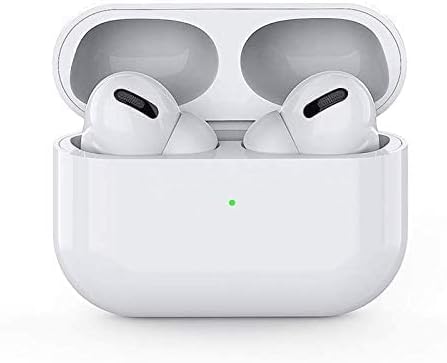
Image: The WIWU Airbuds Pro SE charging case with a short lanyard attached, showing the charging port and status lights on the side.
2. നിങ്ങളുടെ ഉപകരണവുമായി ജോടിയാക്കൽ (ബ്ലൂടൂത്ത് 5.0)
- Ensure the Airbuds Pro SE are charged.
- Open the charging case. The earbuds will automatically enter pairing mode, and a pop-up window may appear on compatible devices for instant pairing.
- നിങ്ങളുടെ സ്മാർട്ട്ഫോണിലോ മറ്റ് ബ്ലൂടൂത്ത് പ്രവർത്തനക്ഷമമാക്കിയ ഉപകരണത്തിലോ, ബ്ലൂടൂത്ത് ക്രമീകരണങ്ങളിലേക്ക് പോകുക.
- Select "WIWU Airbuds Pro SE" from the list of available devices.
- Once connected, you will hear an audio confirmation, and the indicator light on the case may change.

Image: WIWU Airbuds Pro SE in their open charging case, positioned next to a smartphone, demonstrating the pop-up pairing feature for quick connection.
പ്രവർത്തന നിർദ്ദേശങ്ങൾ
ഇയർബഡുകൾ ധരിക്കുന്നു
Gently insert the earbuds into your ears. Adjust them for a comfortable and secure fit. The in-ear design ensures stability during various activities.
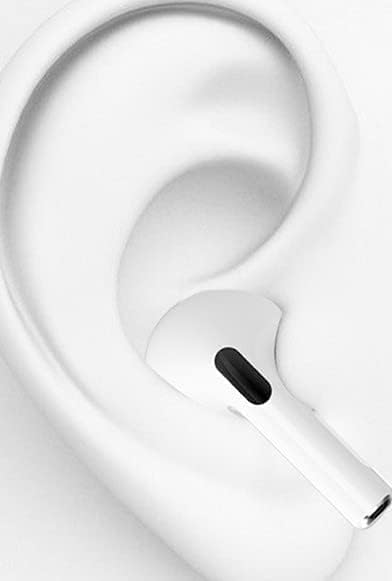
ചിത്രം: ഒരു ക്ലോസ്-അപ്പ് view of a white in-ear earbud properly seated within the ear canal, illustrating the correct wearing position.

Image: A man wearing WIWU Airbuds Pro SE in-ear headphones, looking at his smartphone, demonstrating typical usage.
Smart Tap Controls
The Airbuds Pro SE feature intuitive touch controls for managing audio and calls.
| ആക്ഷൻ | ഫംഗ്ഷൻ |
|---|---|
| ഒറ്റ ടാപ്പ് | സംഗീതം പ്ലേ ചെയ്യുക/താൽക്കാലികമായി നിർത്തുക, കോൾ സ്വീകരിക്കുക/അവസാനിപ്പിക്കുക |
| ഡബിൾ ടാപ്പ് (വലത് ഇയർബഡ്) | അടുത്ത ട്രാക്ക് |
| ഡബിൾ ടാപ്പ് (ഇടത് ഇയർബഡ്) | മുമ്പത്തെ ട്രാക്ക് |
| ട്രിപ്പിൾ ടാപ്പ് | വോയ്സ് അസിസ്റ്റൻ്റ് സജീവമാക്കുക |
| ലോംഗ് പ്രസ്സ് | കോൾ നിരസിക്കുക |
വിളിക്കുന്നു
- ഉത്തരം/അവസാന കോൾ: ഇയർബഡുകളിലൊന്നിൽ ഒറ്റത്തവണ ടാപ്പ് ചെയ്യുക.
- കോൾ നിരസിക്കുക: ഇയർബഡുകളിലൊന്നിൽ ദീർഘനേരം അമർത്തുക.
- The built-in Hi-Fi Clear Voice microphone helps filter noise for clear communication.
സംഗീത പ്ലേബാക്ക്
- പ്ലേ/താൽക്കാലികമായി നിർത്തുക: ഇയർബഡുകളിലൊന്നിൽ ഒറ്റത്തവണ ടാപ്പ് ചെയ്യുക.
- അടുത്ത ട്രാക്ക്: വലത് ഇയർബഡിൽ രണ്ടുതവണ ടാപ്പ് ചെയ്യുക.
- മുമ്പത്തെ ട്രാക്ക്: ഇടത് ഇയർബഡിൽ രണ്ടുതവണ ടാപ്പ് ചെയ്യുക.
വോയ്സ് അസിസ്റ്റൻ്റ്
- സജീവമാക്കുക: Triple tap either earbud to activate your device's voice assistant (e.g., Siri, Google Assistant).
മെയിൻ്റനൻസ്
വൃത്തിയാക്കൽ
- ഇയർബഡുകളും ചാർജിംഗ് കെയ്സും മൃദുവായതും ഉണങ്ങിയതും ലിന്റ് രഹിതവുമായ തുണി ഉപയോഗിച്ച് പതിവായി വൃത്തിയാക്കുക.
- അബ്രാസീവ് ക്ലീനറുകൾ, ആൽക്കഹോൾ, കെമിക്കൽ ലായകങ്ങൾ എന്നിവ ഉപയോഗിക്കരുത്.
- Ensure charging contacts are free of dust and debris.

Image: A close-up of a white earbud with water droplets, suggesting a degree of water resistance. While the product description mentions "protection," it doesn't explicitly state waterproof ratings. Cleaning should still be gentle.
സംഭരണം
- ഉപയോഗത്തിലില്ലാത്തപ്പോൾ, ഇയർബഡുകൾ സംരക്ഷിക്കുന്നതിനും ചാർജ്ജ് ചെയ്ത നിലയിൽ നിലനിർത്തുന്നതിനും അവ ചാർജിംഗ് കേസിൽ സൂക്ഷിക്കുക.
- Keep the device away from extreme temperatures, humidity, and dust.
ട്രബിൾഷൂട്ടിംഗ്
| പ്രശ്നം | പരിഹാരം |
|---|---|
| ഇയർബഡുകൾ ജോടിയാക്കുന്നില്ല |
|
| ഒരു ഇയർബഡിൽ നിന്ന് ശബ്ദമില്ല |
|
| മോശം ശബ്ദ നിലവാരം |
|
| ഇയർബഡുകൾ ചാർജ് ചെയ്യുന്നില്ല |
|
സ്പെസിഫിക്കേഷനുകൾ
| ഫീച്ചർ | വിശദാംശങ്ങൾ |
|---|---|
| മോഡലിൻ്റെ പേര് | Airbuds Pro SE |
| ബ്രാൻഡ് | WIWU |
| Connectivity Standard | ബ്ലൂടൂത്ത് 5.0 |
| പ്രത്യേക സവിശേഷതകൾ | Pop-up Pairing, Touch Control, Portable Charging Case, Lightweight Comfort, Hi-Fi Audio Drivers |
| അനുയോജ്യമായ ഉപകരണങ്ങൾ | സ്മാർട്ട്ഫോണുകൾ |
| നിയന്ത്രണ രീതി | സ്പർശിക്കുക |
| നിറം | വെള്ള |
| ഭാഗം നമ്പർ | APSEW |
വാറൻ്റിയും പിന്തുണയും
The WIWU Airbuds Pro SE are backed by a ഒരു വർഷത്തെ നിർമ്മാതാവിൻ്റെ വാറൻ്റി. For warranty claims or technical support, please contact your retailer or visit the official WIWU webകൂടുതൽ സഹായത്തിനുള്ള സൈറ്റ്.
വാറന്റി ആവശ്യങ്ങൾക്കായി നിങ്ങളുടെ വാങ്ങിയതിന്റെ തെളിവ് സൂക്ഷിക്കുക.