
1. ഉൽപ്പന്നം കഴിഞ്ഞുview
The TECLAST T65 is a high-performance tablet designed for both productivity and entertainment. It features a large 13.4-inch 120Hz display, runs on Android 16 with Gemini AI integration, and offers robust connectivity options including 4G LTE and 5G WiFi. This manual provides essential information for setting up, operating, and maintaining your device.
ചിത്രം: മുൻഭാഗം view of the TECLAST T65 Tablet, showcasing അതിന്റെ വലിയ ഡിസ്പ്ലേ.
2. സജ്ജീകരണ ഗൈഡ്
2.1. അൺബോക്സിംഗും പ്രാരംഭ പരിശോധനയും
പാക്കേജിംഗിൽ നിന്ന് എല്ലാ ഇനങ്ങളും ശ്രദ്ധാപൂർവ്വം നീക്കം ചെയ്യുക. ഇനിപ്പറയുന്ന ഘടകങ്ങൾ ഉണ്ടെന്ന് ഉറപ്പാക്കുക:
- TECLAST T65 Tablet
- ബ്ലൂടൂത്ത് കീബോർഡ്
- നിഷ്ക്രിയ സ്റ്റൈലസ്
- സംരക്ഷണ കേസ്
- OTG അഡാപ്റ്റർ
- Keyboard Stickers
- പവർ അഡാപ്റ്റർ (വ്യക്തമായി പട്ടികപ്പെടുത്തിയിട്ടില്ല, പക്ഷേ ചാർജ് ചെയ്യുന്നതിനായി സൂചിപ്പിച്ചിരിക്കുന്നു)

Image: The TECLAST T65 Tablet displayed with its full set of included accessories, including the keyboard, stylus, and protective case.
2.2. പവർ ഓൺ, പ്രാരംഭ കോൺഫിഗറേഷൻ
- Press and hold the Power button located on the side of the tablet until the TECLAST logo appears.
- നിങ്ങളുടെ ഭാഷ, പ്രദേശം എന്നിവ തിരഞ്ഞെടുത്ത് ഒരു വൈഫൈ നെറ്റ്വർക്കിലേക്ക് കണക്റ്റുചെയ്യുന്നതിന് ഓൺ-സ്ക്രീൻ നിർദ്ദേശങ്ങൾ പാലിക്കുക.
- Sign in with your Google account or create a new one to access Android services and the Google Play Store.
2.3. സിം, മൈക്രോ എസ്ഡി കാർഡുകൾ ചേർക്കൽ
The TECLAST T65 supports Dual SIM 4G LTE and MicroSD card expansion up to 4TB.
- ടാബ്ലെറ്റിന്റെ വശത്ത് സിം/മൈക്രോ എസ്ഡി കാർഡ് ട്രേ കണ്ടെത്തുക.
- ട്രേ തുറക്കാൻ നൽകിയിരിക്കുന്ന സിം എജക്റ്റർ ഉപകരണം ഉപയോഗിക്കുക.
- Carefully place your Nano-SIM cards and/or MicroSD card into the designated slots. Ensure correct orientation.
- ട്രേ അതിന്റെ സ്ഥാനത്ത് ക്ലിക്കു ചെയ്യുന്നത് വരെ ടാബ്ലെറ്റിലേക്ക് പതുക്കെ തിരികെ തള്ളുക.

ചിത്രം: ക്ലോസ്-അപ്പ് view of the SIM and MicroSD card tray, illustrating how to insert the cards.
2.4. ആക്സസറികൾ ബന്ധിപ്പിക്കുന്നു
Your tablet comes with a Bluetooth keyboard and a passive stylus for enhanced functionality.
- ബ്ലൂടൂത്ത് കീബോർഡ്: Turn on the keyboard and enable Bluetooth on your tablet (Settings > Connected devices > Bluetooth). Select the keyboard from the list of available devices to pair.
- Passive Stylus: The passive stylus does not require pairing. Simply use it directly on the screen for writing or drawing.
- സംരക്ഷണ കേസ്: Install the protective case to safeguard your tablet from bumps and scratches. It can also serve as a stand.
3. Operating Your TECLAST T65
3.1. Android 16 and Gemini AI
The TECLAST T65 runs on Android 16, offering a streamlined and intelligent user experience. It integrates the latest Gemini AI assistant for various tasks.
- ജെമിനി AI: Access Gemini AI to synthesize information, draft emails, plan appointments, create content, and engage in online discussions.
- Fluid OS: Experience smooth performance, real-time information updates, and enhanced anti-theft protection.

Image: Screenshot of the Android 16 system update interface, highlighting new features.

Image: Visual representation of Gemini AI 3.0 features, including intelligent recognition, content creation, and real-time translation.
3.2. ഡിസ്പ്ലേ സവിശേഷതകൾ
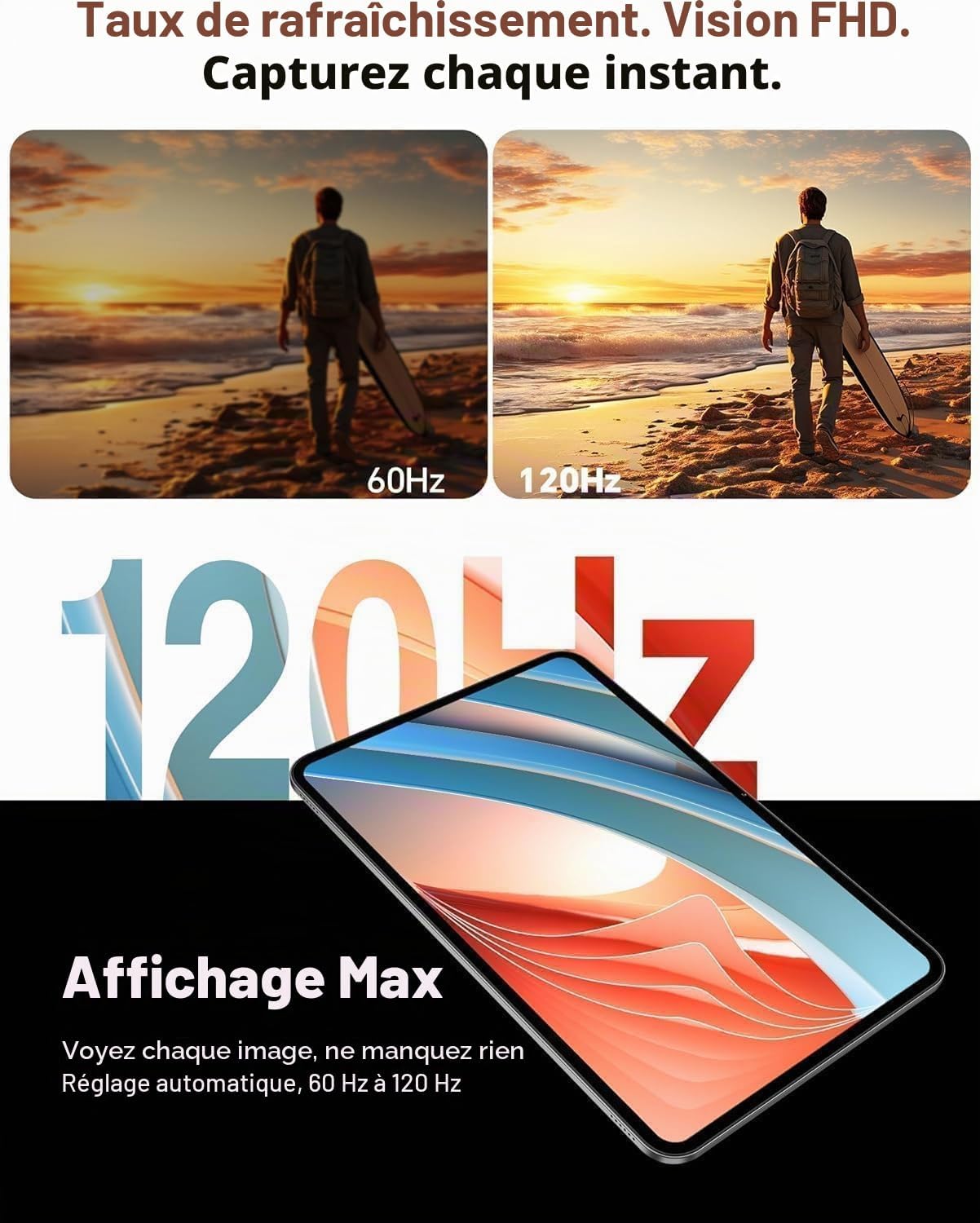
The 13.4-inch IPS display offers a Full HD resolution of 1920x1200 pixels and a 120Hz AdaptiveSync refresh rate.
- 120Hz AdaptiveSync: Enjoy smoother visuals and reduced eye strain, especially during fast-paced content like games or videos. The refresh rate adjusts automatically between 60Hz and 120Hz to optimize battery life.
- Widevine L1 Certification: Stream high-definition content from platforms like Netflix, YouTube, Disney+, Hulu, HBO Max, and Amazon Prime Video with rich colors and sharp details.

Image: A dynamic scene demonstrating the smoothness of the 120Hz AdaptiveSync display compared to 60Hz.

Image: Logos of various streaming services (YouTube, Netflix, Disney+, Hulu, HBO Max, Prime Video) indicating Widevine L1 support for high-quality streaming.
3.3. കണക്റ്റിവിറ്റി
Stay connected with various wireless technologies.
- 4G LTE ഡ്യുവൽ സിം: Use two SIM cards for mobile data and calls, ensuring connectivity even without Wi-Fi.
- 5G Wi-Fi: Enjoy fast and stable internet connections with dual-band Wi-Fi (2.4GHz + 5GHz).
- ബ്ലൂടൂത്ത് 5.0: Connect wireless peripherals like headphones, speakers, or the included keyboard with efficient power consumption.
- ജിപിഎസ്: The integrated GPS supports multiple satellite systems (GPS, BeiDou, GLONASS, Galileo) for accurate navigation.

Image: Icons representing 4G, VoLTE, GPS, and Wi-Fi connectivity, demonstrating the tablet's versatile connection options.

Image: The TECLAST T65 Tablet displaying a navigation map, illustrating its GPS functionality.
3.4. ക്യാമറയും ഓഡിയോയും
Capture moments and enjoy immersive sound.
- പിൻ ക്യാമറ: 13 MP with AI technology for clear photos.
- മുൻ ക്യാമറ: 5 MP, ideal for video calls and selfies.
- ഇരട്ട സ്പീക്കറുകൾ: Equipped with a smart chip for clear, powerful, and balanced audio.

Image: A person using the TECLAST T65 Tablet for a video call, demonstrating the front camera functionality.

Image: A graphic illustrating the immersive sound experience provided by the tablet's dual speakers and smart audio chip.
3.5. ഉൽപ്പാദനക്ഷമതയും വിനോദവും
- സ്പ്ലിറ്റ്-സ്ക്രീൻ മോഡ്: Android 16 supports split-screen mode, allowing you to run multiple applications side-by-side for enhanced productivity.
- ഗെയിമിംഗ്: The Octa-Core T7280 processor and Mali-G57 GPU ensure smooth gaming performance.
- സ്ക്രീൻ മിററിംഗ്: Wirelessly cast your tablet's screen to a larger display for presentations or home entertainment.

Image: A tablet screen demonstrating split-screen mode, showing two applications running simultaneously to boost productivity.

Image: A person holding the TECLAST T65 Tablet while playing a graphic-intensive game, highlighting its gaming capabilities.

Image: A tablet mirroring its screen content to a large projector, demonstrating wireless screen duplication.
4. പരിപാലനം
4.1. നിങ്ങളുടെ ടാബ്ലെറ്റ് വൃത്തിയാക്കൽ
To keep your tablet in optimal condition, follow these cleaning guidelines:
- സ്ക്രീനും ബോഡിയും തുടയ്ക്കാൻ മൃദുവായ, ലിന്റ് രഹിത തുണി ഉപയോഗിക്കുക.
- കഠിനമായ പാടുകൾക്ക്, ചെറുതായി dampതുണിയിൽ വെള്ളം അല്ലെങ്കിൽ സ്ക്രീൻ ക്ലീനിംഗ് ലായനി ഉപയോഗിച്ച് നനയ്ക്കുക.
- കഠിനമായ രാസവസ്തുക്കൾ, ഉരച്ചിലുകൾ ഉള്ള വസ്തുക്കൾ, അല്ലെങ്കിൽ അമിതമായ ഈർപ്പം എന്നിവ ഉപയോഗിക്കുന്നത് ഒഴിവാക്കുക.
4.2. സോഫ്റ്റ്വെയർ അപ്ഡേറ്റുകൾ
നിങ്ങളുടെ ടാബ്ലെറ്റിൽ ഏറ്റവും പുതിയ സവിശേഷതകൾ, സുരക്ഷാ പാച്ചുകൾ, പ്രകടന മെച്ചപ്പെടുത്തലുകൾ എന്നിവ ഉണ്ടെന്ന് ഉറപ്പാക്കാൻ പതിവായി സോഫ്റ്റ്വെയർ അപ്ഡേറ്റുകൾ പരിശോധിച്ച് ഇൻസ്റ്റാൾ ചെയ്യുക.
- ക്രമീകരണങ്ങൾ > സിസ്റ്റം > സിസ്റ്റം അപ്ഡേറ്റ് എന്നതിലേക്ക് പോകുക.
- ലഭ്യമായ എല്ലാ അപ്ഡേറ്റുകളും ഡൗൺലോഡ് ചെയ്ത് ഇൻസ്റ്റാൾ ചെയ്യാൻ ഓൺ-സ്ക്രീൻ നിർദ്ദേശങ്ങൾ പാലിക്കുക.
4.3. സ്റ്റോറേജ് മാനേജ്മെൻ്റ്
Manage your tablet's 256GB internal storage and expandable 4TB MicroSD card support to maintain performance.
- അനാവശ്യമായത് പതിവായി ഇല്ലാതാക്കുക files, apps, and media.
- ബാക്കപ്പുകൾക്കായി ക്ലൗഡ് സ്റ്റോറേജ് സേവനങ്ങൾ ഉപയോഗിക്കുക.
- വലുതായി നീക്കുക files to your MicroSD card to free up internal storage.
4.4. ബാറ്ററി പരിചരണം
The 10000 mAh battery provides extended usage. Follow these tips for optimal battery life:
- തീവ്രമായ താപനില ഒഴിവാക്കുക.
- ബാറ്ററി ഇടയ്ക്കിടെ പൂർണ്ണമായും തീർന്നുപോകാൻ അനുവദിക്കരുത്.
- Use the original charger or a certified compatible charger.

Image: A visual representation of the tablet's 10000 mAh battery capacity, highlighting its long-lasting performance.

Image: The TECLAST T65 Tablet securely placed within its protective case, emphasizing device protection.
5. പ്രശ്നപരിഹാരം
5.1. പൊതുവായ പ്രശ്നങ്ങളും പരിഹാരങ്ങളും
- ടാബ്ലെറ്റ് ഓണാക്കുന്നില്ല: ബാറ്ററി ചാർജ്ജ് ചെയ്തിട്ടുണ്ടെന്ന് ഉറപ്പാക്കുക. ചാർജർ കണക്റ്റ് ചെയ്ത് വീണ്ടും പവർ ചെയ്യാൻ ശ്രമിക്കുന്നതിന് മുമ്പ് കുറച്ച് മിനിറ്റ് കാത്തിരിക്കുക.
- വൈഫൈ കണക്റ്റിവിറ്റി പ്രശ്നങ്ങൾ: Restart your tablet and Wi-Fi router. Check if other devices can connect to the Wi-Fi network. Forget and reconnect to the network on your tablet.
- മന്ദഗതിയിലുള്ള പ്രകടനം: Close unnecessary background applications. Clear cache data for apps. Check for available software updates.
- ആപ്പുകൾ ക്രാഷാകുന്നു: Ensure apps are updated to their latest versions. Clear app cache or data (Settings > Apps > [App Name] > Storage > Clear cache/data).
5.2. ഫാക്ടറി റീസെറ്റ്
നിങ്ങൾക്ക് സ്ഥിരമായ സോഫ്റ്റ്വെയർ പ്രശ്നങ്ങൾ നേരിടുകയാണെങ്കിൽ, ഒരു ഫാക്ടറി റീസെറ്റ് അവ പരിഹരിച്ചേക്കാം. മുന്നറിയിപ്പ്: ഇത് നിങ്ങളുടെ ടാബ്ലെറ്റിലെ എല്ലാ ഡാറ്റയും മായ്ക്കും. തുടരുന്നതിന് മുമ്പ് പ്രധാനപ്പെട്ട ഡാറ്റയുടെ ബാക്കപ്പ് എടുക്കുക.
- ക്രമീകരണങ്ങൾ > സിസ്റ്റം > റീസെറ്റ് ഓപ്ഷനുകൾ എന്നതിലേക്ക് പോകുക.
- "എല്ലാ ഡാറ്റയും മായ്ക്കുക (ഫാക്ടറി റീസെറ്റ്)" തിരഞ്ഞെടുക്കുക.
- നിങ്ങളുടെ തീരുമാനം സ്ഥിരീകരിച്ച് സ്ക്രീനിലെ നിർദ്ദേശങ്ങൾ പാലിക്കുക.
6 സ്പെസിഫിക്കേഷനുകൾ
| ഫീച്ചർ | സ്പെസിഫിക്കേഷൻ |
|---|---|
| ബ്രാൻഡ് | ടെക്ലാസ്റ്റ് |
| മോഡലിൻ്റെ പേര് | T65 |
| ഓപ്പറേറ്റിംഗ് സിസ്റ്റം | ആൻഡ്രോയിഡ് 16 |
| പ്രോസസ്സർ | യൂണിസോക്ക് T7280 ഒക്ടാ-കോർ (2.2 GHz) |
| ജിപിയു | മാലി-ജി57 |
| റാം | 26 ജിബി (6 ജിബി ഫിസിക്കൽ + 20 ജിബി വെർച്വൽ) |
| ആന്തരിക സംഭരണം | 256 ജിബി |
| വികസിപ്പിക്കാവുന്ന സംഭരണം | 4 TB വരെ മൈക്രോഎസ്ഡി |
| സ്ക്രീൻ വലിപ്പം | 13.36 ഇഞ്ച് |
| ഡിസ്പ്ലേ റെസല്യൂഷൻ | 1920 x 1200 പിക്സലുകൾ (FHD) |
| പുതുക്കിയ നിരക്ക് | 120 Hz (AdaptiveSync) |
| ബാറ്ററി ശേഷി | 10000 mAh |
| ബാറ്ററി ലൈഫ് (ശരാശരി) | 12 മണിക്കൂർ |
| പിൻ ക്യാമറ | 13 എം.പി |
| മുൻ ക്യാമറ | 5 എം.പി |
| കണക്റ്റിവിറ്റി | 4G LTE (Dual SIM), 5G Wi-Fi (802.11 ac/b/g/n), Bluetooth 5.0, USB Type-C |
| ജിപിഎസ് | GPS, BeiDou, GLONASS, Galileo |
| ഓഡിയോ | ഡ്യുവൽ സ്പീക്കറുകൾ, 3.5mm ഹെഡ്ഫോൺ ജാക്ക് |
| ഭാരം | 720 ഗ്രാം |
| അളവുകൾ (L x W x H) | 30L x 19W x 0.8H സെൻ്റീമീറ്റർ |

Image: Diagram illustrating the Unisoc T7280 Octa-Core processor and its key specifications.
7. വാറൻ്റിയും പിന്തുണയും
7.1. ഉൽപ്പന്ന വാറൻ്റി
The TECLAST T65 Tablet comes with a 2 വർഷത്തെ നിർമ്മാതാവിന്റെ വാറന്റി, valid immediately after purchase. This warranty covers manufacturing defects and ensures peace of mind regarding your product's quality.
7.2. ഉപഭോക്തൃ പിന്തുണ
Should you encounter any issues or require assistance with your TECLAST T65 Tablet, please contact TECLAST customer support via Amazon. Our specialists aim to respond within one business day. We stand by our products and are committed to providing excellent service.
For further assistance, please refer to the TECLAST brand store on Amazon: TECLAST Amazon Store