
YABER YABER-V5-MINI
YABER V5 Mini Projector User Manual
Model: YABER-V5-MINI
1. ആമുഖം
വാങ്ങിയതിന് നന്ദി.asing the YABER V5 Mini Projector. This manual provides detailed instructions for setting up, operating, and maintaining your projector to ensure optimal performance and longevity. Please read this manual thoroughly before use and keep it for future reference.

Image: The YABER V5 Mini Projector, shown with its included carrying bag and mini tripod, highlighting its portability and accessories.
2. ബോക്സിൽ എന്താണുള്ളത്?
Upon opening your YABER V5 Mini Projector package, please verify that all the following items are included:
- YABER V5 Mini Projector
- ചുമക്കുന്ന ബാഗ്
- മിനി ട്രൈപോഡ്
- റിമോട്ട് കൺട്രോൾ (ബാറ്ററികൾ ഉൾപ്പെടുത്തിയിട്ടില്ല)
- പവർ കേബിൾ
- HDMI കേബിൾ
- എവി കേബിൾ
- ഉപയോക്തൃ മാനുവൽ
- ലെൻസ് ക്യാപ്

Image: The retail packaging for the YABER V5 Mini Projector, indicating the product and its branding.
3. ഉൽപ്പന്ന സവിശേഷതകൾ
- Dual-Band WiFi Connectivity (5G/2.4G): The V5 supports both 5GHz and 2.4GHz WiFi bands, providing faster and more stable wireless screen mirroring for smoother video and image transmission from your smartphone or tablet.
- ബ്ലൂടൂത്ത് 5.0: Equipped with Bluetooth 5.0, allowing seamless connection to external Bluetooth speakers, headphones, or AirPods for enhanced audio experience.
- Enhanced Brightness & 1080P Full HD Support: Features enhanced German jade glass lenses and increased brightness for clearer and more vibrant images. Supports Full HD 1080P resolution for a high-quality viewഅനുഭവം.
- Giant Screen & Zoom Function: Capable of projecting images from 45 to 200 inches. The digital zoom function allows you to reduce the image size from 100% to 50% using the remote control without moving the projector.
- വിശാലമായ അനുയോജ്യത: Multiple input ports including HDMI, USB, VGA, AV, Audio, and TF card ensure compatibility with a wide range of devices such as TV boxes, Fire Stick TV, Chromecast, PCs, laptops, tablets, and smartphones.
- നീണ്ട എൽamp ജീവിതം: Utilizes SmarEco technology to minimize power consumption, extending the lamp's lifespan up to 100,000 hours.

Image: Illustration of the projector's dual-band (2.4GHz and 5GHz) WiFi capability, emphasizing faster transmission speeds for a smoother experience.

Image: The projector wirelessly connected to various Bluetooth audio devices like headphones and speakers, demonstrating its Bluetooth 5.0 capability.
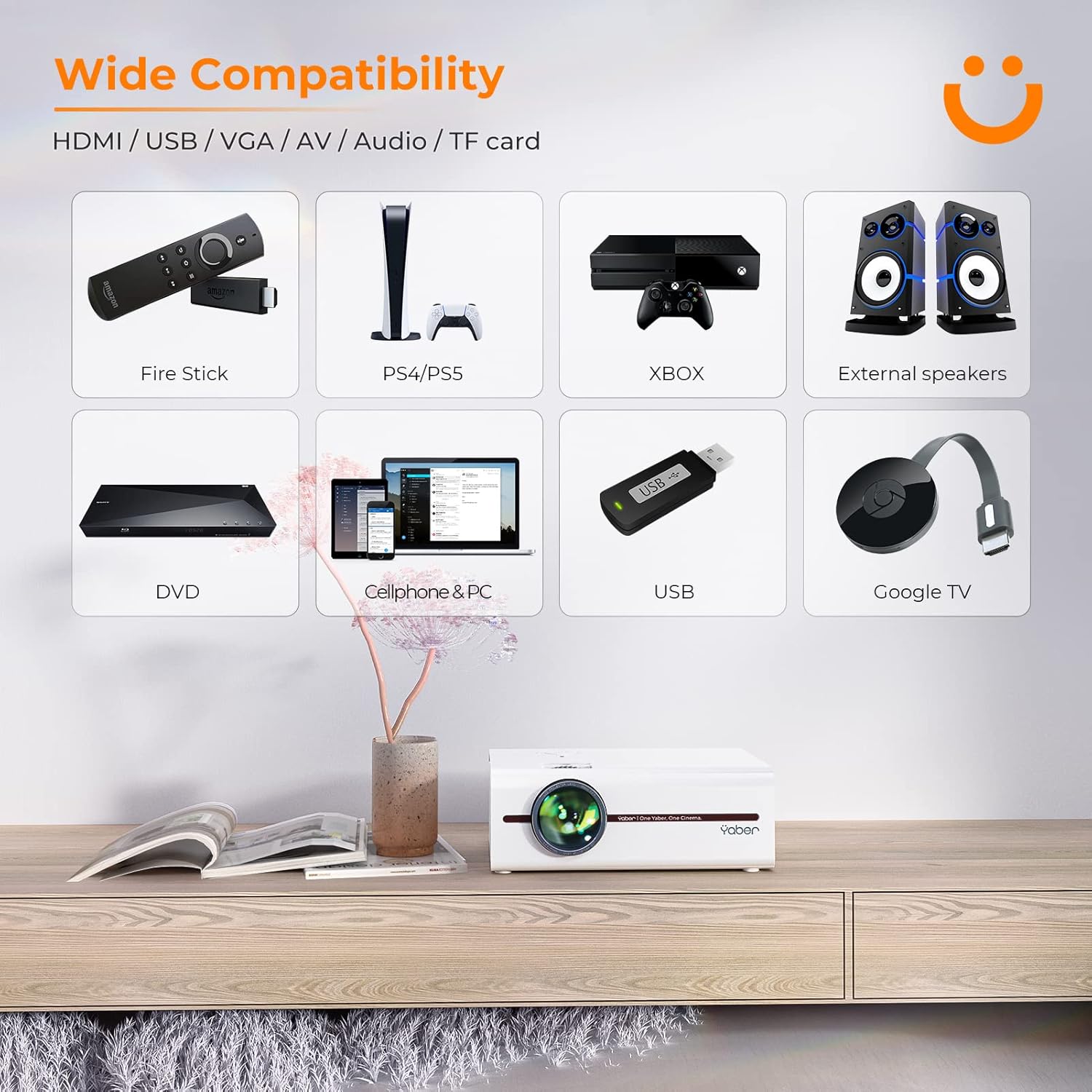
Image: A visual representation of the projector's wide range of compatible devices, including Fire Stick, PS4/PS5, Xbox, external speakers, DVD players, cellphones, PCs, USB drives, and Google TV, connected via various ports.
4. സജ്ജീകരണം
4.1 Initial Placement and Power
- Place the projector on a stable, flat surface or mount it using a compatible tripod. Ensure proper ventilation around the unit.
- Connect the power cable to the projector's power input and then to a power outlet.
- പ്രൊജക്ടറിലോ റിമോട്ട് കൺട്രോളിലോ ഉള്ള പവർ ബട്ടൺ അമർത്തി അത് ഓണാക്കുക.
4.2 ഇമേജ് ഫോക്കസും കീസ്റ്റോണും ക്രമീകരിക്കൽ
After powering on, adjust the focus and keystone correction for a clear, rectangular image.
- ഫോക്കസ്: ചിത്രം വ്യക്തവും വ്യക്തവുമായി കാണപ്പെടുന്നതുവരെ പ്രൊജക്ടർ ലെൻസിലെ ഫോക്കസ് റിംഗ് തിരിക്കുക.
- കീസ്റ്റോൺ തിരുത്തൽ: Use the keystone adjustment dial or the remote control to correct any trapezoidal distortion, ensuring the image is perfectly rectangular. The V5 supports both mechanical and digital keystone correction.

Image: A hand holding the projector's remote control, illustrating the ease of adjusting the projected image, including focus and keystone correction.
4.3 ഉപകരണങ്ങൾ ബന്ധിപ്പിക്കുന്നു
The YABER V5 offers various connectivity options:
- എച്ച്ഡിഎംഐ: Connect your laptop, game console, or streaming device via an HDMI cable.
- USB: മീഡിയ പ്ലേ ചെയ്യാൻ ഒരു USB ഡ്രൈവ് ഇടുക fileനേരിട്ട്.
- ഓഫ്: Use the AV cable for older devices like DVD players.
- വി.ജി.എ: Connect to computers with a VGA output.
- TF കാർഡ്: Insert a TF card for media playback.
4.4 Wireless Screen Mirroring (WiFi)
To mirror your smartphone or tablet screen wirelessly:
- നിങ്ങളുടെ പ്രൊജക്ടറും മൊബൈൽ ഉപകരണവും ഒരേ വൈഫൈ നെറ്റ്വർക്കിലേക്ക് കണക്റ്റുചെയ്തിട്ടുണ്ടെന്ന് ഉറപ്പാക്കുക.
- On the projector, select the 'Screen Mirroring' input source.
- For iOS devices, open Control Center and tap 'Screen Mirroring' or 'AirPlay Mirroring', then select the projector from the list.
- For Android devices, enable 'Wireless Display', 'Smart View', 'Multi-screen', or similar function in your device settings, then select the projector.

Image: A visual comparison demonstrating the faster loading and transmission speed of 5GHz WiFi compared to 2.4GHz, highlighting the benefit for screen mirroring.
4.5 ബ്ലൂടൂത്ത് ഓഡിയോ കണക്ഷൻ
To connect to a Bluetooth audio device:
- നിങ്ങളുടെ ബാഹ്യ സ്പീക്കറിലോ ഹെഡ്ഫോണുകളിലോ ബ്ലൂടൂത്ത് പ്രവർത്തനക്ഷമമാക്കി പെയറിംഗ് മോഡിലേക്ക് സജ്ജമാക്കുക.
- പ്രൊജക്ടറിൽ, ബ്ലൂടൂത്ത് ക്രമീകരണ മെനുവിലേക്ക് നാവിഗേറ്റ് ചെയ്യുക.
- ജോടിയാക്കാൻ ലഭ്യമായ ഉപകരണങ്ങളുടെ പട്ടികയിൽ നിന്ന് നിങ്ങളുടെ ഉപകരണം തിരഞ്ഞെടുക്കുക.

Image: The YABER V5 projector wirelessly connected to an external Bluetooth speaker, illustrating the enhanced audio experience possible.
5. പ്രവർത്തന നിർദ്ദേശങ്ങൾ
5.1 പവർ ഓൺ/ഓഫ്
- To power on, press the power button on the projector or remote.
- പവർ ഓഫ് ചെയ്യാൻ, വീണ്ടും പവർ ബട്ടൺ അമർത്തുക. ആവശ്യപ്പെടുകയാണെങ്കിൽ ഷട്ട്ഡൗൺ സ്ഥിരീകരിക്കുക.
5.2 ഇൻപുട്ട് ഉറവിട തിരഞ്ഞെടുപ്പ്
Use the 'Source' button on the remote or projector to cycle through available input sources (HDMI, USB, AV, VGA, TF Card, Screen Mirroring).
5.3 മെനു നാവിഗേഷൻ
Use the arrow keys on the remote or projector to navigate through the on-screen menu. Press 'OK' or 'Enter' to confirm selections. Use 'Return' or 'Exit' to go back or close the menu.
5.4 Adjusting Projection Size (Zoom Function)
To adjust the projection size without moving the projector, use the digital zoom function via the remote control. This allows you to shrink the image from 100% down to 50%.

Image: An illustration showing the digital zoom function, allowing the projected image size to be adjusted from 100% down to 50% without physically moving the projector.
6. പരിപാലനം
6.1 ലെൻസ് വൃത്തിയാക്കൽ
പ്രൊജക്ടർ ലെൻസ് മൃദുവായി തുടയ്ക്കാൻ ഒപ്റ്റിക്കൽ ലെൻസുകൾക്കായി പ്രത്യേകം രൂപകൽപ്പന ചെയ്ത മൃദുവായ, ലിന്റ് രഹിത തുണി ഉപയോഗിക്കുക. അബ്രാസീവ് ക്ലീനറുകൾ അല്ലെങ്കിൽ അമിത മർദ്ദം ഉപയോഗിക്കുന്നത് ഒഴിവാക്കുക.
6.2 പ്രൊജക്ടർ ബോഡി വൃത്തിയാക്കൽ
Wipe the exterior of the projector with a soft, dry cloth. Do not use liquid cleaners or solvents.
6.3 വെന്റിലേഷൻ
Ensure the projector's ventilation vents are clear and unobstructed to prevent overheating. Do not block the vents during operation.
6.4 എൽamp ജീവിതം
The YABER V5 projector lamp has an estimated lifespan of up to 100,000 hours. No user replacement is typically required for the lamp.
7. പ്രശ്നപരിഹാരം
If you encounter issues with your YABER V5 Mini Projector, please refer to the following common problems and solutions:
| പ്രശ്നം | സാധ്യമായ കാരണം | പരിഹാരം |
|---|---|---|
| No image/No signal | Incorrect input source selected; Loose cable connection; Device not powered on. | Select the correct input source. Check all cable connections. Ensure connected device is powered on. |
| മങ്ങിയ ചിത്രം | ഫോക്കസ് ക്രമീകരിച്ചിട്ടില്ല; കീസ്റ്റോൺ ശരിയാക്കിയിട്ടില്ല. | Adjust the focus ring on the lens. Use keystone correction to square the image. |
| ശബ്ദമില്ല | Volume too low; Muted; External audio device not connected/paired. | Increase volume. Unmute the projector. Ensure Bluetooth device is paired or external speakers are properly connected. |
| Screen mirroring issues (freezing/disconnection) | Weak WiFi signal; Network congestion; Device compatibility. | Ensure strong WiFi signal (preferably 5G). Reduce network traffic. Try a wired connection if wireless is unstable. |
| റിമോട്ട് കൺട്രോൾ പ്രവർത്തിക്കുന്നില്ല | Dead batteries; Obstruction between remote and projector. | Replace batteries. Ensure no objects are blocking the IR receiver on the projector. |
If the problem persists after trying these solutions, please contact YABER customer support for assistance.
8 സ്പെസിഫിക്കേഷനുകൾ
| ഫീച്ചർ | വിശദാംശങ്ങൾ |
|---|---|
| മോഡൽ നമ്പർ | YABER-V5-MINI |
| ഡിസ്പ്ലേ റെസല്യൂഷൻ | 1920 x 1080 (Full HD Supported) |
| കണക്റ്റിവിറ്റി ടെക്നോളജി | Bluetooth, Wi-Fi (5G/2.4G), USB, HDMI, VGA, AV, TF Card |
| പ്രത്യേക സവിശേഷതകൾ | Portable, Built-in Wi-Fi, Bluetooth, Digital Zoom, Hi-Fi Stereo Speaker |
| ശുപാർശ ചെയ്യുന്ന ഉപയോഗം | ഹോം സിനിമ |
| ഉൽപ്പന്ന അളവുകൾ | 8.19 x 6.63 x 3.07 ഇഞ്ച് |
| ഇനത്തിൻ്റെ ഭാരം | 2.2 പൗണ്ട് |
| Lamp ജീവിതം | 100,000 മണിക്കൂർ വരെ |
9. വാറൻ്റിയും പിന്തുണയും
YABER provides comprehensive support for your V5 Mini Projector:
- 6-Month Return Policy: Enjoy a 6-month return period from the date of purchase.
- 3 വർഷത്തെ വാറൻ്റി: The projector is covered by a 3-year warranty for repairs.
- ആജീവനാന്ത പ്രൊഫഷണൽ സാങ്കേതിക പിന്തുണ: YABER offers professional technical assistance for the lifetime of the product.
For any inquiries or support needs, please contact YABER customer service through their official channels or the retailer where you purchased the product.
Ask a question about this manual
Ask about setup, troubleshooting, compatibility, parts, safety, or missing instructions. Manuals+ will review the question and use this page’s manual context to help answer it.