
ആമുഖം
പാക്കേജ് ഉള്ളടക്കം
Upon opening the MAXTOP Smart Watch T5 package, you should find the following items:
- MAXTOP Smart Watch T5 device
- Silicone watch strap (black)
- USB ചാർജിംഗ് കേബിൾ
- ഉപയോക്തൃ മാനുവൽ

Image: MAXTOP Smart Watch T5 package contents, showing the watch, a black silicone strap, a USB charging cable, and the user manual.
ഉപകരണം ചാർജ് ചെയ്യുന്നു
ആദ്യമായി ഉപയോഗിക്കുന്നതിന് മുമ്പ്, നിങ്ങളുടെ സ്മാർട്ട് വാച്ച് പൂർണ്ണമായും ചാർജ് ചെയ്യുക. വാച്ചിന്റെ പിൻഭാഗത്തുള്ള ചാർജിംഗ് പോയിന്റുകളുമായി മാഗ്നറ്റിക് ചാർജിംഗ് കേബിൾ ബന്ധിപ്പിച്ച് USB എൻഡ് ഒരു സ്റ്റാൻഡേർഡ് USB പവർ അഡാപ്റ്ററിലേക്കോ (ഉൾപ്പെടുത്തിയിട്ടില്ല) കമ്പ്യൂട്ടറിന്റെ USB പോർട്ടിലേക്കോ പ്ലഗ് ചെയ്യുക. വാച്ച് ഡിസ്പ്ലേ ചാർജിംഗ് നില സൂചിപ്പിക്കും.
കുറിപ്പ്:
- ചാർജിംഗ് കോൺടാക്റ്റുകൾ വൃത്തിയുള്ളതും വരണ്ടതുമാണെന്ന് ഉറപ്പാക്കുക.
- Use a 5V/1A charger for optimal charging.
പവർ ചെയ്യുന്നത് ഓൺ/ഓഫ്
- പവർ ഓണാക്കാൻ: Press and hold the side button for a few seconds until the MAXTOP logo appears.
- പവർ ഓഫ് ചെയ്യാൻ: From the watch face, swipe down to access quick settings, or navigate to the "Settings" menu. Select the power icon and confirm to shut down the device.
ആപ്പ് ഇൻസ്റ്റാളേഷനും ജോടിയാക്കലും
To unlock the full functionality of your MAXTOP Smart Watch T5, you need to install the companion app on your smartphone.
- ആപ്പ് ഡൗൺലോഡ് ചെയ്യുക: ഇതിനായി തിരയുക the "MAXTOP" app (or specified companion app in the included manual) in the Apple App Store (for iOS) or Google Play Store (for Android).
- അക്കൗണ്ട് സൃഷ്ടിക്കുക: ആപ്പ് തുറന്ന് സ്ക്രീനിലെ നിർദ്ദേശങ്ങൾ പാലിച്ച് ഒരു അക്കൗണ്ട് സൃഷ്ടിച്ച് നിങ്ങളുടെ പ്രൊഫഷണലിനെ സജ്ജമാക്കുക.file.
- വാച്ച് ജോടിയാക്കുക:
- നിങ്ങളുടെ സ്മാർട്ട്ഫോണിൽ ബ്ലൂടൂത്ത് പ്രവർത്തനക്ഷമമാക്കിയിട്ടുണ്ടെന്ന് ഉറപ്പാക്കുക.
- Open the app and navigate to the device pairing section.
- Select "Add Device" or similar option. The app will search for nearby devices.
- Select "MAXTOP T5" from the list of found devices.
- ആവശ്യപ്പെടുകയാണെങ്കിൽ, നിങ്ങളുടെ ഫോണിലും വാച്ചിലും ജോടിയാക്കൽ അഭ്യർത്ഥന സ്ഥിരീകരിക്കുക.
പ്രധാനപ്പെട്ടത്:
- Keep the watch close to your phone during the pairing process.
- Allow all requested permissions for the app to function correctly.
സവിശേഷതകളും പ്രവർത്തനവും
ഇൻ്റർഫേസ് നാവിഗേറ്റ് ചെയ്യുന്നു
The MAXTOP Smart Watch T5 features a 1.54-inch full touch screen for easy navigation.
- മുകളിലേക്കും താഴേക്കും സ്വൈപ്പ് ചെയ്യുക: മെനുകളിലൂടെയോ അറിയിപ്പുകളിലൂടെയോ സ്ക്രോൾ ചെയ്യുക.
- ഇടത്തേക്ക്/വലത്തേക്ക് സ്വൈപ്പ് ചെയ്യുക: Access different feature screens or quick views.
- ടാപ്പ് ചെയ്യുക: ഒരു ഇനം തിരഞ്ഞെടുക്കുക അല്ലെങ്കിൽ ഒരു പ്രവർത്തനം സ്ഥിരീകരിക്കുക.
- സൈഡ് ബട്ടൺ: Press to return to the main watch face or wake the screen.

Image: The MAXTOP Smart Watch T5 display showcasing multiple functions including heart rate, blood pressure, music control, and various sports modes.
Daily Activity Tracking
Your smart watch automatically tracks your daily activities, including steps, distance, and calories burned. You can view detailed summaries in the companion app.

Image: The MAXTOP Smart Watch T5 tracking daily activities such as steps, calories, and distance, alongside icons representing various sports modes like hiking, cycling, and running.
കായിക മോഡുകൾ
The watch supports 10 different sport modes to accurately track your workouts. To start a sport mode:
- Swipe on the watch face to find the "Sport" icon or menu.
- Tap to select your desired activity (e.g., Outdoor Run, Indoor Walk, Cycling).
- The watch will begin tracking your activity. Tap to pause or end the workout.

Image: The MAXTOP Smart Watch T5 interface showing 10 distinct sport modes, such as hiking, outdoor cycling, indoor running, and elliptical training.
Heart Rate and Blood Pressure Monitoring
The watch can monitor your heart rate (HR) and blood pressure (BP). For accurate readings:
- Wear the watch snugly on your wrist, about one finger's width from your wrist bone.
- അളക്കുന്ന സമയത്ത് നിശ്ചലമായി തുടരുക.
- To measure: Navigate to the HR or BP icon on the watch and tap to start.

Image: The MAXTOP Smart Watch T5 displaying heart rate in beats per minute (BPM) and illustrating different sleep stages (awake, light, deep sleep).
ഉറക്ക നിരീക്ഷണം
The watch automatically tracks your sleep patterns, including awake time, light sleep, and deep sleep. View your sleep quality report in the companion app.

Image: The MAXTOP Smart Watch T5's sleep monitoring feature, displaying sleep duration and a detailed sleep quality analysis within the companion application.
സന്ദേശ അറിയിപ്പുകൾ
Receive notifications from your smartphone directly on your watch. Ensure the watch is paired and app notifications are enabled in your phone's settings and the companion app.
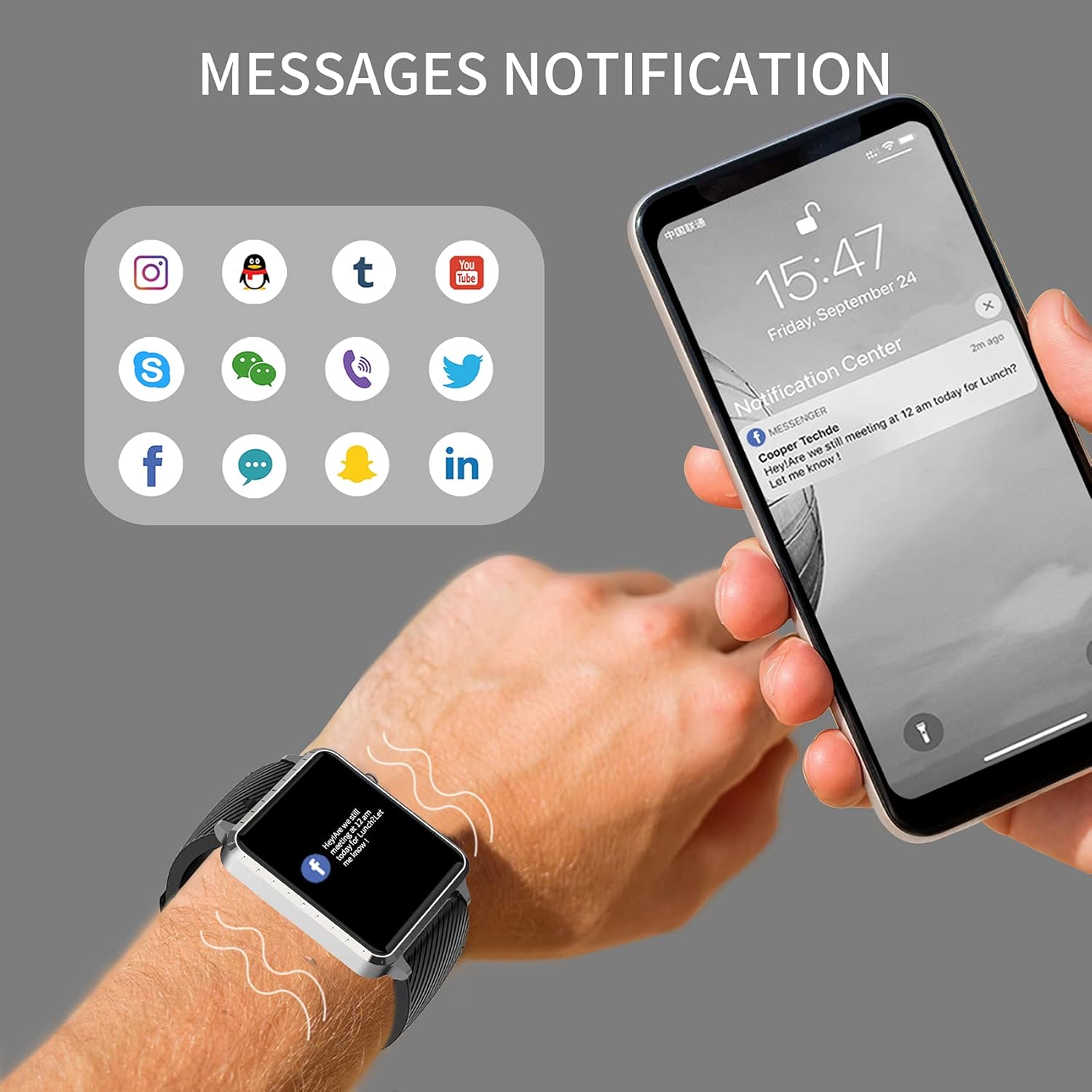
Image: The MAXTOP Smart Watch T5 showing incoming message notifications from popular social media and communication applications on its screen.
സംഗീത നിയന്ത്രണം
Control music playback on your smartphone directly from your watch. This feature allows you to play, pause, skip tracks, and adjust volume without taking out your phone.

Image: The MAXTOP Smart Watch T5 demonstrating various features including music control, message notifications, sedentary reminders, and the 'find phone' function.
മറ്റ് പ്രവർത്തനങ്ങൾ
- ഉദാസീനമായ ഓർമ്മപ്പെടുത്തലുകൾ: Set reminders in the app to encourage movement after periods of inactivity.
- ഫോൺ കണ്ടെത്തുക: Use this feature on your watch to make your paired phone ring, helping you locate it.
- Stopwatch & Countdown: Access these tools from the watch's menu for timing activities.
പരിപാലനവും പരിചരണവും
ജല പ്രതിരോധം
The MAXTOP Smart Watch T5 is rated IP67 waterproof. This means it is resistant to splashes, rain, and brief immersion in water. It is suitable for daily use and can withstand hand washing or light rain.
ജാഗ്രത:
- Do not use the watch for swimming, diving, or showering with hot water.
- Avoid exposing the watch to high-pressure water or steam.
- Water resistance is not a permanent condition and may decrease over time with normal wear.
വൃത്തിയാക്കൽ
Regularly clean your watch and strap to maintain hygiene and prevent skin irritation.
- വാച്ച് സ്ക്രീനും ബോഡിയും ഒരു സോഫ്റ്റ്, ഡി ക്ലീനർ ഉപയോഗിച്ച് തുടയ്ക്കുക.amp, ലിൻ്റ് രഹിത തുണി.
- For the silicone strap, you can wash it with mild soap and water, then rinse thoroughly and dry completely before reattaching to your wrist.
- കഠിനമായ രാസവസ്തുക്കളോ ഉരച്ചിലുകളോ ഉപയോഗിക്കുന്നത് ഒഴിവാക്കുക.
ബാറ്ററി കെയർ
ബാറ്ററി ആയുസ്സ് വർദ്ധിപ്പിക്കാൻ:
- Charge the watch fully before first use.
- തീവ്രമായ താപനില ഒഴിവാക്കുക.
- If not using the watch for an extended period, charge it to about 50% before storing.
ട്രബിൾഷൂട്ടിംഗ്
വാച്ച് ഓണാക്കുന്നില്ല
- വാച്ച് പൂർണ്ണമായും ചാർജ് ചെയ്തിട്ടുണ്ടെന്ന് ഉറപ്പാക്കുക. കുറഞ്ഞത് 30 മിനിറ്റെങ്കിലും ചാർജറുമായി ബന്ധിപ്പിക്കുക.
- റീസ്റ്റാർട്ട് ചെയ്യാൻ നിർബന്ധിതമായി സൈഡ് ബട്ടൺ 10-15 സെക്കൻഡ് അമർത്തിപ്പിടിക്കുക.
ഫോണുമായി ജോടിയാക്കാൻ കഴിയില്ല
- നിങ്ങളുടെ ഫോണിൽ ബ്ലൂടൂത്ത് പ്രവർത്തനക്ഷമമാക്കിയിട്ടുണ്ടെന്നും വാച്ച് പരിധിക്കുള്ളിലാണെന്നും ഉറപ്പാക്കുക.
- നിങ്ങളുടെ ഫോണും വാച്ചും പുനരാരംഭിക്കുക.
- Ensure the companion app is installed and updated to the latest version.
- Forget the device from your phone's Bluetooth settings and try pairing again through the app.
- Check if the watch is already paired with another device.
Inaccurate Readings (HR/BP/Sleep)
- Ensure the watch is worn correctly: snug on the wrist, not too tight or too loose.
- Remain still during measurements.
- സ്മാർട്ട് വാച്ച് റീഡിംഗുകൾ റഫറൻസിനായി മാത്രമാണെന്നും മെഡിക്കൽ രോഗനിർണയത്തിന് ഉപയോഗിക്കരുതെന്നും ശ്രദ്ധിക്കുക.
അറിയിപ്പുകൾ ദൃശ്യമാകുന്നില്ല
- വാച്ച് നിങ്ങളുടെ ഫോണുമായി വിജയകരമായി ജോടിയാക്കിയെന്ന് പരിശോധിക്കുക.
- Check app notification settings on your phone and within the companion app.
- ആപ്പ് പശ്ചാത്തലത്തിൽ പ്രവർത്തിക്കുന്നുണ്ടെന്നും നിങ്ങളുടെ ഫോണിന്റെ പവർ ലാഭിക്കൽ സവിശേഷതകൾ അത് അടയ്ക്കുന്നില്ലെന്നും ഉറപ്പാക്കുക.
സ്പെസിഫിക്കേഷനുകൾ
| ഫീച്ചർ | വിശദാംശങ്ങൾ |
|---|---|
| ബ്രാൻഡ് | മാക്സ്ടോപ്പ് |
| മോഡൽ | T5 |
| സ്ക്രീൻ വലിപ്പം | 1.54 ഇഞ്ച് |
| ഉൽപ്പന്ന അളവുകൾ | 1.46 x 1.57 x 0.28 ഇഞ്ച് |
| ഇനത്തിൻ്റെ ഭാരം | 1.87 ഔൺസ് (53 ഗ്രാം) |
| ഓപ്പറേറ്റിംഗ് സിസ്റ്റം | Android, iOS compatible |
| വയർലെസ് കമ്മ്യൂണിക്കേഷൻ | ബ്ലൂടൂത്ത് |
| ബാറ്ററി തരം | ലിഥിയം പോളിമർ (1 ഉൾപ്പെടുത്തിയിരിക്കുന്നു) |
| ബാറ്ററി ലൈഫ് | 10 ദിവസം വരെ |
| ജല പ്രതിരോധ നില | വാട്ടർപ്രൂഫ് (IP67) |
| ആദ്യം ലഭ്യമായ തീയതി | ജൂലൈ 6, 2022 |

Image: Detailed physical dimensions of the MAXTOP Smart Watch T5, including the watch face width, height, and the adjustable strap length.
വാറൻ്റിയും പിന്തുണയും
For warranty information and customer support, please refer to the official MAXTOP webസൈറ്റിൽ നൽകുകയോ അവരുടെ ഉപഭോക്തൃ സേവനവുമായി നേരിട്ട് ബന്ധപ്പെടുകയോ ചെയ്യുക. വിശദാംശങ്ങൾ സാധാരണയായി പാക്കേജിംഗിലോ നിർമ്മാതാവിന്റെയോ webസൈറ്റ്.
ഏതെങ്കിലും വാറന്റി ക്ലെയിമുകൾക്ക് വാങ്ങിയതിന്റെ തെളിവായി നിങ്ങളുടെ വാങ്ങൽ രസീത് സൂക്ഷിക്കുക.