
1. ആമുഖം
This manual provides essential instructions for the safe operation, maintenance, and troubleshooting of your WEELMOTION 6.5 Inch Graffiti Hoverboard. Please read this manual thoroughly before first use to ensure a safe and enjoyable experience. This hoverboard is designed for personal transportation and recreation.

Image 1.1: The WEELMOTION 6.5 Inch Graffiti Hoverboard, showcasing its colorful design and integrated features.
2 സുരക്ഷാ വിവരങ്ങൾ
Your safety is paramount. The WEELMOTION hoverboard is UL 2272 certified, indicating compliance with electrical safety standards. Adhere to all warnings and instructions to prevent injury or damage.
2.1 പൊതു സുരക്ഷാ മാർഗ്ഗനിർദ്ദേശങ്ങൾ
- എപ്പോഴും മാനുവൽ വായിക്കുക: Before operating, familiarize yourself with all instructions.
- ഭാരം പരിധി: Minimum supported weight is 40 lbs (18 kg), maximum is 220 lbs (100 kg).
- പ്രായപരിധി: This product is specified for adult use, but younger riders should always be supervised and meet the minimum weight requirement.
- സംരക്ഷണ ഗിയർ: Always wear a helmet, knee pads, elbow pads, and wrist guards.
- പരിസ്ഥിതി വ്യവസ്ഥകൾ: Do not ride in wet conditions, on uneven terrain, or near water. Avoid riding on public roads or in heavy traffic.
- വേഗതയും നിയന്ത്രണവും: Ride at a safe speed. The hoverboard has a maximum climbing angle of 12°.
- ചാർജർ ഉപയോഗം: Only use the charger supplied with this hoverboard. Using a non-compatible charger can damage the battery and void the warranty.
2.2 ബാറ്ററി സുരക്ഷ
The hoverboard uses a Lithium-Ion battery. Improper handling can pose a risk of fire.
- Do not leave the hoverboard unattended while charging.
- 6 മണിക്കൂറിൽ കൂടുതൽ ചാർജ് ചെയ്യരുത്.
- Do not charge a warm or fully discharged battery immediately. Allow it to cool down or warm up to room temperature first.
- After each use, charge the battery to prolong its lifespan.
- Store the hoverboard battery in rooms with temperatures between 0°C (32°F) and 40°C (104°F).
- Never use around water or fire.
2.3 സംയോജിത സുരക്ഷാ സവിശേഷതകൾ
- UL 2272 സാക്ഷ്യപ്പെടുത്തിയത്: Ensures electrical system safety.
- No-Fall Technology: Assists beginners with stability.
- സ്മാർട്ട് സെൻസർ: Enhances balancing capabilities.
- അമിത ചൂടാക്കൽ സംരക്ഷണം: Prevents components from exceeding safe temperatures.
- ഷോർട്ട് സർക്യൂട്ട് സംരക്ഷണം: Safeguards the electrical system.
- Fire Protection Shell: Provides an additional layer of safety.
- അമിത വേഗത മുന്നറിയിപ്പ്: Notifies the rider when exceeding safe speeds.
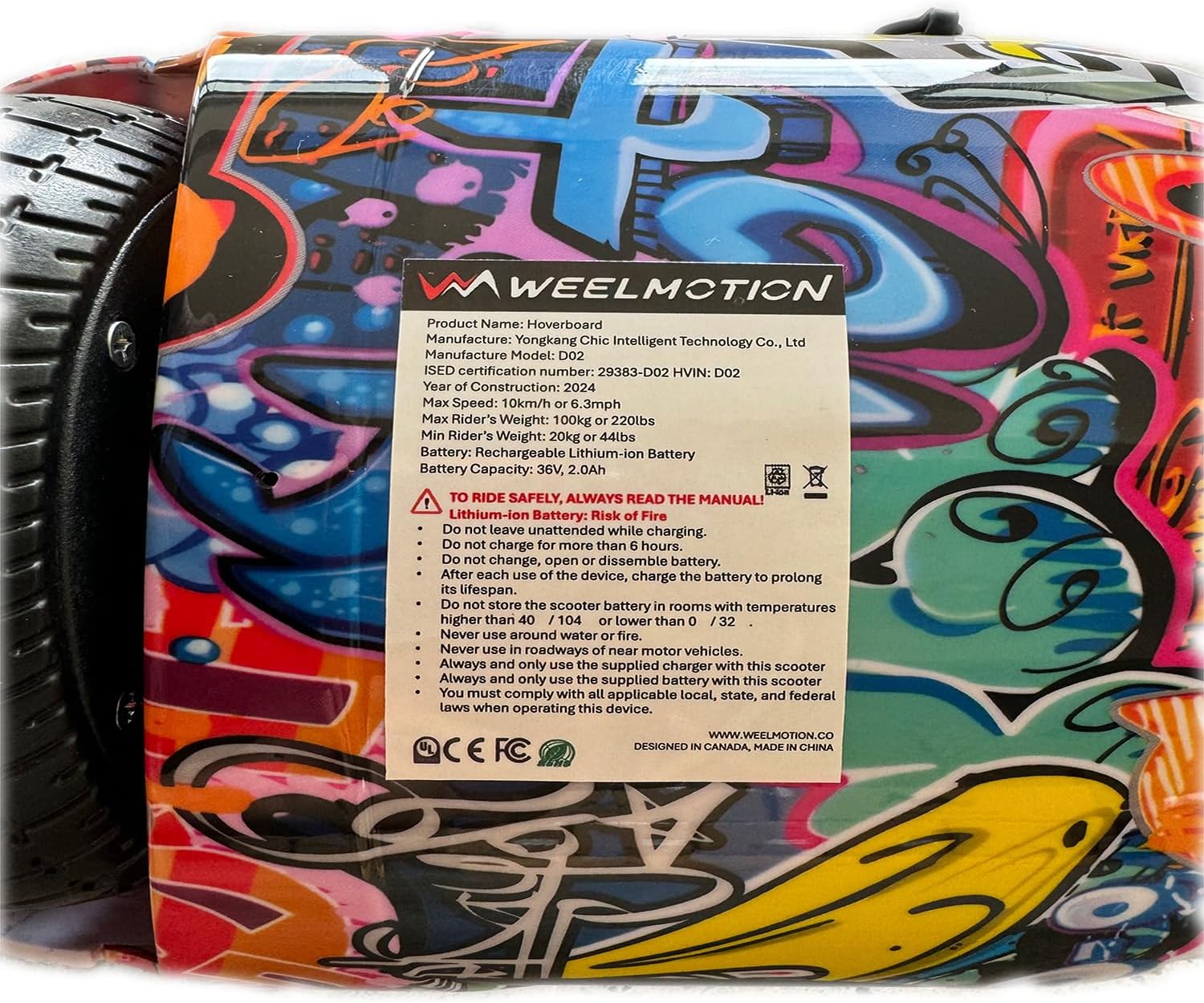
Image 2.1: A close-up of the product label, detailing important safety warnings and battery information.
3. ഉൽപ്പന്നം കഴിഞ്ഞുview
The WEELMOTION 6.5 Inch Graffiti Hoverboard combines performance with interactive features for an engaging riding experience.
3.1 പ്രധാന സവിശേഷതകൾ
- മോട്ടോറുകൾ: Dual 200W brushless motors (400W total) for efficient power delivery.
- ചക്രങ്ങൾ: 6.5-inch solid shining tires designed for various terrains.
- ബാറ്ററി: High-capacity Lithium-Ion battery (72Wh) providing a range of up to 8 km per charge. Actual range may vary based on rider weight, terrain, and riding style.
- ലൈറ്റിംഗ്: Dynamic LED strip lights and front LED lights for visibility and aesthetics.
- ഓഡിയോ: Built-in wireless speaker for music playback via Bluetooth.
- സ്ഥിരത: Gyroscope stabilization system and powerful self-balancing feature for ease of use.
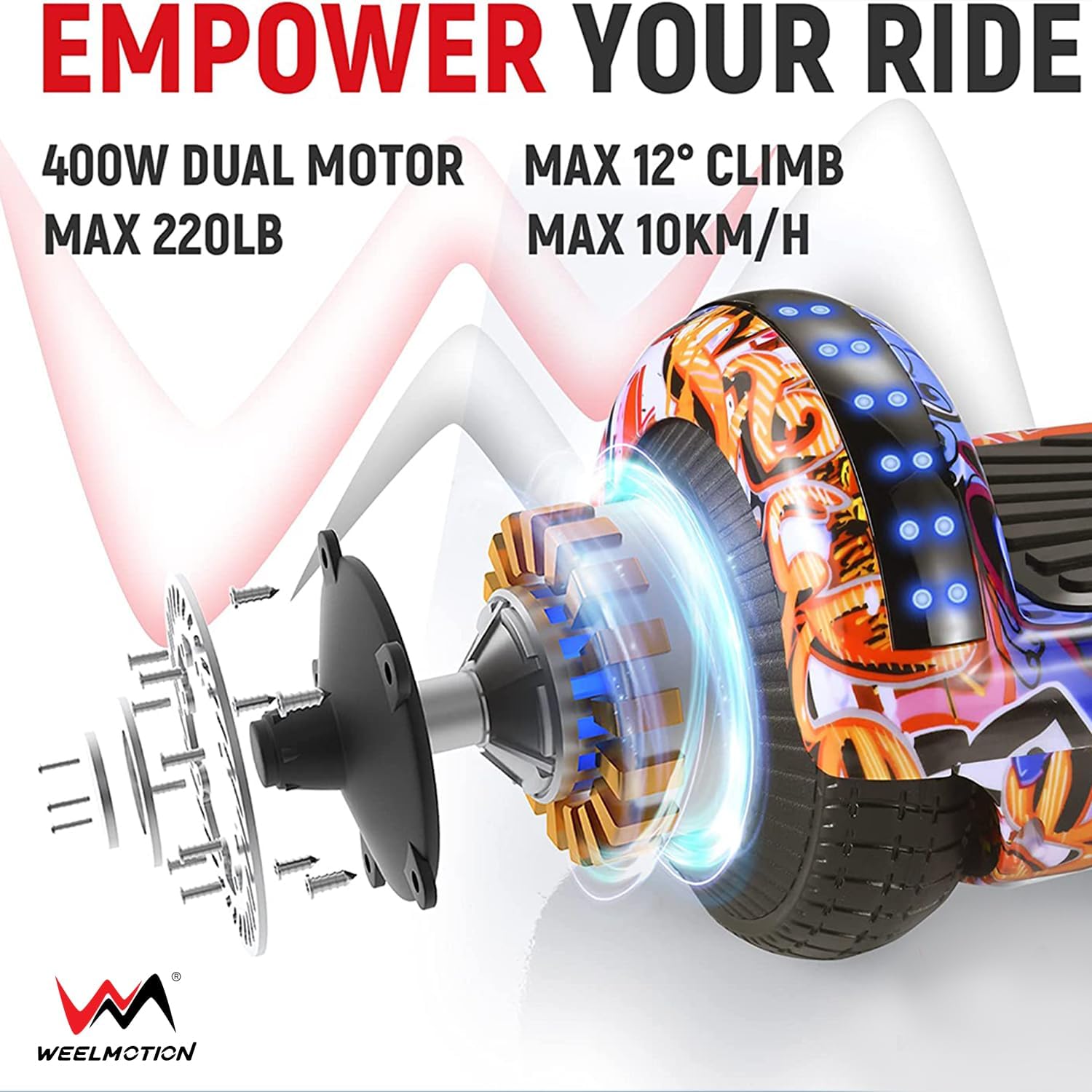
Image 3.1: Illustration of the hoverboard's dual motor system, highlighting its power, maximum load capacity (220 lbs), maximum climb angle (12°), and maximum speed (10 km/h).
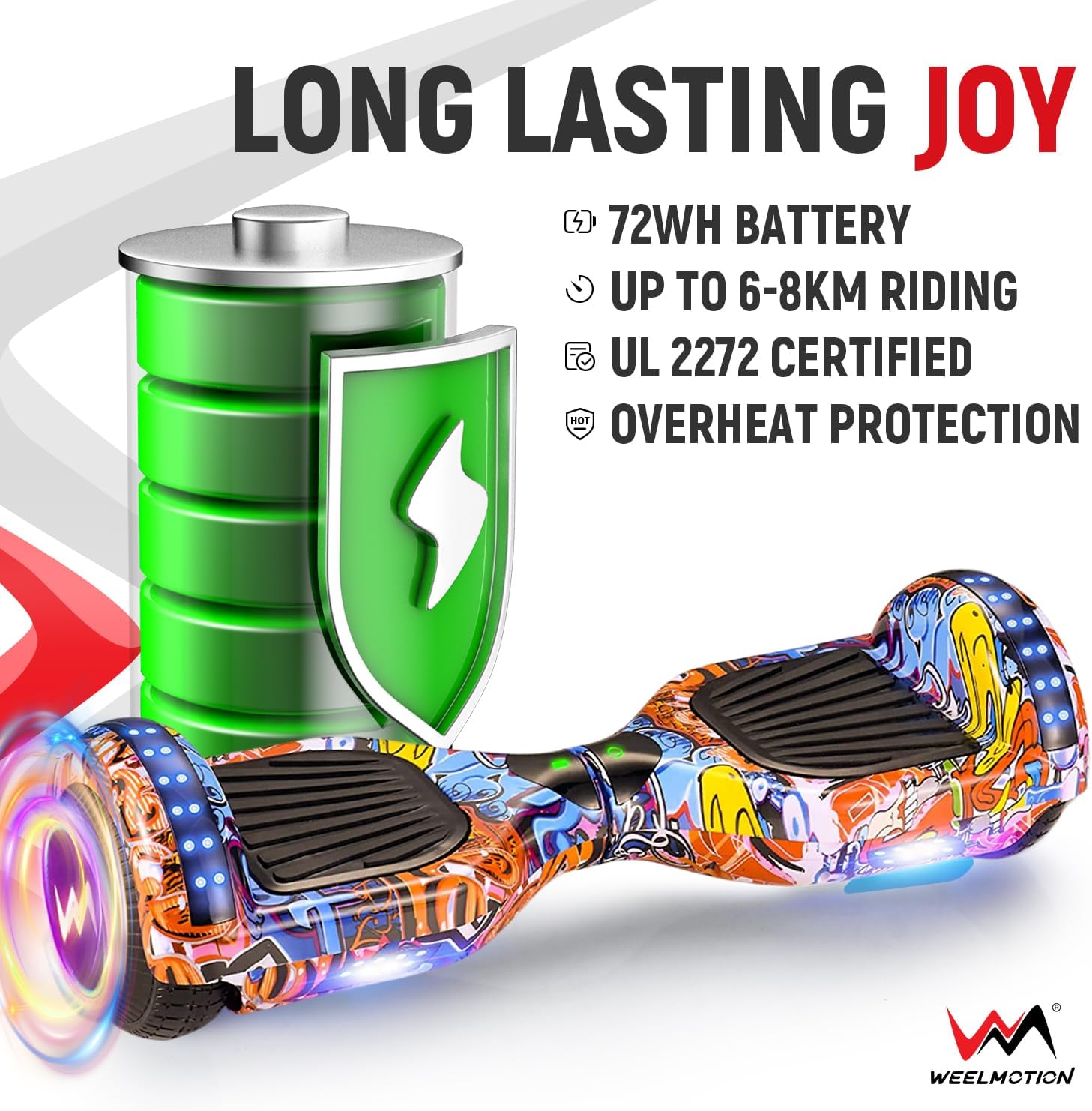
Image 3.2: Details on the hoverboard's 72Wh battery, indicating a range of 6-8 km, UL 2272 certification, and overheat protection.
3.2 പാക്കേജ് ഉള്ളടക്കം
- WEELMOTION 6.5 Inch Graffiti Hoverboard
- ചാർജർ
- Complimentary Hoverboard Bag
4. സജ്ജീകരണം
4.1 പ്രാരംഭ ചാർജിംഗ്
- Unpack the hoverboard and charger.
- Ensure the hoverboard is turned off.
- Connect the charger to the charging port on the hoverboard.
- Plug the charger into a standard wall outlet. The indicator light on the charger will typically turn red during charging and green when fully charged.
- Allow the hoverboard to charge completely before its first use. Do not overcharge (maximum 6 hours).
പ്രധാനപ്പെട്ടത്: Always use the original charger provided by WEELMOTION. Using an unauthorized charger can damage the battery and is a safety risk.
5. പ്രവർത്തന നിർദ്ദേശങ്ങൾ
Learning to ride your hoverboard is an intuitive process thanks to its self-balancing technology.
5.1 Basic Riding
- പവർ ഓൺ: Place the hoverboard on a flat, level surface. Press the power button. The indicator light should illuminate.
- മൗണ്ടിംഗ്: Place one foot on a footpad, ensuring the hoverboard remains level. Then, quickly step up with your other foot. Use a wall or a friend for support initially.
- മുന്നോട്ട്/പിന്നോട്ട്: Lean slightly forward to move forward. Lean slightly backward to move backward.
- തിരിയുന്നു: ഇടത്തേക്ക് തിരിയാൻ, നിങ്ങളുടെ വലതു കാൽ പതുക്കെ മുന്നോട്ട് അമർത്തുക. വലത്തേക്ക് തിരിയാൻ, നിങ്ങളുടെ ഇടതു കാൽ പതുക്കെ മുന്നോട്ട് അമർത്തുക.
- നിർത്തുന്നു: Return to an upright, neutral position to stop.
- ഡിസ്മൗണ്ട് ചെയ്യുന്നു: Step off the hoverboard one foot at a time, preferably backward.

Image 5.1: A rider's feet positioned on the hoverboard, illustrating the correct stance for operation.
5.2 ബ്ലൂടൂത്ത് സ്പീക്കർ പ്രവർത്തനം
- Ensure the hoverboard is powered on.
- നിങ്ങളുടെ മൊബൈൽ ഉപകരണത്തിൽ ബ്ലൂടൂത്ത് സജീവമാക്കുക.
- ഇതിനായി തിരയുക available Bluetooth devices and select the hoverboard (usually named 'Hoverboard' or similar).
- Once paired, you can play music through the hoverboard's built-in speaker.

Image 5.2: The hoverboard illuminated with vibrant lights, emphasizing its integrated music speaker functionality.
5.3 Go-Kart Mode (Optional Accessory)
The WEELMOTION hoverboard is compatible with a hover-kart accessory (sold separately). This accessory transforms your hoverboard into a seated go-kart for a different riding experience. Refer to the hover-kart's instruction manual for assembly and operation.

Image 5.3: Depiction of the hoverboard's self-balance mode and how it can be adapted for a go-kart setup (go-kart not included).
6. പരിപാലനം
Proper maintenance ensures the longevity and optimal performance of your hoverboard.
6.1 വൃത്തിയാക്കൽ
- Turn off the hoverboard and unplug it from any power source before cleaning.
- ഒരു സോഫ്റ്റ് ഉപയോഗിക്കുക, ഡിamp പുറംഭാഗം തുടയ്ക്കാൻ തുണി ഉപയോഗിക്കുക. കഠിനമായ രാസവസ്തുക്കളോ ഉരച്ചിലുകളുള്ള ക്ലീനറുകളോ ഉപയോഗിക്കുന്നത് ഒഴിവാക്കുക.
- Do not use water directly on the hoverboard, as this can damage electronic components.
6.2 സംഭരണം
- ഹോവർബോർഡ് തണുത്തതും വരണ്ടതുമായ സ്ഥലത്ത് സൂക്ഷിക്കുക, നേരിട്ടുള്ള സൂര്യപ്രകാശവും കടുത്ത താപനിലയും ഏൽക്കുന്നതിൽ നിന്ന് അകറ്റി നിർത്തുക.
- Ensure the battery is charged to approximately 50% before long-term storage. Recharge every 3 months if not in use to maintain battery health.
- Use the complimentary hoverboard bag for protection during storage and transport.
7. പ്രശ്നപരിഹാരം
If you encounter issues with your WEELMOTION hoverboard, refer to the following common problems and solutions.
| പ്രശ്നം | സാധ്യമായ കാരണം | പരിഹാരം |
|---|---|---|
| ഹോവർബോർഡ് ഓണാകുന്നില്ല. | ബാറ്ററി കുറവാണോ അതോ പവർ ബട്ടണിന്റെ പ്രശ്നമോ. | ഹോവർബോർഡ് പൂർണ്ണമായും ചാർജ് ചെയ്യുക. പവർ ബട്ടൺ ദൃഢമായി അമർത്തിയെന്ന് ഉറപ്പാക്കുക. |
| Hoverboard does not charge. | Charger not properly connected, faulty charger, or damaged battery. | Ensure charger is securely connected to both hoverboard and power outlet. Verify the charger indicator light. Only use the original charger. If issues persist, contact customer support. |
| Difficulty balancing or erratic movement. | Improper calibration or sensor issue. | Recalibrate the hoverboard: Turn off, place on a flat surface, hold power button for 5-10 seconds until lights flash, then release and power off/on. |
| ബ്ലൂടൂത്ത് സ്പീക്കർ കണക്ട് ചെയ്യുന്നില്ല. | Bluetooth on device is off, hoverboard not in pairing mode, or interference. | Ensure hoverboard is on. Check Bluetooth settings on your device. Move closer to the hoverboard. Restart both devices. |
For issues not listed here or if solutions do not resolve the problem, please contact WEELMOTION customer support.
8 സ്പെസിഫിക്കേഷനുകൾ
| ഫീച്ചർ | വിശദാംശങ്ങൾ |
|---|---|
| മോഡൽ നമ്പർ | B09HPKW58G |
| ഉൽപ്പന്ന അളവുകൾ | 59.8 x 18.5 x 18 സെ.മീ |
| ഇനത്തിൻ്റെ ഭാരം | 6.5 കി.ഗ്രാം (14.3 പൗണ്ട്) |
| ചക്രത്തിൻ്റെ വലിപ്പം | 6.5 ഇഞ്ച് |
| മോട്ടോർ വാട്ട്tage | ഡ്യുവൽ 200W (ആകെ 400W) |
| ബാറ്ററി തരം | Lithium-Ion, 72Wh |
| പരമാവധി വേഗത | 10 km/h (6.2 mph) വരെ |
| പരമാവധി ശ്രേണി | ഒരു ചാർജിൽ 8 കിലോമീറ്റർ (5 മൈൽ) വരെ |
| പരമാവധി ക്ലൈംബിംഗ് ആംഗിൾ | 12° |
| Min/Max Weight Capacity | Min 40 lbs (18 kg) / Max 220 lbs (100 kg) |
| ബ്രേക്ക് തരം | പുനരുൽപ്പാദിപ്പിക്കുന്ന ബ്രേക്കിംഗ് |
| ഫ്രെയിം മെറ്റീരിയൽ | Aluminum or lightweight Alloy Steel |
| സർട്ടിഫിക്കേഷനുകൾ | UL 2272 |
9. വാറൻ്റിയും പിന്തുണയും
WEELMOTION is committed to product quality and customer satisfaction. For warranty claims, technical support, or any inquiries regarding your hoverboard, please contact WEELMOTION customer service.
Based on customer feedback, WEELMOTION provides responsive customer service, including support for warranty issues and replacement parts. Please retain your proof of purchase for warranty validation.
Contact information can typically be found on the WEELMOTION official webസൈറ്റ് അല്ലെങ്കിൽ നിങ്ങളുടെ വാങ്ങൽ പ്ലാറ്റ്ഫോം വഴി.