
BLAUX 30888
BLX Earbuds - Wireless Bluetooth 5.1 Earbuds User Manual
Model: 30888 | Brand: BLAUX
1. ആമുഖം
Thank you for choosing BLX Earbuds. These True Wireless Stereo (TWS) earbuds are designed to provide a seamless and high-quality audio experience with the convenience of Bluetooth 5.1 technology. This manual will guide you through the setup, operation, and maintenance of your new earbuds to ensure optimal performance and longevity.
2. ബോക്സിൽ എന്താണുള്ളത്?
എല്ലാ ഇനങ്ങളും ഉണ്ടെന്ന് ഉറപ്പാക്കാൻ പാക്കേജ് ഉള്ളടക്കങ്ങൾ പരിശോധിക്കുക:
- BLX Wireless Earbuds (Left and Right)
- വയർലെസ് ചാർജിംഗ് കേസ്
- മൈക്രോ യുഎസ്ബി ചാർജിംഗ് കേബിൾ
- Silicone Ear Tips (Small, Medium, Large)
- ഉപയോക്തൃ മാനുവൽ
3. ഉൽപ്പന്നം കഴിഞ്ഞുview
The BLX Earbuds offer a compact and ergonomic design for comfortable, all-day wear. The included charging case provides extended battery life and convenient storage.
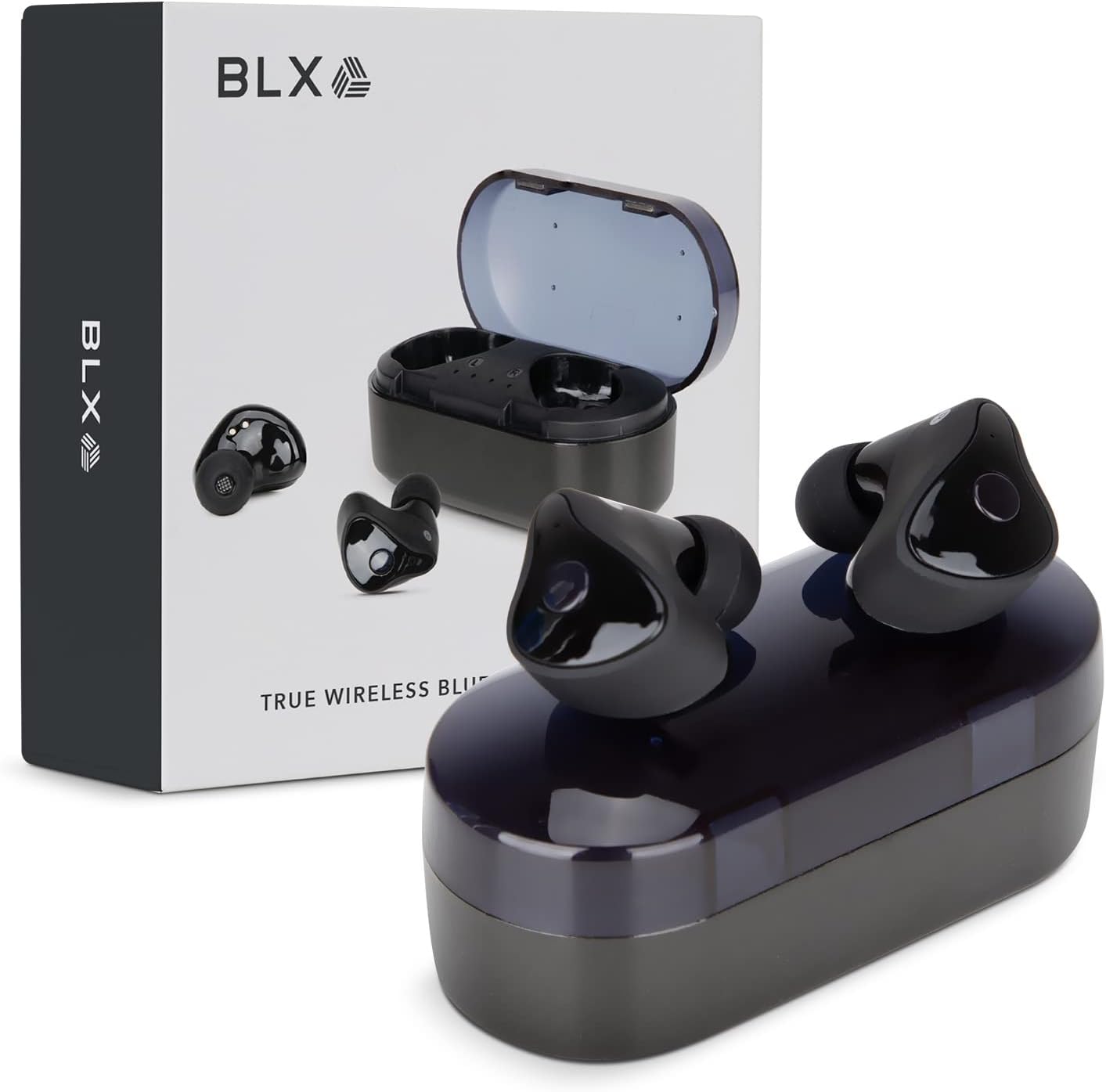
Image: BLX Earbuds, charging case, and product packaging.
3.1 പ്രധാന സവിശേഷതകൾ
- ട്രൂ വയർലെസ് സ്റ്റീരിയോ (TWS): Enjoy a completely wireless audio experience with independent earbuds.
- ബ്ലൂടൂത്ത് 5.1 സാങ്കേതികവിദ്യ: Provides a stable and efficient wireless connection with a range of up to 10 meters.
- വേഗത്തിലുള്ള ജോടിയാക്കൽ: Earbuds automatically connect to your device once removed from the charging case.
- അവബോധജന്യമായ ടച്ച് നിയന്ത്രണങ്ങൾ: Manage music playback, calls, and voice assistants with simple taps.
- IPX4 ജല പ്രതിരോധം: Designed to withstand sweat and splashes, making them suitable for workouts and outdoor activities.
- ബിൽറ്റ്-ഇൻ മൈക്രോഫോൺ: ഹാൻഡ്സ്-ഫ്രീ കോളിംഗും വോയ്സ് അസിസ്റ്റന്റ് ഇടപെടലും പ്രവർത്തനക്ഷമമാക്കുന്നു.

Image: BLX Earbuds demonstrating true wireless freedom with Bluetooth 5.1, fast pairing, and a 10-meter range.

ചിത്രം: വിശദമായത് view of a BLX Earbud highlighting its smart touch control capabilities for various functions.

Image: A person running while wearing BLX Earbuds, emphasizing their IPX4 water resistance for sweat and splashes, and the portability of the compact charging case.

Image: A woman wearing a BLX Earbud, with an illustration of the three included silicone ear tip sizes (11mm, 12mm, 13mm) to help users find their perfect fit.

Image: A woman enjoying music with BLX Earbuds, illustrating the battery performance: 4.5 hours of listening time, up to 18 hours with the charging case, and a 1-hour full charge time for the case.

Image: A close-up of a BLX Earbud, emphasizing its clear immersive audio quality with a frequency response range of 20Hz to 20KHz.

Image: BLX Earbuds depicted with icons for Google Assistant and Siri, along with a built-in microphone icon, indicating hands-free voice assistant capabilities.
4. സജ്ജീകരണം
4.1 ഇയർബഡുകളും കേസും ചാർജ് ചെയ്യുന്നു
Before first use, fully charge the BLX Earbuds and their charging case.
- ഇയർബഡുകൾ ചാർജിംഗ് കെയ്സിൽ വയ്ക്കുക. അവ അവയുടെ സ്ലോട്ടുകളിൽ ശരിയായി സ്ഥാപിച്ചിട്ടുണ്ടെന്ന് ഉറപ്പാക്കുക (ഇടത് വശത്ത് L, വലതുവശത്ത് R).
- Connect the Micro USB charging cable to the charging port on the case and the other end to a USB power source (e.g., computer, wall adapter).
- The indicator lights on the charging case will illuminate to show charging status. A full charge for the case takes approximately 1 hour.
- Once fully charged, disconnect the charging cable. The earbuds will charge automatically when placed in the powered case.
4.2 നിങ്ങളുടെ ഉപകരണവുമായി ജോടിയാക്കൽ
BLX Earbuds feature auto-pairing technology for quick and easy connection.
- ചാർജിംഗ് കേസ് ചാർജ് ചെയ്തിട്ടുണ്ടെന്നും നിങ്ങളുടെ ഉപകരണത്തിന്റെ ബ്ലൂടൂത്ത് പ്രവർത്തനക്ഷമമാക്കിയിട്ടുണ്ടെന്നും ഉറപ്പാക്കുക.
- ചാർജിംഗ് കേസ് തുറക്കുക. ഇയർബഡുകൾ സ്വയമേവ ഓണാകുകയും ജോടിയാക്കൽ മോഡിലേക്ക് പ്രവേശിക്കുകയും ചെയ്യും.
- നിങ്ങളുടെ ഉപകരണത്തിൽ (സ്മാർട്ട്ഫോൺ, ടാബ്ലെറ്റ്, ലാപ്ടോപ്പ്), ബ്ലൂടൂത്ത് ക്രമീകരണങ്ങളിലേക്ക് പോയി ലഭ്യമായ ഉപകരണങ്ങൾക്കായി തിരയുക.
- Select "BLX Earbuds" from the list of found devices.
- Once connected, your device will confirm the pairing, and the earbuds will be ready for use.
- തുടർന്നുള്ള ഉപയോഗങ്ങൾക്കായി, കേസിൽ നിന്ന് നീക്കം ചെയ്യുമ്പോൾ ഇയർബഡുകൾ അവസാനം ജോടിയാക്കിയ ഉപകരണത്തിലേക്ക് യാന്ത്രികമായി കണക്റ്റ് ചെയ്യും.
4.3 Finding the Perfect Fit
A proper fit is crucial for sound quality and comfort. Experiment with the included silicone ear tips (Small, Medium, Large) to find the size that best seals your ear canal.
- നിങ്ങളുടെ ഇയർ കനാലിലേക്ക് ഇയർബഡ് മൃദുവായി തിരുകുക.
- Twist slightly to secure it in place. The earbud should feel snug and comfortable without causing pressure.
- If the sound quality is poor or the earbuds feel loose, try a different size ear tip.
5. Operating Your BLX Earbuds
The BLX Earbuds utilize touch controls for easy management of audio and calls.
5.1 പവർ ഓൺ/ഓഫ്
- പവർ ഓൺ: ചാർജിംഗ് കെയ്സ് തുറക്കുക, ഇയർബഡുകൾ സ്വയമേവ ഓണാകും.
- പവർ ഓഫ്: ഇയർബഡുകൾ തിരികെ ചാർജിംഗ് കെയ്സിലേക്ക് വയ്ക്കുക, ലിഡ് അടയ്ക്കുക. അവ യാന്ത്രികമായി ഓഫാകുകയും ചാർജ് ചെയ്യാൻ തുടങ്ങുകയും ചെയ്യും.
5.2 മ്യൂസിക് പ്ലേബാക്ക്
| ആക്ഷൻ | നിയന്ത്രണം |
|---|---|
| പ്ലേ/താൽക്കാലികമായി നിർത്തുക | ഏതെങ്കിലും ഇയർബഡിൽ ഒറ്റ ടാപ്പ് ചെയ്യുക |
| അടുത്ത ട്രാക്ക് | വലതുവശത്തെ ഇയർബഡിൽ രണ്ടുതവണ ടാപ്പ് ചെയ്യുക |
| മുമ്പത്തെ ട്രാക്ക് | ഇടതുവശത്തെ ഇയർബഡിൽ രണ്ടുതവണ ടാപ്പ് ചെയ്യുക |
5.3 കോൾ മാനേജ്മെന്റ്
| ആക്ഷൻ | നിയന്ത്രണം |
|---|---|
| ഉത്തരം / കോൾ അവസാനിപ്പിക്കുക | ഏതെങ്കിലും ഇയർബഡിൽ ഒറ്റ ടാപ്പ് ചെയ്യുക |
| കോൾ നിരസിക്കുക | ഏതെങ്കിലും ഇയർബഡിൽ 2 സെക്കൻഡ് അമർത്തിപ്പിടിക്കുക |
5.4 വോയ്സ് അസിസ്റ്റന്റ്
| ആക്ഷൻ | നിയന്ത്രണം |
|---|---|
| വോയ്സ് അസിസ്റ്റന്റ് സജീവമാക്കുക (സിരി, ഗൂഗിൾ അസിസ്റ്റന്റ്, മുതലായവ) | ഇയർബഡുകളിലൊന്നിൽ മൂന്ന് തവണ ടാപ്പ് ചെയ്യുക |
5.5 വോളിയം നിയന്ത്രണം
Volume control is managed directly through your connected device (phone, tablet, laptop).
6. പരിപാലനം
Proper care and maintenance will extend the life of your BLX Earbuds.
6.1 വൃത്തിയാക്കൽ
- ഇയർബഡുകളും ചാർജിംഗ് കെയ്സും വൃത്തിയാക്കാൻ മൃദുവായതും ഉണങ്ങിയതും ലിന്റ് രഹിതവുമായ തുണി ഉപയോഗിക്കുക.
- ചെവിയുടെ അറ്റങ്ങൾക്കായി, അവ ഇയർബഡുകളിൽ നിന്ന് നീക്കം ചെയ്ത് ആവശ്യമെങ്കിൽ നേരിയ സോപ്പ് ലായനി ഉപയോഗിച്ച് വൃത്തിയാക്കുക, തുടർന്ന് നന്നായി കഴുകി വീണ്ടും ഘടിപ്പിക്കുന്നതിന് മുമ്പ് പൂർണ്ണമായും ഉണക്കുക.
- അബ്രാസീവ് ക്ലീനറുകൾ, ആൽക്കഹോൾ, കെമിക്കൽ ലായകങ്ങൾ എന്നിവ ഉപയോഗിക്കരുത്.
- ഇയർബഡുകളിലെയും കെയ്സിലെയും ചാർജിംഗ് കോൺടാക്റ്റുകൾ വൃത്തിയുള്ളതും അവശിഷ്ടങ്ങൾ ഇല്ലാത്തതുമാണെന്ന് ഉറപ്പാക്കുക.
6.2 സംഭരണം
ഉപയോഗത്തിലില്ലാത്തപ്പോൾ, പൊടി, കേടുപാടുകൾ എന്നിവയിൽ നിന്ന് സംരക്ഷിക്കുന്നതിനും ചാർജ്ജ് ചെയ്ത് നിലനിർത്തുന്നതിനും ഇയർബഡുകൾ എല്ലായ്പ്പോഴും ചാർജിംഗ് കേസിൽ സൂക്ഷിക്കുക.
6.3 ജല പ്രതിരോധം (IPX4)
Your BLX Earbuds are rated IPX4, meaning they are resistant to splashing water from any direction. This makes them suitable for:
- Sweaty workouts
- Light rain or splashes
പ്രധാന കുറിപ്പ്:
- IPX4 rating does NOT mean the earbuds are waterproof. Do not submerge them in water.
- Do not wear them while swimming, showering, or in heavy rain.
- If the earbuds get wet, wipe them dry immediately before placing them back in the charging case.
7. പ്രശ്നപരിഹാരം
If you encounter issues with your BLX Earbuds, try the following solutions:
7.1 ഇയർബഡുകൾ ജോടിയാക്കുകയോ ബന്ധിപ്പിക്കുകയോ ചെയ്യുന്നില്ല.
- രണ്ട് ഇയർബഡുകളും ചാർജ്ജ് ചെയ്തിട്ടുണ്ടെന്ന് ഉറപ്പാക്കുക.
- നിങ്ങളുടെ ഉപകരണത്തിൽ ബ്ലൂടൂത്ത് പ്രവർത്തനക്ഷമമാക്കിയിട്ടുണ്ടെന്ന് ഉറപ്പാക്കുക.
- Place the earbuds back in the case, close the lid, wait a few seconds, then open the lid again to re-enter pairing mode.
- Forget/delete "BLX Earbuds" from your device's Bluetooth list and try pairing again.
- ഇയർബഡുകൾ നിങ്ങളുടെ ഉപകരണത്തിന് അടുത്തേക്ക് നീക്കുക (10 മീറ്ററിനുള്ളിൽ).
7.2 ശബ്ദമില്ല അല്ലെങ്കിൽ കുറഞ്ഞ ശബ്ദം
- നിങ്ങളുടെ കണക്റ്റ് ചെയ്ത ഉപകരണത്തിലെ വോളിയം ലെവൽ പരിശോധിക്കുക.
- ഇയർബഡുകൾ നിങ്ങളുടെ ഉപകരണവുമായി ശരിയായി ബന്ധിപ്പിച്ചിട്ടുണ്ടെന്ന് ഉറപ്പാക്കുക.
- ഇയർബഡ് സ്പീക്കർ മെഷിലെ അവശിഷ്ടങ്ങൾ വൃത്തിയാക്കുക.
- വ്യത്യസ്തമായ ഒരു ആപ്ലിക്കേഷനിൽ നിന്നോ ഉറവിടത്തിൽ നിന്നോ ഓഡിയോ പ്ലേ ചെയ്യാൻ ശ്രമിക്കുക.
7.3 ഒരു ഇയർബഡ് പ്രവർത്തിക്കുന്നില്ല
- രണ്ട് ഇയർബഡുകളും ചാർജിംഗ് കെയ്സിലേക്ക് തിരികെ വയ്ക്കുക, ലിഡ് അടയ്ക്കുക, തുടർന്ന് അത് വീണ്ടും തുറക്കുക.
- രണ്ട് ഇയർബഡുകളും ചാർജ്ജ് ചെയ്തിട്ടുണ്ടെന്ന് ഉറപ്പാക്കുക.
- ഇയർബഡുകൾ പുനഃസജ്ജമാക്കാൻ ശ്രമിക്കുക (നിർമ്മാതാവിന്റെ website or support for specific reset instructions if needed).
7.4 ചാർജിംഗ് കേസ് ചാർജ് ചെയ്യുന്നില്ല
- ചാർജിംഗ് കേബിൾ കേസിലേക്കും പവർ സ്രോതസ്സിലേക്കും സുരക്ഷിതമായി ബന്ധിപ്പിച്ചിട്ടുണ്ടെന്ന് ഉറപ്പാക്കുക.
- മറ്റൊരു USB പോർട്ട് അല്ലെങ്കിൽ വാൾ അഡാപ്റ്റർ പരീക്ഷിക്കുക.
- ചാർജിംഗ് കേബിളിന് കേടുപാടുകൾ സംഭവിച്ചിട്ടില്ലെന്ന് ഉറപ്പാക്കുക.
8 സ്പെസിഫിക്കേഷനുകൾ
| ഫീച്ചർ | വിശദാംശങ്ങൾ |
|---|---|
| മോഡലിൻ്റെ പേര് | 30888 |
| കണക്റ്റിവിറ്റി ടെക്നോളജി | വയർലെസ്സ് (ബ്ലൂടൂത്ത് 5.1) |
| വയർലെസ് ശ്രേണി | 10 മീറ്റർ വരെ |
| ഫ്രീക്വൻസി പ്രതികരണം | 20 ഹെർട്സ് - 20,000 ഹെർട്സ് |
| ബാറ്ററി ലൈഫ് (ഇയർബഡുകൾ) | Approx. 4.5 Hours (listening time) |
| ബാറ്ററി ലൈഫ് (ചാർജിംഗ് കെയ്സിനൊപ്പം) | Approx. 18 Hours total |
| ചാർജിംഗ് സമയം (കേസ്) | ഏകദേശം 1 മണിക്കൂർ |
| ജല പ്രതിരോധ നില | IPX4 (വാട്ടർ റെസിസ്റ്റൻ്റ്) |
| മൈക്രോഫോൺ | Built-In, Bidirectional |
| നിയന്ത്രണ തരം | ടച്ച് നിയന്ത്രണം |
| അനുയോജ്യമായ ഉപകരണങ്ങൾ | Cellphones, Tablets, Laptops (iOS, Android, PC) |
| മെറ്റീരിയൽ | പ്ലാസ്റ്റിക് |
| ഇനത്തിൻ്റെ ഭാരം | 44 ഗ്രാം |
| ഉൽപ്പന്ന അളവുകൾ | 9.9 x 9.9 x 3.8 സെ.മീ |
9. വാറണ്ടിയും പിന്തുണയും
BLAUX products are manufactured to high standards and undergo rigorous testing. For information regarding warranty coverage, technical support, or service inquiries, please visit the official BLAUX webസൈറ്റ് അല്ലെങ്കിൽ അവരുടെ ഉപഭോക്തൃ സേവനവുമായി നേരിട്ട് ബന്ധപ്പെടുക.
കൂടുതൽ വിവരങ്ങളും പിന്തുണയും നിങ്ങൾക്ക് ഇവിടെ കണ്ടെത്താനാകും BLAUX Store on Amazon.
Ask a question about this manual
Ask about setup, troubleshooting, compatibility, parts, safety, or missing instructions. Manuals+ will review the question and use this page’s manual context to help answer it.