
ആമുഖം
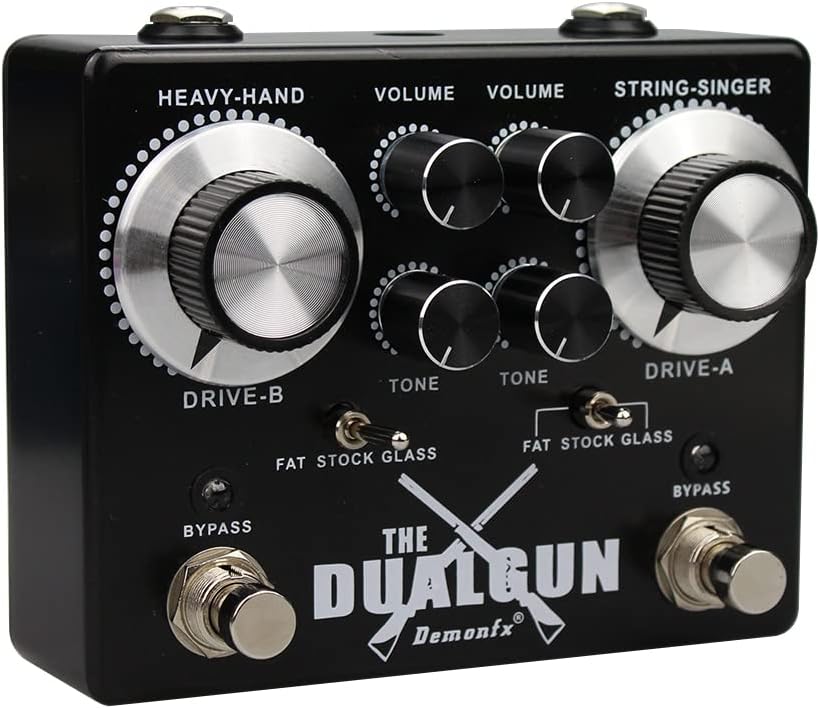
The Demonfx Dual Gun DG1 is a versatile two-channel overdrive pedal designed to deliver a wide range of blues and rock guitar tones. It features two independent overdrive channels, 'String-Singer' (Channel A) and 'Heavy-Hand' (Channel B), each with dedicated controls for Drive, Volume, and Tone, as well as a three-way toggle switch for Fat, Stock, and Glass clipping options. This pedal offers extensive tonal shaping capabilities, from subtle boosts to aggressive distortion, making it suitable for various musical styles and setups.
സുരക്ഷാ വിവരങ്ങൾ
- Use only a 9V DC power supply with a center-negative polarity. Using an incorrect power supply can damage the unit and void the warranty.
- Do not expose the pedal to water, moisture, or extreme temperatures.
- പെഡൽ താഴെയിടുകയോ ശക്തമായ ആഘാതങ്ങൾക്ക് വിധേയമാക്കുകയോ ചെയ്യുന്നത് ഒഴിവാക്കുക.
- Do not attempt to disassemble or modify the pedal beyond accessing the internal DIP switches as described in this manual. Refer all other servicing to qualified personnel.
- കുട്ടികൾക്ക് ലഭ്യമാകാതെ സൂക്ഷിക്കുക.
ഉൽപ്പന്നം കഴിഞ്ഞുview
The Demonfx Dual Gun DG1 features a robust metal casing and intuitive controls. Below is an overview അതിന്റെ പ്രധാന ഘടകങ്ങളും നിയന്ത്രണങ്ങളും.

ചിത്രം: മുകളിൽ view of the Demonfx Dual Gun DG1 overdrive pedal, showing all controls and footswitches.
ഫ്രണ്ട് പാനൽ നിയന്ത്രണങ്ങൾ:
- DRIVE A (String-Singer): Controls the amount of gain for Channel A.
- VOLUME A (String-Singer): Adjusts the output level for Channel A.
- TONE A (String-Singer): Shapes the treble response for Channel A.
- DRIVE B (Heavy-Hand): Controls the amount of gain for Channel B.
- VOLUME B (Heavy-Hand): Adjusts the output level for Channel B.
- TONE B (Heavy-Hand): Shapes the treble response for Channel B.
- FAT/STOCK/GLASS Switches: Three-way toggle switches for each channel, altering the pre-clipping EQ and clipping characteristics.
- BYPASS Footswitches: Engages or bypasses each respective channel. An LED indicator above each footswitch illuminates when the channel is active.
Side Panel Connections:
- ഇൻപുട്ട് ജാക്ക്: Connect your guitar or preceding effects pedal here.
- Jackട്ട്പുട്ട് ജാക്ക്: നിങ്ങളിലേക്ക് ബന്ധിപ്പിക്കുക amplifier or subsequent effects pedal here.
- DC 9V ഇൻപുട്ട്: Connect a 9V DC center-negative power adapter.

ചിത്രം: ആംഗിൾഡ് view of the Demonfx Dual Gun DG1, highlighting the control knobs and toggle switches.
സജ്ജമാക്കുക
- നിങ്ങളുടെ ഉറപ്പാക്കുക amplifier is turned off or set to a clean channel with low volume.
- ഇതിലേക്ക് നിങ്ങളുടെ ഗിറ്റാർ ബന്ധിപ്പിക്കുക ഇൻപുട്ട് jack of the Dual Gun DG1 using a standard 1/4-inch instrument cable.
- ബന്ധിപ്പിക്കുക ഔട്ട്പുട്ട് jack of the Dual Gun DG1 to your ampമറ്റൊരു 1/4-ഇഞ്ച് ഇൻസ്ട്രുമെന്റ് കേബിൾ ഉപയോഗിച്ച് ലിഫയറിന്റെ ഇൻപുട്ട്.
- Connect a 9V DC center-negative power adapter (not included) to the DC 9V ഇൻപുട്ട് jack on the pedal.
- നിങ്ങളുടെ ഓണാക്കുക amplifier and gradually increase the volume to a desired listening level.
പ്രവർത്തന നിർദ്ദേശങ്ങൾ
Engaging/Bypassing Channels:
ബന്ധപ്പെട്ടത് അമർത്തുക ബൈപാസ് footswitch to engage or bypass Channel A (String-Singer) or Channel B (Heavy-Hand). The LED above the footswitch will illuminate when the channel is active.
Adjusting Overdrive Tones:
- ഡ്രൈവ്: Rotate the DRIVE knob clockwise for more gain and distortion, or counter-clockwise for a cleaner, more subtle overdrive.
- വ്യാപ്തം: Adjust the VOLUME knob to set the overall output level of the engaged channel. This can be used to achieve a boost for solos or to match the bypassed signal level.
- ടോൺ: The TONE knob allows you to brighten or darken the sound. Turn it clockwise for more treble and cut, or counter-clockwise for a warmer, smoother tone.
- FAT/STOCK/GLASS Switches: These three-way switches modify the pre-clipping EQ and clipping characteristics:
- കൊഴുപ്പ്: Adds low-end warmth and a fuller sound.
- സ്റ്റോക്ക്: Provides a balanced, classic overdrive tone.
- ഗ്ലാസ്: Offers a brighter, more articulate tone with enhanced high-end clarity.
Stacking Channels:
The Dual Gun DG1 allows you to use both channels simultaneously for increased gain and complex tonal textures. Experiment with different settings on each channel to find unique stacked overdrive sounds.
ആന്തരിക ഡിഐപി സ്വിച്ചുകൾ
The Demonfx Dual Gun DG1 features internal DIP switches that allow for further customization of the pedal's clipping characteristics. These switches are located on the circuit board inside the pedal.
ചിത്രം: ആന്തരികം view of the Demonfx Dual Gun DG1 circuit board, showing the red DIP switch bank.
Accessing and Adjusting DIP Switches:
- പവർ വിച്ഛേദിക്കുക: Ensure the pedal is disconnected from its power supply and all cables before opening.
- സി തുറക്കുകasing: Carefully remove the screws on the back plate of the pedal to access the internal circuit board.
- Locate DIP Switches: Identify the small red DIP switch bank on the circuit board.
- Adjust Switches: Use a small tool (e.g., a toothpick or small screwdriver) to carefully flip the switches to your desired positions. Refer to the diagram below for switch functions.
- വീണ്ടും കൂട്ടിച്ചേർക്കുക: Once adjustments are made, carefully replace the back plate and secure the screws. Reconnect power and test the pedal.

Image: Diagram illustrating the functions of the internal DIP switches on the Demonfx Dual Gun DG1.
ഡിഐപി സ്വിച്ച് പ്രവർത്തനങ്ങൾ:
- സ്വിച്ച് 1: Adds warmth and symmetrical clipping.
- സ്വിച്ച് 2: Engages symmetrical clipping.
- സ്വിച്ച് 3: Adds distortion and symmetrical clipping.
- സ്വിച്ച് 4: Engages symmetrical clipping.
Experiment with different combinations of these switches to achieve a wider range of clipping characteristics, from brutal distortion to open, gritty low-gain tones, or even germanium fuzz-like sounds.
മെയിൻ്റനൻസ്
- വൃത്തിയാക്കൽ: പെഡലിന്റെ പുറംഭാഗം വൃത്തിയാക്കാൻ മൃദുവായതും ഉണങ്ങിയതുമായ തുണി ഉപയോഗിക്കുക. അബ്രസീവ് ക്ലീനറുകളോ ലായകങ്ങളോ ഉപയോഗിക്കരുത്.
- സംഭരണം: Store the pedal in a dry, cool place away from direct sunlight when not in use.
- കേബിൾ കണക്ഷനുകൾ: എല്ലാ കേബിൾ കണക്ഷനുകളിലും തേയ്മാനം സംഭവിച്ചിട്ടുണ്ടോയെന്ന് ഇടയ്ക്കിടെ പരിശോധിക്കുക. മികച്ച പ്രകടനം ഉറപ്പാക്കാൻ കേടായ കേബിളുകൾ മാറ്റിസ്ഥാപിക്കുക.
ട്രബിൾഷൂട്ടിംഗ്
| പ്രശ്നം | സാധ്യമായ കാരണം | പരിഹാരം |
|---|---|---|
| പെഡൽ അമർത്തുമ്പോൾ ശബ്ദമില്ല. | Incorrect power supply, loose cables, pedal not engaged, ampലൈഫയർ ക്രമീകരണങ്ങൾ. |
|
| അപ്രതീക്ഷിതമായ ശബ്ദം അല്ലെങ്കിൽ മൂളൽ. | Faulty cables, ground loop, interference from other electronics, power supply noise. |
|
| LED not lighting up. | No power, faulty LED. |
|
സ്പെസിഫിക്കേഷനുകൾ
| മോഡൽ നമ്പർ: | DG1 |
| ഇൻപുട്ട്/ഔട്ട്പുട്ട്: | 1/4-ഇഞ്ച് ഓഡിയോ ജാക്കുകൾ |
| വൈദ്യുതി ആവശ്യകത: | 9V DC, Center Negative |
| നിലവിലെ നറുക്കെടുപ്പ്: | 12 മില്ലിamps |
| മെറ്റീരിയൽ: | പ്ലാസ്റ്റിക്, മെറ്റൽ |
| നിറം: | കറുപ്പ്, വെള്ളി |
| ഇനത്തിൻ്റെ ഭാരം: | 1.2 പൗണ്ട് |
| അളവുകൾ (ഏകദേശം): | 10 x 4 x 2 ഇഞ്ച് (പാക്കേജ് അളവുകൾ) |
വാറൻ്റിയും പിന്തുണയും
For warranty information or technical support, please refer to the retailer where you purchased the Demonfx Dual Gun DG1 pedal or contact the manufacturer directly through their official channels. Keep your proof of purchase for warranty claims.