
1. ഉൽപ്പന്നം കഴിഞ്ഞുview
The PROHEAR 033 Bluetooth Hearing Protection Headphones are designed to provide effective noise reduction while allowing for audio entertainment and communication. This device integrates Bluetooth 5.0 technology, FM/AM radio, and a built-in rechargeable battery. The included GEP01 Gel Ear Pads offer enhanced comfort and sealing.

Image 1.1: PROHEAR 033 Headphones, GEP01 Gel Ear Pads, carrying bag, and packaging.
പ്രധാന സവിശേഷതകൾ:
- ബ്ലൂടൂത്ത് 5.0 കണക്റ്റിവിറ്റി: For stable wireless audio streaming and hands-free calling.
- Integrated FM/AM Radio: High reception sensitivity with automatic and manual tuning, and station presets.
- നോയ്സ് റിഡക്ഷൻ റേറ്റിംഗ് (NRR): 25dB for effective hearing protection.
- റീചാർജ് ചെയ്യാവുന്ന ബാറ്ററി: Built-in 2000mAh battery providing extended playtime.
- GEP01 Gel Ear Pads: Designed for improved comfort, sealing, and durability.
- LCD ഡിസ്പ്ലേ: എളുപ്പത്തിനായി viewing of radio tuning and settings.
2. സജ്ജീകരണം
2.1 ഹെഡ്ഫോണുകൾ ചാർജ് ചെയ്യുന്നു
Before initial use, fully charge the PROHEAR 033 headphones. The built-in 2000mAh rechargeable battery provides approximately 48 hours of playtime in Bluetooth mode and over 40 hours in wired or FM/AM radio mode. A full charge typically takes about 6 hours.
- നൽകിയിരിക്കുന്ന ചാർജിംഗ് കേബിൾ ഹെഡ്ഫോണുകളിലെ ചാർജിംഗ് പോർട്ടുമായി ബന്ധിപ്പിക്കുക.
- Plug the other end of the cable into a compatible USB power source (e.g., computer USB port, wall adapter).
- The charging indicator will illuminate. Once charging is complete, the indicator may change color or turn off, depending on the model.

Image 2.1: Rechargeable battery information and playtime details.
2.2 ബ്ലൂടൂത്ത് ജോടിയാക്കൽ
To connect your PROHEAR 033 headphones to a Bluetooth-enabled device:
- Ensure the headphones are powered on and in Bluetooth pairing mode. Refer to the device's specific button functions for activating pairing mode (often indicated by a flashing LED).
- നിങ്ങളുടെ സ്മാർട്ട്ഫോണിലോ, ടാബ്ലെറ്റിലോ, മറ്റ് ബ്ലൂടൂത്ത് ഉപകരണത്തിലോ, ബ്ലൂടൂത്ത് ക്രമീകരണങ്ങളിലേക്ക് നാവിഗേറ്റ് ചെയ്യുക.
- ഇതിനായി തിരയുക available devices. The headphones should appear as "PROHEAR 033" or a similar name.
- Select the headphones from the list to initiate pairing. Once connected, a confirmation tone or LED indicator will signify successful pairing.
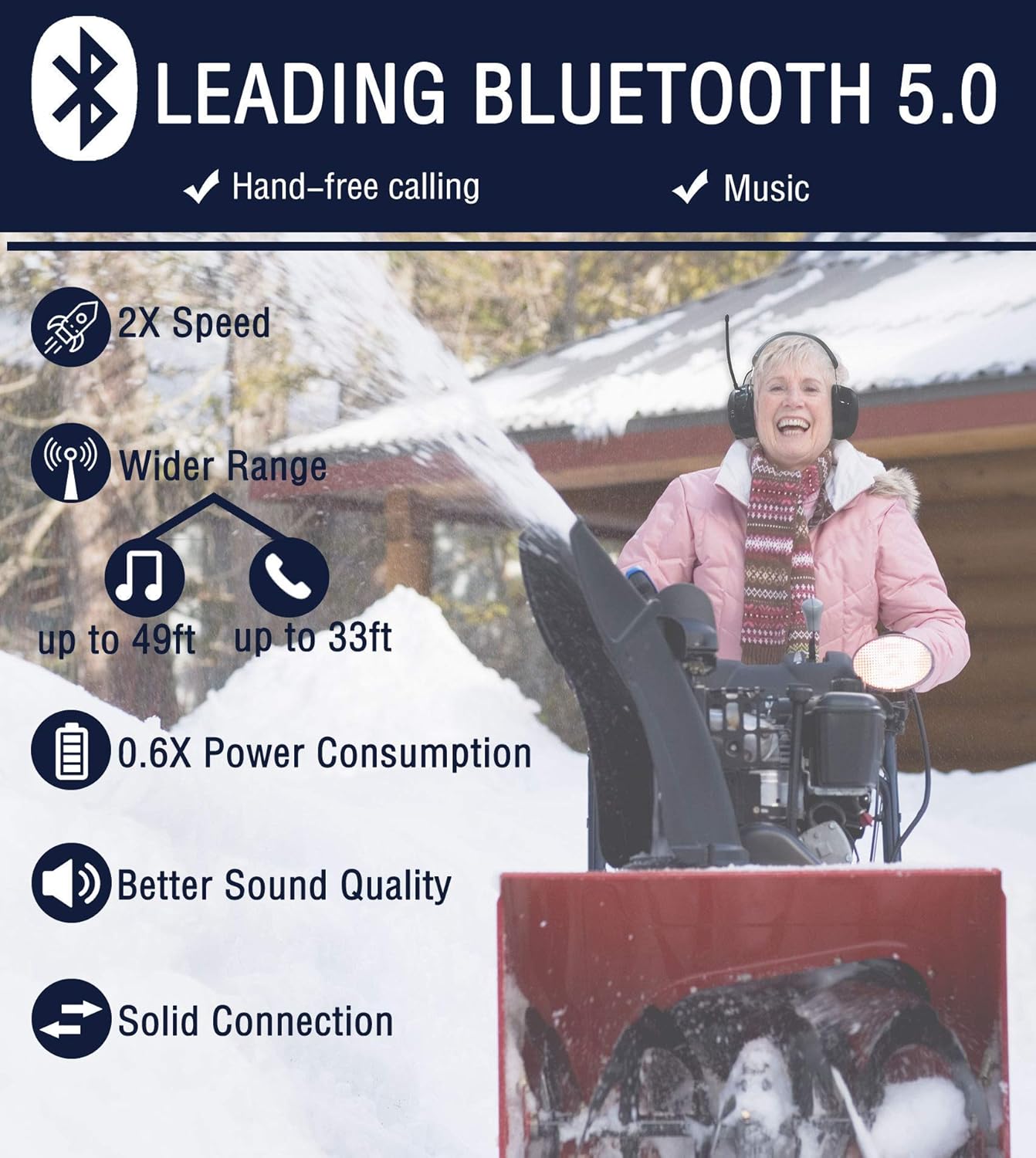
Image 2.2: Benefits of Bluetooth 5.0 technology.
3. ഓപ്പറേഷൻ
3.1 Bluetooth Audio and Calls
Once paired, you can stream audio from your device and manage calls directly from the headphones.
- ഓഡിയോ പ്ലേബാക്ക്: Use the controls on the headphones (e.g., play/pause, next/previous track, volume) to manage your music or other audio content.
- ഹാൻഡ്സ് ഫ്രീ കോളിംഗ്: The integrated microphone and multifunctional button allow you to answer, end, or reject calls without removing the earmuffs.

Image 3.1: High-fidelity speakers for premium sound quality.
3.2 FM/AM Radio Function
The PROHEAR 033 headphones feature a high-sensitivity antenna for clear radio reception.
- ട്യൂണിംഗ്: Use the dedicated buttons to switch between FM and AM bands. The LCD display will show the current frequency.
- യാന്ത്രിക സ്കാൻ: Activate the automatic scan function to find and save available radio stations.
- സ്വമേധയാലുള്ള ട്യൂണിംഗ്: Fine-tune to specific frequencies using the manual tuning controls.
- പ്രീസെറ്റുകൾ: Save up to 10 AM and 10 FM stations for quick access.
4. GEP01 Gel Ear Pad Installation and Compatibility
4.1 അനുയോജ്യത
The PROHEAR GEP01 Gel Ear Pads are designed for use with a wide range of 3M PELTOR headsets, including 3M WorkTunes hearing protectors. They are also compatible with ZOHAN EM042, PROHEAR 037, and PROHEAR 033 headsets. കുറിപ്പ്: These ear pads are not compatible with 3M PELTOR Optime 105 Earmuffs H10A.

Image 4.1: Compatible headset models for GEP01 Gel Ear Pads.
4.2 ഇൻസ്റ്റലേഷൻ
The GEP01 Gel Ear Pads are designed for easy, quick installation to enhance comfort and sealing.
- Carefully remove the existing ear pads from your compatible headset.
- Align the GEP01 Gel Ear Pads with the ear cup.
- Press firmly around the edges until the ear pads snap securely into place. The "snap-in" design allows for easy maintenance and replacement.

Image 4.2: GEP01 Gel Ear Pads provide a perfect head seal and reduce noise.
4.3 Features of GEP01 Gel Ear Pads
The GEP01 Gel Ear Pads are constructed with advanced materials for durability and comfort:
- Super-Premium Acoustic Memory Foam: Conforms to your head shape for a closed head seal, enhancing noise blocking.
- Super-Thin Polyurethane Skin: Durable, anti-sweat, easy to clean, and provides a comfortable touch.
- Silicone Gel Filled: Contributes to better noise-blocking and longer-lasting comfort.
- Double-Hump Top Face Design: Engineered for improved softness and sealing.

Image 4.3: Detailed construction of GEP01 Memory Foam Gel Ear Pads.
5. പരിപാലനം
5.1 Cleaning Gel Ear Pads
To maintain hygiene and prolong the life of your GEP01 Gel Ear Pads:
- Clean the outer surface of the ear pads with soapy water as necessary.
- Do not submerge the ear pads in water, as they contain a pinhole-sized air vent for proper functioning.
- Allow the ear pads to air dry completely before reattaching them to the headset.
6 സ്പെസിഫിക്കേഷനുകൾ
| ഫീച്ചർ | വിശദാംശങ്ങൾ |
|---|---|
| മോഡൽ | PROHEAR 033 |
| ബ്ലൂടൂത്ത് പതിപ്പ് | 5.0 |
| നോയ്സ് റിഡക്ഷൻ റേറ്റിംഗ് (NRR) | 25dB (ANSI S3.19-1974, CE 352-1 certified) |
| ബാറ്ററി ശേഷി | 2000mAh റീചാർജ് ചെയ്യാവുന്നത് |
| പ്ലേടൈം (ബ്ലൂടൂത്ത് മോഡ്) | 48 മണിക്കൂർ വരെ |
| Playtime (Wired/FM/AM Mode) | 40 മണിക്കൂറിലധികം |
| ചാർജിംഗ് സമയം | ഏകദേശം 6 മണിക്കൂർ |
| റേഡിയോ ബാൻഡുകൾ | FM/AM |
| ഇയർ പാഡ് മെറ്റീരിയൽ | Polyurethane (PU) with Silicone Gel and Memory Foam |
| നിറം | കറുപ്പ് |
| ASIN | B09JG7FD3V |

Image 6.1: All-day comfort features of the PROHEAR 033 headphones.

Image 6.2: NRR 25dB rating and typical usage environments.
7. പ്രശ്നപരിഹാരം
If you encounter issues with your PROHEAR 033 headphones, consider the following common solutions:
- ശക്തിയില്ല: Ensure the battery is fully charged. Connect the headphones to a power source and allow sufficient charging time.
- ബ്ലൂടൂത്ത് കണക്ഷൻ പ്രശ്നങ്ങൾ:
- Ensure Bluetooth is enabled on both the headphones and your device.
- Move the headphones closer to your device to reduce interference.
- നിങ്ങളുടെ ഫോണിന്റെ ബ്ലൂടൂത്ത് ക്രമീകരണങ്ങളിൽ ഉപകരണം മറന്ന് വീണ്ടും പെയർ ചെയ്യാൻ ശ്രമിക്കുക.
- ഹെഡ്ഫോണുകളും നിങ്ങളുടെ ബ്ലൂടൂത്ത് ഉപകരണവും പുനരാരംഭിക്കുക.
- മോശം റേഡിയോ സ്വീകരണം:
- ഒപ്റ്റിമൽ റിസപ്ഷനായി ആന്റിന പൂർണ്ണമായും നീട്ടുക.
- Move to an open area away from large metal structures or other electronic devices that may cause interference.
- Try manual tuning to fine-tune the station.
- ശബ്ദമില്ല:
- ഹെഡ്ഫോണുകളിലും ബന്ധിപ്പിച്ചിരിക്കുന്ന ഉപകരണത്തിലും വോളിയം ലെവലുകൾ പരിശോധിക്കുക.
- Ensure the headphones are correctly paired via Bluetooth or the audio cable is fully inserted.
കൂടുതൽ സഹായത്തിന്, ദയവായി വാറന്റി, പിന്തുണ വിഭാഗം പരിശോധിക്കുക.
8. വാറൻ്റിയും പിന്തുണയും
PROHEAR offers a 50-DAY NO RISK MONEY BACK GUARANTEE കൂടാതെ എ 1 വർഷത്തെ വാറൻ്റി for this product. If you encounter any problems or have questions regarding your PROHEAR 033 headphones or GEP01 Gel Ear Pads, please do not hesitate to contact PROHEAR customer support. They are available 24/7 to provide assistance.
You can reach support via Amazon or by emailing support@proheartac.com.

Image 8.1: PROHEAR customer support and warranty information.