
AOSHIDA RC-15A
Topping RC-15A Remote Control User Manual
Model: RC-15A
Brand: AOSHIDA
1. ആമുഖം
This manual provides detailed instructions for the proper use and maintenance of your Topping RC-15A Remote Control. The RC-15A is designed to provide convenient wireless control over various Topping Digital-to-Analog Converters (DACs) and Headphone Amplifiers, enhancing your audio experience.
Please read this manual thoroughly before operating the device to ensure optimal performance and longevity.
2. ഉൽപ്പന്നം കഴിഞ്ഞുview
The Topping RC-15A is a compact infrared remote control. It features a range of buttons for power, volume adjustment, input selection, and other specific functions depending on the connected Topping device.
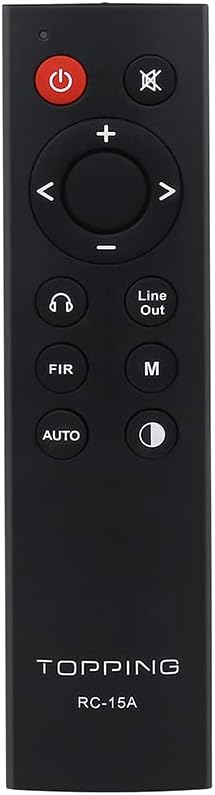
ചിത്രം 2.1: ഫ്രണ്ട് view of the RC-15A remote control, displaying the button layout including power, mute, volume up/down, navigation, input selection, and mode buttons.
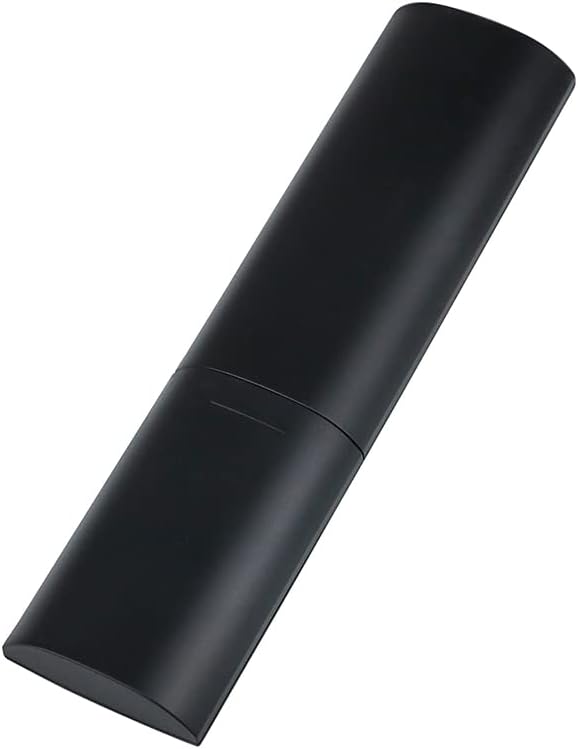
ചിത്രം 2.2: വശവും പിൻഭാഗവും view of the RC-15A remote control, highlighting its sleek, black casing and ergonomic design.
ബട്ടൺ പ്രവർത്തനങ്ങൾ:
- പവർ ബട്ടൺ (●): Turns the connected Topping device on or off.
- നിശബ്ദ ബട്ടൺ (✕ ✕ 📺): ഓഡിയോ ഔട്ട്പുട്ട് നിശബ്ദമാക്കുകയോ അൺമ്യൂട്ടുചെയ്യുകയോ ചെയ്യുന്നു.
- വോളിയം കൂട്ടുക/താഴ്ത്തുക (+/-): വോളിയം ലെവൽ കൂട്ടുകയോ കുറയ്ക്കുകയോ ചെയ്യുന്നു.
- Navigation Buttons (◀ ▶ ▲ ▼): Used for menu navigation or input selection, depending on the device.
- Headphone Output Button (♫): Switches to headphone output mode (if supported by the device).
- Line Out Button: Switches to line output mode (if supported by the device).
- FIR Button: Function varies by device, often related to filter settings.
- എം ബട്ടൺ: Mode or Menu button, function varies by device.
- ഓട്ടോ ബട്ടൺ: Automatic input selection or mode (function varies by device).
- Display Brightness Button (☽ ☽ മിനിമം): Adjusts the display brightness of the connected device.
3. സജ്ജീകരണം
ബാറ്ററി ഇൻസ്റ്റാളേഷൻ:
The RC-15A remote control requires batteries for operation. Batteries are not included and must be purchased separately. It typically uses two AAA batteries (Lithium recommended for longer life).
- റിമോട്ട് കൺട്രോളിന്റെ പിൻഭാഗത്ത് ബാറ്ററി കമ്പാർട്ട്മെന്റ് കണ്ടെത്തുക.
- ബാറ്ററി കവർ തുറക്കാൻ താഴേക്ക് സ്ലൈഡ് ചെയ്യുക അല്ലെങ്കിൽ ഒരു അമ്പടയാളം സൂചിപ്പിക്കുന്ന ദിശയിലേക്ക് സ്ലൈഡ് ചെയ്യുക.
- കമ്പാർട്ടുമെന്റിനുള്ളിലെ അടയാളപ്പെടുത്തലുകളുമായി പോസിറ്റീവ് (+), നെഗറ്റീവ് (-) ടെർമിനലുകൾ ശരിയായി വിന്യസിക്കുന്നുണ്ടെന്ന് ഉറപ്പാക്കാൻ രണ്ട് AAA ബാറ്ററികൾ ഇടുക.
- സുരക്ഷിതമായി ക്ലിക്ക് ചെയ്യുന്നത് വരെ ബാറ്ററി കവർ തിരികെ അതിന്റെ സ്ഥാനത്തേക്ക് സ്ലൈഡ് ചെയ്ത് അടയ്ക്കുക.
കുറിപ്പ്: ചോർച്ചയും കേടുപാടുകളും തടയാൻ റിമോട്ട് കൺട്രോൾ ദീർഘനേരം ഉപയോഗിക്കുന്നില്ലെങ്കിൽ ബാറ്ററികൾ നീക്കം ചെയ്യുക.
4. പ്രവർത്തന നിർദ്ദേശങ്ങൾ
The RC-15A remote control operates via infrared (IR) signals. Ensure there is a clear line of sight between the remote control and the IR receiver on your Topping device.
അനുയോജ്യമായ ഉപകരണങ്ങൾ:
The RC-15A is pre-programmed to work with a range of Topping DACs and audio devices, including but not limited to:
- Topping E30, E30 II, E50, E70, E70V
- Topping DX3 Pro, DX3 Pro+, DX5, DX5 Lite, DX7 Pro, DX7 Pro+
- Topping D30 Pro, D50s, D90se, D90
അടിസ്ഥാന പ്രവർത്തനം:
- പവർ ഓൺ/ഓഫ്: Point the remote at your Topping device and press the ശക്തി ബട്ടൺ.
- വോളിയം നിയന്ത്രണം: ഉപയോഗിക്കുക + വോളിയം കൂട്ടാനുള്ള ബട്ടണും - വോളിയം കുറയ്ക്കുന്നതിനുള്ള ബട്ടൺ.
- നിശബ്ദമാക്കുക: അമർത്തുക നിശബ്ദമാക്കുക ഓഡിയോ താൽക്കാലികമായി നിശബ്ദമാക്കാൻ ബട്ടൺ. അൺമ്യൂട്ട് ചെയ്യാൻ വീണ്ടും അമർത്തുക.
- ഇൻപുട്ട് തിരഞ്ഞെടുക്കൽ: Use the navigation buttons (left/right arrows) or dedicated input buttons (if available on your device) to cycle through available inputs.
- മെനു നാവിഗേഷൻ: For devices with on-screen menus, use the navigation arrows (up/down/left/right) and potentially the 'M' or 'AUTO' button for selection or confirmation. Refer to your specific Topping device's manual for detailed menu operations.
പ്രധാനപ്പെട്ടത്: The specific functions of some buttons (e.g., FIR, M, AUTO, Headphone Output, Line Out) may vary depending on the model and firmware version of your Topping DAC or amplifier. Always consult the user manual of your specific Topping audio device for detailed compatibility and functionality.
5. പരിപാലനം
Proper maintenance ensures the longevity and reliable operation of your RC-15A remote control.
- വൃത്തിയാക്കൽ: Wipe the remote control with a soft, dry cloth. Do not use abrasive cleaners, waxes, or solvents as they may damage the finish or internal components.
- ബാറ്ററി മാറ്റിസ്ഥാപിക്കൽ: Replace batteries when the remote's range decreases or it becomes unresponsive. Always replace all batteries at the same time with new ones of the same type.
- സംഭരണം: നേരിട്ടുള്ള സൂര്യപ്രകാശത്തിൽ നിന്നും ഉയർന്ന താപനിലയിൽ നിന്നും അകലെ തണുത്തതും വരണ്ടതുമായ സ്ഥലത്ത് റിമോട്ട് കൺട്രോൾ സൂക്ഷിക്കുക.
- തുള്ളികൾ ഒഴിവാക്കുക: Protect the remote from physical shocks and drops, which can damage internal circuitry.
6. പ്രശ്നപരിഹാരം
If you encounter issues with your RC-15A remote control, try the following troubleshooting steps:
| പ്രശ്നം | സാധ്യമായ കാരണം | പരിഹാരം |
|---|---|---|
| റിമോട്ട് പ്രതികരിക്കുന്നില്ല. | ഡെഡ് അല്ലെങ്കിൽ കുറഞ്ഞ ബാറ്ററികൾ. | ബാറ്ററികൾ പുതിയവ ഉപയോഗിച്ച് മാറ്റിസ്ഥാപിക്കുക. |
| റിമോട്ട് പ്രതികരിക്കുന്നില്ല. | No clear line of sight to device. | Ensure no obstructions between remote and device's IR receiver. Point directly at the device. |
| വിദൂര ദൂരം മോശമാണ്. | ദുർബലമായ ബാറ്ററികൾ. | ബാറ്ററികൾ മാറ്റിസ്ഥാപിക്കുക. |
| പ്രത്യേക ബട്ടൺ പ്രവർത്തിക്കുന്നില്ല. | Button stuck or damaged. | Gently press the button multiple times. If still unresponsive, the remote may be faulty. |
| ചില പ്രവർത്തനങ്ങൾക്ക് റിമോട്ട് പ്രവർത്തിക്കും, പക്ഷേ മറ്റുള്ളവയ്ക്ക് അങ്ങനെയല്ല. | Function not supported by your specific Topping device model. | Refer to the user manual of your Topping DAC/amplifier to confirm supported remote functions. |
7 സ്പെസിഫിക്കേഷനുകൾ
| ഫീച്ചർ | വിശദാംശങ്ങൾ |
|---|---|
| മോഡൽ | RC-15A |
| ബ്രാൻഡ് | AOSHIDA (Manufacturer: TOPPING) |
| കണക്റ്റിവിറ്റി ടെക്നോളജി | ഇൻഫ്രാറെഡ് (IR) |
| പ്രത്യേക സവിശേഷതകൾ | Pre-programmed for Topping devices |
| അനുയോജ്യമായ ഉപകരണങ്ങൾ | Topping E30, E30 II, E50, E70, E70V, DX3 Pro, DX3 Pro+, DX5, DX5 Lite, DX7 Pro, DX7 Pro+, D30 Pro, D50s, D90se, D90 |
| ബാറ്ററികൾ ആവശ്യമാണ് | അതെ (2 x AAA, ഉൾപ്പെടുത്തിയിട്ടില്ല) |
| അളവുകൾ (ഏകദേശം.) | 21.6 x 11.7 x 9.1 സെ.മീ (പാഴ്സൽ അളവുകൾ) |
| ഭാരം (ഏകദേശം) | 40 ഗ്രാം |
8. വാറൻ്റിയും പിന്തുണയും
Information regarding the specific warranty period and support contact for the Topping RC-15A remote control is typically provided with the original purchase of your Topping audio device or on the manufacturer's official webസൈറ്റ്.
For technical support, warranty claims, or further inquiries, please refer to the documentation included with your Topping DAC/amplifier or visit the official Topping or AOSHIDA webസൈറ്റ്.
അനുബന്ധ രേഖകൾ - RC-15A
 |
How to Locate Serial Numbers on Spektrum Transmitters, Receivers, and Devices A guide to finding serial numbers for Spektrum RC transmitters, receivers, and devices, including specific instructions for DX models and receiver devices, and detailing the use of the Spektrum PC programmer. |
 |
ARRMA INFRACTION 6S and FELONY 6S Instruction Manual Comprehensive instruction manual for the ARRMA INFRACTION 6S and FELONY 6S RC vehicles. Includes safety precautions, setup, operation, and maintenance guidelines. |
 |
Axial SCX10 III Early Ford Bronco RTR Instruction Manual This manual provides comprehensive instructions for operating, maintaining, and troubleshooting the Axial SCX10 III Early Ford Bronco 4WD RTR remote control rock crawler. It covers setup, safety, electronic components, and warranty information. |
 |
Toshiba Electric Rice Cooker/Warmer Instruction Manual - Safety, Operation, and Recipes This comprehensive instruction manual provides detailed guidance for the Toshiba Electric Rice Cooker/Warmer. Learn about essential safety precautions, part identification, preparation steps, cooking various types of rice, bread, cake, and eggs, setting the clock and timer, and important maintenance information. Ensure safe and optimal use of your Toshiba rice cooker with this user-friendly guide. |
 |
ആർസി ഫാക്ടറി ഫ്ലാഷ് സിഎൽ കൺട്രോൾ ലൈൻ എയർപ്ലെയിൻ മോഡൽ - അസംബ്ലി ഗൈഡ് ആർസി ഫാക്ടറി ഫ്ലാഷ് സിഎൽ കൺട്രോൾ ലൈൻ വിമാന മോഡലിനായുള്ള വിശദമായ അസംബ്ലി നിർദ്ദേശങ്ങളും ഘടക സവിശേഷതകളും. ഒപ്റ്റിമൽ ഫ്ലൈറ്റ് പ്രകടനത്തിനായി നിങ്ങളുടെ മോഡൽ എങ്ങനെ നിർമ്മിക്കാമെന്നും സജ്ജീകരിക്കാമെന്നും മനസിലാക്കുക. |
 |
ARRMA KRATON 8S Brushless Electric RC Monster Truck Instruction Manual Comprehensive instruction manual for the ARRMA KRATON 8S 1/5 scale brushless electric RC monster truck, covering setup, operation, maintenance, safety, and troubleshooting. Includes details on Spektrum radio gear, AVC technology, ESC programming, and warranty information. |
Ask a question about this manual
Ask about setup, troubleshooting, compatibility, parts, safety, or missing instructions. Manuals+ will review the question and use this page’s manual context to help answer it.