
1. ആമുഖം
This manual provides detailed instructions for the proper use and maintenance of your Cellularline Task Dual-Mode Headset. Please read this manual thoroughly before using the product to ensure optimal performance and longevity.
The Cellularline Task headset is designed for versatility, offering both wired and wireless (Bluetooth) connectivity. It features a detachable microphone, making it suitable for smart working, remote learning, and music listening.
2. ഉൽപ്പന്നം കഴിഞ്ഞുview
The Cellularline Task headset combines comfort with functionality, featuring over-ear cushions and intuitive controls. Its dual-mode capability allows seamless switching between wired and Bluetooth connections.

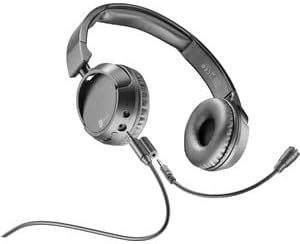
ചിത്രം 2.1: Cellularline Task Dual-Mode Headset with detachable microphone connected.
പ്രധാന സവിശേഷതകൾ:
- Dual-mode stereo headset (wired and Bluetooth).
- Wireless communication technology compatible with various devices (iPhone, Samsung, Huawei, Xiaomi, etc.).
- Modern design with comfortable over-ear cushions.
- Adaptable and removable microphone, ideal for video calls and audio recording.
- Volume limitation feature for hearing protection.
- Up to 18 hours of continuous music playback or talk time.
3. സജ്ജീകരണം
3.1 പാക്കേജ് ഉള്ളടക്കം
Before proceeding, ensure your package contains the following items:
- Cellularline Task Headset
- വേർപെടുത്താവുന്ന മൈക്രോഫോൺ
- ചാർജിംഗ് കേബിൾ (USB)
- Audio Cable (3.5mm jack)
- ഉപയോക്തൃ മാനുവൽ (ഈ പ്രമാണം)
3.2 ഹെഡ്സെറ്റ് ചാർജ് ചെയ്യുന്നു
Before first use, fully charge the headset. Connect the provided USB charging cable to the charging port on the headset and to a compatible USB power source. The LED indicator will show charging status and turn off or change color when fully charged.
3.3 വേർപെടുത്താവുന്ന മൈക്രോഫോൺ ഘടിപ്പിക്കൽ
The microphone can be easily attached or detached based on your usage needs.
- ഹെഡ്സെറ്റിന്റെ ഇടതുവശത്തുള്ള ഇയർകപ്പിൽ മൈക്രോഫോൺ ഇൻപുട്ട് പോർട്ട് കണ്ടെത്തുക.
- Align the 3.5mm jack of the detachable microphone with the port.
- Gently push the microphone jack into the port until it is securely seated.
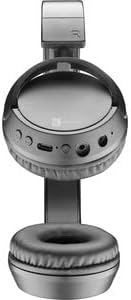
ചിത്രം 3.1: Headset with the detachable microphone removed, showing the input port.
3.4 വയർഡ് കണക്ഷൻ
വയർഡ് മോഡിൽ ഹെഡ്സെറ്റ് ഉപയോഗിക്കാൻ:
- ഹെഡ്സെറ്റ് പവർ ഓഫ് ആണെന്ന് ഉറപ്പാക്കുക.
- Connect one end of the 3.5mm audio cable to the audio input port on the headset.
- Connect the other end of the 3.5mm audio cable to the audio output jack of your device (e.g., computer, smartphone, tablet).
- The headset will function as a wired headset, drawing power from the connected device if needed, or using its own battery for active features.

ചിത്രം 3.2: Headset connected via 3.5mm audio cable, demonstrating wired mode.
3.5 ബ്ലൂടൂത്ത് ജോടിയാക്കൽ
To connect your headset wirelessly via Bluetooth:
- പവർ ഓൺ: Press and hold the Power button on the headset until the LED indicator flashes, indicating pairing mode.
- ബ്ലൂടൂത്ത് സജീവമാക്കുക: നിങ്ങളുടെ ഉപകരണത്തിൽ (സ്മാർട്ട്ഫോൺ, ടാബ്ലെറ്റ്, കമ്പ്യൂട്ടർ), ബ്ലൂടൂത്ത് ക്രമീകരണങ്ങളിലേക്ക് പോയി ബ്ലൂടൂത്ത് പ്രവർത്തനക്ഷമമാക്കിയിട്ടുണ്ടെന്ന് ഉറപ്പാക്കുക.
- ഇതിനായി തിരയുക ഉപകരണങ്ങൾ: Your device will scan for available Bluetooth devices.
- ഹെഡ്സെറ്റ് തിരഞ്ഞെടുക്കുക: From the list of found devices, select "Cellularline Task" (or similar name).
- കണക്ഷൻ സ്ഥിരീകരിക്കുക: Once connected, the LED indicator on the headset will change to a steady light or flash slowly, and your device will confirm the connection.
The headset is compatible with iPhone, Samsung, Huawei, Xiaomi, and other Bluetooth-enabled devices.
4. പ്രവർത്തന നിർദ്ദേശങ്ങൾ
4.1 പവർ ഓൺ/ഓഫ്
- പവർ ഓൺ: LED ഇൻഡിക്കേറ്റർ പ്രകാശിക്കുന്നത് വരെ ഏകദേശം 3 സെക്കൻഡ് നേരത്തേക്ക് പവർ ബട്ടൺ അമർത്തിപ്പിടിക്കുക.
- പവർ ഓഫ്: LED ഇൻഡിക്കേറ്റർ ഓഫാകുന്നതുവരെ ഏകദേശം 5 സെക്കൻഡ് നേരത്തേക്ക് പവർ ബട്ടൺ അമർത്തിപ്പിടിക്കുക.
4.2 വോളിയം നിയന്ത്രണം
The headset features tactile controls for volume adjustment.
ചിത്രം 4.1: ക്ലോസ് അപ്പ് view of the earcup showing control buttons for volume and playback.
- വോളിയം വർദ്ധിപ്പിക്കുക: '+' ബട്ടൺ അമർത്തുക.
- വോളിയം കുറയ്ക്കുക: '-' ബട്ടൺ അമർത്തുക.
The headset includes a volume limitation feature to protect your hearing.
4.3 കോൾ മാനേജ്മെന്റ്
When connected via Bluetooth, you can manage calls directly from the headset:
- മറുപടി കോൾ: Press the Multi-function button (usually the Power button or a dedicated call button) once.
- കോൾ അവസാനിപ്പിക്കുക: ഒരു കോൾ സമയത്ത് മൾട്ടി-ഫംഗ്ഷൻ ബട്ടൺ ഒരിക്കൽ അമർത്തുക.
- കോൾ നിരസിക്കുക: Press and hold the Multi-function button for 2 seconds when an incoming call rings.
4.4 മ്യൂസിക് പ്ലേബാക്ക്
When connected via Bluetooth, control your music playback:
- പ്ലേ/താൽക്കാലികമായി നിർത്തുക: മൾട്ടി-ഫംഗ്ഷൻ ബട്ടൺ ഒരിക്കൽ അമർത്തുക.
- അടുത്ത ട്രാക്ക്: '+' ബട്ടൺ അമർത്തിപ്പിടിക്കുക.
- മുമ്പത്തെ ട്രാക്ക്: '-' ബട്ടൺ അമർത്തിപ്പിടിക്കുക.
4.5 മൈക്രോഫോൺ ഉപയോഗം
The detachable microphone is designed for clear voice capture during calls or recordings.
- Ensure the microphone is securely attached (refer to Section 3.3).
- ഒപ്റ്റിമൽ വോയ്സ് പിക്കപ്പിനായി മൈക്രോഫോൺ ഉചിതമായി സ്ഥാപിക്കുക.
- When using the headset in wired mode, the microphone functionality will depend on the connected device's compatibility with 4-pole 3.5mm jacks.
5. പരിപാലനം
5.1 വൃത്തിയാക്കൽ
- Use a soft, dry cloth to clean the headset.
- അബ്രാസീവ് ക്ലീനറുകൾ, ലായകങ്ങൾ, കഠിനമായ രാസവസ്തുക്കൾ എന്നിവ ഉപയോഗിക്കരുത്.
- ഏതെങ്കിലും ദ്വാരങ്ങളിൽ ഈർപ്പം കയറുന്നത് ഒഴിവാക്കുക.
5.2 സംഭരണം
- ഹെഡ്സെറ്റ് നേരിട്ട് സൂര്യപ്രകാശം ഏൽക്കാത്തതും ഉയർന്ന താപനില ഏൽക്കാത്തതുമായ ഒരു തണുത്ത വരണ്ട സ്ഥലത്ത് സൂക്ഷിക്കുക.
- If storing for an extended period, ensure the battery is partially charged (around 50%) to maintain battery health.
5.3 ബാറ്ററി കെയർ
- ബാറ്ററി ഇടയ്ക്കിടെ പൂർണ്ണമായും ഡിസ്ചാർജ് ചെയ്യുന്നത് ഒഴിവാക്കുക.
- ഉയർന്ന താപനിലയിൽ ബാറ്ററി തുറന്നുകാട്ടരുത്.
- If the headset will not be used for a long time, charge it every few months to prevent deep discharge.
6. പ്രശ്നപരിഹാരം
6.1 Headset Does Not Power On
- ഹെഡ്സെറ്റ് പൂർണ്ണമായും ചാർജ് ചെയ്തിട്ടുണ്ടെന്ന് ഉറപ്പാക്കുക. ഒരു പവർ സ്രോതസ്സിലേക്ക് കണക്റ്റ് ചെയ്ത് വീണ്ടും പവർ ഓൺ ചെയ്യാൻ ശ്രമിക്കുന്നതിന് മുമ്പ് കുറച്ച് മിനിറ്റ് കാത്തിരിക്കുക.
- മറ്റൊരു ചാർജിംഗ് കേബിളോ പവർ അഡാപ്റ്ററോ പരീക്ഷിച്ചുനോക്കൂ.
6.2 ശബ്ദമില്ല അല്ലെങ്കിൽ കുറഞ്ഞ ശബ്ദം
- ഹെഡ്സെറ്റിലും ബന്ധിപ്പിച്ചിരിക്കുന്ന ഉപകരണത്തിലും വോളിയം ലെവലുകൾ പരിശോധിക്കുക.
- If using Bluetooth, ensure the headset is properly paired and connected.
- If using wired mode, ensure the 3.5mm audio cable is fully inserted into both the headset and the device.
- മറ്റൊരു ഓഡിയോ ഉറവിടമോ ഉപകരണമോ ഉപയോഗിച്ച് പരീക്ഷിക്കുക.
6.3 ബ്ലൂടൂത്ത് ജോടിയാക്കൽ പ്രശ്നങ്ങൾ
- ഹെഡ്സെറ്റ് ജോടിയാക്കൽ മോഡിലാണെന്ന് ഉറപ്പാക്കുക (LED മിന്നുന്നു).
- നിങ്ങളുടെ ഉപകരണത്തിൽ ബ്ലൂടൂത്ത് ഓഫാക്കി ഓണാക്കുക.
- Forget the headset from your device's Bluetooth list and attempt to pair again.
- Ensure the headset is within the effective range of your device (typically 10 meters).
6.4 മൈക്രോഫോൺ പ്രവർത്തിക്കുന്നില്ല
- Ensure the detachable microphone is securely attached to the headset.
- Check microphone settings on your connected device to ensure the headset's microphone is selected as the input device.
- മറ്റൊരു ആപ്ലിക്കേഷനോ ഉപകരണമോ ഉപയോഗിച്ച് മൈക്രോഫോൺ പരിശോധിക്കുക.
- Ensure the microphone is not muted on your device or via any headset controls (if applicable).
7 സ്പെസിഫിക്കേഷനുകൾ
| ബ്രാൻഡ് | സെല്ലുലാർലൈൻ |
| മോഡലിൻ്റെ പേര് | BTHEADBTASKK |
| കണക്റ്റിവിറ്റി ടെക്നോളജി | വയർലെസ്സ് (ബ്ലൂടൂത്ത്), വയർഡ് (3.5mm ജാക്ക്) |
| വയർലെസ് കമ്മ്യൂണിക്കേഷൻ ടെക്നോളജി | ബ്ലൂടൂത്ത് |
| ഫോം ഫാക്ടർ | ഓവർ-ഇയർ |
| പ്രത്യേക സവിശേഷതകൾ | Fast Charging, Volume Control, Included Microphone |
| കളിക്കുന്ന സമയം | 18 മണിക്കൂർ വരെ |
| സംസാര സമയം | 18 മണിക്കൂർ |
| അനുയോജ്യമായ ഉപകരണങ്ങൾ | Laptop, Tablet, Mobile Phone, Universal |
| നിയന്ത്രണ തരം | ടച്ച് കൺട്രോൾ, റിമോട്ട് കൺട്രോൾ |
| മെറ്റീരിയൽ | പ്ലാസ്റ്റിക്, റബ്ബർ |
| നിറം | കറുപ്പ് |
8. വാറൻ്റിയും പിന്തുണയും
Cellularline products are designed and manufactured to the highest quality standards. For information regarding warranty coverage, please refer to the warranty card included with your product or visit the official Cellularline webസൈറ്റ്.
If you encounter any issues not covered in this manual or require further assistance, please contact Cellularline customer support through their official webസൈറ്റ് അല്ലെങ്കിൽ നിങ്ങളുടെ ഉൽപ്പന്ന പാക്കേജിംഗിൽ നൽകിയിരിക്കുന്ന ബന്ധപ്പെടാനുള്ള വിവരങ്ങൾ.
Webസൈറ്റ്: www.cellularline.com