
PX5 Car DVD Player for Honda City 2008-2011
User Manual for PX5 Car DVD Player
Model: PX5 Car DVD Player for Honda City 2008-2011
ആമുഖം
This manual provides comprehensive instructions for the installation, operation, and maintenance of your PX5 Car DVD Player. Please read this manual thoroughly before using the device to ensure proper functionality and safety.
സുരക്ഷാ വിവരങ്ങൾ
- ഡ്രൈവിംഗിൽ നിന്ന് നിങ്ങളെ വ്യതിചലിപ്പിക്കുന്ന രീതിയിൽ ഉപകരണം പ്രവർത്തിപ്പിക്കരുത്.
- ഷോർട്ട് സർക്യൂട്ടുകളോ കേടുപാടുകളോ തടയുന്നതിന് എല്ലാ വയറിംഗും ശരിയായി ബന്ധിപ്പിച്ചിട്ടുണ്ടെന്ന് ഉറപ്പാക്കുക.
- യൂണിറ്റിനെ തീവ്രമായ താപനില, നേരിട്ടുള്ള സൂര്യപ്രകാശം അല്ലെങ്കിൽ ഈർപ്പം എന്നിവയിൽ എത്തിക്കുന്നത് ഒഴിവാക്കുക.
- യൂണിറ്റ് ഡിസ്അസംബ്ലിംഗ് ചെയ്യാനോ പരിഷ്ക്കരിക്കാനോ ശ്രമിക്കരുത്. എല്ലാ സേവനങ്ങളും യോഗ്യതയുള്ള ഉദ്യോഗസ്ഥർക്ക് റഫർ ചെയ്യുക.
- പ്രാദേശിക ഗതാഗത നിയമങ്ങളും ചട്ടങ്ങളും എപ്പോഴും പാലിക്കുക.
ഉൽപ്പന്നം കഴിഞ്ഞുview
The PX5 Car DVD Player is an advanced in-dash multimedia system designed for Honda City models from 2008 to 2011. It features an 8-inch capacitive multi-touch screen, Android 10.0 operating system, and integrated GPS navigation.
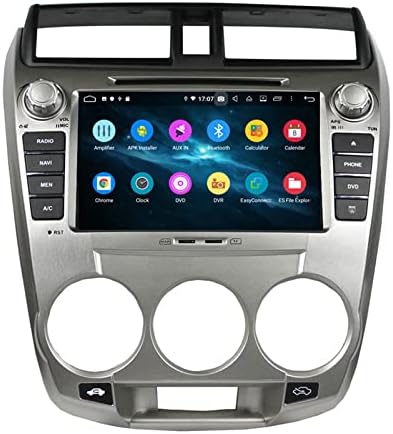
This image shows the PX5 Car DVD Player seamlessly integrated into the dashboard of a Honda City, highlighting its 8-inch display and physical control buttons.
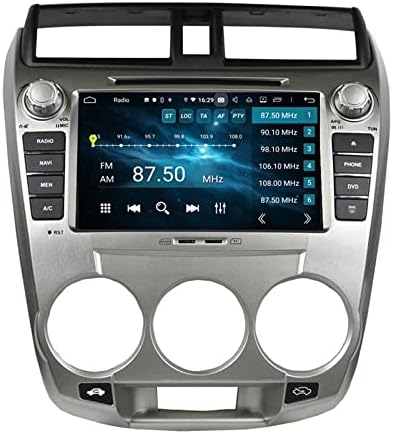
This image displays the main screen of the PX5 Car DVD Player, showing various application icons such as Amplifier, APK Installer, AUX In, Bluetooth, Calculator, Calendar, Chrome, Clock, DVD, DVR, EasyConnect, and ES File എക്സ്പ്ലോറർ.
പ്രധാന സവിശേഷതകൾ:
- Capacitive Multi-Touch Screen: High-definition display for intuitive interaction.
- നാവിഗേഷൻ: Supports GPS and GLONASS dual-mode navigation for accurate positioning.
- ബ്ലൂടൂത്ത് 5.0: Built-in module for hands-free calling, music streaming, and internet access.
- അന്തർനിർമ്മിത വൈഫൈ: High-speed internet access for online features and app downloads.
- CarPlay & Android Auto: Seamless integration with smartphones for enhanced functionality.
- OBD Support: On-Board Diagnostics for vehicle health monitoring.
- DSP (Digital Signal Processor): Adjustable sound effects and audio presets for optimized sound.
- 4G LTE നെറ്റ്വർക്ക്: Fast and flexible network connectivity (optional).
- TPMS Support: Tire Pressure Monitoring System compatibility (optional).
- Reversing Image: Compatible with AHD high-definition rear view cameras for safe parking.
ഇൻസ്റ്റാളേഷനും സജ്ജീകരണവും
Professional installation is recommended for this device. Ensure the vehicle's power is disconnected before beginning installation.
വയറിംഗ് ഡയഗ്രം:

This diagram illustrates the various connection points for the PX5 Car DVD Player, including GPS antenna, reverse input, key controls, ground, amplifier, brake, USB ports, AUX inputs, and camera inputs. Each connection is numbered for clarity.
പ്രാരംഭ പവർ ഓൺ:
- After installation, reconnect the vehicle's power.
- Press the power button on the unit or vehicle's ignition to turn on the device.
- The system will boot up to the Android home screen.
- Follow on-screen prompts for initial setup, including language selection and time zone.
പ്രവർത്തന നിർദ്ദേശങ്ങൾ
നാവിഗേഷൻ:
The unit supports both online and offline navigation. Pre-installed with "HereWego" for offline maps. Online navigation apps like Google Maps and Waze can be downloaded via Wi-Fi or hotspot.

This image highlights the internet connectivity options (4G, WiFi, Mobile Hotspot) and GPS navigation capabilities, showing different map applications like iGO and a comparison of old vs. new map versions.
ബ്ലൂടൂത്ത് കണക്റ്റിവിറ്റി:
Pair your mobile device via Bluetooth 5.0 for hands-free calls and audio streaming.
- Go to the Bluetooth settings on the unit.
- നിങ്ങളുടെ മൊബൈൽ ഉപകരണത്തിൽ ബ്ലൂടൂത്ത് പ്രവർത്തനക്ഷമമാക്കുകയും ലഭ്യമായ ഉപകരണങ്ങൾക്കായി തിരയുകയും ചെയ്യുക.
- Select the unit's Bluetooth name (e.g., "CarBT") and confirm pairing.

This image illustrates the Bluetooth 5.0 functionality for high-quality sound and hands-free operation, alongside the steering wheel control feature, allowing users to manage the unit without taking their hands off the wheel.
മൾട്ടിമീഡിയ പ്ലേബാക്ക്:
Supports music and video playback via USB interface. Some models may include an SD card slot.
CarPlay & Android Auto:
Connect your smartphone to mirror its screen and access compatible apps directly from the unit.
സ്റ്റിയറിംഗ് വീൽ നിയന്ത്രണം:
Configure the unit to respond to your vehicle's steering wheel controls for convenient operation.
റിവേഴ്സ് ക്യാമറ:
When connected to a compatible AHD rear view camera, the display automatically switches to the camera view റിവേഴ്സ് ചെയ്യുമ്പോൾ.
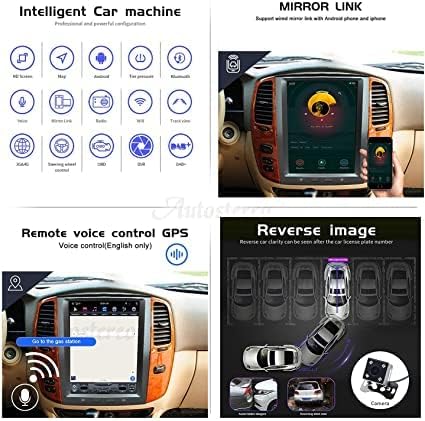
This image demonstrates the reverse image functionality, showing a clear view from a rear camera, and the mirror link feature, which allows mirroring of Android and iPhone screens onto the unit.
DSP Sound Settings:
Access the DSP settings to fine-tune audio output, including equalizer, sound field, and balance.

This image displays the Digital Signal Processor (DSP) interface, showing adjustable frequency bands for sound control, balance, fader, and loudness settings, designed for a user-friendly audio customization experience.
User Interface (UI) Versions:
The unit may feature different user interface designs depending on the software version.

This image showcases three different user interface (UI) designs: 9.0 UI, 10.0 UI, and PX4 UI, demonstrating variations in layout, icons, and overall aesthetic across different software versions of the car stereo system.
മെയിൻ്റനൻസ്
- Clean the screen with a soft, lint-free cloth. Do not use abrasive cleaners.
- യൂണിറ്റ് പൊടിയിൽ നിന്നും അവശിഷ്ടങ്ങളിൽ നിന്നും മുക്തമായി സൂക്ഷിക്കുക.
- ഒപ്റ്റിമൽ പ്രകടനം ഉറപ്പാക്കാൻ സോഫ്റ്റ്വെയർ അപ്ഡേറ്റുകൾക്കായി പതിവായി പരിശോധിക്കുക.
ട്രബിൾഷൂട്ടിംഗ്
| പ്രശ്നം | സാധ്യമായ കാരണം | പരിഹാരം |
|---|---|---|
| യൂണിറ്റ് പവർ ഓണാക്കുന്നില്ല. | Incorrect wiring; Blown fuse; Vehicle power issue. | Check power connections; Inspect vehicle fuses; Consult a professional installer. |
| ശബ്ദമില്ല. | ശബ്ദം വളരെ കുറവാണ്; മ്യൂട്ട് സജീവമാക്കി; സ്പീക്കർ വയറിംഗ് പ്രശ്നം. | Increase volume; Check mute setting; Verify speaker connections. |
| GPS സിഗ്നൽ നഷ്ടപ്പെട്ടു അല്ലെങ്കിൽ കൃത്യമല്ല. | GPS ആന്റിന തടസ്സപ്പെട്ടു അല്ലെങ്കിൽ വിച്ഛേദിക്കപ്പെട്ടു. | Ensure GPS antenna has clear sky view; Check antenna connection. |
| ബ്ലൂടൂത്ത് കണക്ഷൻ അസ്ഥിരമാണ്. | Interference; Device too far; Software glitch. | Move device closer; Restart both devices; Update unit firmware. |
സ്പെസിഫിക്കേഷനുകൾ
| ഫീച്ചർ | വിശദാംശങ്ങൾ |
|---|---|
| ഡിസ്പ്ലേ വലിപ്പം | 8 ഇഞ്ച് |
| ഓപ്പറേറ്റിംഗ് സിസ്റ്റം | ആൻഡ്രോയിഡ് 10.0 |
| മെമ്മറി സ്റ്റോറേജ് കപ്പാസിറ്റി | 64 ജിബി (ഇന്റേണൽ) |
| കണക്റ്റിവിറ്റി ടെക്നോളജി | Bluetooth 5.0, Cellular (4G LTE optional), Wi-Fi |
| ഹ്യൂമൻ ഇന്റർഫേസ് ഇൻപുട്ട് | ടച്ച് സ്ക്രീൻ |
| വാഹന സേവന തരം | Car (Honda City 2008-2011) |
| പ്രത്യേക സവിശേഷതകൾ | GPS, GLONASS, CarPlay, Android Auto, OBD, DSP, TPMS, Reversing Image |
വാറൻ്റിയും പിന്തുണയും
വാറന്റി വിവരങ്ങൾക്കും സാങ്കേതിക പിന്തുണയ്ക്കും, നിങ്ങളുടെ വാങ്ങലിനൊപ്പം നൽകിയിരിക്കുന്ന ഡോക്യുമെന്റേഷൻ പരിശോധിക്കുകയോ റീട്ടെയിലറെ ബന്ധപ്പെടുകയോ ചെയ്യുക. വാറന്റി ക്ലെയിമുകൾക്കായി നിങ്ങളുടെ വാങ്ങിയതിന്റെ തെളിവ് സൂക്ഷിക്കുക.
Ask a question about this manual
Ask about setup, troubleshooting, compatibility, parts, safety, or missing instructions. Manuals+ will review the question and use this page’s manual context to help answer it.