
1. ആമുഖം
This instruction manual provides essential information for the safe and effective use of your KOBANOICA Infrared Headphones for Car DVD. Please read this manual thoroughly before using the product and retain it for future reference. These headphones are designed to provide a personalized audio experience for passengers in vehicles equipped with an infrared (IR) compatible DVD system.

Figure 1: KOBANOICA Infrared Headphones (2 Pack) with accessories.
2. സജ്ജീകരണം
2.1 ബാറ്ററി ഇൻസ്റ്റാളേഷൻ
- Locate the battery compartment on one of the earcups.
- Gently push down the left battery cover to open it.
- Insert 2 AAA alkaline batteries (not included), ensuring correct polarity (+/-).
- ബാറ്ററി കവർ സുരക്ഷിതമായി അടയ്ക്കുക.
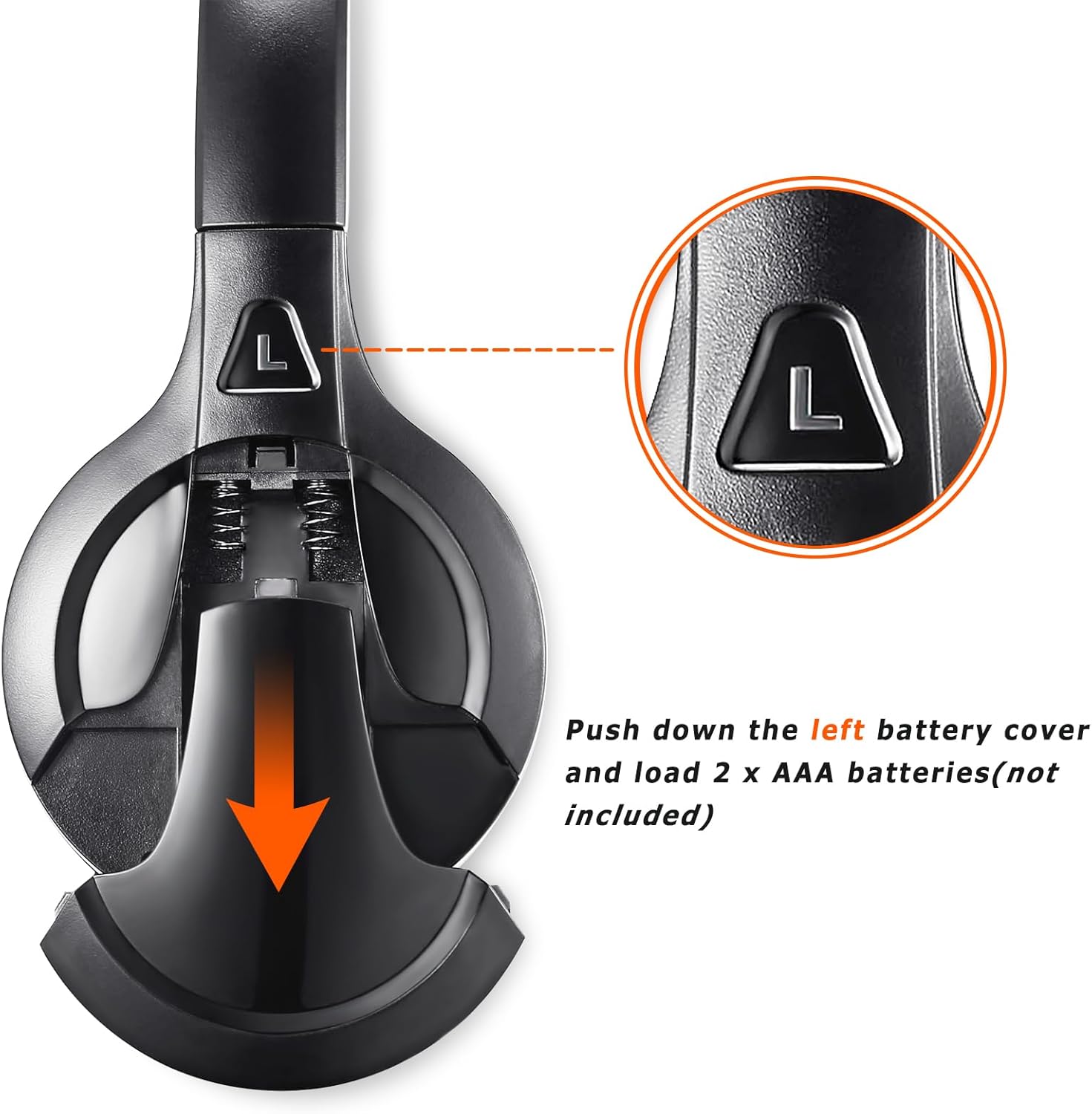
Figure 2: Battery installation in the left earcup.
2.2 Initial Power On and Channel Selection
- After installing batteries, slide the "POWER" switch to the "ON" position. A power light will illuminate.
- Locate the "Channel A/B Switch" on the earcup.
- Toggle the switch to select either Channel A or Channel B to match your vehicle's DVD system's transmitting frequency. Refer to your car's DVD manual for specific frequency information.

Figure 3: Headphone controls: Power, Channel Switch, and Volume.
2.3 വയർഡ് കണക്ഷൻ (ഓപ്ഷണൽ)
For devices without IR transmission or when batteries are depleted, you can use the included 3.5mm audio cable. Plug one end into the headphone's audio jack and the other end into your audio source (e.g., smartphone, tablet, MP3 player).
3. പ്രവർത്തന നിർദ്ദേശങ്ങൾ
3.1 പവർ ഓൺ/ഓഫ്
- To turn on, slide the "POWER" switch to "ON". The power indicator light will illuminate.
- To turn off, slide the "POWER" switch to "OFF". The power indicator light will turn off.
3.2 വോളിയം ക്രമീകരണം
Use the "VOL" slider on the earcup to increase or decrease the audio volume to your desired level.
3.3 ചാനൽ സ്വിച്ചിംഗ്
If your vehicle's DVD system transmits on multiple IR channels, use the "Channel A/B Switch" to select the appropriate channel for the audio you wish to hear. Incorrect channel selection may result in intermittent or no sound.
3.4 Using with Car DVD Systems
Ensure your car's DVD system is powered on and transmitting an IR signal. Select the correct channel on your headphones. The headphones will automatically connect to the IR signal. Adjust the volume on both the headphones and the DVD player for optimal sound.
Video 1: KOBANOICA Infrared Car Headphones overview, demonstrating features and use with car DVD systems.
4 അനുയോജ്യത
These KOBANOICA infrared headphones are designed for universal compatibility with most car DVD systems that utilize standard IR frequencies. Please verify your vehicle's IR system frequencies before purchase.

Figure 4: Child enjoying audio with KOBANOICA headphones in a vehicle.
4.1 Supported IR Frequencies
- ചാനൽ എ: L/2.3MHz, R/2.8MHz (Universal Standard)
- ചാനൽ ബി: L/3.2MHz, R/3.8MHz (Universal Standard)
4.2 Compatible Vehicle Models (Exampലെസ്)
- Honda Odyssey (2003-2021)
- Chevy Suburban (2002-2016)
- Chevy Tahoe (2000-2016)
- Chrysler Town & Country (2006-2018)
- Chrysler Pacifica (2002-2016)
- ജിഎംസി യുക്കോൺ (2002-2016)
- Dodge Grand Caravan (2002-2020)
- Dodge Durango (2006-2021)
- Toyota Sienna (2004-2019)
- Ford Escalade (2001-2017)
- Ford Expedition (2001-2017)
- Nissan Armada (2004-2021)
- uConnect VES systems
4.3 പ്രധാന പൊരുത്തക്കേട് കുറിപ്പുകൾ
- DO NOT SUPPORT DIGITAL IR systems.
- DO NOT SUPPORT wireless playback for portable DVD players. These headphones are primarily designed for built-in vehicle entertainment systems.
5. Design and Comfort
The KOBANOICA headphones are engineered for comfort and convenience during long car journeys.
5.1 Foldable and Rotatable Design
The headphones feature a 90-degree rotatable earcup design and a foldable construction, allowing for compact storage in the included storage bag and easy portability.

Figure 5: Headphone design highlighting adjustability and rotatable earcups.
5.2 Comfortable Ear Cushions and Adjustable Headband
Equipped with super soft protein ear cushions and an adjustable headband, these headphones ensure a comfortable fit for various head sizes, sealing in sound for an immersive listening experience.

Figure 6: Detail of the soft protein ear pads.
6. പരിപാലനം
6.1 വൃത്തിയാക്കൽ
Wipe the headphones with a soft, dry cloth. Do not use harsh chemicals or abrasive cleaners. Ensure no liquid enters the earcup or control areas.
6.2 ബാറ്ററി കെയർ
- Always use 2x AAA premium alkaline batteries.
- Remove batteries if the headphones will not be used for an extended period to prevent leakage.
- Replace both batteries simultaneously. Do not mix old and new batteries.
6.3 സംഭരണം
When not in use, fold the headphones and store them in the provided storage bag to protect them from dust and damage.
7. പ്രശ്നപരിഹാരം
7.1 ശബ്ദമില്ല അല്ലെങ്കിൽ ഇടവിട്ടുള്ള ശബ്ദം
- ബാറ്ററികൾ പരിശോധിക്കുക: Ensure 2x AAA premium alkaline batteries are inserted correctly and have sufficient charge.
- വോളിയം ക്രമീകരിക്കുക: Verify that the volume on both your DVD player and the headphones is turned up to an audible level.
- Select Correct Channel: Use the Channel A/B switch on the headphone to match the transmitting channel of your vehicle's DVD system. Using the wrong channel will cause intermittent sound issues.
- Multiple DVD Players: If watching different movies on two DVDs, set each DVD to a different channel and select the corresponding channel on the headphones.
- IR Signal Obstruction: Ensure there are no obstructions between the headphones and the vehicle's IR transmitter.
7.2 Headphones Not Working Wirelessly
- Verify Car Compatibility: Confirm your car's DVD player uses universal IR frequencies (Channel A: L/2.3MHZ, R/2.8MHZ; Channel B: L/3.2MHZ, R/3.8MHZ). These headphones do not support digital IR systems.
- Check IR Sensor Frequencies: Refer to your car's DVD manual or consult the car manufacturer for specific IR sensor frequencies.
7.3 One Headphone Not Functioning
If one of the two headphones does not work, please refer to the Warranty & Support section for assistance.
8 സ്പെസിഫിക്കേഷനുകൾ
| ബ്രാൻഡ് | കൊബനോയിക്ക |
| മോഡലിൻ്റെ പേര് | 2 പായ്ക്ക് |
| കണക്റ്റിവിറ്റി ടെക്നോളജി | Wired, Wireless (Infrared) |
| വയർലെസ് കമ്മ്യൂണിക്കേഷൻ ടെക്നോളജി | ഇൻഫ്രാറെഡ് |
| ഹെഡ്ഫോണുകൾ ജാക്ക് | 3.5 mm ജാക്ക് |
| പവർ ഉറവിടം | 2 x AAA ബാറ്ററികൾ (ഉൾപ്പെടുത്തിയിട്ടില്ല) |
| IR Frequencies (Channel A) | L/2.3MHz, R/2.8MHz |
| IR Frequencies (Channel B) | L/3.2MHz, R/3.8MHz |
| ചെവി പ്ലേസ്മെൻ്റ് | ചെവിയിൽ |
| പ്രത്യേക ഫീച്ചർ | Foldable, Adjustable Headband |
| മെറ്റീരിയൽ | Plastic (ear cushions: Protein leather) |
| ഉൽപ്പന്ന അളവുകൾ | 7.9 x 6.3 x 3.6 ഇഞ്ച് |
| ഇനത്തിൻ്റെ ഭാരം | 1.04 പൗണ്ട് (ഒരു ജോഡിക്ക്) |
8.1 ബോക്സിൽ എന്താണുള്ളത്
- 2 x KOBANOICA Universal IR Wireless Headphones
- 2 x 3.5mm ഓഡിയോ കേബിൾ
- 2 x സ്റ്റോറേജ് ബാഗ്
- 1 x ഉപയോക്തൃ മാനുവൽ (ഈ പ്രമാണം)

ചിത്രം 7: പാക്കേജ് ഉള്ളടക്കം.
9. വാറണ്ടിയും പിന്തുണയും
For warranty information, product support, or to inquire about additional accessories (such as ear pads, headphone covers, or audio cables), please contact KOBANOICA customer service. If a unit is found to be non-functional, a replacement may be provided.
Refer to your product packaging or the official KOBANOICA webഏറ്റവും പുതിയ കോൺടാക്റ്റ് വിവരങ്ങൾക്കും പിന്തുണാ ഉറവിടങ്ങൾക്കുമുള്ള സൈറ്റ്.