
1. ആമുഖം
The AOPUTTRIVER AP-5800M is a high-precision air quality monitor designed to detect fine particulate matter, specifically PM2.5, PM1.0, and PM10. Utilizing a laser PM2.5 sensor and single-chip microcomputer technology, this device provides accurate readings displayed on a 2.8-inch TFT color LCD. It is suitable for monitoring air quality in various environments, including indoor spaces, outdoor areas, bedrooms, factories, construction sites, and during travel.
This manual provides essential information for the safe and effective use of your AP-5800M air quality monitor. Please read it thoroughly before operation.
2 സുരക്ഷാ വിവരങ്ങൾ
- Do not attempt to disassemble or modify the device. Unauthorized modifications can lead to malfunction or injury.
- Keep the device away from water and high humidity to prevent electrical shock or damage.
- Avoid exposing the device to extreme temperatures, direct sunlight, or corrosive substances.
- Use only the provided USB cable for charging. Ensure the charging voltage ഉപകരണവുമായി പൊരുത്തപ്പെടുന്നു.
- കുട്ടികൾക്ക് ലഭ്യമാകാതെ സൂക്ഷിക്കുക.
- Dispose of the device and its battery according to local environmental regulations.
3. പാക്കേജ് ഉള്ളടക്കം
പാക്കേജ് തുറക്കുമ്പോൾ, താഴെ പട്ടികപ്പെടുത്തിയിരിക്കുന്ന എല്ലാ ഇനങ്ങളും നിലവിലുണ്ടെന്നും നല്ല നിലയിലാണെന്നും ദയവായി പരിശോധിക്കുക:
- 1 x AOPUTTRIVER AP-5800M Air Quality Monitor
- 1 x USB ചാർജിംഗ് കേബിൾ
- 1 x ചുമക്കുന്ന കേസ്
- 1 x ഉപയോക്തൃ മാനുവൽ

This image displays the items included in the product package: the AP-5800M air quality monitor, a USB cable, a carrying case, and the user manual.
4. ഉൽപ്പന്നം കഴിഞ്ഞുview
4.1 ഉപകരണ ലേഔട്ടും ബട്ടണുകളും
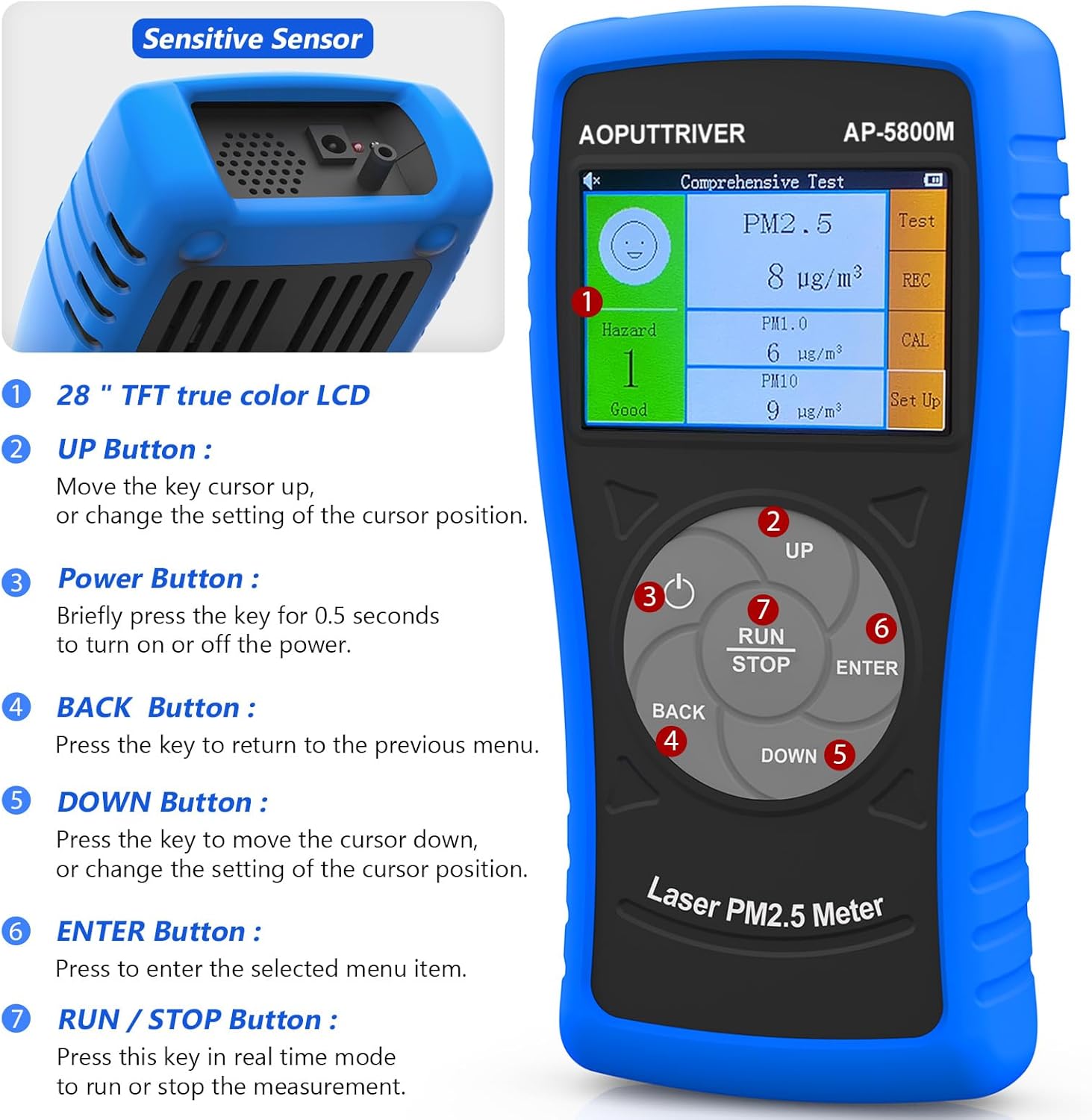
ഈ ചിത്രം മുൻഭാഗം കാണിക്കുന്നു view of the AOPUTTRIVER AP-5800M Air Quality Monitor, highlighting the 2.8-inch TFT true color LCD, the sensitive sensor area, and the functions of the UP, Power, BACK, DOWN, ENTER, and RUN/STOP buttons.
- സെൻസിറ്റീവ് സെൻസർ: Located at the top, responsible for detecting particulate matter.
- UP ബട്ടൺ: Moves the cursor up or changes the setting of the cursor position.
- പവർ ബട്ടൺ: Briefly press for 0.5 seconds to turn the device on or off.
- ബാക്ക് ബട്ടൺ: മുമ്പത്തെ മെനുവിലേക്ക് മടങ്ങാൻ അമർത്തുക.
- ഡൗൺ ബട്ടൺ: Moves the cursor down or changes the setting of the cursor position.
- എന്റർ ബട്ടൺ: Press to select the highlighted menu item.
- റൺ/സ്റ്റോപ്പ് ബട്ടൺ: Press this key in real-time mode to start or stop the measurement.
4.2 ഡിസ്പ്ലേയും സൂചകങ്ങളും
The device features a 2.8-inch TFT true color LCD, providing clear visibility even in low-light conditions. The display shows real-time readings for PM2.5, PM1.0, and PM10, along with a hazard index and battery indicator.

ഈ ചിത്രം ഒരു ക്ലോസ്-അപ്പ് നൽകുന്നു view of the AP-5800M's colorful LCD display, showing the comprehensive test results for PM2.5, PM1.0, and PM10, along with the hazard index.
4.3 ആന്തരിക ഘടകങ്ങൾ

This diagram shows the internal components of the AP-5800M, emphasizing the high-precision laser PM2.5 sensor and the 3rd generation particle sensor responsible for detecting PM2.5 and PM10 in air sampലെസ്.

ഈ ചിത്രം ഒരു ക്ലോസ്-അപ്പ് നൽകുന്നു view of the air outlet and inlet on the device, illustrating how air samples are drawn in and expelled for particle detection.
5. സജ്ജീകരണം
5.1 ഉപകരണം ചാർജ് ചെയ്യുന്നു
The AP-5800M is equipped with a rechargeable battery. Before first use, or when the battery indicator shows low power, charge the device using the provided USB cable.
- Connect the USB cable to the device's charging port and to a standard USB power source (e.g., computer, USB wall adapter).
- A red indicator light will illuminate during charging.
- The indicator light will turn green once the battery is fully charged.

This image depicts the charging process of the AP-5800M's 2000mAh rechargeable battery via a USB cable, with an indicator showing the battery level.
5.2 പ്രാരംഭ പവർ ഓൺ
After charging, press the Power Button briefly (for approximately 0.5 seconds) to turn on the device. The display will light up, and the device will begin its startup sequence.
6. പ്രവർത്തന നിർദ്ദേശങ്ങൾ
6.1 പവർ ഓൺ/ഓഫ്
- പവർ ഓണാക്കാൻ: അമർത്തുക പവർ ബട്ടൺ (labeled '3' in the diagram) for approximately 0.5 seconds.
- പവർ ഓഫ് ചെയ്യാൻ: അമർത്തുക പവർ ബട്ടൺ for approximately 0.5 seconds. The device also features an automatic power-off mode to conserve battery.
6.2 നാവിഗേറ്റിംഗ് മെനുകൾ
Use the following buttons for menu navigation:
- UP ബട്ടൺ: Move cursor up or increase values.
- ഡൗൺ ബട്ടൺ: Move cursor down or decrease values.
- എന്റർ ബട്ടൺ: തിരഞ്ഞെടുപ്പ് സ്ഥിരീകരിക്കുക അല്ലെങ്കിൽ ഒരു ഉപമെനു നൽകുക.
- ബാക്ക് ബട്ടൺ: മുമ്പത്തെ മെനുവിലേക്ക് മടങ്ങുക അല്ലെങ്കിൽ ഒരു പ്രവർത്തനം റദ്ദാക്കുക.
6.3 Starting and Stopping Measurements
In real-time measurement mode, press the റൺ/സ്റ്റോപ്പ് ബട്ടൺ to initiate or pause the air quality measurement process.
6.4 ഡിസ്പ്ലേ മനസ്സിലാക്കുന്നു
The 2.8-inch TFT color LCD displays various parameters:
- PM2.5, PM1.0, PM10 Values: Real-time concentration in µg/m³.
- Hazard Index: A calculated risk value based on PM2.5, PM1.0, and PM10 levels. The formula used is: Hazard Value = PM2.5/6 + PM1.0/20 + PM10/20.
- ബാറ്ററി സൂചകം: നിലവിലെ ബാറ്ററി ലെവൽ കാണിക്കുന്നു.

This image illustrates the AP-5800M monitor on its stand, alongside a color-coded chart explaining PM2.5 and PM10 health concern levels, ranging from Good to Hazardous.

ഈ ചിത്രം ഒരു വലുതാക്കിയ ചിത്രം കാണിക്കുന്നു view of the hazard index chart displayed on the AP-5800M, detailing the color-coded levels of air quality from Good to Hazardous for PM2.5 and PM10.
6.5 Setting Parameters and Alarms
The AP-5800M allows for various settings adjustments, including:
- സമയ ക്രമീകരണം: Adjust the device's internal clock.
- ഡാറ്റ റെക്കോർഡിംഗ്: Enable or disable the recording of measurement data.
- ഡാറ്റ ഹോൾഡ്: Freeze the current display readings.
- Hazard Index Alarm: Set thresholds for an audible alarm to activate when air quality levels exceed predefined limits. The device features an audible alarm.

This image highlights the audible alarm function of the AP-5800M, showing an alarm icon on the display and indicating that the device can emit sound alerts for high particle levels.
6.6 Usage Environments
The AP-5800M is versatile and can be used in a variety of settings to monitor air quality:
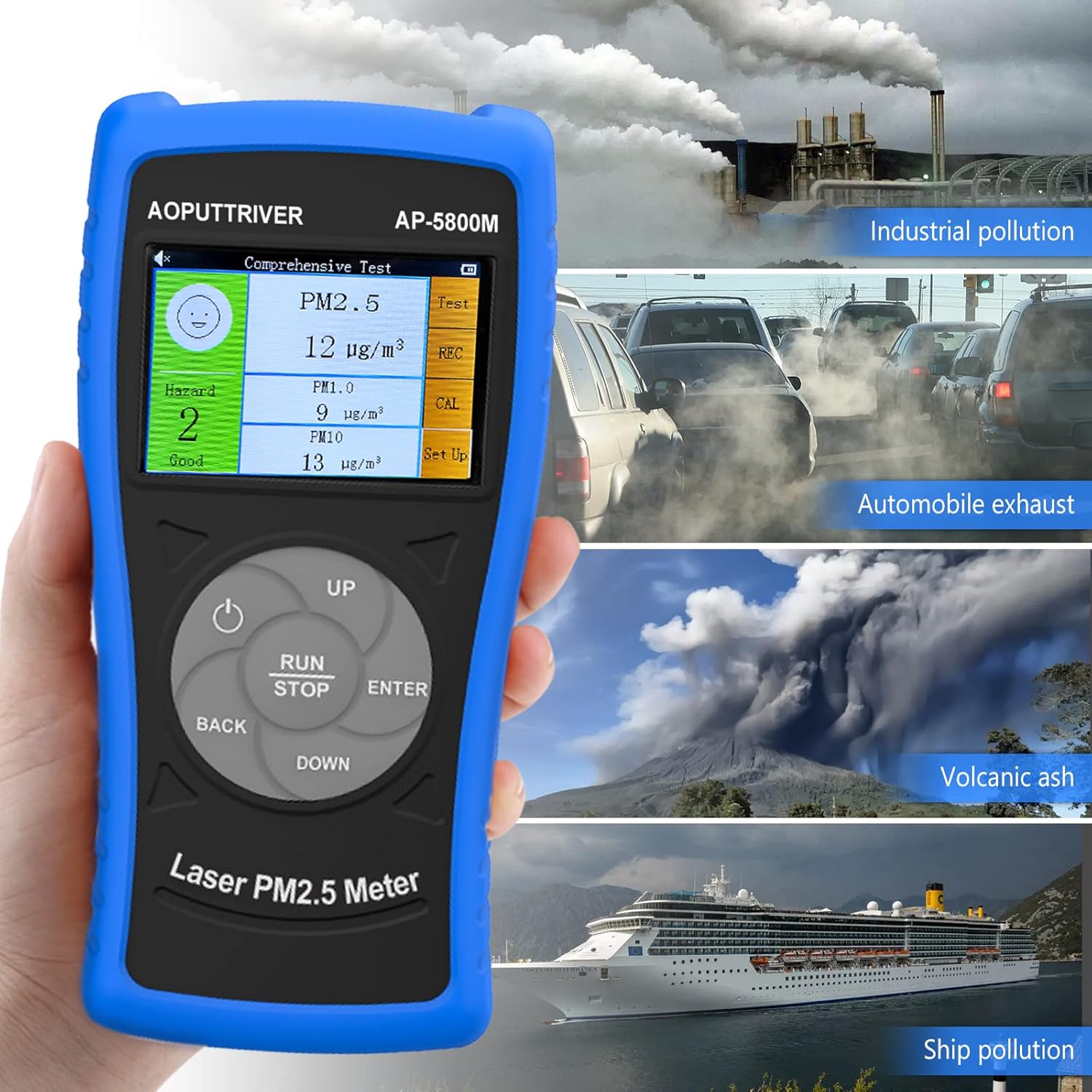
This image demonstrates the versatility of the AP-5800M, showing it in different scenarios such as industrial pollution, automobile exhaust, volcanic ash, and ship pollution, indicating its suitability for diverse testing environments.

This image combines a PM2.5/PM10 air quality level guide with illustrations of various suitable usage environments, including home, school, car, and office, demonstrating the monitor's versatility.
7. പരിപാലനം
7.1 ഉപകരണം വൃത്തിയാക്കുന്നു
- മൃദുവായതും ഉണങ്ങിയതുമായ തുണി ഉപയോഗിച്ച് ഉപകരണത്തിന്റെ പുറംഭാഗം തുടയ്ക്കുക.
- അബ്രാസീവ് ക്ലീനറുകളോ, ലായകങ്ങളോ, കഠിനമായ രാസവസ്തുക്കളോ ഉപയോഗിക്കരുത്, കാരണം ഇവ സിക്ക് കേടുവരുത്തും.asinജി അല്ലെങ്കിൽ ഡിസ്പ്ലേ.
- Ensure the air inlet and outlet are free from dust and obstructions for accurate readings.
7.2 ബാറ്ററി കെയർ
- ബാറ്ററി ലൈഫ് വർദ്ധിപ്പിക്കാൻ, ബാറ്ററി ഇടയ്ക്കിടെ പൂർണ്ണമായും ഡിസ്ചാർജ് ചെയ്യുന്നത് ഒഴിവാക്കുക.
- ഉപകരണം ദീർഘനേരം സൂക്ഷിക്കുകയാണെങ്കിൽ, ഏകദേശം 50% വരെ ചാർജ് ചെയ്യുക, ഏതാനും മാസങ്ങൾ കൂടുമ്പോൾ റീചാർജ് ചെയ്യുക.
7.3 സംഭരണം
ഉപകരണം അതിന്റെ ചുമക്കുന്ന കേസിൽ തണുത്തതും വരണ്ടതുമായ സ്ഥലത്ത് സൂക്ഷിക്കുക, നേരിട്ടുള്ള സൂര്യപ്രകാശത്തിൽ നിന്നും കടുത്ത താപനിലയിൽ നിന്നും അകറ്റി നിർത്തുക.
8. പ്രശ്നപരിഹാരം
If you encounter issues with your AP-5800M, refer to the following common problems and solutions:
| പ്രശ്നം | സാധ്യമായ കാരണം | പരിഹാരം |
|---|---|---|
| ഉപകരണം ഓണാക്കില്ല. | ബാറ്ററി കുറവോ പവർ പ്രശ്നമോ. | Charge the device using the provided USB cable. Ensure the charging indicator lights up. If the issue persists, contact customer support. |
| കൃത്യമല്ലാത്തതോ പൊരുത്തമില്ലാത്തതോ ആയ വായനകൾ. | Blocked air inlet/outlet, sensor contamination, or environmental interference. | Ensure the air inlet/outlet is clear. Clean the device exterior. Move the device away from strong air currents, dust sources, or chemical fumes. |
| ഡിസ്പ്ലേ ശൂന്യമാണ് അല്ലെങ്കിൽ നിശ്ചലമാണ്. | സോഫ്റ്റ്വെയർ തകരാറ് അല്ലെങ്കിൽ കുറഞ്ഞ ബാറ്ററി. | Try restarting the device by holding the Power Button. If unresponsive, charge the device. |
| അപ്രതീക്ഷിതമായി അലാറം മുഴങ്ങുന്നു. | High particulate levels detected or alarm threshold set too low. | Check the displayed PM values. If levels are high, ventilate the area. Adjust the alarm threshold in the settings if necessary. |
9 സ്പെസിഫിക്കേഷനുകൾ
| പരാമീറ്റർ | മൂല്യം |
|---|---|
| മോഡൽ നമ്പർ | UK-AP-5800M |
| PM2.5 കണ്ടെത്തൽ ശ്രേണി | 0 ~ 999.9 µg/m³ |
| PM2.5 Resolution | 0.1 µg/m³ |
| PM10 കണ്ടെത്തൽ ശ്രേണി | 0 ~ 999.9 µg/m³ |
| PM10 Resolution | 0.1 µg/m³ |
| പ്രദർശിപ്പിക്കുക | 2.8-ഇഞ്ച് TFT കളർ എൽസിഡി |
| പവർ ഉറവിടം | Rechargeable Battery (2000mAh), USB Powered |
| അലാറം | കേൾക്കാവുന്ന |
| ഉൽപ്പന്ന അളവുകൾ | 196 മിമി (7.71 ഇഞ്ച്) x 95 മിമി (3.74 ഇഞ്ച്) x 46 മിമി (1.81 ഇഞ്ച്) |
| ഇനത്തിൻ്റെ ഭാരം | 500 ഗ്രാം |

ഈ ചിത്രം വിശദമായ ഒരു വിവരണം നൽകുന്നു view of the AP-5800M, showing its dimensions (196mm height, 95mm width, 46mm depth), the 90-degree support stand, the double protective shell, and the tripod hole for mounting.
10. വാറൻ്റിയും പിന്തുണയും
AOPUTTRIVER offers a 2-year warranty for the AP-5800M Air Quality Monitor and provides lifetime customer service. If you encounter any issues with this product or require assistance, please do not hesitate to contact our customer support team. We are committed to ensuring your satisfaction.