
Veezoom B09L85LP9Z
VEEZOOM PoE Camera (Pack of 2)
ഉപയോക്തൃ മാനുവൽ
1. ആമുഖം
This manual provides detailed instructions for the installation, operation, and maintenance of your VEEZOOM PoE Camera (Pack of 2). These 5MP IP cameras are designed for outdoor use, featuring AI human detection, support for up to a 256GB SD card, and come with 59ft Ethernet cables for Power over Ethernet (PoE) connectivity.

Image: Two VEEZOOM PoE Cameras, white bullet-style cameras with mounting bases.
The cameras offer 5-megapixel resolution (2560x1920 pixels) for clear video and a 2.8mm lens providing a 95° wide-angle view. Night vision extends up to 100ft. With an IP66 weatherproof rating, they are suitable for outdoor environments, operating in temperatures from -35°C to 55°C (-31°F to 131°F).

ചിത്രം: കഴിഞ്ഞുview of VEEZOOM 5MP Ultra HD PoE Outdoor Security Camera features, including Smart Human & Motion Detection, Audio Recording, PoE, and IP66 Weatherproof rating.
2. പാക്കേജ് ഉള്ളടക്കം
താഴെ ലിസ്റ്റ് ചെയ്തിരിക്കുന്ന എല്ലാ ഇനങ്ങളും നിങ്ങളുടെ പാക്കേജിൽ ഉൾപ്പെടുത്തിയിട്ടുണ്ടെന്ന് ദയവായി പരിശോധിക്കുക. ഏതെങ്കിലും ഇനങ്ങൾ നഷ്ടപ്പെട്ടിട്ടുണ്ടെങ്കിലോ കേടായിട്ടുണ്ടെങ്കിലോ, ദയവായി ഉപഭോക്തൃ പിന്തുണയുമായി ബന്ധപ്പെടുക.

Image: A visual representation of the package contents, including two IP cameras, two 18m/59ft network cables, two mounting kits, two waterproof lids, two mounting hole templates, and a user manual.
- VEEZOOM IP Camera (x2)
- 18m/59ft Ethernet Cable (x2)
- Mounting Kits (x2)
- വാട്ടർപ്രൂഫ് ലിഡ് (x2)
- മൗണ്ടിംഗ് ഹോൾ ടെംപ്ലേറ്റ് (x2)
- ക്വിക്ക് സ്റ്റാർട്ട് ഗൈഡ് / യൂസർ മാനുവൽ
3. സജ്ജീകരണവും ഇൻസ്റ്റാളേഷനും
The VEEZOOM PoE cameras utilize Power over Ethernet (PoE) technology, allowing both power and data transmission through a single Ethernet cable. This simplifies installation by eliminating the need for separate power outlets near the camera.
3.1 കണക്ഷൻ ഓപ്ഷനുകൾ
Your VEEZOOM camera can be connected in several ways:
- PoE NVR: Connect the camera directly to a PoE Network Video Recorder (NVR) using an Ethernet cable. The NVR provides both power and data.
- PoE Switch/Injector: Connect the camera to a PoE switch or injector, which then connects to your router. This provides power and data over the Ethernet cable.
- DC12V Power Adapter & Router: If PoE is not available, connect the camera to a standard router for data and use a separate DC12V power adapter (not included) for power.

Image: Three connection diagrams illustrating how to connect the camera to a PoE NVR, a DC12V power adapter and router, or a PoE switch/injector and router.
3.2. ഫിസിക്കൽ ഇൻസ്റ്റലേഷൻ
Use the provided mounting kits and template to securely attach the camera to a wall or ceiling. Ensure the camera is positioned to cover the desired surveillance area. The IP66 weatherproof housing allows for both indoor and outdoor installation.
3.3. പ്രാരംഭ കോൺഫിഗറേഷൻ
After physical installation and connection, download the VEEZOOM application to your smartphone or access the camera via PC/laptop for initial setup. Follow the on-screen instructions to connect the camera to your network and configure basic settings.
4. ഓപ്പറേഷൻ
4.1. AI Human & Motion Detection
The camera features advanced AI human detection, which can differentiate between human movement and other sources of motion like animals, vehicles, or environmental factors. This helps reduce false alarms. You can customize detection areas and sensitivity settings within the VEEZOOM NVR or application.
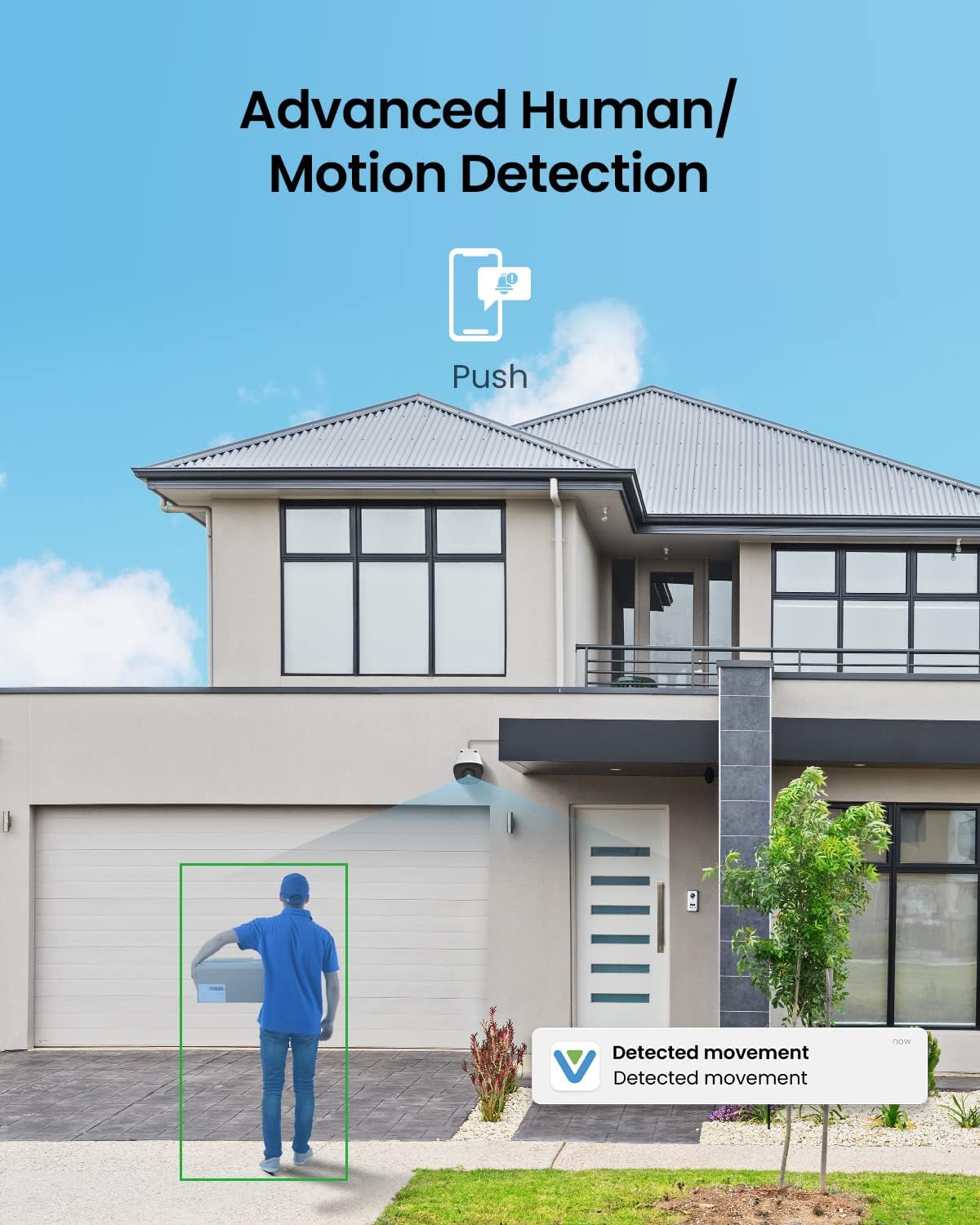
Image: A VEEZOOM camera mounted on a house, showing a green box highlighting a person detected by the AI human detection feature, with a 'Detected movement' notification on a phone.

Image: A graphic illustrating the camera's intelligent detection, showing a human being correctly identified while bugs, leaves, and shadows are not, reducing false alerts.
4.2. Remote Access and Alerts
നിങ്ങളുടെ ക്യാമറയുടെ തത്സമയ ഫീഡും റെക്കോർഡ് ചെയ്ത foo-വും ആക്സസ് ചെയ്യുകtage remotely via the VEEZOOM application on your smartphone, PC, or laptop. The system can send instant alerts to your device when motion or human detection is triggered, allowing for 24/7 surveillance.

ചിത്രം: ഒരു വ്യക്തി viewഇംഗ് ലൈവ് ക്യാമറ ഫൂtage on a smartphone, with other devices like tablets, monitors, and laptops also displaying camera feeds, demonstrating remote access capabilities.
4.3. റെക്കോർഡിംഗ് ഓപ്ഷനുകൾ
The camera offers multiple recording solutions:
- മൈക്രോ എസ്ഡി കാർഡ്: A built-in SD card slot supports up to 256GB Micro SD cards (not included) for local storage.
- ക്ലൗഡ് സംഭരണം: Cloud storage options may be available (subscription may be required).
- VEEZOOM NVR: Integrate with a VEEZOOM NVR for continuous recording and centralized management.
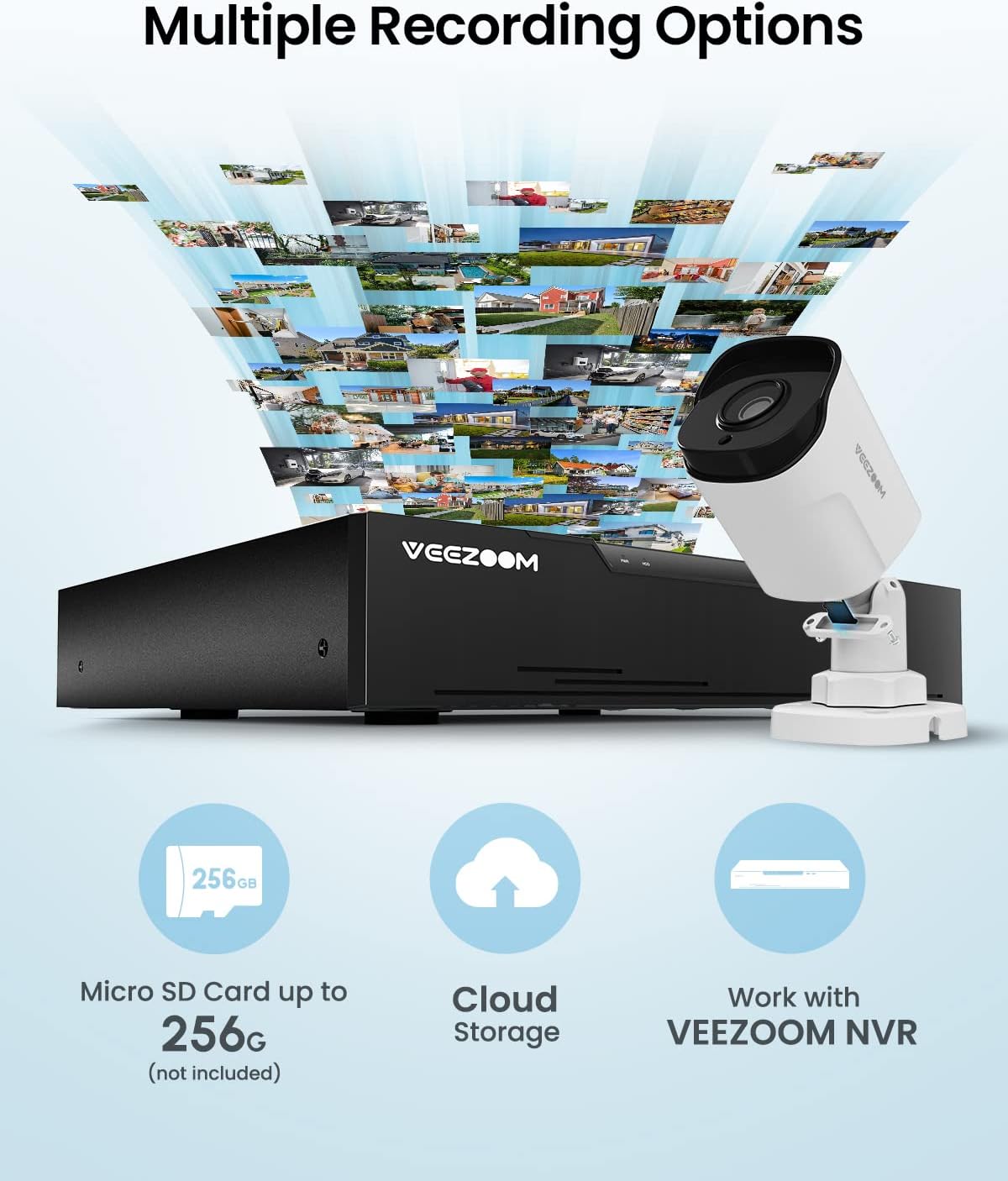
Image: A VEEZOOM camera and NVR, with icons representing Micro SD card storage (up to 256GB), Cloud Storage, and working with VEEZOOM NVR for multiple recording options.
4.4. ഓഡിയോ റെക്കോർഡിംഗ്
Equipped with a built-in microphone, the camera captures both audio and video, ensuring no important details are missed during surveillance.

Image: A close-up of the VEEZOOM camera, with sound waves emanating from it, indicating its built-in microphone and audio recording capability.
5. പരിപാലനം
5.1. വൃത്തിയാക്കൽ
To ensure optimal performance, periodically clean the camera lens and housing. Use a soft, damp cloth to wipe away dust and dirt. Avoid abrasive cleaners or solvents that could damage the camera's finish or lens coating.
5.2 പാരിസ്ഥിതിക പരിഗണനകൾ
The camera is rated IP66 weatherproof, protecting it from dust and strong jets of water. It is designed to operate in temperatures ranging from -35°C to 55°C (-31°F to 131°F). Ensure the camera is installed within these environmental limits for reliable operation.

Image: Three scenes depicting the VEEZOOM camera's resilience in various weather conditions: extreme cold (-35°C/-31°F), extreme heat (55°C/131°F), and heavy rain (IP66 Weatherproof).
5.3. ഫേംവെയർ അപ്ഡേറ്റുകൾ
Regularly check for and install any available firmware updates for your camera. Firmware updates often include performance improvements, bug fixes, and enhanced security features. Refer to the VEEZOOM application or website for update instructions.
6. പ്രശ്നപരിഹാരം
This section addresses common issues you might encounter with your VEEZOOM PoE Camera.
| പ്രശ്നം | സാധ്യമായ കാരണം | പരിഹാരം |
|---|---|---|
| ഇമേജ്/വീഡിയോ ഫീഡ് ഇല്ല | No power, network cable issue, NVR/router problem. | Check power connection (PoE or DC12V adapter). Ensure Ethernet cable is securely connected and not damaged. Verify NVR/router is functioning correctly. Try restarting the camera and NVR/router. |
| പതിവ് തെറ്റായ അലാറങ്ങൾ | High motion sensitivity, environmental factors (e.g., moving branches, shadows, insects). | Adjust motion detection sensitivity settings in the VEEZOOM application or NVR. Define specific detection zones to exclude areas with frequent non-human movement. |
| മോശം വീഡിയോ നിലവാരം | Dirty lens, network bandwidth issues, incorrect resolution settings. | Clean the camera lens. Ensure sufficient network bandwidth. Check video resolution settings in the application/NVR and adjust if necessary. |
| റിമോട്ട് ആക്സസ് പ്രവർത്തിക്കുന്നില്ല | Network connectivity issues, incorrect app settings, firewall restrictions. | Verify your camera and viewing device are connected to the internet. Check app settings for correct login and device pairing. Ensure no firewall rules are blocking access. |
| Camera stops working in cold weather | നിർദ്ദിഷ്ട താപനില പരിധിക്ക് പുറത്ത് പ്രവർത്തിക്കുന്നു. | Ensure the camera is installed within its specified operating temperature range (-35°C to 55°C). If consistently failing in cold, consider additional weather protection or relocation. |
7 സ്പെസിഫിക്കേഷനുകൾ
Below are the technical specifications for the VEEZOOM PoE Camera (Model: B09L85LP9Z).

Image: An exploded diagram of the VEEZOOM camera, highlighting its 2.8mm lens, 100ft IR Night Vision, Built-in Mic, SD Card Slot (up to 256GB), and IP66 Weatherproof Housing.
| ഫീച്ചർ | വിശദാംശങ്ങൾ |
|---|---|
| ഫലപ്രദമായ വീഡിയോ റെസല്യൂഷൻ | 5 MP (2560*1920 Pixels) |
| ലെൻസ് | 2.8 മി.മീ |
| വൈഡ് ആംഗിൾ | 95° |
| നൈറ്റ് വിഷൻ റേഞ്ച് | 100 അടി |
| അന്താരാഷ്ട്ര സംരക്ഷണ റേറ്റിംഗ് | IP66 (കാലാവസ്ഥാ പ്രൂഫ്) |
| പ്രവർത്തന താപനില | -35°C മുതൽ 55°C വരെ (-31°F മുതൽ 131°F വരെ) |
| കണക്റ്റിവിറ്റി ടെക്നോളജി | ഇഥർനെറ്റ് (PoE) |
| SD കാർഡ് പിന്തുണ | Up to 256GB Micro SD Card (not included) |
| ഓഡിയോ | ബിൽറ്റ്-ഇൻ മൈക്രോഫോൺ |
| പ്രത്യേക സവിശേഷതകൾ | AI Human Detection, Motion Sensor, Night Vision |
| പവർ ഉറവിടം | PoE (Power over Ethernet) or DC12V (adapter not included) |
| മെറ്റീരിയൽ | ലോഹം |
| ഫോം ഫാക്ടർ | ബുള്ളറ്റ് |
| ഇനത്തിൻ്റെ ഭാരം | 3.45 പൗണ്ട് (പായ്ക്കിന്) |
8. വാറണ്ടിയും ഉപഭോക്തൃ പിന്തുണയും
8.1. വാറൻ്റി വിവരങ്ങൾ
VEEZOOM products are covered by a manufacturer's warranty. Please refer to the warranty card included in your package or visit the official VEEZOOM webവിശദമായ വാറന്റി നിബന്ധനകൾക്കും വ്യവസ്ഥകൾക്കും സൈറ്റ് സന്ദർശിക്കുക. വാറന്റി ക്ലെയിമുകൾക്കായി നിങ്ങളുടെ വാങ്ങലിന്റെ തെളിവ് സൂക്ഷിക്കുക.
8.2. ഉപഭോക്തൃ പിന്തുണ
For technical assistance, troubleshooting, or any questions regarding your VEEZOOM PoE Camera, please contact VEEZOOM customer support. Contact information can typically be found in the Quick Start Guide, on the product packaging, or on the official VEEZOOM webസൈറ്റ്. നിങ്ങൾക്ക് സന്ദർശിക്കാനും കഴിയും VEEZOOM Store on Amazon കൂടുതൽ വിവരങ്ങൾക്ക്.
Ask a question about this manual
Ask about setup, troubleshooting, compatibility, parts, safety, or missing instructions. Manuals+ will review the question and use this page’s manual context to help answer it.