
1. ആമുഖം
Thank you for choosing the Generic TMS-802 Portable Speaker System. This high-quality, 8-inch portable speaker is designed to deliver powerful sound for parties and various events, featuring vibrant LED lights and wireless connectivity. This manual will guide you through the setup, operation, and maintenance of your new speaker to ensure optimal performance and longevity.
The TMS-802 comes equipped with a 4.5 Ampere lithium battery, providing 60W of power, and includes a wireless microphone and a remote control for convenient operation.
2 പ്രധാനപ്പെട്ട സുരക്ഷാ വിവരങ്ങൾ
- Do not expose the speaker to water, rain, or moisture to prevent electric shock or fire.
- റേഡിയേറ്ററുകൾ, ഹീറ്റ് രജിസ്റ്ററുകൾ, സ്റ്റൗകൾ അല്ലെങ്കിൽ മറ്റ് ഉപകരണങ്ങൾ (ഉൾപ്പെടെ) പോലുള്ള താപ സ്രോതസ്സുകളിൽ നിന്ന് സ്പീക്കറിനെ അകറ്റി നിർത്തുക. ampലൈഫയറുകൾ) ചൂട് ഉത്പാദിപ്പിക്കുന്നത്.
- നിർമ്മാതാവ് വ്യക്തമാക്കിയ അറ്റാച്ച്മെൻ്റുകൾ/ആക്സസറികൾ മാത്രം ഉപയോഗിക്കുക.
- ഇടിമിന്നൽ ഉണ്ടാകുമ്പോഴോ ദീർഘനേരം ഉപയോഗിക്കാതിരിക്കുമ്പോഴോ സ്പീക്കർ പ്ലഗ് ഊരിയിടുക.
- Do not attempt to disassemble, repair, or modify the unit yourself. Refer all servicing to qualified service personnel.
- ശരിയായ വായുസഞ്ചാരം ഉറപ്പാക്കുക, വായുസഞ്ചാര ദ്വാരങ്ങളൊന്നും തടയരുത്.
3. ഉൽപ്പന്നം കഴിഞ്ഞുview
3.1 ഘടകങ്ങൾ
- TMS-802 Speaker Unit
- വയർലെസ് മൈക്രോഫോൺ
- റിമോട്ട് കൺട്രോൾ
- ചാർജിംഗ് കേബിൾ
- ഉപയോക്തൃ മാനുവൽ
3.2 നിയന്ത്രണ പാനൽ ലേഔട്ട്
The control panel is located on the top of the speaker, providing access to all primary functions including volume control, input selection, and microphone settings.

Figure 1: Top Control Panel of the TMS-802 Speaker. This image displays the main rotary volume knob, smaller volume controls for microphone and echo, input selection buttons, and ports for USB and SD card.
3.3 പിൻ പാനൽ കണക്ഷനുകൾ
The rear panel houses essential connections for power and external audio inputs.
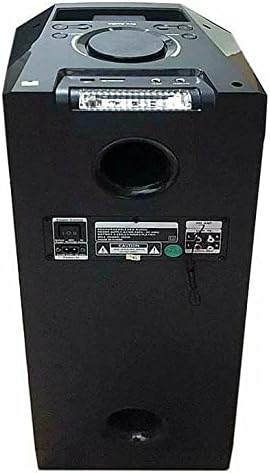
Figure 2: Rear Panel of the TMS-802 Speaker. This image illustrates the power input, auxiliary audio input jacks, and other utility ports on the back of the unit.
4. സജ്ജീകരണ ഗൈഡ്
4.1 അൺപാക്കിംഗ്
- പാക്കേജിംഗിൽ നിന്ന് സ്പീക്കറും എല്ലാ അനുബന്ധ ഉപകരണങ്ങളും ശ്രദ്ധാപൂർവ്വം നീക്കം ചെയ്യുക.
- ഭാവിയിലെ സംഭരണത്തിനോ ഗതാഗതത്തിനോ വേണ്ടി പാക്കേജിംഗ് വസ്തുക്കൾ സൂക്ഷിക്കുക.
- Inspect the unit for any signs of damage. If damaged, contact your retailer.
4.2 സ്പീക്കർ ചാർജ് ചെയ്യുന്നു
The TMS-802 is equipped with a built-in 4.5 Ampere lithium battery. Before first use, it is recommended to fully charge the speaker.
- Connect the charging cable to the speaker's power input port on the rear panel.
- ചാർജിംഗ് കേബിളിന്റെ മറ്റേ അറ്റം അനുയോജ്യമായ ഒരു പവർ ഔട്ട്ലെറ്റിലേക്ക് പ്ലഗ് ചെയ്യുക.
- The LED display will indicate charging status. The speaker is fully charged when the indicator changes or turns off (refer to LED display section for specifics).
4.3 പ്രാരംഭ പവർ ഓൺ
- Locate the power switch, usually on the rear or top panel.
- Flip the switch to the 'ON' position. The LED display will light up, and a voice prompt may indicate the current mode.
5. പ്രവർത്തന നിർദ്ദേശങ്ങൾ
5.1 ബ്ലൂടൂത്ത് കണക്ഷൻ
- Turn on the speaker. It will automatically enter Bluetooth pairing mode, indicated by a flashing Bluetooth icon on the LED display or a voice prompt.
- നിങ്ങളുടെ മൊബൈൽ ഉപകരണത്തിൽ (സ്മാർട്ട്ഫോൺ, ടാബ്ലെറ്റ്, ലാപ്ടോപ്പ്), ബ്ലൂടൂത്ത് പ്രവർത്തനക്ഷമമാക്കി ലഭ്യമായ ഉപകരണങ്ങൾക്കായി തിരയുക.
- Select "TMS-802" from the list of devices.
- Once connected, the speaker will confirm with a voice prompt, and the Bluetooth indicator will stop flashing.
5.2 വയർലെസ് മൈക്രോഫോൺ ഉപയോഗം
The TMS-802 includes a wireless microphone for karaoke or public speaking.
- Insert batteries into the wireless microphone (if not pre-installed).
- Turn on the microphone. It should automatically connect to the speaker.
- കൺട്രോൾ പാനലിലെ ഡെഡിക്കേറ്റഡ് നോബ് ഉപയോഗിച്ച് മൈക്രോഫോൺ വോളിയം ക്രമീകരിക്കുക.
- The speaker features a 'Microphone Priority' function, which automatically lowers music volume when the microphone is in use. Activate this feature via the control panel if desired.
5.3 ഓഡിയോ പ്ലേബാക്ക്
In addition to Bluetooth, the speaker supports playback from USB drives and SD cards.
- USB/SD കാർഡ്: Insert a USB drive or SD card into the respective slot. The speaker will automatically switch to USB/SD mode and begin playing compatible audio files.
- സഹായ ഇൻപുട്ട്: Connect external audio devices (e.g., MP3 players, TVs) using a 3.5mm audio cable to the AUX input on the rear panel. Select AUX mode on the speaker.
5.4 Recording Function (Optional)
The speaker may offer an optional recording function. Refer to the specific buttons on your control panel or remote for activation. This typically records microphone input to a connected USB drive or SD card.
5.5 LED ലൈറ്റ് കൺട്രോൾ
The TMS-802 features dynamic LED lights for an enhanced party atmosphere.
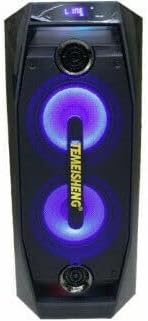
Figure 3: TMS-802 Speaker with LED Lights Activated. This image shows the speaker's front panel with the integrated LED lights glowing, adding a visual element to the audio experience.
Use the dedicated LED light button on the control panel or remote control to cycle through different light modes or turn them off.
5.6 റിമോട്ട് കൺട്രോൾ ഉപയോഗം
The included remote control allows for convenient operation from a distance. Functions typically include power on/off, mode selection, volume adjustment, track control, and LED light control.
6. പരിപാലനം
6.1 വൃത്തിയാക്കൽ
മൃദുവായതും ഉണങ്ങിയതുമായ തുണി ഉപയോഗിച്ച് സ്പീക്കറിന്റെ പുറംഭാഗം തുടയ്ക്കുക. അബ്രാസീവ് ക്ലീനറുകളോ, മെഴുകുകളായോ, ലായകങ്ങളോ ഉപയോഗിക്കരുത്, കാരണം അവ ഫിനിഷിന് കേടുവരുത്തും. സ്പീക്കറിലേക്ക് നേരിട്ട് ദ്രാവകങ്ങൾ സ്പ്രേ ചെയ്യുന്നത് ഒഴിവാക്കുക.
6.2 സംഭരണം
When not in use for extended periods, store the speaker in a cool, dry place, away from direct sunlight and extreme temperatures. It is advisable to store it in its original packaging to protect it from dust and physical damage.
6.3 ബാറ്ററി കെയർ
To prolong battery life, avoid fully discharging the battery frequently. Recharge the speaker regularly, even if not in use, to maintain battery health. Do not expose the battery to high temperatures.
7. പ്രശ്നപരിഹാരം
| പ്രശ്നം | സാധ്യമായ കാരണം | പരിഹാരം |
|---|---|---|
| സ്പീക്കർ പവർ ഓൺ ചെയ്യുന്നില്ല. | ബാറ്ററി തീർന്നു; പവർ സ്വിച്ച് ഓഫാണ്. | Charge the speaker; Ensure the power switch is in the 'ON' position. |
| സ്പീക്കറിൽ നിന്ന് ശബ്ദമില്ല. | ശബ്ദം വളരെ കുറവാണ്; തെറ്റായ ഇൻപുട്ട് മോഡ് തിരഞ്ഞെടുത്തു; ഉപകരണം ശരിയായി കണക്റ്റുചെയ്തിട്ടില്ല. | Increase volume; Select the correct input mode (Bluetooth, USB, AUX); Reconnect your device. |
| ബ്ലൂടൂത്ത് കണക്ഷൻ പരാജയപ്പെടുന്നു. | സ്പീക്കർ ജോടിയാക്കൽ മോഡിലല്ല; ഉപകരണം വളരെ അകലെയാണ്; തടസ്സം. | Ensure speaker is in Bluetooth pairing mode; Move device closer to speaker; Avoid strong electromagnetic interference. |
| Wireless microphone not working. | Microphone batteries are low/dead; Microphone is off; Volume is too low. | Replace microphone batteries; Turn on the microphone; Increase microphone volume. |
8 സ്പെസിഫിക്കേഷനുകൾ
| ഫീച്ചർ | സ്പെസിഫിക്കേഷൻ |
|---|---|
| മോഡൽ നമ്പർ | ടിഎംഎസ്-802 |
| ഉൽപ്പന്ന അളവുകൾ (L x W x H) | 38 x 38 x 80 സെ.മീ |
| ആകെ ഭാരം | 8.5 കി.ഗ്രാം |
| ബാറ്ററി തരം | 4.5 Ampere Lithium Battery |
| പരമാവധി സ്പീക്കർ ഔട്ട്പുട്ട് പവർ | 60 വാട്ട്സ് |
| കണക്റ്റിവിറ്റി ടെക്നോളജി | വയർലെസ് |
| ഓഡിയോ put ട്ട്പുട്ട് മോഡ് | സ്റ്റീരിയോ |
| മൗണ്ടിംഗ് തരം | ഫ്ലോർ സ്റ്റാൻഡിംഗ് |
| മെറ്റീരിയലുകൾ | ഒന്നിലധികം മെറ്റീരിയലുകൾ |
| പ്രത്യേക സവിശേഷതകൾ | വയർലെസ്സ്, പോർട്ടബിൾ |
| ശുപാർശ ചെയ്യുന്ന ഉപയോഗങ്ങൾ | For Smartphones or Tablets, For Music Players, For TVs, For Computers |
| അനുയോജ്യമായ ഉപകരണങ്ങൾ | സ്മാർട്ട്ഫോൺ, ലാപ്ടോപ്പ്, ടാബ്ലെറ്റ് |
| ആദ്യം ലഭ്യമായ തീയതി | നവംബർ 11, 2021 |
9. വാറൻ്റിയും പിന്തുണയും
This product is covered by a standard manufacturer's warranty. For specific warranty terms and conditions, please refer to the documentation provided with your purchase or contact your retailer.
For technical support, troubleshooting assistance, or inquiries about replacement parts, please contact the seller or manufacturer directly. Keep your purchase receipt and model number (TMS-802) handy when contacting support.