
Technical Pro TRX55URIBTT
Technical Pro 1500 Watts Professional Receiver User Manual
Model: TRX55URIBTT
ആമുഖം
വാങ്ങിയതിന് നന്ദി.asing the Technical Pro 1500 Watts Professional Receiver. This high-quality audio component is designed to provide powerful and versatile sound for your home entertainment system, karaoke setup, or public address needs. Featuring 1500 watts of peak power, Bluetooth compatibility, USB and SD card inputs, and comprehensive microphone controls, this receiver offers a robust audio experience. This manual provides detailed instructions for setup, operation, maintenance, and troubleshooting to ensure optimal performance and longevity of your device.
സുരക്ഷാ വിവരങ്ങൾ
ഈ ഉൽപ്പന്നം ഉപയോഗിക്കുന്നതിന് മുമ്പ് ദയവായി എല്ലാ സുരക്ഷാ, പ്രവർത്തന നിർദ്ദേശങ്ങളും ശ്രദ്ധാപൂർവ്വം വായിക്കുക. ഭാവിയിലെ റഫറൻസിനായി ഈ നിർദ്ദേശങ്ങൾ സൂക്ഷിക്കുക.
- ഊർജ്ജ സ്രോതസ്സ്: Connect the unit only to an AC power outlet of the type described in the operating instructions or as marked on the appliance.
- വെൻ്റിലേഷൻ: Ensure proper ventilation. Do not block any ventilation openings. Install in accordance with the manufacturer's instructions.
- ജലവും ഈർപ്പവും: ഈ ഉപകരണം വെള്ളത്തിനടുത്തോ വെള്ളത്തിലോ ഉപയോഗിക്കരുത്.amp environments. Do not expose to dripping or splashing.
- ചൂട്: റേഡിയറുകൾ, ഹീറ്റ് രജിസ്റ്ററുകൾ, സ്റ്റൗകൾ, അല്ലെങ്കിൽ മറ്റ് ഉപകരണങ്ങൾ (ഉൾപ്പെടെ) പോലെയുള്ള താപ സ്രോതസ്സുകൾക്ക് സമീപം ഇൻസ്റ്റാൾ ചെയ്യരുത്. ampലൈഫയറുകൾ) ചൂട് ഉത്പാദിപ്പിക്കുന്നത്.
- വൃത്തിയാക്കൽ: Clean only with a dry cloth. Unplug this apparatus during lightning storms or when unused for long periods of time.
- സേവനം: ഈ ഉൽപ്പന്നം സ്വയം സേവിക്കാൻ ശ്രമിക്കരുത്. യോഗ്യതയുള്ള സേവന ഉദ്യോഗസ്ഥർക്ക് എല്ലാ സേവനങ്ങളും റഫർ ചെയ്യുക.
- ഓവർലോഡിംഗ്: വാൾ ഔട്ട്ലെറ്റുകളോ എക്സ്റ്റൻഷൻ കോഡുകളോ ഓവർലോഡ് ചെയ്യരുത്, ഇത് തീയോ വൈദ്യുത ആഘാതമോ ഉണ്ടാക്കാൻ ഇടയാക്കും.
- വിദേശ വസ്തുക്കൾ: അപകടകരമായ വോളിയം സ്പർശിച്ചേക്കാവുന്നതിനാൽ, തുറസ്സുകളിലൂടെ ഈ ഉൽപ്പന്നത്തിലേക്ക് ഏതെങ്കിലും തരത്തിലുള്ള വസ്തുക്കളെ ഒരിക്കലും തള്ളരുത്tagതീയോ വൈദ്യുതാഘാതമോ ഉണ്ടാക്കിയേക്കാവുന്ന ഇ പോയിൻ്റുകൾ അല്ലെങ്കിൽ ഷോർട്ട്-ഔട്ട് ഭാഗങ്ങൾ.
പാക്കേജ് ഉള്ളടക്കം
പാക്കേജിൽ എല്ലാ ഇനങ്ങളും ഉണ്ടെന്ന് ഉറപ്പുവരുത്തുക:
- Technical Pro 1500 Watts Professional Receiver (TRX55URIBTT)
- റിമോട്ട് കൺട്രോൾ
- ഉപയോക്തൃ മാനുവൽ (ഈ പ്രമാണം)
ഉൽപ്പന്നം കഴിഞ്ഞുview
The Technical Pro 1500 Watts Professional Receiver is a central component for your audio system. Familiarize yourself with its design and layout.

Image: Front perspective view of the Technical Pro 1500 Watts Professional Receiver, showcasing its sleek black design and illuminated controls.
ഫ്രണ്ട് പാനൽ
The front panel provides access to all primary controls and inputs for easy operation.

ചിത്രം: വിശദമായത് view of the receiver's front panel, showing the digital display, volume knob, equalizer controls, microphone inputs, and various function buttons.
- പവർ ബട്ടൺ: യൂണിറ്റ് ഓണാക്കുകയോ ഓഫാക്കുകയോ ചെയ്യുന്നു.
- Digital Fluorescent Display: Shows current input, track information, and equalizer levels.
- മാസ്റ്റർ വോളിയം നോബ്: Adjusts the overall output volume. Features blue LED illumination.
- 5-ബാൻഡ് ഇക്വലൈസർ: Individual sliders for precise frequency adjustment.
- ഇൻപുട്ട് സെലക്ടറുകൾ: Buttons for selecting Tuner, DVD, AUX, MP3/iPod/Bluetooth, and USB/SD inputs.
- Microphone Inputs (MIC1, MIC2): Two 1/4" inputs for connecting microphones.
- മൈക്രോഫോൺ നിയന്ത്രണങ്ങൾ: Echo, Mic Tone, and Mic Volume knobs for microphone effects.
- Bass, Treble, Balance: Rotary knobs for fine-tuning audio output.
- USB/SD Card Inputs: Ports for playing media directly from USB drives and SD cards (up to 32GB).
- ഹെഡ്ഫോൺ ജാക്ക്: 1/8" (3.5mm) output for private listening.
പിൻ പാനൽ
The rear panel houses all the necessary connections for speakers and external audio devices.
ചിത്രം: വിശദമായത് view of the receiver's rear panel, showing speaker terminals, RCA audio inputs/outputs, FM antenna input, and power connection.
- Main Speaker Outputs: Banana binding post (2 speakers) and push button (surround speakers) terminals for connecting passive speakers.
- Audio Inputs (RCA): Multiple RCA stereo inputs (AUX, DVD, LINE) for connecting external audio sources like CD players, TVs, or other devices.
- Audio Outputs (RCA): RCA Line Out and 2 Mono RCA Subwoofer Out for connecting to other audio equipment or powered subwoofers.
- എഫ്എം ആന്റിന ഇൻപുട്ട്: For connecting the included FM antenna.
- പവർ ഇൻപുട്ട്: AC power cord connection.
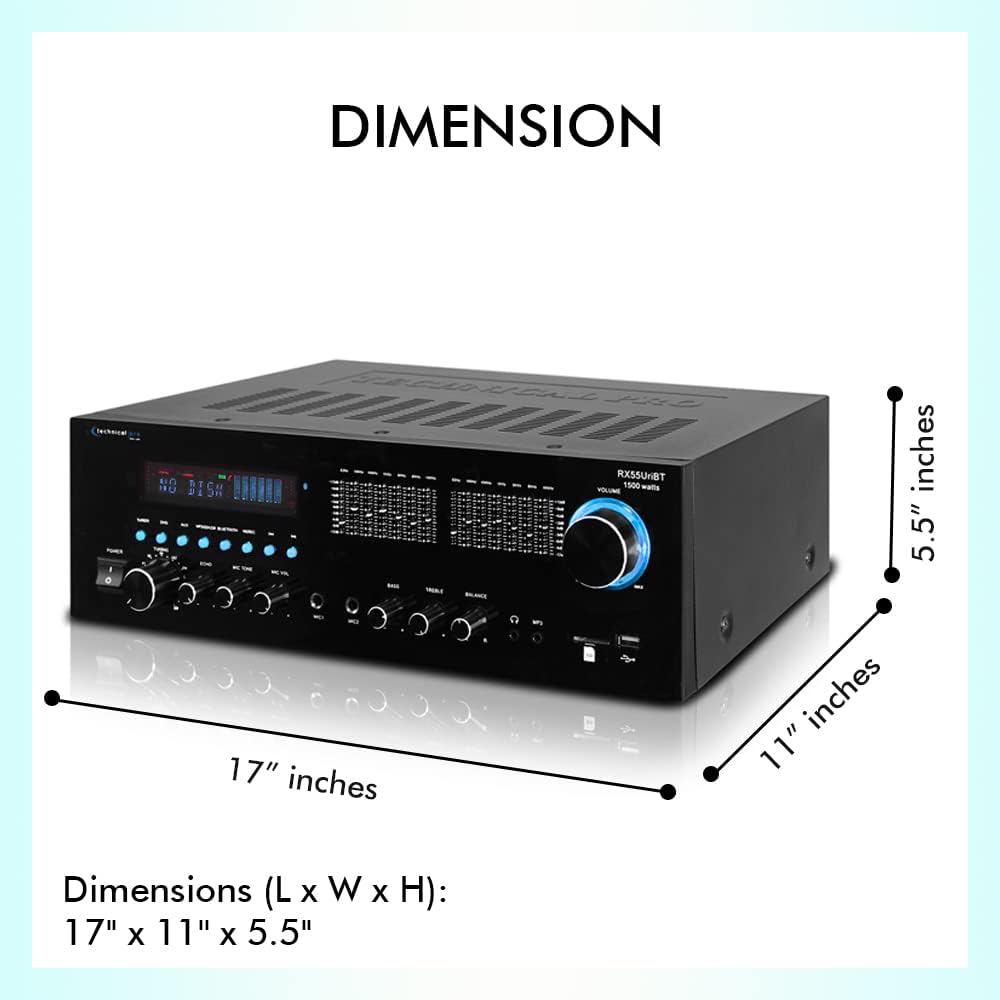
അളവുകൾ
Understanding the dimensions of your receiver is important for proper placement within your audio setup.

Image: Diagram illustrating the length, width, and height of the receiver, showing dimensions of 17 inches (L) x 11 inches (W) x 5.5 inches (H).
The receiver measures approximately 17 inches (Length) x 11 inches (Width) x 5.5 inches (Height).
സജ്ജമാക്കുക
1. സ്പീക്കറുകൾ ബന്ധിപ്പിക്കുന്നു
Ensure the receiver is powered off before making any connections.
- Identify the "MAIN SPEAKERS" terminals on the rear panel. These are typically red (+) and black (-) for each channel (Left and Right).
- Connect your passive speakers to these terminals. Match the positive (+) terminal on the receiver to the positive (+) terminal on your speaker, and the negative (-) to the negative (-).
- For surround speakers, use the "SURROUND SPEAKERS" push-button terminals, ensuring correct polarity.
- If using a powered subwoofer, connect it to the "SUB OUT" RCA jacks.
2. ഓഡിയോ ഉറവിടങ്ങൾ ബന്ധിപ്പിക്കുന്നു
Connect your external audio devices using RCA cables.
- For devices like CD players, DVD players, or other audio components, connect their audio output to the "AUX", "DVD", or "LINE" RCA inputs on the receiver's rear panel. Match the red (right) and white (left) connectors.
- For USB drives or SD cards, insert them into the corresponding slots on the front panel.
3. എഫ്എം ആന്റിന ബന്ധിപ്പിക്കുന്നു
For optimal FM radio reception, connect the included FM antenna to the "FM ANTENNA" terminal on the rear panel.
4. പവർ കണക്ഷൻ
Once all audio and speaker connections are made, plug the receiver's power cord into a standard AC power outlet.
പ്രവർത്തന നിർദ്ദേശങ്ങൾ
പവർ ചെയ്യുന്നത് ഓൺ/ഓഫ്
അമർത്തുക പവർ റിസീവർ ഓണാക്കാനോ ഓഫാക്കാനോ മുൻ പാനലിലെ ബട്ടണോ റിമോട്ട് കൺട്രോളോ അമർത്തുക.
ഉറവിട തിരഞ്ഞെടുപ്പ്
Use the input selector buttons on the front panel (Tuner, DVD, AUX, MP3/iPod/Bluetooth, USB/SD) or the remote control to choose your desired audio source.
വോളിയം നിയന്ത്രണം
വലുത് തിരിക്കുക മാസ്റ്റർ വോളിയം knob on the front panel clockwise to increase volume and counter-clockwise to decrease it. You can also use the volume buttons on the remote control.
ബ്ലൂടൂത്ത് ജോടിയാക്കൽ
The receiver supports Bluetooth v2.0 with EDR technology for wireless audio streaming.

Image: The receiver shown with a graphic indicating Bluetooth compatibility, highlighting its wireless streaming capabilities.
- തിരഞ്ഞെടുക്കുക MP3/iPod/Bluetooth input on the receiver. The display will indicate Bluetooth mode.
- നിങ്ങളുടെ ബ്ലൂടൂത്ത് പ്രാപ്തമാക്കിയ ഉപകരണത്തിൽ (സ്മാർട്ട്ഫോൺ, ടാബ്ലെറ്റ്, ലാപ്ടോപ്പ്), ബ്ലൂടൂത്ത് പ്രാപ്തമാക്കി ലഭ്യമായ ഉപകരണങ്ങൾക്കായി തിരയുക.
- Select "Technical Pro" or a similar name from the list of devices.
- Once paired, you can stream audio wirelessly to the receiver. The Bluetooth range is approximately 30 feet.
USB/SD കാർഡ് പ്ലേബാക്ക്
Insert a USB flash drive or SD card (up to 32GB) containing MP3, WAV, or WMA audio files into the respective front panel slot. The receiver will automatically switch to the USB/SD input and begin playback. The digital display will show track title, number, and elapsed time.
മൈക്രോഫോൺ ഉപയോഗം
Connect microphones to the MIC1 or MIC2 inputs on the front panel.
- എംഐസി വോൾ: ബന്ധിപ്പിച്ചിരിക്കുന്ന മൈക്രോഫോണുകളുടെ ശബ്ദം ക്രമീകരിക്കുന്നു.
- എക്കോ: Controls the echo effect applied to the microphone audio.
- MIC TONE: Adjusts the tone (bass/treble) of the microphone audio.
എഫ്എം റേഡിയോ ട്യൂണിംഗ്
തിരഞ്ഞെടുക്കുക ട്യൂണർ input. Use the tuning controls on the front panel or remote to scan for and select FM radio stations.
ഇക്വലൈസർ ക്രമീകരണം
Use the 5-band equalizer sliders on the front panel to fine-tune the audio frequency response to your preference. Adjustments can be made across a range of ±12dB.
മെയിൻ്റനൻസ്
ശരിയായ അറ്റകുറ്റപ്പണി നിങ്ങളുടെ റിസീവറിന്റെ ദീർഘായുസ്സും ഒപ്റ്റിമൽ പ്രകടനവും ഉറപ്പാക്കുന്നു.
- വൃത്തിയാക്കൽ: Disconnect the power cord before cleaning. Use a soft, dry cloth to wipe the exterior of the unit. Do not use liquid cleaners or aerosol cleaners.
- വെൻ്റിലേഷൻ: Keep the ventilation openings clear of dust and debris. Ensure adequate airflow around the unit to prevent overheating.
- സംഭരണം: യൂണിറ്റ് ദീർഘനേരം സൂക്ഷിക്കുകയാണെങ്കിൽ, പവർ ഔട്ട്ലെറ്റിൽ നിന്ന് അത് അൺപ്ലഗ് ചെയ്ത് നേരിട്ടുള്ള സൂര്യപ്രകാശത്തിൽ നിന്നും കടുത്ത താപനിലയിൽ നിന്നും അകലെ തണുത്തതും വരണ്ടതുമായ സ്ഥലത്ത് സൂക്ഷിക്കുക.
ട്രബിൾഷൂട്ടിംഗ്
നിങ്ങളുടെ റിസീവറിൽ പ്രശ്നങ്ങൾ നേരിടുകയാണെങ്കിൽ, ഇനിപ്പറയുന്ന പൊതുവായ പ്രശ്നങ്ങളും പരിഹാരങ്ങളും പരിശോധിക്കുക:
| പ്രശ്നം | സാധ്യമായ കാരണം | പരിഹാരം |
|---|---|---|
| ശക്തിയില്ല | പവർ കോർഡ് ബന്ധിപ്പിച്ചിട്ടില്ല; പവർ ഔട്ട്ലെറ്റ് സജീവമല്ല; യൂണിറ്റ് ഓഫാണ്. | Ensure power cord is securely plugged in. Check power outlet with another device. Press the POWER button. |
| ശബ്ദ ഔട്ട്പുട്ട് ഇല്ല | Incorrect input selected; Volume too low; Speakers not connected properly; Mute function active. | Select the correct input source. Increase master volume. Check speaker connections (polarity). Deactivate mute if active. |
| ബ്ലൂടൂത്ത് കണക്റ്റ് ചെയ്യുന്നില്ല | Receiver not in Bluetooth mode; Device too far; Device already paired with another unit. | Select MP3/iPod/Bluetooth input. Move device closer to receiver (within 30 ft). Disconnect from other Bluetooth devices. |
| USB/SD കാർഡ് പ്ലേ ചെയ്യുന്നില്ല | തെറ്റാണ് file format; Card/drive not inserted correctly; Card/drive corrupted. | ഉറപ്പാക്കുക files are MP3, WAV, or WMA. Reinsert card/drive. Try a different card/drive. |
| മൈക്രോഫോൺ പ്രവർത്തിക്കുന്നില്ല | Microphone not plugged in; Mic volume too low; Microphone faulty. | Ensure microphone is fully plugged into MIC1/MIC2. Increase MIC VOL. Test with another microphone. |
If the problem persists after trying these solutions, please contact Technical Pro customer support for assistance.
സ്പെസിഫിക്കേഷനുകൾ
Detailed technical specifications for the Technical Pro 1500 Watts Professional Receiver.
| ബ്രാൻഡ് | സാങ്കേതിക പ്രോ |
| മോഡൽ നമ്പർ | TRX55URIBTT |
| പവർ ഔട്ട്പുട്ട് | 1500 വാട്ട്സ് പീക്ക് പവർ |
| സ്പീക്കർ ഇംപെഡൻസ് | 2-8 ഓംസ് |
| ബ്ലൂടൂത്ത് പതിപ്പ് | v2.0 with EDR (2.4 GHz) |
| ബ്ലൂടൂത്ത് ശ്രേണി | 30 അടി |
| USB/SD Card Support | Up to 32GB; Plays .mp3, .wav, .wma files |
| സമനില ക്രമീകരണ ശ്രേണി | ±12dB |
| മൈക്രോഫോൺ ഇൻപുട്ടുകൾ | 2 x 1/4" (6.35mm) |
| ഓഡിയോ ഇൻപുട്ടുകൾ | RCA (AUX, DVD, LINE) |
| ഓഡിയോ p ട്ട്പുട്ടുകൾ | RCA Line Out, 2 Mono RCA Subwoofer Out |
| ഉൽപ്പന്ന അളവുകൾ (L x W x H) | 17 x 11 x 5.5 ഇഞ്ച് |
| ഇനത്തിൻ്റെ ഭാരം | 9.9 പൗണ്ട് |
വാറൻ്റിയും പിന്തുണയും
Technical Pro products are designed for reliability and performance. For information regarding warranty coverage, technical support, or service inquiries, please visit the official Technical Pro webസൈറ്റിൽ ബന്ധപ്പെടുകയോ അവരുടെ ഉപഭോക്തൃ സേവന വിഭാഗവുമായി ബന്ധപ്പെടുകയോ ചെയ്യുക. വാറന്റി ക്ലെയിമുകൾക്കുള്ള വാങ്ങലിന്റെ തെളിവായി നിങ്ങളുടെ വാങ്ങൽ രസീത് സൂക്ഷിക്കുക.
For the most up-to-date support information, please refer to the Technical Pro webസൈറ്റ്: www.technicalpro.com
Ask a question about this manual
Ask about setup, troubleshooting, compatibility, parts, safety, or missing instructions. Manuals+ will review the question and use this page’s manual context to help answer it.