

1. ആമുഖം
This manual provides comprehensive instructions for the safe operation, setup, and maintenance of your CHUBORY F89 WI-FI Drone System. Please read this manual thoroughly before operating the drone to ensure proper function and to prevent damage or injury. Retain this manual for future reference.
2. സുരക്ഷാ മാർഗ്ഗനിർദ്ദേശങ്ങൾ
- Operate the drone in open areas, away from people, animals, buildings, and power lines.
- ശക്തമായ കാറ്റിലോ പ്രതികൂല കാലാവസ്ഥയിലോ പ്രവർത്തിക്കരുത്.
- ഓരോ ഫ്ലൈറ്റിനും മുമ്പ് എല്ലാ ബാറ്ററികളും പൂർണ്ണമായും ചാർജ്ജ് ചെയ്തിട്ടുണ്ടെന്ന് ഉറപ്പാക്കുക.
- കറങ്ങുന്ന പ്രൊപ്പല്ലറുകളിൽ നിന്ന് വിരലുകളും അയഞ്ഞ വസ്ത്രങ്ങളും അകറ്റി നിർത്തുക.
- 14 വയസ്സിന് താഴെയുള്ള ഉപയോക്താക്കൾക്ക് മുതിർന്നവരുടെ മേൽനോട്ടം ശുപാർശ ചെയ്യുന്നു.
- Do not modify or disassemble the drone or controller.
- Follow all local regulations and laws regarding drone operation.
3. പാക്കേജ് ഉള്ളടക്കം
താഴെ കൊടുത്തിരിക്കുന്ന എല്ലാ ഇനങ്ങളും നിങ്ങളുടെ പാക്കേജിൽ ഉണ്ടെന്ന് ഉറപ്പാക്കുക:
- CHUBORY F89 Drone
- റിമോട്ട് കൺട്രോൾ
- ക്യാമറ
- ഉപയോക്തൃ മാനുവൽ (ഈ പ്രമാണം)
- Charging Cable (not explicitly listed in JSON but implied by rechargeable battery)
4. ഘടക ഐഡന്റിഫിക്കേഷൻ
Familiarize yourself with the main components of your CHUBORY F89 Drone System:
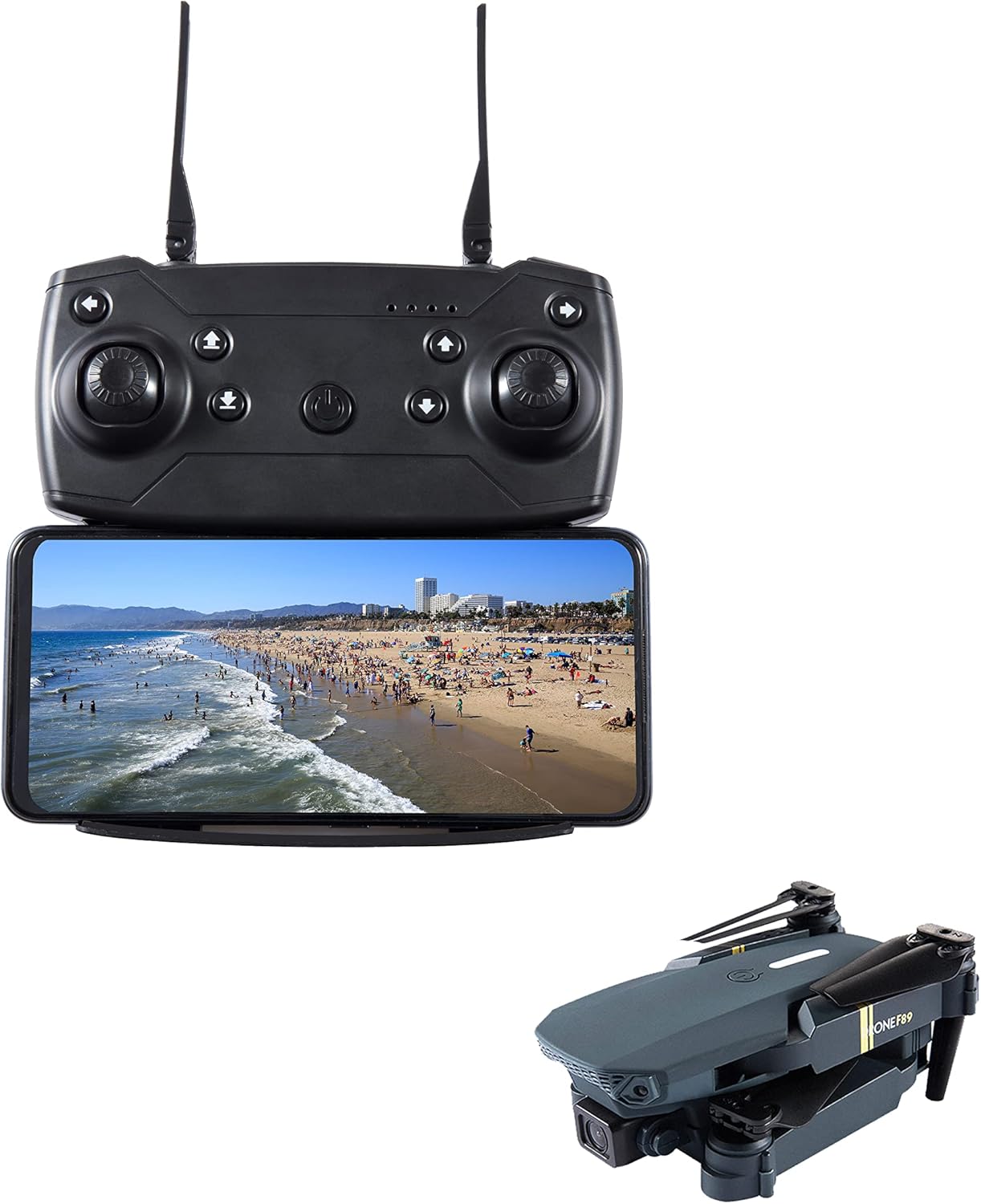
This image displays the CHUBORY F89 drone in its folded state, alongside its remote controller with a smartphone attached, showing a live feed from the drone's camera.
4.1. ഡ്രോൺ
- പ്രൊപ്പല്ലറുകൾ: Provide lift and thrust.
- മോട്ടോറുകൾ: Drive the propellers.
- ക്യാമറ: ഫോട്ടോകളും വീഡിയോകളും പകർത്തുന്നു.
- ബാറ്ററി കമ്പാർട്ട്മെൻ്റ്: Houses the drone's rechargeable battery.
- LED സൂചകങ്ങൾ: Display drone status.
4.2. റിമോട്ട് കൺട്രോൾ
- നിയന്ത്രണ സ്റ്റിക്കുകൾ: For flight direction and altitude.
- പവർ ബട്ടൺ: Turns the controller on/off.
- സ്മാർട്ട്ഫോൺ ഹോൾഡർ: Secures your smartphone for FPV (First Person View) operation.
- ഫംഗ്ഷൻ ബട്ടണുകൾ: For various operations like takeoff/landing, photo/video capture.
5. സജ്ജീകരണം
5.1. ബാറ്ററി ചാർജിംഗും ഇൻസ്റ്റാളേഷനും

Two CHUBORY F89 drone batteries are shown next to a folded drone, with text indicating 'Battery Capacity: 2850 Milliamp Hours' and 'Charging Time: 4 Hours (5V=3A adapter)'.
- ഡ്റോൺ ബാറ്ററി: Connect the drone battery to the provided charging cable. Connect the cable to a 5V=3A USB power adapter (not included). The battery capacity is 2850 Milliamp Hours, and a full charge typically takes 4 hours. The battery indicator lights will show charging status.
- കൺട്രോളർ ബാറ്ററികൾ: The remote control requires its own batteries (type not specified, typically AA or AAA). Open the battery compartment on the back of the controller and insert the batteries, observing correct polarity.
- ഇൻസ്റ്റലേഷൻ: Once fully charged, insert the drone battery into the drone's battery compartment, ensuring it clicks securely into place.
5.2. പ്രൊപ്പല്ലർ ഇൻസ്റ്റാളേഷൻ (ആവശ്യമെങ്കിൽ)
If propellers are not pre-installed, attach them according to the markings (e.g., A and B) on the propellers and motor arms. Ensure they are securely fastened.
5.3. സ്മാർട്ട്ഫോൺ കണക്ഷൻ
- Download the official CHUBORY F89 app from your smartphone's app store.
- ഡ്രോണും റിമോട്ട് കൺട്രോളും ഓണാക്കുക.
- On your smartphone, go to Wi-Fi settings and connect to the drone's Wi-Fi network (usually named something like 'F89-XXXXXX').
- Open the CHUBORY F89 app. You should see a live video feed from the drone's camera.
6. പ്രവർത്തന നിർദ്ദേശങ്ങൾ
6.1. പ്രീ-ഫ്ലൈറ്റ് ചെക്ക്ലിസ്റ്റ്
- Ensure drone and controller batteries are fully charged.
- പ്രൊപ്പല്ലറുകൾക്ക് കേടുപാടുകൾ സംഭവിച്ചിട്ടുണ്ടോയെന്ന് പരിശോധിച്ച് അവ സുരക്ഷിതമായി ഘടിപ്പിച്ചിട്ടുണ്ടെന്ന് ഉറപ്പാക്കുക.
- Verify a stable Wi-Fi connection between the drone and your smartphone.
- Choose an open, clear area for flight.
6.2. അടിസ്ഥാന ഫ്ലൈറ്റ് നിയന്ത്രണങ്ങൾ
- ടേക്ക് ഓഫ്/ലാൻഡിംഗ്: Use the dedicated one-key takeoff/landing button on the controller or push both control sticks simultaneously outwards and downwards to arm motors, then push the left stick up to ascend.
- ഉയരം: Left control stick (up/down).
- ദിശ: Right control stick (forward/backward, left/right).
- റൊട്ടേഷൻ: Left control stick (left/right) to rotate the drone horizontally.
6.3. ക്യാമറ പ്രവർത്തനം
The CHUBORY F89 drone is equipped with a camera utilizing CMOS/CCD optical sensor technology, capable of capturing video in MP4 format.
- ഫോട്ടോ ക്യാപ്ചർ: Press the designated photo button on the remote control or within the app to take a still image.
- വീഡിയോ റെക്കോർഡിംഗ്: Press the designated video button on the remote control or within the app to start/stop video recording.
- Viewing Media: Captured photos and videos are typically saved to your smartphone via the app or to an inserted SD card (if applicable, not specified in JSON).
7. പരിപാലനം
- വൃത്തിയാക്കൽ: Use a soft, dry cloth to clean the drone and controller. Avoid using liquids or solvents.
- പ്രൊപ്പല്ലർ പരിശോധന: Regularly check propellers for cracks or damage. Replace damaged propellers immediately.
- സംഭരണം: Store the drone and controller in a cool, dry place, away from direct sunlight. Remove batteries from the controller if storing for extended periods.
- ബാറ്ററി കെയർ: Do not overcharge or over-discharge batteries. Store batteries with a partial charge (around 50%) if not used for a long time.
8. പ്രശ്നപരിഹാരം
| പ്രശ്നം | സാധ്യമായ കാരണം | പരിഹാരം |
|---|---|---|
| ഡ്രോൺ പവർ ഓൺ ചെയ്യുന്നില്ല. | കുറഞ്ഞ അല്ലെങ്കിൽ ചാർജ് ചെയ്യാത്ത ബാറ്ററി. | Charge the drone battery fully. Ensure it is correctly installed. |
| കൺട്രോളർ പവർ ഓണാക്കുന്നില്ല. | കൺട്രോളർ ബാറ്ററികൾ തീർന്നിരിക്കുന്നു അല്ലെങ്കിൽ തെറ്റായി ഇൻസ്റ്റാൾ ചെയ്തിട്ടുണ്ട്. | Replace controller batteries, ensuring correct polarity. |
| No video feed on smartphone. | No Wi-Fi connection or app issue. | Ensure smartphone is connected to the drone's Wi-Fi. Restart the app and drone. |
| പറക്കലിനിടെ ഡ്രോൺ തെന്നിമാറി. | Calibration needed or environmental factors. | Perform a gyroscope calibration (refer to app instructions). Avoid flying in windy conditions. |
| പ്രൊപ്പല്ലറുകൾ കറങ്ങുന്നില്ല. | Motors not armed or obstruction. | Ensure motors are armed (push sticks outwards/downwards). Check for any obstructions to propellers. |
9 സ്പെസിഫിക്കേഷനുകൾ
- ബ്രാൻഡ്: ചുബോറി
- മോഡലിൻ്റെ പേര്: F89
- കണക്റ്റിവിറ്റി ടെക്നോളജി: വൈഫൈ
- നിയന്ത്രണ തരം: റിമോട്ട് കൺട്രോൾ
- നൈപുണ്യ ശേഷി: തുടക്കക്കാരൻ
- മെറ്റീരിയൽ: പ്ലാസ്റ്റിക്
- Drone Battery Capacity: 2850 മില്ലിamp Hours (as per image)
- Drone Battery Charging Time: 4 Hours (with 5V=3A adapter)
- വീഡിയോ ക്യാപ്ചർ ഫോർമാറ്റ്: MP4
- ഒപ്റ്റിക്കൽ സെൻസർ ടെക്നോളജി: CMOS, CCD
- UPC: 797823914484
10. വാറൻ്റിയും പിന്തുണയും
For warranty information and technical support, please refer to the product packaging or contact CHUBORY customer service directly. Keep your purchase receipt as proof of purchase.