
3Plus Vibe Pro
3Plus Vibe Pro Smart Watch User Manual
Model: 3PL-VIBEPPRO-BK
1. ആമുഖം
The 3Plus Vibe Pro Smart Watch is designed to assist you in monitoring your health and fitness activities. It features a large AMOLED touch screen display, comprehensive health tracking capabilities, and smart notifications. This manual provides instructions for setting up, operating, and maintaining your device.
പ്രധാന സവിശേഷതകൾ
- 1.78-inch Large AMOLED Touch Screen Display
- 21-Day Battery Life (typical usage)
- ഹൃദയമിടിപ്പ് നിരീക്ഷണം
- Blood Oxygen (SpO2) Tracking
- സ്ലീപ്പ് ട്രാക്കിംഗ്
- Built-in GPS for outdoor activities
- 5 എടിഎം വാട്ടർ റെസിസ്റ്റൻസ്
- Smart Notifications (calls, texts, calendar, app alerts)
- ഒന്നിലധികം സ്പോർട്സ് മോഡുകൾ
ബോക്സിൽ എന്താണുള്ളത്
- 3പ്ലസ് വൈബ് പ്രോ സ്മാർട്ട് വാച്ച്
- ചാർജിംഗ് കേബിൾ
- ഉപയോക്തൃ മാനുവൽ
2. സജ്ജീകരണം
2.1 ഉപകരണം ചാർജ് ചെയ്യുന്നു
Before initial use, fully charge your 3Plus Vibe Pro Smart Watch. Connect the charging cable to the charging contacts on the back of the watch and to a USB power source. The watch display will indicate charging status.

ചിത്രം 2.1: മുൻഭാഗം view of the 3Plus Vibe Pro Watch display.
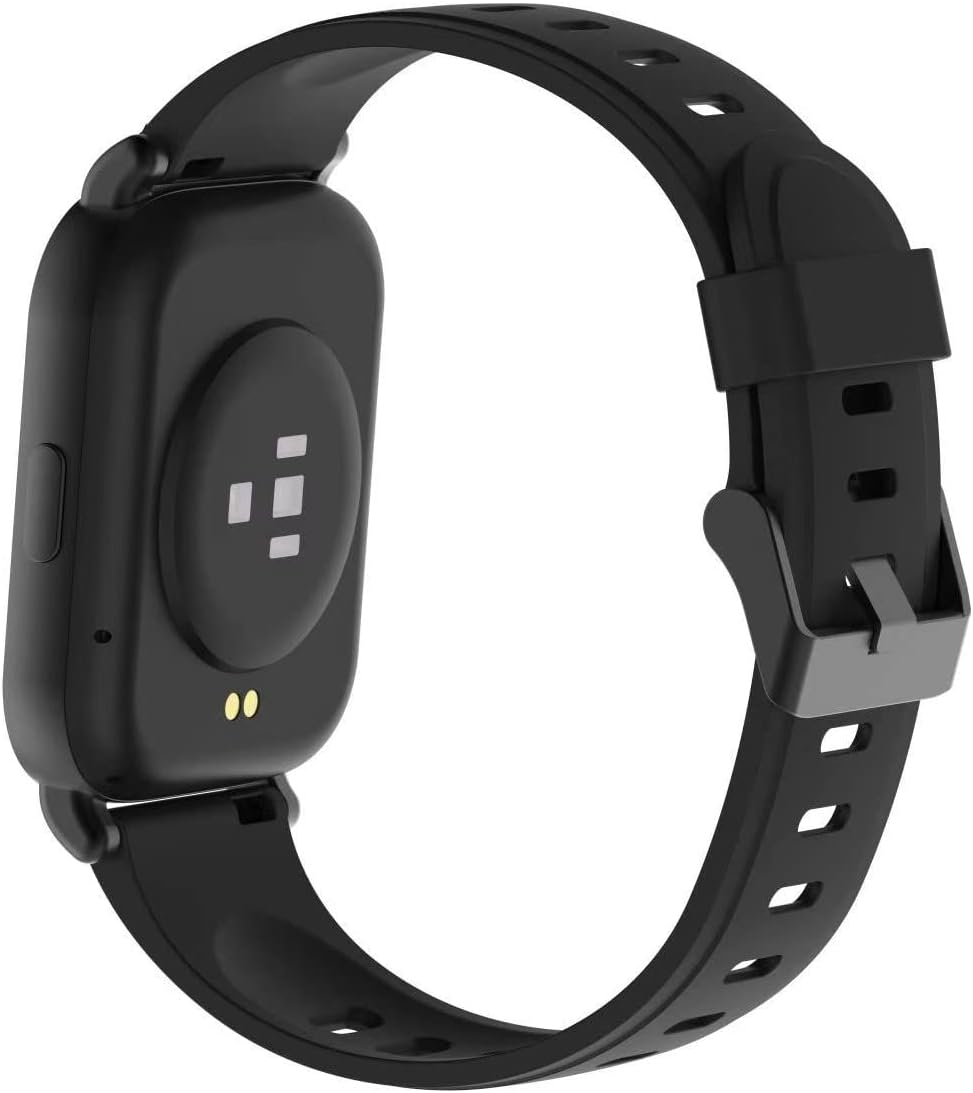
ചിത്രം 2.2: പിൻഭാഗം view of the 3Plus Vibe Pro Watch with charging contacts and sensors.
2.2 ആപ്പ് ഇൻസ്റ്റാളേഷനും ജോടിയാക്കലും
- Download the 3Plus App: ഇതിനായി തിരയുക the "3Plus" app on your smartphone's app store (iOS or Android) and install it.
- ഒരു അക്കൗണ്ട് സൃഷ്ടിക്കുക: ആപ്പ് തുറന്ന് സ്ക്രീനിലെ നിർദ്ദേശങ്ങൾ പാലിച്ച് പുതിയൊരു ഉപയോക്തൃ അക്കൗണ്ട് സൃഷ്ടിക്കുക അല്ലെങ്കിൽ നിങ്ങൾക്ക് ഇതിനകം ഒരു അക്കൗണ്ട് ഉണ്ടെങ്കിൽ ലോഗിൻ ചെയ്യുക.
- നിങ്ങളുടെ വാച്ച് ജോടിയാക്കുക:
- നിങ്ങളുടെ സ്മാർട്ട്ഫോണിൽ ബ്ലൂടൂത്ത് പ്രവർത്തനക്ഷമമാക്കിയിട്ടുണ്ടെന്ന് ഉറപ്പാക്കുക.
- Open the 3Plus app and navigate to the device pairing section.
- Select your 3Plus Vibe Pro from the list of available devices.
- നിങ്ങളുടെ വാച്ചിലും സ്മാർട്ട്ഫോണിലും ജോടിയാക്കൽ അഭ്യർത്ഥന സ്ഥിരീകരിക്കുക.
2.3 Customizing the Watch Face
You can customize the watch face directly on the device by swiping or through the 3Plus app. The app offers a wider selection of watch faces to personalize your device.

Figure 2.3: The 1.78" AMOLED display of the 3Plus Vibe Pro Watch.
3. പ്രവർത്തന നിർദ്ദേശങ്ങൾ
3.1 അടിസ്ഥാന നാവിഗേഷൻ
- ടച്ച് സ്ക്രീൻ: മെനുകളിലൂടെയും സവിശേഷതകളിലൂടെയും നാവിഗേറ്റ് ചെയ്യാൻ ഇടത്തോട്ടോ വലത്തോട്ടോ മുകളിലേക്കോ താഴേക്കോ സ്വൈപ്പ് ചെയ്യുക. തിരഞ്ഞെടുക്കാൻ ടാപ്പ് ചെയ്യുക.
- സൈഡ് ബട്ടൺ: Typically used to return to the home screen or activate specific functions.
3.2 ആരോഗ്യ, ഫിറ്റ്നസ് ട്രാക്കിംഗ്
The 3Plus Vibe Pro tracks various health and fitness metrics automatically throughout the day. You can view detailed data on the watch or through the connected 3Plus app.
- Steps, Calories, Distance: Automatically recorded.
- ഹൃദയമിടിപ്പ്: Continuous monitoring. For accurate readings, ensure the watch is snug on your wrist.
- രക്ത ഓക്സിജൻ (SpO2): Track your oxygen levels. For best results, remain still during measurement.
- ഉറക്ക ട്രാക്കിംഗ്: Monitors deep sleep, light sleep, and awake times.
- അന്തർനിർമ്മിത ജിപിഎസ്: Provides real-time route tracking during outdoor exercises.

Figure 3.1: Activity tracking screen on the 3Plus Vibe Pro Watch.

Figure 3.2: Blood oxygen and heart rate measurement screen.

Figure 3.3: Sleep data display on the 3Plus Vibe Pro Watch.
3.3 സ്പോർട്സ് മോഡുകൾ
The watch includes multiple sports modes to track specific workouts. Select the appropriate mode before starting an activity for more accurate data collection.
Video 3.1: Official product video demonstrating various features including sports modes, GPS, and notifications. This video highlights the watch's capabilities for active lifestyles.
3.4 സ്മാർട്ട് അറിയിപ്പുകൾ
Receive call, text, calendar, and smartphone app notifications directly on your watch when your phone is nearby and connected via Bluetooth. Quick replies and voice replies are available on Android devices only.

Figure 3.4: Notifications displayed on the 3Plus Vibe Pro Watch screen.
3.5 ജല പ്രതിരോധം
The 3Plus Vibe Pro has a 5 ATM water resistance rating, making it suitable for swimming, showering, snorkeling, and exposure to rain. It is not recommended for high-speed water sports or diving.

Figure 3.5: The 3Plus Vibe Pro Watch demonstrating its water resistance.
4. പരിപാലനം
4.1 നിങ്ങളുടെ വാച്ച് വൃത്തിയാക്കൽ
- നിങ്ങളുടെ വാച്ചും ബാൻഡും പതിവായി മൃദുവായ, ഡി-ക്ലോഷർ ഉപയോഗിച്ച് വൃത്തിയാക്കുക.amp തുണി.
- കഠിനമായ രാസവസ്തുക്കളോ ഉരച്ചിലുകളോ ഉള്ള വസ്തുക്കളോ ഉപയോഗിക്കുന്നത് ഒഴിവാക്കുക, കാരണം ഇവ ഉപകരണത്തിന് കേടുവരുത്തും.
- ചാർജ് ചെയ്യുന്നതിനുമുമ്പ് വാച്ച് പൂർണ്ണമായും ഉണങ്ങിയെന്ന് ഉറപ്പാക്കുക.
4.2 ബാറ്ററി കെയർ
- To prolong battery life, avoid exposing the watch to extreme temperatures.
- ദീർഘനേരം നിഷ്ക്രിയമാകുന്നതിന് മുമ്പ് വാച്ച് പൂർണ്ണമായും ചാർജ് ചെയ്യുക.
- While the watch boasts a long battery life, individual usage patterns and settings can affect actual duration.
4.3 ജല പ്രതിരോധ മുൻകരുതലുകൾ
- Although rated 5 ATM, avoid pressing buttons underwater.
- Do not expose the watch to hot water, steam, or detergents, as this may compromise the water seal.
- If the watch gets wet, dry it thoroughly before charging or using the side button.
5. പ്രശ്നപരിഹാരം
5.1 പൊതുവായ പ്രശ്നങ്ങളും പരിഹാരങ്ങളും
| ഇഷ്യൂ | സാധ്യമായ കാരണം / പരിഹാരം |
|---|---|
| വാച്ച് ഫോണുമായി ജോടിയാക്കുന്നില്ല |
|
| Inaccurate heart rate/blood oxygen readings |
|
| ചെറിയ ബാറ്ററി ലൈഫ് |
|
| Watch not responding / Screen blank |
|
| Alarm/Timer functionality issues |
|
If you encounter issues not listed here or if the suggested solutions do not resolve the problem, please contact 3Plus customer support.
6 സ്പെസിഫിക്കേഷനുകൾ
| ഫീച്ചർ | വിശദാംശങ്ങൾ |
|---|---|
| മോഡൽ നമ്പർ | 3PL-VIBEPPRO-BK |
| ഡിസ്പ്ലേ വലിപ്പം | 1.78 ഇഞ്ച് AMOLED |
| ഉൽപ്പന്ന അളവുകൾ | 0.39 x 10.63 x 1.57 ഇഞ്ച് |
| ഇനത്തിൻ്റെ ഭാരം | 2.4 ഔൺസ് |
| ബാറ്ററി | 1 CR5 battery (included), 280 mAh Lithium Ion |
| ഓപ്പറേറ്റിംഗ് സിസ്റ്റം | Android, Apple iOS compatible |
| കണക്റ്റിവിറ്റി | Bluetooth, GPS (True) |
| ജല പ്രതിരോധം | 5 എ.ടി.എം |
| മെമ്മറി സ്റ്റോറേജ് കപ്പാസിറ്റി | 16 MB |
| ഇൻസ്റ്റാൾ ചെയ്ത RAM മെമ്മറി വലുപ്പം | 32 MB |
7. വാറൻ്റിയും പിന്തുണയും
For warranty information and customer support, please refer to the documentation included with your purchase or visit the official 3Plus webസൈറ്റ്. നിങ്ങൾക്ക് സന്ദർശിക്കാനും കഴിയും 3Plus Store on Amazon അധിക ഉറവിടങ്ങൾക്കായി.
If you require technical assistance or have questions about your 3Plus Vibe Pro Smart Watch, please contact 3Plus customer service directly.
Ask a question about this manual
Ask about setup, troubleshooting, compatibility, parts, safety, or missing instructions. Manuals+ will review the question and use this page’s manual context to help answer it.