
1. ഉൽപ്പന്നം കഴിഞ്ഞുview
The Satechi USB-C Multiport MX Adapter is a versatile docking solution designed to expand the connectivity of your USB-C enabled devices, including MacBooks, Windows laptops, and iPads. It provides a comprehensive array of ports to enhance your productivity and multimedia experience.

Image: The Satechi USB-C Multiport MX Adapter, a compact and sleek device.
2. സജ്ജീകരണ നിർദ്ദേശങ്ങൾ
- അഡാപ്റ്റർ ബന്ധിപ്പിക്കുക: Plug the integrated USB-C cable from the Multiport MX Adapter into an available USB-C port on your host device (laptop, tablet, etc.).
- പവർ കണക്ഷൻ (ഓപ്ഷണൽ എന്നാൽ ശുപാർശ ചെയ്യുന്നത്): For optimal performance and to charge your host device, connect your USB-C power adapter to the USB-C PD port on the Multiport MX Adapter. This port supports up to 100W Power Delivery.
- Dual HDMI Display Setup:
- Connect your HDMI-enabled monitors to the two HDMI ports on the adapter. One port supports 4K@60Hz, and the other supports 4K@30Hz.
- പ്രധാനപ്പെട്ടത്: For both HDMI ports to function simultaneously, installation of the SiliconMotion software is required. Please refer to the official Satechi website for the latest software and installation guide.
- പെരിഫറലുകൾ ബന്ധിപ്പിക്കുക: Plug in your USB-A devices, Ethernet cable, Micro/SD cards, and audio devices into their respective ports on the adapter.

Image: The Satechi USB-C Multiport MX Adapter connected to a laptop via its integrated USB-C cable.
3. പ്രവർത്തന നിർദ്ദേശങ്ങൾ
The Satechi USB-C Multiport MX Adapter is designed for plug-and-play functionality, requiring no additional drivers for most basic operations (except for dual HDMI as noted above). Simply connect your devices to the corresponding ports.
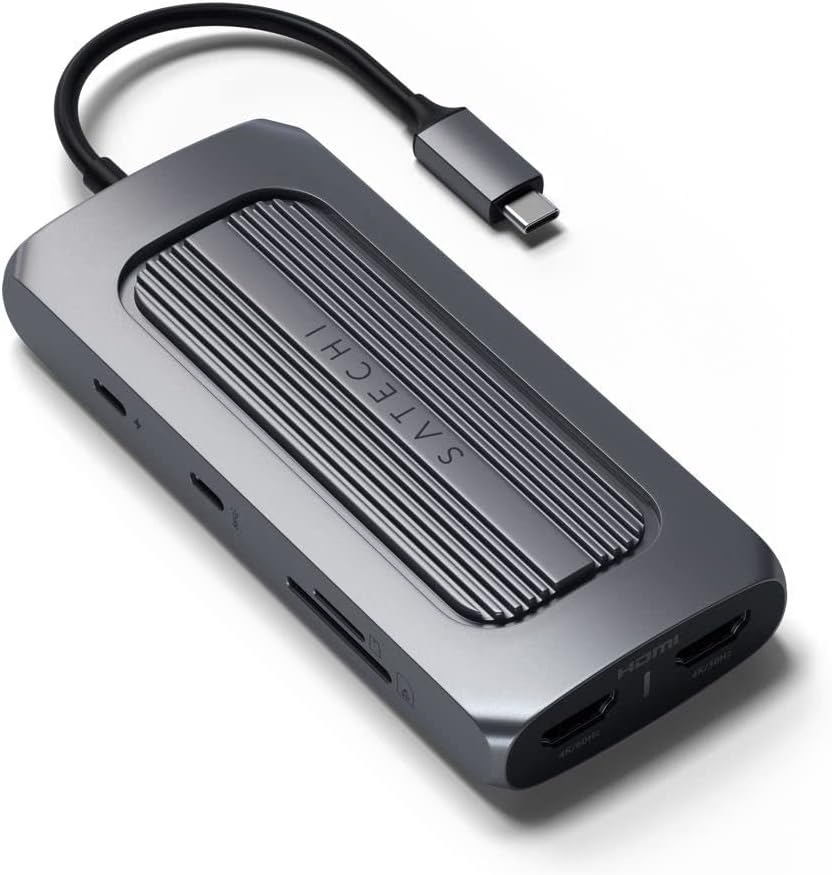
ചിത്രം: വശം view of the adapter highlighting USB-C PD, USB-C Data, SD, and MicroSD card slots.
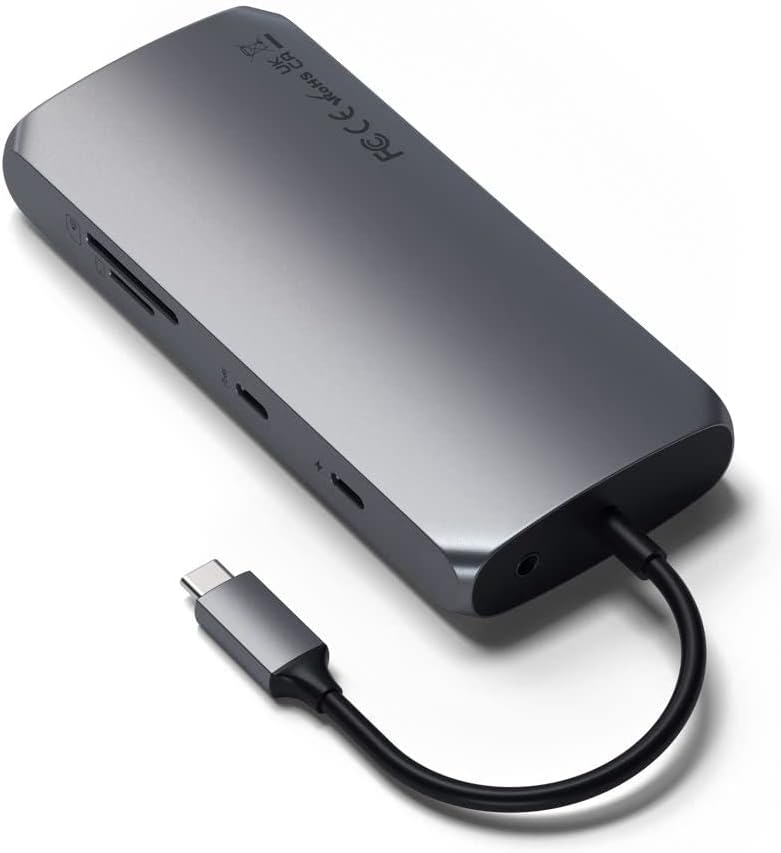
ചിത്രം: വശം view of the adapter highlighting Ethernet, USB-A 3.0 ports, and HDMI ports.
- USB-C പവർ ഡെലിവറി (PD) പോർട്ട്: Use this port to power your host device and the adapter itself. It supports up to 100W input, with approximately 15W reserved for the adapter's operation.
- USB-C ഡാറ്റ പോർട്ട്: Connect USB-C peripherals for data transfer speeds up to 5Gbps. This port is for data only and does not support video output.
- USB-A 3.0 പോർട്ടുകൾ (x2): Connect traditional USB-A devices such as external hard drives, keyboards, mice, or flash drives. These ports offer data transfer speeds up to 5Gbps.
- ഡ്യുവൽ 4K HDMI പോർട്ടുകൾ: Connect external monitors for extended or mirrored display. One port supports 4K resolution at 60Hz, and the other supports 4K resolution at 30Hz. Ensure SiliconMotion software is installed for dual display functionality.
- ഇഥർനെറ്റ് പോർട്ട്: Provides a stable and fast wired network connection with Gigabit Ethernet speeds.
- Micro/SD Card Readers: Insert MicroSD and standard SD cards for quick data transfer (UHS-I speeds).
- ഓഡിയോ ജാക്ക്: ഓഡിയോ ഔട്ട്പുട്ടിനായി ഹെഡ്ഫോണുകളോ സ്പീക്കറുകളോ ബന്ധിപ്പിക്കുക.
Video: Official Satechi overview of the USB-C Multiport MX Adapter, demonstrating its various ports and features.
4. പരിപാലനം
- വൃത്തിയാക്കൽ: Use a soft, dry cloth to clean the adapter. Avoid using harsh chemicals or abrasive materials.
- സംഭരണം: നേരിട്ടുള്ള സൂര്യപ്രകാശവും കടുത്ത താപനിലയും ഏൽക്കാത്ത ഒരു തണുത്തതും വരണ്ടതുമായ സ്ഥലത്ത് അഡാപ്റ്റർ സൂക്ഷിക്കുക.
- താപനില: The adapter is designed to operate within a temperature range of 30-50°C (86-122°F). Prolonged use outside this range may affect performance.
5. പ്രശ്നപരിഹാരം
- ബാഹ്യ മോണിറ്ററുകളിൽ ഡിസ്പ്ലേ ഇല്ല:
- Ensure your HDMI cables are securely connected to both the adapter and the monitors.
- Verify that the SiliconMotion software is correctly installed on your host device. This software is crucial for dual HDMI output.
- Check your display settings on your computer to ensure the external monitors are detected and configured correctly (extended or mirrored).
- അഡാപ്റ്റർ ചൂട് അനുഭവപ്പെടുന്നു: It is normal for the adapter to become warm during operation, especially when multiple ports are in use or when charging your device at high wattage. This is due to power conversion and data processing. If it becomes excessively hot, disconnect it and allow it to cool down.
- USB-C Port Not Functioning: Ensure your host device's USB-C port supports the necessary functions (Power Delivery, DisplayPort Alt Mode, data transfer) for the features you are trying to use. Not all USB-C ports have the same capabilities.
- മന്ദഗതിയിലുള്ള ഡാറ്റ കൈമാറ്റം: Ensure you are using high-quality cables and that your connected devices support the advertised speeds (e.g., USB 3.0 for 5Gbps).
- ഇതർനെറ്റ് കണക്ഷൻ പ്രശ്നങ്ങൾ: Check the Ethernet cable connection. Ensure your network drivers are up to date on your host device.
6 സ്പെസിഫിക്കേഷനുകൾ
| ബ്രാൻഡ് | സതേച്ചി |
| മോഡൽ | USB-C മൾട്ടിപോർട്ട് MX അഡാപ്റ്റർ |
| ഹാർഡ്വെയർ ഇന്റർഫേസ് | യുഎസ്ബി ടൈപ്പ് സി |
| അനുയോജ്യമായ ഉപകരണങ്ങൾ | MacBook Pro 14/16-inch (2025 M5/M4/M3/M2/M1), MacBook Air 13/15-inch (2025 M4/M3/M2/M1), iPad Pro 11/13-inch (2025 M5/M4/M2/M1), iPad Air 11/13-inch (2025 M3/M2/M1), iPad Mini (2024 A17/6th Gen), Mac Mini (2024 M4/M2/M1), iMac (2024 M4/M3/M1), Mac Studio (2025 M4/M3/M2/M1), Lenovo ThinkPad, Microsoft Surface, Google Pixelbook |
| മൊത്തം USB പോർട്ടുകൾ | 4 (1x USB-C Data, 2x USB-A 3.0, 1x USB-C PD) |
| തുറമുഖങ്ങളുടെ എണ്ണം | 9 (including HDMI, Ethernet, Card Readers, Audio Jack) |
| ഉൽപ്പന്ന അളവുകൾ | 5.12"L x 2.28"W x 0.79"H |
| ഇനത്തിൻ്റെ ഭാരം | 171 ഗ്രാം |
| ആകെ HDMI പോർട്ടുകൾ | 2 (4K@60Hz, 4K@30Hz) |
| വാട്ട്tage | 100W പവർ ഡെലിവറി |
| നിറം | സ്പേസ് ഗ്രേ |
| യു.പി.സി | 810086360130 |
7. വാറൻ്റിയും പിന്തുണയും
Satechi products are covered by a 2 വർഷത്തെ പരിമിത വാറൻ്റി against defects in materials and workmanship under normal use. For customer support, technical assistance, or warranty claims, please visit the official Satechi webസൈറ്റ് അല്ലെങ്കിൽ അവരുടെ ഉപഭോക്തൃ സേവന വിഭാഗവുമായി ബന്ധപ്പെടുക.
For further assistance, please refer to the Satechi support page or contact their customer service directly.


