
ആമുഖം
This user manual provides essential information and instructions for the safe and efficient operation of your Qubo SP510 smartphone. Please read this manual thoroughly before using your device to ensure proper setup, usage, and maintenance. Keep this manual for future reference.
പാക്കേജ് ഉള്ളടക്കം
ഉൽപ്പന്ന പാക്കേജിംഗിൽ എല്ലാ ഇനങ്ങളും ഉണ്ടെന്ന് ഉറപ്പാക്കുക:
- Qubo SP510 Smartphone
- USB കേബിൾ
- ഉപയോക്തൃ മാനുവൽ (ഈ പ്രമാണം)
ഏതെങ്കിലും ഇനങ്ങൾ നഷ്ടപ്പെട്ടാലോ കേടുപാടുകൾ സംഭവിച്ചാലോ, ദയവായി നിങ്ങളുടെ റീട്ടെയിലറെ ബന്ധപ്പെടുക.
ഉപകരണം കഴിഞ്ഞുview
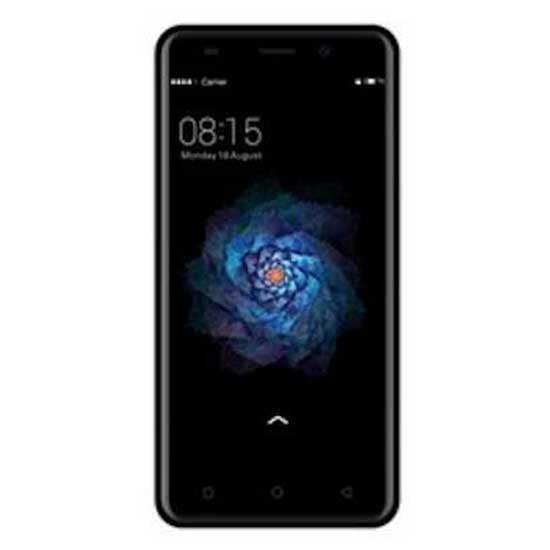
Familiarize yourself with the physical components of your Qubo SP510 smartphone.
ചിത്രം 1: പിൻഭാഗം view of the Qubo SP510 smartphone. This image displays the back panel of the device, featuring the main camera lens and flash in the upper left corner, the "Qubo" brand logo centrally located, and regulatory compliance markings towards the bottom. The overall finish is a matte black.
പ്രധാന ഘടകങ്ങൾ:
- മുൻ ക്യാമറ: സെൽഫികൾക്കും വീഡിയോ കോളുകൾക്കും.
- Rear Camera (8 MP): ഫോട്ടോകളും വീഡിയോകളും എടുക്കുന്നതിന്.
- ഫ്ലാഷ്: കുറഞ്ഞ വെളിച്ചത്തിൽ ഫോട്ടോകൾക്ക് പ്രകാശം നൽകുന്നു.
- പവർ ബട്ടൺ: ഉപകരണം ഓൺ/ഓഫ് ചെയ്യുന്നു, സ്ക്രീൻ ലോക്ക് ചെയ്യുന്നു/അൺലോക്ക് ചെയ്യുന്നു.
- വോളിയം ബട്ടണുകൾ: മീഡിയയും കോൾ വോളിയവും ക്രമീകരിക്കുന്നു.
- USB പോർട്ട്: ചാർജിംഗിനും ഡാറ്റ കൈമാറ്റത്തിനും.
- 3.5mm ഓഡിയോ ജാക്ക്: ഹെഡ്ഫോണുകൾ ബന്ധിപ്പിക്കുന്നതിന്.
- സ്പീക്കർ: ഓഡിയോ ഔട്ട്പുട്ടിനായി.
- മൈക്രോഫോൺ: For voice input during calls and recordings.
- സിം/എസ്ഡി കാർഡ് ട്രേ: Holds SIM cards and a microSD card for expandable storage.
സജ്ജമാക്കുക
1. സിം, SD കാർഡുകൾ ചേർക്കൽ
- Locate the SIM/SD card tray on the side of your phone.
- Use the provided SIM ejector tool (if included) or a small paperclip to gently press into the small hole on the tray. The tray will pop out.
- Place your Nano-SIM card(s) and/or microSD card into the designated slots on the tray, ensuring the gold contacts face downwards. The Qubo SP510 supports Dual SIM functionality.
- ഉപകരണത്തിന്റെ വശവുമായി ഫ്ലഷ് ആകുന്നതുവരെ ട്രേ ഫോണിലേക്ക് ശ്രദ്ധാപൂർവ്വം വീണ്ടും തിരുകുക.
2 ഉപകരണം ചാർജ് ചെയ്യുന്നു
- നിങ്ങളുടെ ഫോണിലെ ചാർജിംഗ് പോർട്ടിലേക്ക് USB കേബിൾ ബന്ധിപ്പിക്കുക.
- USB കേബിളിന്റെ മറ്റേ അറ്റം അനുയോജ്യമായ ഒരു USB പവർ അഡാപ്റ്ററുമായി (ഉൾപ്പെടുത്തിയിട്ടില്ല) അല്ലെങ്കിൽ കമ്പ്യൂട്ടറിന്റെ USB പോർട്ടുമായി ബന്ധിപ്പിക്കുക.
- Allow the phone to charge until the battery indicator shows a full charge. For optimal battery life, it is recommended to fully charge the device before first use.
3. പവർ ഓൺ/ഓഫ്
- പവർ ഓണാക്കാൻ: Press and hold the Power button until the Qubo logo appears on the screen.
- പവർ ഓഫ് ചെയ്യാൻ: പവർ ഓപ്ഷൻ മെനു ദൃശ്യമാകുന്നതുവരെ പവർ ബട്ടൺ അമർത്തിപ്പിടിക്കുക. "പവർ ഓഫ്" തിരഞ്ഞെടുത്ത് സ്ഥിരീകരിക്കുക.
- പുനരാരംഭിക്കാൻ: പവർ ഓപ്ഷനുകൾ മെനുവിൽ നിന്ന്, "പുനരാരംഭിക്കുക" തിരഞ്ഞെടുത്ത് സ്ഥിരീകരിക്കുക.
4. പ്രാരംഭ സജ്ജീകരണം
Upon first power-on, the device will guide you through the initial setup process. This includes selecting your language (Spanish, English), connecting to Wi-Fi, setting up your Google account, and configuring security options.
പ്രവർത്തന നിർദ്ദേശങ്ങൾ
1. അടിസ്ഥാന നാവിഗേഷൻ
- ടച്ച്സ്ക്രീൻ ആംഗ്യങ്ങൾ: തിരഞ്ഞെടുക്കാൻ ടാപ്പ് ചെയ്യുക, സ്ക്രോൾ ചെയ്യാൻ സ്വൈപ്പ് ചെയ്യുക, സൂം ചെയ്യാൻ പിഞ്ച് ചെയ്യുക.
- ഹോം സ്ക്രീൻ: നിങ്ങളുടെ ആപ്പുകൾക്കും വിജറ്റുകൾക്കുമുള്ള കേന്ദ്ര ഹബ്.
- അറിയിപ്പ് പാനൽ: അറിയിപ്പുകളും ദ്രുത ക്രമീകരണങ്ങളും ആക്സസ് ചെയ്യാൻ സ്ക്രീനിന്റെ മുകളിൽ നിന്ന് താഴേക്ക് സ്വൈപ്പ് ചെയ്യുക.
- നാവിഗേഷൻ ബാർ: Typically includes Back, Home, and Recent Apps buttons at the bottom of the screen.
2. കോളുകൾ ചെയ്യുക, സന്ദേശങ്ങൾ അയയ്ക്കുക
- കോളുകൾ: "ഫോൺ" ആപ്പ് തുറന്ന് നമ്പർ നൽകി കോൾ ഐക്കണിൽ ടാപ്പ് ചെയ്യുക.
- സന്ദേശങ്ങൾ: Open the "Messages" app, tap to compose a new message, enter the recipient and text, then send.
3. ഇന്റർനെറ്റും കണക്റ്റിവിറ്റിയും
- വൈഫൈ: Go to Settings > Network & internet > Wi-Fi. Turn Wi-Fi on, select a network, and enter the password if required.
- ബ്ലൂടൂത്ത്: Go to Settings > Connected devices > Bluetooth. Turn Bluetooth on, scan for devices, and pair with your desired accessory.
- Mobile Data (GSM): ക്രമീകരണം > നെറ്റ്വർക്കും ഇന്റർനെറ്റും > മൊബൈൽ നെറ്റ്വർക്ക് എന്നതിൽ നിങ്ങളുടെ സിം കാർഡ് സജീവമാണെന്നും മൊബൈൽ ഡാറ്റ പ്രവർത്തനക്ഷമമാക്കിയിട്ടുണ്ടെന്നും ഉറപ്പാക്കുക.
4. ക്യാമറ ഉപയോഗം
- Open the "Camera" app.
- ഒരു ഫോട്ടോ എടുക്കാൻ ഷട്ടർ ബട്ടൺ ടാപ്പ് ചെയ്യുക.
- ക്യാമറ സ്വിച്ച് ഐക്കൺ ഉപയോഗിച്ച് മുൻ ക്യാമറയും പിൻ ക്യാമറയും തമ്മിൽ മാറുക.
- Select video mode to record videos (up to 720p resolution).
5. ആപ്പ് മാനേജ്മെന്റ്
- ആപ്പുകൾ ഇൻസ്റ്റാൾ ചെയ്യുന്നു: Download apps from the Google Play Store.
- ആപ്പുകൾ അൺഇൻസ്റ്റാൾ ചെയ്യുന്നു: Long-press an app icon on the home screen or app drawer, then drag it to "Uninstall" or go to Settings > Apps & notifications.
മെയിൻ്റനൻസ്
1. നിങ്ങളുടെ ഉപകരണം വൃത്തിയാക്കൽ
Use a soft, lint-free cloth to gently wipe the screen and body of the phone. Avoid using harsh chemicals, abrasive cleaners, or aerosol sprays, as these can damage the device's finish or internal components. The device is not water-resistant.
2. സോഫ്റ്റ്വെയർ അപ്ഡേറ്റുകൾ
Periodically check for software updates to ensure your device has the latest features, security patches, and performance improvements. Go to Settings > System > System update to check for and install available updates.
3. ബാറ്ററി പരിചരണം
- ഉയർന്ന താപനിലയിൽ ഫോൺ തുറന്നുവെക്കുന്നത് ഒഴിവാക്കുക.
- അംഗീകൃത ചാർജറുകളും കേബിളുകളും മാത്രം ഉപയോഗിക്കുക.
- ബാറ്ററി ഇടയ്ക്കിടെ പൂർണ്ണമായും ഡിസ്ചാർജ് ചെയ്യാൻ അനുവദിക്കരുത്.
- ഉപകരണം കൂടുതൽ നേരം ഉപയോഗിക്കില്ലെങ്കിൽ, സൂക്ഷിക്കുന്നതിന് മുമ്പ് ഏകദേശം 50% വരെ ചാർജ് ചെയ്യുക.
ട്രബിൾഷൂട്ടിംഗ്
This section addresses common issues you might encounter with your Qubo SP510 smartphone.
- ഉപകരണം ഓണാക്കുന്നില്ല: Ensure the battery is charged. Connect the charger and wait a few minutes before attempting to power on again. If the issue persists, perform a forced restart by holding the Power button for 10-15 seconds.
- സ്ക്രീൻ പ്രതികരിക്കുന്നില്ല: Restart the device. If the problem continues, try a factory reset (note: this will erase all data).
- Wi-Fi-ലേക്ക് കണക്റ്റുചെയ്യാൻ കഴിയില്ല: Ensure Wi-Fi is enabled. Restart your phone and the Wi-Fi router. Forget the network in your phone's settings and reconnect.
- Poor call quality or no network signal: Check if your SIM card is properly inserted. Ensure you are in an area with network coverage. Try restarting the device.
- ആപ്പുകൾ ക്രാഷാകുകയോ മരവിക്കുകയോ ചെയ്യുന്നു: Close and reopen the app. Clear the app's cache and data in Settings > Apps & notifications. Ensure your device's software is up to date.
- ബാറ്ററി പെട്ടെന്ന് തീർന്നു പോകുന്നു: Reduce screen brightness, close unused apps, disable unnecessary connectivity features (Wi-Fi, Bluetooth, GPS) when not in use. Check battery usage in Settings to identify power-hungry apps.
For more complex issues, please refer to the support section or contact customer service.
സ്പെസിഫിക്കേഷനുകൾ
Below are the technical specifications for the Qubo SP510 smartphone:
| മോഡലിൻ്റെ പേര് | SP510 |
| ഓപ്പറേറ്റിംഗ് സിസ്റ്റം | ആൻഡ്രോയിഡ് |
| സ്ക്രീൻ വലിപ്പം | 5 ഇഞ്ച് |
| സ്ക്രീൻ റെസല്യൂഷൻ | 672 x 384 |
| ആന്തരിക സംഭരണം | 8 ജിബി |
| പിൻ ക്യാമറ റെസല്യൂഷൻ | 8 എം.പി |
| ഫ്രണ്ട് ക്യാമറ റെസല്യൂഷൻ | 13 MP (Optical Sensor Resolution) |
| വീഡിയോ റെക്കോർഡിംഗ് റെസല്യൂഷൻ | 720p |
| ബാറ്ററി ശേഷി | 2000 mAh |
| സിം കാർഡ് സ്ലോട്ടുകൾ | ഡ്യുവൽ സിം |
| കണക്റ്റിവിറ്റി | Bluetooth, Wi-Fi, GSM |
| ഓഡിയോ ജാക്ക് | 3.5 മി.മീ |
| അളവുകൾ (L x W x H) | 14 x 7 x 1 സെ.മീ |
| ഭാരം | 300 ഗ്രാം |
| നിറം | കറുപ്പ് |
| ജല പ്രതിരോധം | No (Not water-resistant) |
| പിന്തുണയ്ക്കുന്ന ഭാഷകൾ | സ്പാനിഷ്, ഇംഗ്ലീഷ് |
വാറൻ്റി വിവരങ്ങൾ
The Qubo SP510 smartphone comes with a മൂന്ന് വർഷത്തെ വാറന്റി from the date of purchase. This warranty covers manufacturing defects and malfunctions under normal use. It does not cover damage caused by misuse, accidents, unauthorized modifications, or normal wear and tear. Please retain your proof of purchase for warranty claims.
For warranty service, please contact your retailer or the manufacturer's authorized service center with your device's model number and proof of purchase.
പിന്തുണയും ബന്ധപ്പെടാനുള്ള വിവരങ്ങളും
If you require further assistance or have questions not covered in this manual, please refer to the official Qubo website or contact their customer support. Always provide your product model (SP510) when seeking support.
Note: Specific contact details are not provided in this manual. Please refer to the product packaging or official brand webഏറ്റവും കാലികമായ പിന്തുണാ വിവരങ്ങൾക്കായി സൈറ്റ്.