
OMTech B09MQKFSLL
OMTech 50W CO2 ലേസർ എൻഗ്രേവർ ഉപയോക്തൃ മാനുവൽ
ബ്രാൻഡ്: ഒഎംടെക്
മോഡൽ: B09MQKFSLL
ഉൽപ്പന്നം കഴിഞ്ഞുview
OMTech 50W CO2 ലേസർ എൻഗ്രേവർ എന്നത് മരം, ഗ്ലാസ്, അക്രിലിക്, തുകൽ തുടങ്ങിയ വിവിധ ലോഹേതര വസ്തുക്കൾ കൊത്തുപണി ചെയ്യുന്നതിനും മുറിക്കുന്നതിനുമായി രൂപകൽപ്പന ചെയ്ത ഒരു വൈവിധ്യമാർന്ന യന്ത്രമാണ്. ഇതിൽ 300x500mm വർക്ക് ഏരിയ, ശക്തമായ 50W DC ലേസർ ട്യൂബ്, കൃത്യവും കാര്യക്ഷമവുമായ പ്രവർത്തനത്തിനായി നൂതന ഡിജിറ്റൽ നിയന്ത്രണം എന്നിവ ഉൾപ്പെടുന്നു. സുരക്ഷിതവും ഒപ്റ്റിമൽ പ്രകടനം ഉറപ്പാക്കുന്നതിന് നിങ്ങളുടെ ലേസർ എൻഗ്രേവർ സജ്ജീകരിക്കുന്നതിനും പ്രവർത്തിപ്പിക്കുന്നതിനും പരിപാലിക്കുന്നതിനും ട്രബിൾഷൂട്ട് ചെയ്യുന്നതിനും ആവശ്യമായ വിവരങ്ങൾ ഈ മാനുവൽ നൽകുന്നു.

ചിത്രം 1: മുൻഭാഗം view OMTech 50W CO2 ലേസർ എൻഗ്രേവറിന്റെ ഒതുക്കമുള്ള രൂപകൽപ്പനയും ആക്സസ് ചെയ്യാവുന്ന ജോലിസ്ഥലവും എടുത്തുകാണിക്കുന്നു.
സജ്ജീകരണവും ഇൻസ്റ്റാളേഷനും
നിങ്ങളുടെ OMTech ലേസർ എൻഗ്രേവർ പ്രവർത്തിപ്പിക്കുന്നതിന് മുമ്പ്, ശരിയായ സജ്ജീകരണവും സുരക്ഷയും ഉറപ്പാക്കാൻ ഈ ഘട്ടങ്ങൾ ശ്രദ്ധാപൂർവ്വം പാലിക്കുക.
1. പായ്ക്ക് ചെയ്യലും പ്ലേസ്മെന്റും
- പാക്കേജിംഗിൽ നിന്ന് മെഷീനും എല്ലാ അനുബന്ധ ഉപകരണങ്ങളും ശ്രദ്ധാപൂർവ്വം നീക്കം ചെയ്യുക.
- കൊത്തുപണിക്കാരന്റെ ഭാരം (ഏകദേശം 75 കിലോഗ്രാം) താങ്ങാൻ കഴിയുന്ന ഒരു സ്ഥിരതയുള്ളതും നിരപ്പായതുമായ പ്രതലത്തിൽ സ്ഥാപിക്കുക. മെഷീനിന് ചുറ്റും മതിയായ വായുസഞ്ചാരം ഉറപ്പാക്കുക.
- കത്തുന്ന വസ്തുക്കളിൽ നിന്നും നേരിട്ടുള്ള സൂര്യപ്രകാശത്തിൽ നിന്നും യന്ത്രത്തെ അകറ്റി നിർത്തുക.
2. ഘടകങ്ങൾ ബന്ധിപ്പിക്കുന്നു
- പവർ കണക്ഷൻ: മെഷീനിലേക്കും ഗ്രൗണ്ടഡ് 220V ഔട്ട്ലെറ്റിലേക്കും പവർ കേബിൾ ബന്ധിപ്പിക്കുക.
- എയർ അസിസ്റ്റ്: കൊത്തുപണി സമയത്ത് അവശിഷ്ടങ്ങൾ നീക്കം ചെയ്യാൻ ബിൽറ്റ്-ഇൻ എയർ അസിസ്റ്റ് സഹായിക്കുന്നു. എയർ പമ്പ് ബന്ധിപ്പിച്ചിട്ടുണ്ടെന്നും പ്രവർത്തിക്കുന്നുണ്ടെന്നും ഉറപ്പാക്കുക.
- വാട്ടർ കൂളിംഗ്: ലേസർ ട്യൂബ് കൂളിംഗ് സിസ്റ്റത്തിനായി വാട്ടർ പമ്പും ട്യൂബിംഗും ബന്ധിപ്പിക്കുക. ലേസർ ഓണാക്കുന്നതിന് മുമ്പ് വാട്ടർ റിസർവോയറിൽ വാറ്റിയെടുത്ത വെള്ളം നിറച്ചിട്ടുണ്ടെന്നും പമ്പ് വെള്ളത്തിൽ മുങ്ങി വെള്ളം പ്രചരിക്കുന്നുണ്ടെന്നും ഉറപ്പാക്കുക.
- എക്സ്ഹോസ്റ്റ് സിസ്റ്റം: എക്സ്ഹോസ്റ്റ് ഹോസ് മെഷീനുമായി ബന്ധിപ്പിച്ച് പുറത്തേക്ക് വായുസഞ്ചാരം നടത്തി പുകയും പുകയും നീക്കം ചെയ്യുക.

ചിത്രം 2: നിങ്ങളുടെ ലേസർ എൻഗ്രേവറിനൊപ്പം ഉൾപ്പെടുത്തിയിരിക്കുന്ന അവശ്യ ആക്സസറികൾ, ശരിയായ സജ്ജീകരണത്തിനും പ്രവർത്തനത്തിനും നിർണായകമാണ്.
3. സോഫ്റ്റ്വെയർ ഇൻസ്റ്റാളേഷനും കണക്റ്റിവിറ്റിയും
- നൽകിയിരിക്കുന്ന ലേസർ നിയന്ത്രണ സോഫ്റ്റ്വെയർ (ഉദാ: ലൈറ്റ്ബേൺ, കോറൽഡ്രോ, ഓട്ടോകാഡ് അനുയോജ്യം) നിങ്ങളുടെ കമ്പ്യൂട്ടറിൽ ഇൻസ്റ്റാൾ ചെയ്യുക.
- യുഎസ്ബി അല്ലെങ്കിൽ ഇതർനെറ്റ് കേബിൾ വഴി എൻഗ്രേവറിനെ നിങ്ങളുടെ കമ്പ്യൂട്ടറുമായി ബന്ധിപ്പിക്കുക. ഓഫ്ലൈൻ പ്രവർത്തനത്തിനായി മെഷീൻ യു-ഫ്ലാഷ് ഡിസ്കിനെയും പിന്തുണയ്ക്കുന്നു.
- മെഷീൻറെ അടിസ്ഥാന പ്രവർത്തനങ്ങൾക്കായി നിയന്ത്രണ പാനലുമായി പരിചയപ്പെടുക.
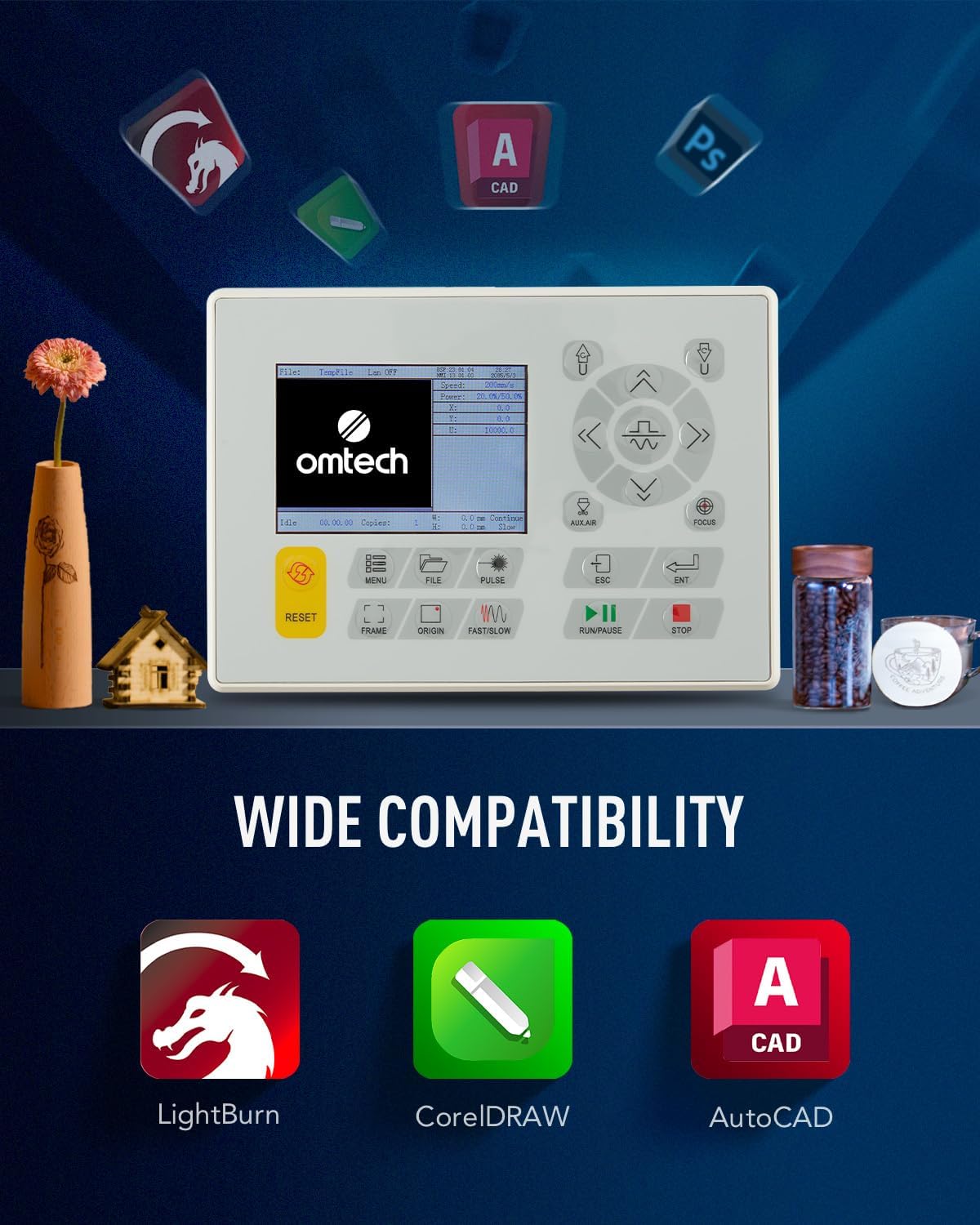
ചിത്രം 3: രൂപകൽപ്പനയ്ക്കും പ്രവർത്തനത്തിനുമായി അനുയോജ്യമായ സോഫ്റ്റ്വെയറിനെ പ്രതിനിധീകരിക്കുന്ന മെഷീനിന്റെ നിയന്ത്രണ പാനലും ഐക്കണുകളും.
പ്രവർത്തന നിർദ്ദേശങ്ങൾ
നിങ്ങളുടെ ലേസർ എൻഗ്രേവറിന്റെ സുരക്ഷിതവും ഫലപ്രദവുമായ പ്രവർത്തനത്തിന് ഈ ഘട്ടങ്ങൾ പാലിക്കുക.
1. നിങ്ങളുടെ ഡിസൈനും മെറ്റീരിയലും തയ്യാറാക്കൽ
- ലേസർ സോഫ്റ്റ്വെയർ ഉപയോഗിച്ച് നിങ്ങളുടെ ഡിസൈൻ സൃഷ്ടിക്കുക അല്ലെങ്കിൽ ഇറക്കുമതി ചെയ്യുക.
- ഉചിതമായ മെറ്റീരിയൽ (ഉദാ: മരം, അക്രിലിക്, തുകൽ) തിരഞ്ഞെടുത്ത് അത് തേൻകൂമ്പ് അല്ലെങ്കിൽ അലുമിനിയം ബ്ലേഡ് വർക്ക്ബെഡിൽ സുരക്ഷിതമായി വയ്ക്കുക.
- ഒപ്റ്റിമൽ കൊത്തുപണി/മുറിക്കൽ ഫലങ്ങൾക്കായി ചുവന്ന ഡോട്ട് പോയിന്റർ ഉപയോഗിച്ച് ലേസർ ഫോക്കസ് ക്രമീകരിക്കുക.

ചിത്രം 4: കൃത്യമായ മെറ്റീരിയൽ പൊസിഷനിംഗിനും ഫോക്കസ് ക്രമീകരണത്തിനും ഉപയോഗിക്കുന്ന ചുവന്ന ഡോട്ട് പോയിന്ററുള്ള ലേസർ ഹെഡ്.
2. കൊത്തുപണി/മുറിക്കൽ നിർവ്വഹിക്കൽ
- നിങ്ങളുടെ മെറ്റീരിയലും ആവശ്യമുള്ള ഫലവും അടിസ്ഥാനമാക്കി സോഫ്റ്റ്വെയറിൽ ആവശ്യമുള്ള പവറും വേഗതയും സജ്ജമാക്കുക. മെഷീൻ 600 mm/s വരെ വേഗത പിന്തുണയ്ക്കുന്നു.
- ലിഡ് അടച്ചിട്ടുണ്ടെന്ന് ഉറപ്പാക്കുക. പ്രവർത്തന സമയത്ത് ലിഡ് തുറന്നാൽ ലേസർ ബീം മുറിക്കുന്ന ഒരു സുരക്ഷാ ഇന്റർലോക്ക് മെഷീനിൽ ഉണ്ട്.
- സോഫ്റ്റ്വെയറിൽ നിന്നോ നിയന്ത്രണ പാനലിൽ നിന്നോ കൊത്തുപണി അല്ലെങ്കിൽ മുറിക്കൽ പ്രക്രിയ ആരംഭിക്കുക.
- ജ്വാല പ്രതിരോധകത്തിലൂടെ പ്രക്രിയ നിരീക്ഷിക്കുക. viewഇൻ വിൻഡോ.

ചിത്രം 5: ലേസർ എൻഗ്രേവർ ഒരു തടി പ്രതലത്തിൽ ഒരു ഡിസൈൻ സജീവമായി പ്രോസസ്സ് ചെയ്യുന്നു, അതിന്റെ കൃത്യത പ്രകടമാക്കുന്നു.
3. ഓപ്പറേഷന് ശേഷം
- പ്രക്രിയ പൂർത്തിയായിക്കഴിഞ്ഞാൽ, എക്സ്ഹോസ്റ്റ് സിസ്റ്റം ശേഷിക്കുന്ന പുക നീക്കം ചെയ്യുന്നതുവരെ കാത്തിരിക്കുക.
- കൊത്തിയെടുത്തതോ മുറിച്ചതോ ആയ വസ്തുക്കൾ ശ്രദ്ധാപൂർവ്വം നീക്കം ചെയ്യുക.
- ദീർഘനേരം ഉപയോഗത്തിലില്ലെങ്കിൽ മെഷീൻ ഓഫ് ചെയ്ത് വൈദ്യുതി വിച്ഛേദിക്കുക.
മെയിൻ്റനൻസ്
നിങ്ങളുടെ ലേസർ എൻഗ്രേവറിന്റെ ആയുസ്സ് വർദ്ധിപ്പിക്കുന്നതിനും ഒപ്റ്റിമൽ പ്രകടനം ഉറപ്പാക്കുന്നതിനും പതിവ് അറ്റകുറ്റപ്പണികൾ നിർണായകമാണ്.
1. ലേസർ ലെൻസുകളും കണ്ണാടികളും വൃത്തിയാക്കൽ
- ലേസർ ലെൻസുകളും പ്രതിഫലന കണ്ണാടികളും ഇടയ്ക്കിടെ ലിന്റ് രഹിത തുണിയും ലെൻസ് ക്ലീനിംഗ് ലായനിയും ഉപയോഗിച്ച് വൃത്തിയാക്കുക. ലേസർ ബീമിന്റെ ഗുണനിലവാരത്തെ ബാധിക്കുന്ന അവശിഷ്ടങ്ങൾ അടിഞ്ഞുകൂടുന്നത് ഇത് തടയുന്നു.
- പ്രവർത്തന സമയത്ത് ലെൻസുകളിലെ അവശിഷ്ടങ്ങൾ കുറയ്ക്കാൻ ബിൽറ്റ്-ഇൻ എയർ അസിസ്റ്റ് സഹായിക്കുന്നു.

ചിത്രം 6: ശരിയായ തണുപ്പിക്കലും പരിചരണവും ആവശ്യമുള്ള ഒരു നിർണായക ഘടകമായ CO2 ലേസർ ട്യൂബ്.
2. വാട്ടർ കൂളിംഗ് സിസ്റ്റം
- കൂളിംഗ് റിസർവോയറിലെ ജലനിരപ്പ് പതിവായി പരിശോധിക്കുകയും ആവശ്യാനുസരണം വാറ്റിയെടുത്ത വെള്ളം നിറയ്ക്കുകയും ചെയ്യുക.
- ആൽഗകളുടെ വളർച്ച തടയുന്നതിനും തണുപ്പിക്കൽ കാര്യക്ഷമത നിലനിർത്തുന്നതിനും ഇടയ്ക്കിടെ വെള്ളം മാറ്റുക.
3 ജനറൽ ക്ലീനിംഗ്
- മെഷീനിന്റെ ജോലിസ്ഥലവും ഉൾഭാഗവും പൊടിയിൽ നിന്നും അവശിഷ്ടങ്ങളിൽ നിന്നും വൃത്തിയായി സൂക്ഷിക്കുക.
- ശരിയായ മെറ്റീരിയൽ സ്ഥാനവും വായുസഞ്ചാരവും ഉറപ്പാക്കാൻ കട്ടയും അലുമിനിയം ബ്ലേഡ് വർക്ക്ബെഡുകളും പതിവായി വൃത്തിയാക്കുക.
ട്രബിൾഷൂട്ടിംഗ്
നിങ്ങൾ അഭിമുഖീകരിച്ചേക്കാവുന്ന പൊതുവായ പ്രശ്നങ്ങളും അവയുടെ സാധ്യമായ പരിഹാരങ്ങളും ഈ വിഭാഗം അഭിസംബോധന ചെയ്യുന്നു.
| പ്രശ്നം | സാധ്യമായ കാരണം | പരിഹാരം |
|---|---|---|
| ലേസർ വെടിവയ്ക്കുന്നില്ല | മൂടി തുറന്നിരിക്കുന്നു, വെള്ളം തണുപ്പിക്കുന്ന പ്രശ്നം, ലേസർ ട്യൂബ് തകരാർ, വൈദ്യുതി വിതരണ പ്രശ്നം. | ലിഡ് അടച്ചിട്ടുണ്ടെന്ന് ഉറപ്പാക്കുക. ജലപ്രവാഹവും താപനിലയും പരിശോധിക്കുക. ലേസർ ട്യൂബിന് കേടുപാടുകൾ സംഭവിച്ചിട്ടുണ്ടോയെന്ന് പരിശോധിക്കുക. പവർ സപ്ലൈ കണക്ഷനുകൾ പരിശോധിക്കുക. |
| മോശം കൊത്തുപണി/മുറിക്കൽ നിലവാരം | തെറ്റായ ഫോക്കസ്, വൃത്തികെട്ട ലെൻസുകൾ/കണ്ണാടി, തെറ്റായ പവർ/വേഗത ക്രമീകരണങ്ങൾ, മെറ്റീരിയൽ പ്രശ്നങ്ങൾ. | ഫോക്കസ് ക്രമീകരിക്കുക. ഒപ്റ്റിക്കൽ ഘടകങ്ങൾ വൃത്തിയാക്കുക. മെറ്റീരിയലിനായി പവർ, വേഗത ക്രമീകരണങ്ങൾ കാലിബ്രേറ്റ് ചെയ്യുക. മെറ്റീരിയൽ പരന്നതാണെന്ന് ഉറപ്പാക്കുക. |
| മെഷീൻ പ്രതികരിക്കുന്നില്ല | സോഫ്റ്റ്വെയർ ആശയവിനിമയ പിശക്, അടിയന്തര സ്റ്റോപ്പ്, വൈദ്യുതി പ്രശ്നം. | സോഫ്റ്റ്വെയറും മെഷീനും റീസ്റ്റാർട്ട് ചെയ്യുക. യുഎസ്ബി/ഇഥർനെറ്റ് കണക്ഷൻ പരിശോധിക്കുക. എമർജൻസി സ്റ്റോപ്പ് ബട്ടൺ വിച്ഛേദിക്കുക. പവർ സപ്ലൈ പരിശോധിക്കുക. |
ഇവിടെ പട്ടികപ്പെടുത്തിയിട്ടില്ലാത്ത പ്രശ്നങ്ങൾ നേരിടുകയോ കൂടുതൽ സഹായം ആവശ്യമുണ്ടെങ്കിൽ, ദയവായി OMTech ഉപഭോക്തൃ പിന്തുണയുമായി ബന്ധപ്പെടുക.
സ്പെസിഫിക്കേഷനുകൾ
OMTech 50W CO2 ലേസർ എൻഗ്രേവറിനുള്ള പ്രധാന സാങ്കേതിക സവിശേഷതകൾ.
| ഫീച്ചർ | വിശദാംശങ്ങൾ |
|---|---|
| നിർമ്മാതാവ് | ഒഎംടെക് |
| ഉൽപ്പന്ന അളവുകൾ | 102 x 65 x 63 സെ.മീ |
| ഭാരം | 75 കി.ഗ്രാം |
| ലേസർ പവർ | 50 വാട്ട് |
| വാല്യംtage | 220 വോൾട്ട് |
| പരമാവധി. കൊത്തുപണി വേഗത | 600 മിമി/സെ |
| പ്രോസസ്സിംഗ് ഏരിയ | 300 x 500 മി.മീ |
| വർക്ക്ബെഡുകൾ | തേൻകോമ്പും അലുമിനിയം ബ്ലേഡും |
| കണക്റ്റിവിറ്റി | യുഎസ്ബി കേബിൾ, ഇതർനെറ്റ് കേബിൾ, യു-ഫ്ലാഷ് ഡ്രൈവ്, ഓഫ്ലൈൻ |

ചിത്രം 7: മെഷീനിന്റെ അളവുകളുടെ ദൃശ്യ പ്രാതിനിധ്യവും അതിന്റെ സാങ്കേതിക സവിശേഷതകളുടെ സംഗ്രഹവും.
വാറൻ്റിയും പിന്തുണയും
OMTech അതിന്റെ ഉൽപ്പന്നങ്ങൾക്ക് പിന്തുണ നൽകുന്നു. എന്തെങ്കിലും പ്രശ്നങ്ങൾക്കോ അന്വേഷണങ്ങൾക്കോ, ദയവായി ഇനിപ്പറയുന്ന വിവരങ്ങൾ പരിശോധിക്കുക:
- തിരികെ നൽകൽ നയം: വാങ്ങിയതിന് 30 ദിവസത്തിനുള്ളിൽ ഉൽപ്പന്നം റീഫണ്ടിനോ മാറ്റിസ്ഥാപിക്കലിനോ അർഹമാണ്.
- ഉപഭോക്തൃ പിന്തുണ: സാങ്കേതിക സഹായം, ട്രബിൾഷൂട്ടിംഗ്, അല്ലെങ്കിൽ വാറന്റി ക്ലെയിമുകൾ എന്നിവയ്ക്കായി, ദയവായി വിൽപ്പനക്കാരനായ OMTech Direct NL-നെ ബന്ധപ്പെടുക അല്ലെങ്കിൽ Amazon-ലെ ഔദ്യോഗിക OMTech സ്റ്റോർ സന്ദർശിക്കുക.
- ഒഎംടെക് സ്റ്റോർ: OMTech സ്റ്റോർ സന്ദർശിക്കുക
Ask a question about this manual
Ask about setup, troubleshooting, compatibility, parts, safety, or missing instructions. Manuals+ will review the question and use this page’s manual context to help answer it.