
1. ആമുഖം
Thank you for choosing the Keychron V1 Wired Custom Mechanical Keyboard. This keyboard features a 75% layout, QMK/VIA programmability, and hot-swappable Keychron K Pro Red switches, offering a highly customizable and comfortable typing experience. It is compatible with Mac, Windows, and Linux operating systems.
2. പാക്കേജ് ഉള്ളടക്കം
ആരംഭിക്കുന്നതിന് മുമ്പ്, നിങ്ങളുടെ പാക്കേജിൽ എല്ലാ ഇനങ്ങളും ഉണ്ടെന്ന് ഉറപ്പാക്കുക:
- 1 x Fully Assembled Keychron V1 Keyboard
- 1 x ടൈപ്പ്-സി മുതൽ ടൈപ്പ്-സി കേബിൾ വരെ
- 1 x ടൈപ്പ്-എ മുതൽ ടൈപ്പ്-സി അഡാപ്റ്റർ വരെ
- 1 x സ്വിച്ച് പുള്ളർ
- 1 x കീക്യാപ്പ് പുള്ളർ
- 1 x സ്ക്രൂഡ്രൈവർ
- 1 x ഹെക്സ് കീ
- Additional Keycaps for Windows/macOS

Image: Contents of the Keychron V1 package.
3. സജ്ജീകരണം
Follow these steps to set up your Keychron V1 keyboard:
- കീബോർഡ് ബന്ധിപ്പിക്കുക: Use the provided USB Type-C to Type-C cable (or Type-A to Type-C adapter) to connect the keyboard to your computer.
- Select Operating System: Locate the system toggle switch on the side of the keyboard. Slide it to the appropriate position for your operating system (Mac or Windows).

Image: System toggle switch for Mac and Windows compatibility.

Image: USB-C cable connection.
The keyboard is designed with an ergonomic angle for comfortable typing. You can adjust the feet on the underside of the keyboard to find your preferred typing angle.

Image: Adjustable feet for ergonomic angle.
4. കീബോർഡ് പ്രവർത്തിപ്പിക്കൽ
The Keychron V1 offers extensive customization and features for an enhanced user experience.
4.1 ക്യുഎംകെ/വിഐഎ പ്രോഗ്രാമബിലിറ്റി
The keyboard supports QMK and VIA software, allowing you to remap keys, create macros, and customize lighting effects. Download the VIA software from the official Keychron website for full customization. The open-source firmware provides endless possibilities for keyboard layouts and shortcuts.

ചിത്രം: ഇഷ്ടാനുസൃതമാക്കലിനുള്ള VIA സോഫ്റ്റ്വെയർ ഇന്റർഫേസ്.
4.2 ഹോട്ട്-സ്വാപ്പ് ചെയ്യാവുന്ന സ്വിച്ചുകൾ
The Keychron V1 comes with pre-lubed Keychron K Pro Red linear switches, offering a smooth and responsive typing feel. The hot-swappable sockets allow you to easily change switches with almost all 3-pin and 5-pin MX mechanical switches on the market (e.g., Cherry, Gateron, Kailh, Panda) without soldering.
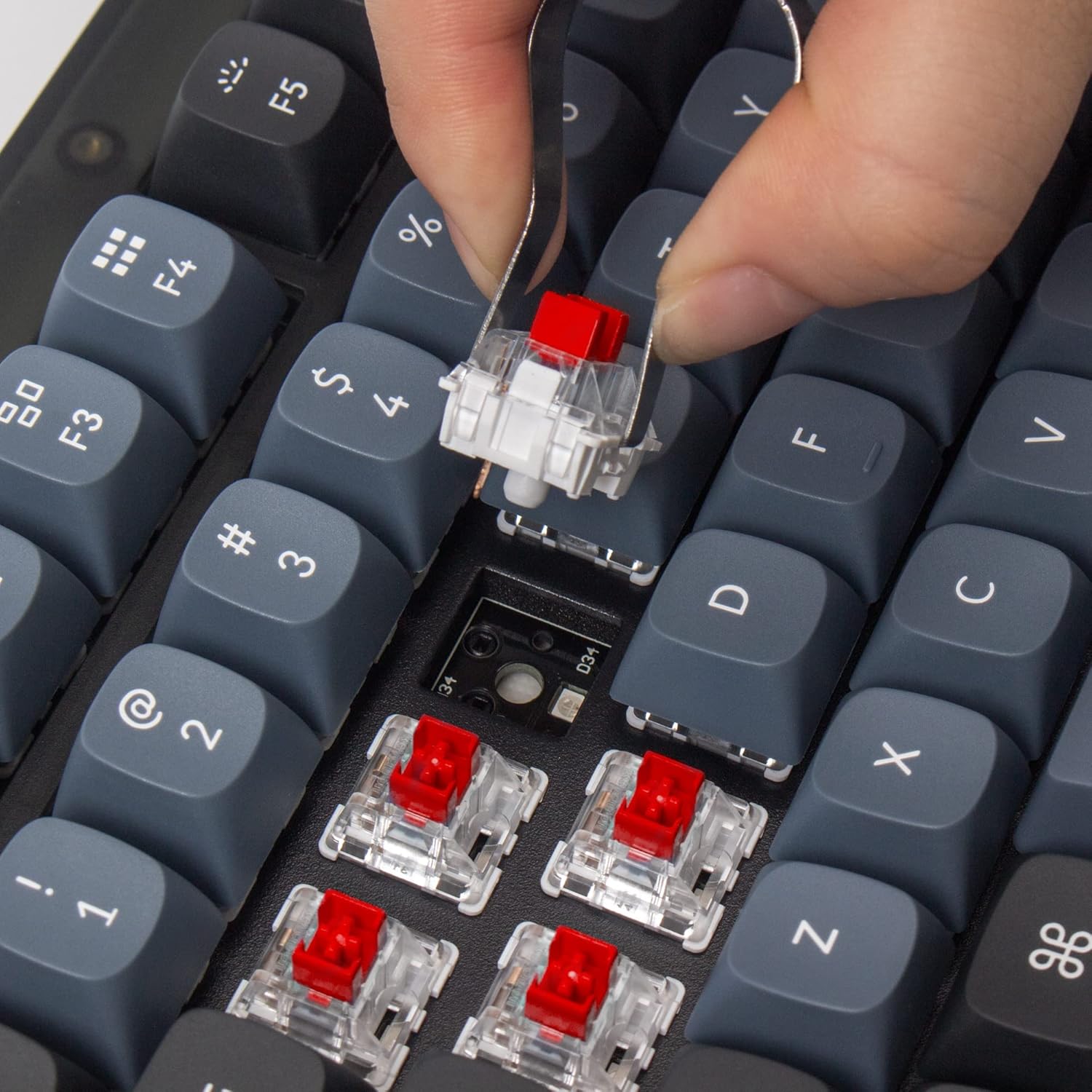
Image: Removing a hot-swappable switch.
4.3 Double-shot PBT Keycaps
The keyboard features durable OSA profile double-shot PBT keycaps. These keycaps provide a comfortable feel and excellent oil resistance for long-term use.

Image: Double-shot PBT keycaps.
4.4 RGB ബാക്ക്ലൈറ്റിംഗ്
The V1 includes south-facing RGB backlighting, designed to better illuminate the keyboard from the typist’s angle and prevent interference when using Cherry-profile keycaps. Various lighting effects can be customized via the VIA software.

Image: RGB backlighting on switches.
4.5 ഉൽപ്പന്നം കഴിഞ്ഞുview വീഡിയോ
വീഡിയോ: ഒരു ഉപയോക്താവ്view highlighting the features and benefits of the Keychron V1 keyboard, including its customizable RGB lighting and mechanical key switches.
5. പരിപാലനം
ശരിയായ അറ്റകുറ്റപ്പണി നിങ്ങളുടെ കീബോർഡിന്റെ ദീർഘായുസ്സും പ്രകടനവും ഉറപ്പാക്കുന്നു.
5.1 വൃത്തിയാക്കൽ
Regularly clean your keyboard using a soft brush or compressed air to remove dust and debris from between the keycaps. For deeper cleaning, keycaps can be removed using the provided keycap puller.
5.2 സ്വിച്ചും കീക്യാപ്പ് മാറ്റിസ്ഥാപിക്കലും
Thanks to the hot-swappable design, switches can be easily replaced without soldering. Use the switch puller to gently remove switches. Similarly, keycaps can be removed with the keycap puller for replacement or cleaning.

ചിത്രം: പൊട്ടിത്തെറിച്ചു view of Keychron V1 components for easy assembly/disassembly.
6. പ്രശ്നപരിഹാരം
If you encounter issues with your Keychron V1 keyboard, refer to the following common solutions:
- കീബോർഡ് കണ്ടെത്താത്ത സോഫ്റ്റ്വെയർ വഴി: If the VIA software does not detect your keyboard, you may need to manually load the appropriate .json file for the Keychron V1. Refer to the Keychron website for detailed instructions on loading firmware and keymap files.
- USB Cable Connectivity Issues: Ensure the USB-C cable is securely connected to both the keyboard and your computer. Try using a different USB port or cable to rule out cable or port malfunctions.
- Incorrect Key Layout: Verify that the operating system toggle switch on the side of the keyboard is set to the correct position (Mac or Windows) for your system.
7 സ്പെസിഫിക്കേഷനുകൾ
| ബ്രാൻഡ് | കീക്രോൺ |
| മോഡൽ നമ്പർ | V1-A1 |
| കണക്റ്റിവിറ്റി ടെക്നോളജി | യുഎസ്ബി-സി (വയേർഡ്) |
| കീബോർഡ് ലേഔട്ട് | 75% ലേഔട്ട് (82 കീകൾ) |
| സ്വിച്ച് തരം | Keychron K Pro Red (Linear) |
| കീക്യാപ് മെറ്റീരിയൽ | Double-shot PBT (OSA Profile) |
| ബാക്ക്ലൈറ്റിംഗ് | RGB (തെക്ക് ദർശനമുള്ളത്) |
| പ്രോഗ്രാമബിലിറ്റി | QMK/VIA പിന്തുണ |
| അനുയോജ്യമായ ഓപ്പറേറ്റിംഗ് സിസ്റ്റങ്ങൾ | macOS, Windows, Linux |
| ഉൽപ്പന്ന അളവുകൾ | 12.93"L x 5.85"W x 1.02"H |
8. വാറൻ്റിയും പിന്തുണയും
For warranty information, technical support, or further assistance, please visit the official Keychron website or contact Keychron customer service directly. Keep your purchase receipt for warranty claims.