
1. ആമുഖം
This manual provides detailed instructions for the installation, operation, and maintenance of your APPS2Car Upgraded Tablet Car Mount. This device is designed to securely hold tablets and smartphones ranging from 4.7 to 13 inches, offering flexible viewing angles for navigation and entertainment in vehicles.
2. ഉൽപ്പന്ന ഘടകങ്ങൾ
- Tablet/Phone Holder Clamp
- Flexible Long Arm (Gooseneck)
- Strong Adhesive Suction Cup Base
- Sticky Stabilizer (optional, for dashboard mounting)

ചിത്രം 2.1: ഒരു ഓവർview of the APPS2Car Tablet Car Mount, showing the device holder, flexible arm, and suction cup base.
3. സജ്ജീകരണ നിർദ്ദേശങ്ങൾ
3.1. Step 1: Choose a Mounting Location
Select a clean, flat surface on your windshield or dashboard. Ensure the chosen location does not obstruct your view വാഹന നിയന്ത്രണങ്ങളിൽ ഇടപെടുകയോ റോഡിന്റെ വശത്തേക്ക് മാറ്റുകയോ ചെയ്യരുത്.
3.2. Step 2: Prepare the Suction Cup
Ensure the suction cup and the mounting surface are clean and dry. For optimal adhesion, especially on textured dashboards, consider using the included sticky stabilizer pad.
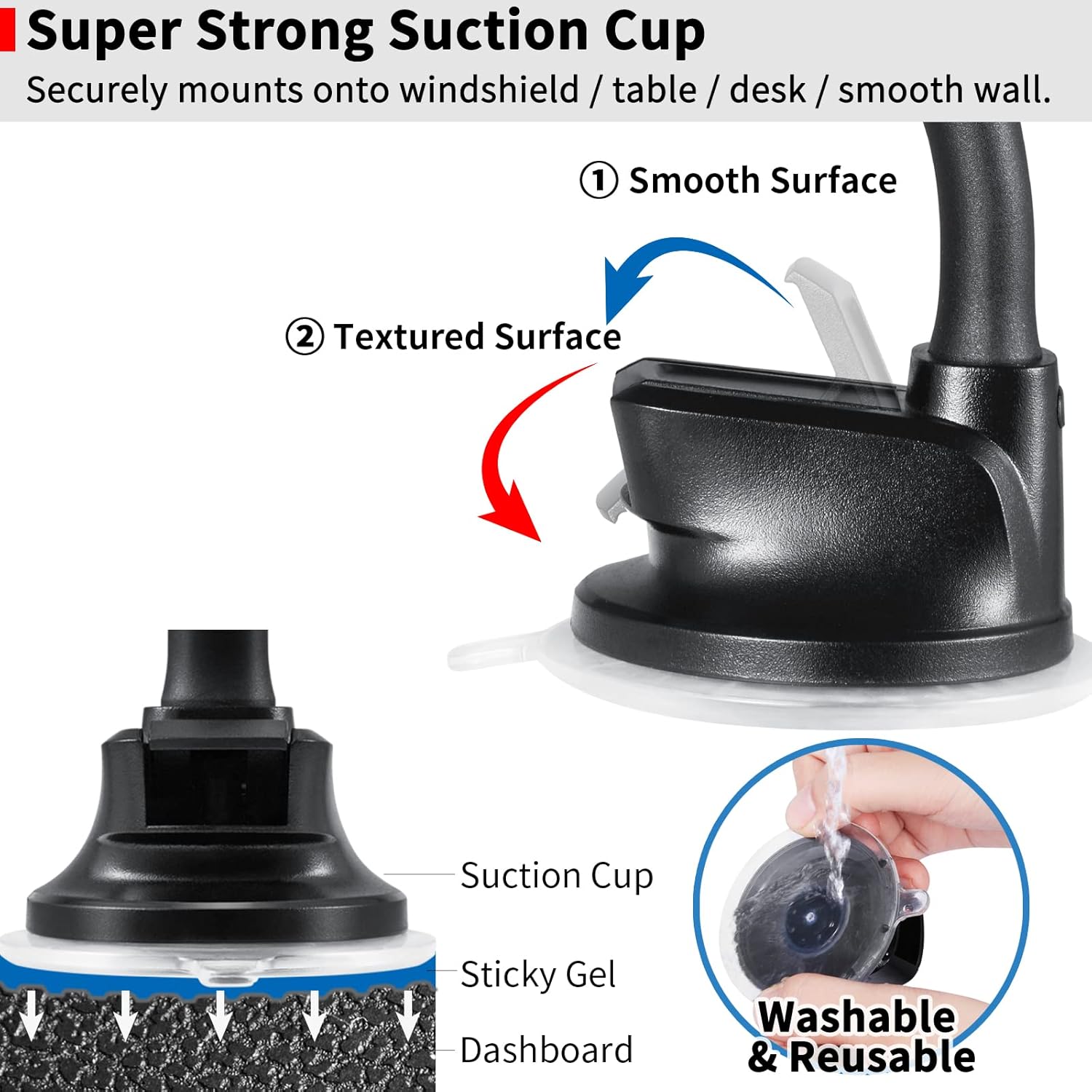
ചിത്രം 3.1: This image illustrates the strong suction cup mechanism, detailing its sticky gel pad for secure attachment to both smooth windshields and textured dashboards. It also shows how to wash and reuse the suction cup.
3.3. Step 3: Attach the Mount
Press the suction cup firmly against the chosen surface. While maintaining pressure, push down the locking lever on the suction cup base to create a vacuum seal.
If mounting on a dashboard, attach the sticky stabilizer to the dashboard first, then attach the suction cup to the stabilizer.
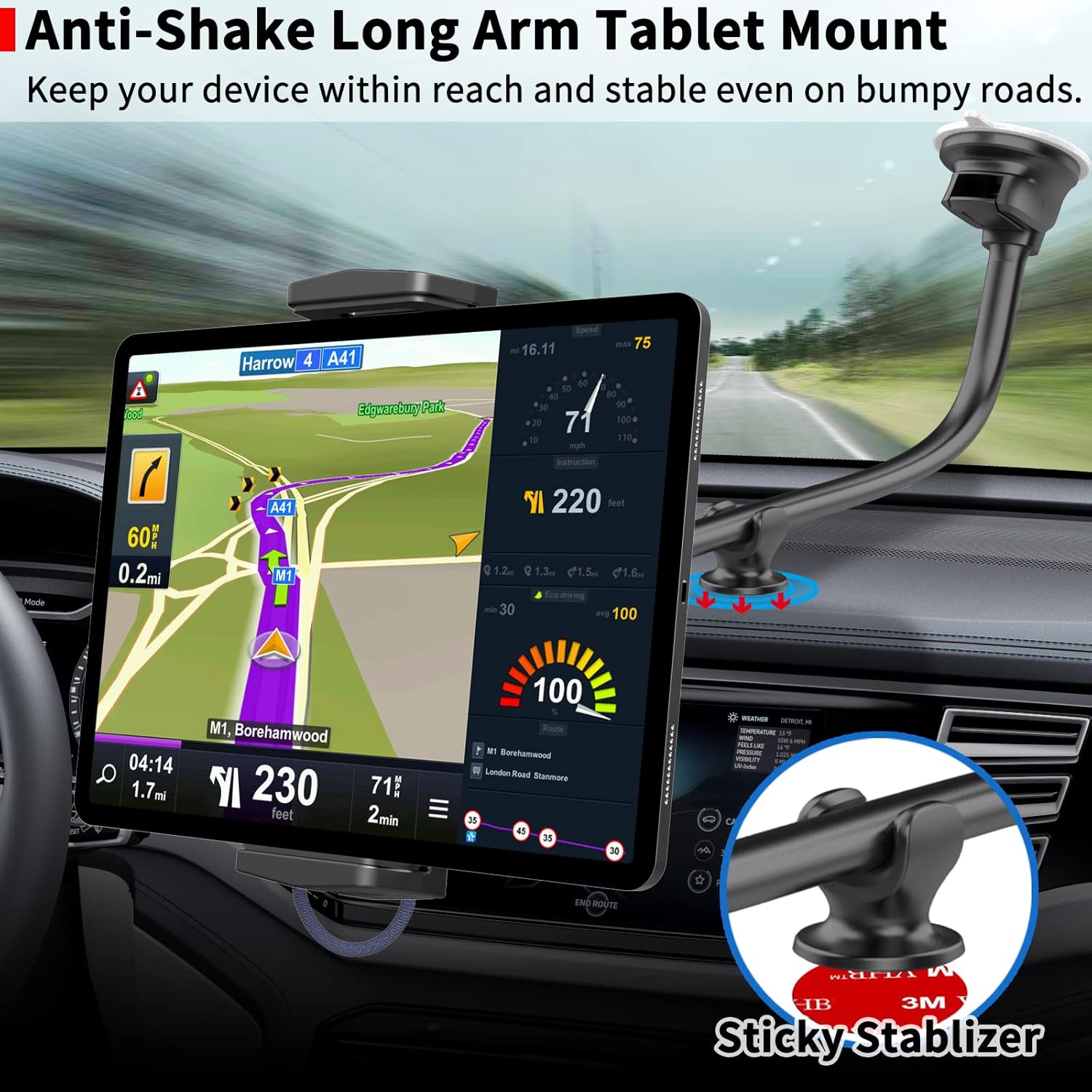
ചിത്രം 3.2: This image demonstrates the tablet mount installed in a car, highlighting the use of a sticky stabilizer on the dashboard to reduce shaking and enhance stability for the long arm.
4. പ്രവർത്തന നിർദ്ദേശങ്ങൾ
4.1. Inserting Your Device
Gently pull apart the adjustable clamps of the holder. Place your tablet or smartphone into the holder, ensuring it is securely gripped by the clamps.
For tablets, grip the device by its left and right edges. For phones, grip by the long side for a secure hold.
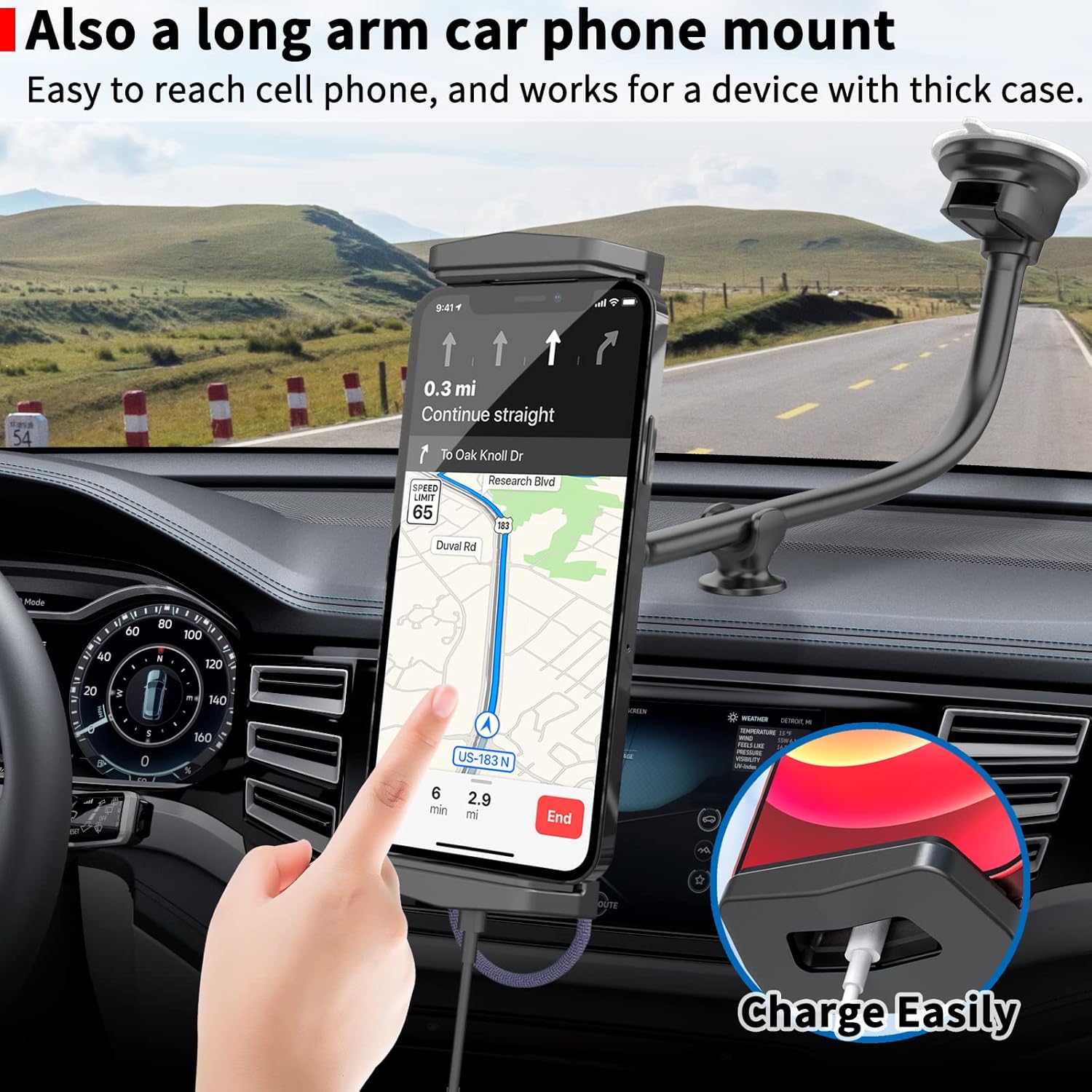
ചിത്രം 4.1: This image shows a smartphone mounted vertically in the holder, demonstrating how the design allows for easy charging with a dedicated cable hole at the bottom.
4.2. ക്രമീകരിക്കുന്നു Viewing ആംഗിൾ
The flexible long arm (gooseneck) allows for precise positioning. Bend the arm to achieve your desired viewing height and distance.
The device holder features 240-degree tiltability and 360-degree rotation. Adjust these features to switch between landscape and portrait orientations or to find the optimal viewing ആംഗിൾ.

ചിത്രം 4.2: This image highlights the robust 17mm thick aluminum gooseneck arm, emphasizing its durability and flexibility for positioning devices. It also contrasts it with thinner, less stable arms.
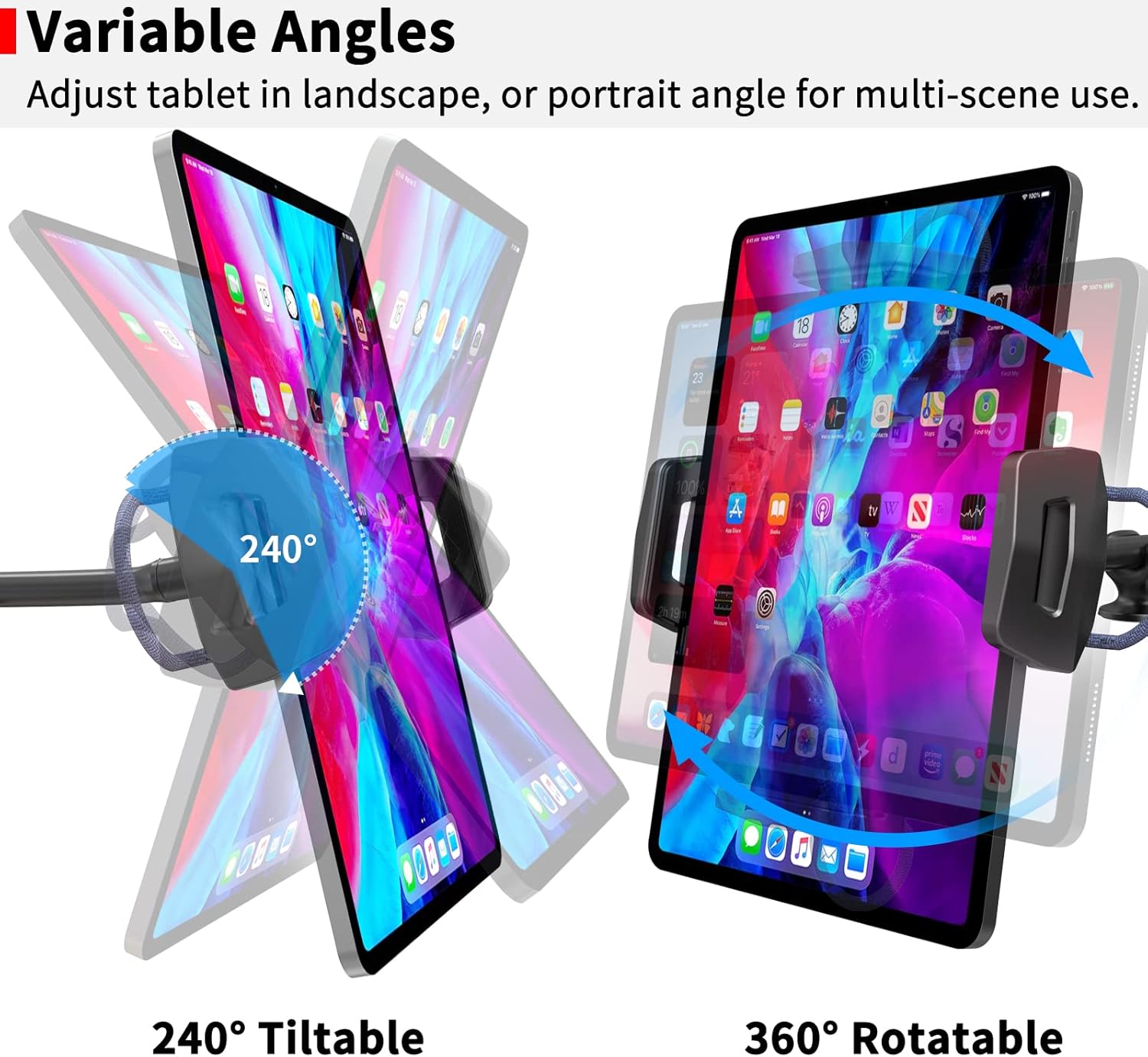
ചിത്രം 4.3: This image visually explains the adjustable features of the holder, including its 240-degree tilt range and full 360-degree rotation, allowing for versatile viewing angles in both landscape and portrait modes.
5 അനുയോജ്യത
The APPS2Car Tablet Car Mount is compatible with most tablets and smartphones with screen sizes ranging from 4.7 to 13 inches.
- ഗുളികകൾ: iPad Pro (9.7, 10.5, 11, 12.9, 13 inches), iPad mini (all generations), iPad Air (all generations), iPad (all generations), Fire Tablets, Samsung Tablets, and similar devices.
- സ്മാർട്ട്ഫോണുകൾ: All iPhone models, Samsung Galaxy Z Fold series, Samsung Galaxy S series, Samsung Galaxy Note series, Google Pixel phones, and similar devices.
പ്രധാന കുറിപ്പ്: The holder clamp opens up to 220 mm (8.66 inches) wide and has a depth of 20 mm (0.79 inches). It is not compatible with iPad Pro 12.9-inch or 13-inch models when used with a thick protective case. It does not work for laptops, portable carplay, or car tablets.

ചിത്രം 5.1: This image illustrates the upgraded design of the holder clamp, showing its wider and deeper dimensions (Min: 120mm - Max: 220mm, Depth: 20mm) for enhanced stability and compatibility with a broader range of devices from 4.7 to 12.9 inches, including case-friendly designs.
6. പരിപാലനം
6.1. Cleaning the Suction Cup
If the suction cup loses its stickiness, rinse it with warm water and allow it to air dry completely. This will restore its adhesive properties.
6.2 ജനറൽ ക്ലീനിംഗ്
മൗണ്ട് ഒരു സോഫ്റ്റ്, ഡി ക്ലീനർ ഉപയോഗിച്ച് തുടയ്ക്കുക.amp പൊടിയും അവശിഷ്ടങ്ങളും നീക്കം ചെയ്യാൻ തുണി ഉപയോഗിക്കുക. കഠിനമായ രാസവസ്തുക്കളോ അബ്രസീവ് ക്ലീനറുകളോ ഉപയോഗിക്കുന്നത് ഒഴിവാക്കുക.
7. പ്രശ്നപരിഹാരം
- Issue: Mount is not sticking securely.
Solution: Ensure the mounting surface and suction cup are clean and dry. Re-apply the suction cup, pressing firmly and engaging the locking lever. If on a textured dashboard, ensure the sticky stabilizer is properly applied. Rinse the suction cup with warm water and air dry if it has lost stickiness. - Issue: Device feels unstable or shakes excessively.
Solution: Ensure the device is centered and securely clamped. Verify the suction cup is firmly attached. If using on a dashboard, ensure the sticky stabilizer is used and properly adhered. Adjust the flexible arm to a more stable position, avoiding extreme extensions if possible. - Issue: Device does not fit in the holder.
Solution: Check the compatibility section. The holder supports devices from 4.7 to 13 inches, with a maximum clamp opening of 220mm and depth of 20mm. Large tablets with thick cases may not fit.
8 സ്പെസിഫിക്കേഷനുകൾ
- മോഡൽ നമ്പർ: IP2S-S3L
- Compatible Device Sizes: 4.7 to 13 inches (smartphones and tablets)
- ഹോൾഡർ Clamp തുറക്കുന്നു: Minimum 120 mm (4.72 in) to Maximum 220 mm (8.66 in)
- ഹോൾഡർ Clamp ആഴം: 20 മിമി (0.79 ഇഞ്ച്)
- കൈ നീളം: 13 inches (flexible gooseneck)
- ആകെ നീളം: 15 ഇഞ്ച്
- Arm Thickness: 17 മി.മീ
- മൗണ്ടിംഗ് തരം: Windshield, Dashboard (with sticky stabilizer)
- റൊട്ടേഷൻ: 360 ഡിഗ്രി
- ടിൽറ്റ്: 240 ഡിഗ്രി
- ഇനത്തിൻ്റെ ഭാരം: 9.9 ഔൺസ്
- പാക്കേജ് അളവുകൾ: 6.18 x 4.06 x 2.87 ഇഞ്ച്
- പ്രത്യേക സവിശേഷതകൾ: Adjustable, Hands-Free, Rotatable, Scratch Resistant, Tilt Head
9. വാറൻ്റിയും പിന്തുണയും
For warranty information or technical support, please refer to the official APPS2Car webസൈറ്റിൽ നൽകുകയോ അവരുടെ ഉപഭോക്തൃ സേവനവുമായി നേരിട്ട് ബന്ധപ്പെടുകയോ ചെയ്യുക. കോൺടാക്റ്റ് വിശദാംശങ്ങൾ സാധാരണയായി നിങ്ങളുടെ ഉൽപ്പന്ന പാക്കേജിംഗിലോ നിർമ്മാതാവിന്റെയോ പട്ടികയിൽ നൽകിയിട്ടുണ്ട്. webസൈറ്റ്.