
Acoustic Audio by Goldwood 2.1 Channel Sound Bar with Wired Subwoofer
Model: AASB1102W
ആമുഖം
വാങ്ങിയതിന് നന്ദി.asing the Acoustic Audio by Goldwood 2.1 Channel Sound Bar with Wired Subwoofer. This system is designed to enhance your audio experience for television, movies, music, and more. Please read this manual carefully before operating the device to ensure proper use and to maximize its performance.
സുരക്ഷാ വിവരങ്ങൾ
- മഴ, ഈർപ്പം, അല്ലെങ്കിൽ തീവ്രമായ താപനില എന്നിവയിൽ യൂണിറ്റ് തുറന്നുകാട്ടരുത്.
- Ensure proper ventilation around the sound bar and subwoofer.
- സി തുറക്കരുത്.asing. എല്ലാ സേവനങ്ങളും യോഗ്യതയുള്ള ഉദ്യോഗസ്ഥർക്ക് റഫർ ചെയ്യുക.
- നൽകിയിരിക്കുന്ന പവർ കോർഡ് മാത്രം ഉപയോഗിക്കുക.
- Keep the remote control batteries out of reach of children.
പാക്കേജ് ഉള്ളടക്കം
താഴെ ലിസ്റ്റ് ചെയ്തിരിക്കുന്ന എല്ലാ ഇനങ്ങളും നിങ്ങളുടെ പാക്കേജിൽ ഉൾപ്പെടുത്തിയിട്ടുണ്ടെന്ന് ഉറപ്പാക്കുക:
- സൗണ്ട് ബാർ
- വയർഡ് സബ് വൂഫർ
- 5-foot HDMI Cable
- ഡിജിറ്റൽ ഒപ്റ്റിക്കൽ കേബിൾ
- 3.5 എംഎം ഓക്സ് കേബിൾ
- മൌണ്ടിംഗ് ഹാർഡ്വെയർ
- പവർ കോർഡ്
- റിമോട്ട് കൺട്രോൾ

Image: Contents of the product package, including the soundbar, subwoofer, remote, and connection cables.
ഉൽപ്പന്നം കഴിഞ്ഞുview
സൗണ്ട് ബാർ ഫ്രണ്ട് View

ചിത്രം: മുൻഭാഗം view of the sound bar, featuring a sleek black design with a metal mesh grille.
Sound Bar Rear View (കണക്ഷനുകൾ)

ചിത്രം: പിൻഭാഗം view of the sound bar, highlighting the various input ports including AUX IN, OPTICAL IN, and TV (ARC).
വയർഡ് സബ് വൂഫർ

ചിത്രം: വശം view of the wired subwoofer, showing its compact design and bass port.
സജ്ജമാക്കുക
1. പ്ലേസ്മെന്റ്
- സൗണ്ട് ബാർ: Place the sound bar on a flat surface directly in front of your TV, or mount it on the wall below your TV. Ensure it is not obstructed.
- സബ്വൂഫർ: Position the wired subwoofer on the floor near the sound bar. Its compact size allows for flexible placement.
2. കണക്ഷനുകൾ
Choose one of the following connection methods to link your sound bar to your audio source (TV, PC, etc.):
- എച്ച്ഡിഎംഐ ആർസി: Connect one end of the HDMI cable to the TV (ARC) port on the sound bar and the other end to the HDMI ARC port on your TV. This allows for audio return channel functionality.
- ഒപ്റ്റിക്കൽ: Connect one end of the digital optical cable to the OPTICAL IN port on the sound bar and the other end to the optical output port on your TV or audio source.
- ഓക്സ്: Connect one end of the 3.5mm Aux cable to the AUX IN port on the sound bar and the other end to the 3.5mm audio output jack on your TV, PC, or other device.
- ബ്ലൂടൂത്ത്: For wireless connection, refer to the Bluetooth pairing instructions in the Operating section.
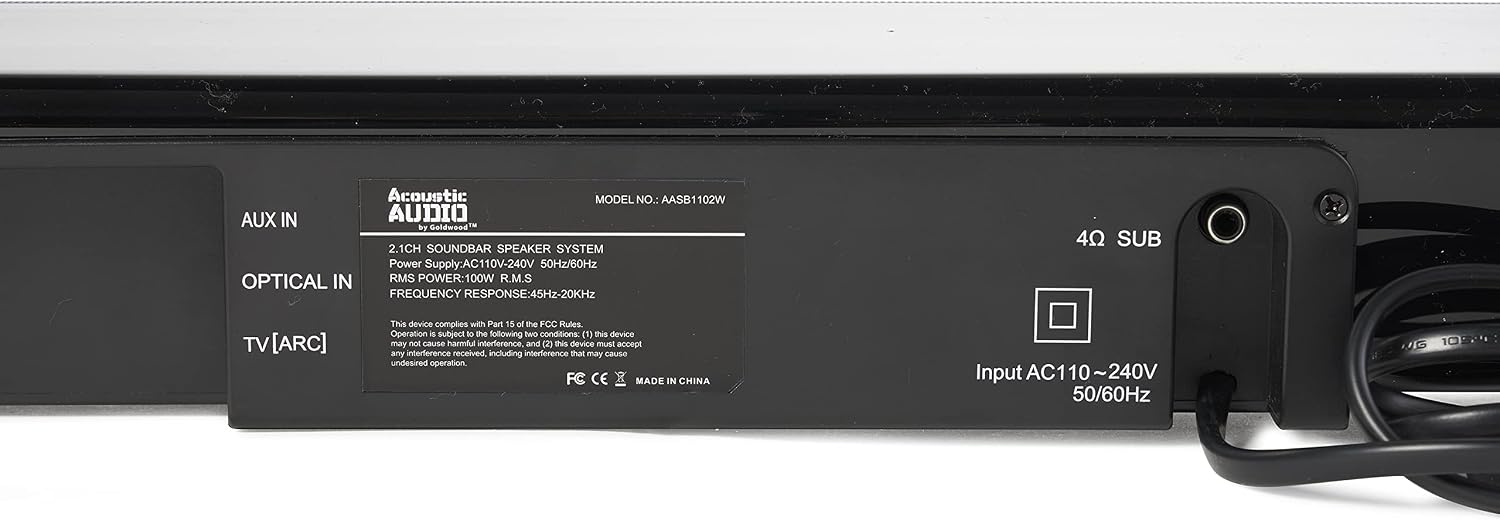
ചിത്രം: വിശദമായത് view of the sound bar's rear panel, showing AUX IN, OPTICAL IN, and TV (ARC) ports, along with the subwoofer output and power input.
3. പവർ കണക്ഷൻ
Connect the power cord to the sound bar's power input and then plug it into a standard electrical outlet.
4. വാൾ മൗണ്ടിംഗ് (ഓപ്ഷണൽ)
Use the included mounting hardware to securely attach the sound bar to a wall. Ensure the wall can support the weight of the sound bar and follow all safety guidelines for installation.
പ്രവർത്തന നിർദ്ദേശങ്ങൾ
1. പവർ ഓൺ/ഓഫ്
Press the power button on the sound bar or the remote control to turn the unit on or off.
2. ഇൻപുട്ട് തിരഞ്ഞെടുക്കൽ
Press the 'Input' or 'Source' button on the remote control or sound bar to cycle through available input modes: HDMI (ARC), Optical, AUX, and Bluetooth. The selected input will be displayed on the sound bar's front panel.

Image: The sound bar's front display showing the active input mode, in this case, 'Bluetooth'.
3. ബ്ലൂടൂത്ത് ജോടിയാക്കൽ
- Switch the sound bar to Bluetooth mode. The display will show 'BT' and may flash, indicating it's ready for pairing.
- On your mobile device (phone, tablet, PC), enable Bluetooth and search for available devices.
- Select 'AASB1102W' from the list. Once paired, the sound bar will indicate a successful connection.

Image: A graphic representation of the Bluetooth logo, indicating wireless connectivity.
4. വോളിയം നിയന്ത്രണം
Use the Volume Up (+) and Volume Down (-) buttons on the remote control or sound bar to adjust the master volume.
5. Bass and Treble Adjustment
Use the dedicated bass and treble controls on the remote to fine-tune the audio output to your preference.

Image: A graphic of a volume knob, symbolizing adjustable bass and treble settings.
6. Listening Modes
The sound bar features three preset listening modes: Movie, Music, and Dialogue. Press the corresponding button on the remote control to select the mode best suited for your content.

Image: A graphic of multiple speaker icons, representing the different listening modes available.
7. റിമോട്ട് കൺട്രോൾ

Image: The sound bar positioned next to its remote control, showing the compact design of both units.
The remote control provides full functionality for the sound bar, including power, input selection, volume, bass/treble adjustment, and listening modes. Ensure batteries are correctly inserted.
മെയിൻ്റനൻസ്
- വൃത്തിയാക്കൽ: സൗണ്ട് ബാറിന്റെയും സബ് വൂഫറിന്റെയും പ്രതലങ്ങൾ വൃത്തിയാക്കാൻ മൃദുവായതും ഉണങ്ങിയതുമായ തുണി ഉപയോഗിക്കുക. ലിക്വിഡ് ക്ലീനറുകളോ അബ്രസീവ് വസ്തുക്കളോ ഉപയോഗിക്കരുത്.
- സംഭരണം: യൂണിറ്റ് ദീർഘനേരം സൂക്ഷിക്കുകയാണെങ്കിൽ, അത് വൈദ്യുതിയിൽ നിന്ന് വിച്ഛേദിച്ച് തണുത്തതും വരണ്ടതുമായ സ്ഥലത്ത് സൂക്ഷിക്കുക.
ട്രബിൾഷൂട്ടിംഗ്
| പ്രശ്നം | സാധ്യമായ കാരണം | പരിഹാരം |
|---|---|---|
| ശക്തിയില്ല | പവർ കോർഡ് ബന്ധിപ്പിച്ചിട്ടില്ല; പവർ ഔട്ട്ലെറ്റ് സജീവമല്ല. | Ensure power cord is securely connected; Try a different power outlet |
| ശബ്ദമില്ല | തെറ്റായ ഇൻപുട്ട് തിരഞ്ഞെടുത്തു; വോളിയം വളരെ കുറവാണ്; കേബിളുകൾ ശരിയായി ബന്ധിപ്പിച്ചിട്ടില്ല. | Select correct input source; Increase volume; Check all cable connections |
| ബ്ലൂടൂത്ത് കണക്റ്റ് ചെയ്യുന്നില്ല | Sound bar not in pairing mode; Device Bluetooth off; Device too far | Ensure sound bar is in BT mode; Enable Bluetooth on your device; Move device closer to sound bar |
| റിമോട്ട് കൺട്രോൾ പ്രവർത്തിക്കുന്നില്ല | Batteries depleted or incorrectly inserted; Obstruction between remote and sound bar | Replace batteries; Ensure clear line of sight to sound bar sensor |
സ്പെസിഫിക്കേഷനുകൾ
| ഫീച്ചർ | വിശദാംശങ്ങൾ |
|---|---|
| മോഡലിൻ്റെ പേര് | AASB1102W |
| സ്പീക്കർ തരം | Soundbar, Subwoofer, Surround Sound |
| പ്രത്യേക ഫീച്ചർ | ബാസ് ബൂസ്റ്റ് |
| ശുപാർശ ചെയ്യുന്ന ഉപയോഗങ്ങൾ | For Smartphones or Tablets, For Surround Sound, Television |
| അനുയോജ്യമായ ഉപകരണങ്ങൾ | പേഴ്സണൽ കമ്പ്യൂട്ടർ, ടെലിവിഷൻ |
| സറൗണ്ട് സൗണ്ട് ചാനൽ കോൺഫിഗറേഷൻ | 2.1 |
| ഉൽപ്പന്ന അളവുകൾ (സൗണ്ട്ബാർ) | 3.5"D x 35.5"W x 3"H |
| ഇനത്തിൻ്റെ ഭാരം | 16 പൗണ്ട് (ആകെ സിസ്റ്റം) |
| നിയന്ത്രണ രീതി | റിമോട്ട് |
| വയർലെസ് കമ്മ്യൂണിക്കേഷൻ ടെക്നോളജി | ബ്ലൂടൂത്ത് 5.0 |
| സ്പീക്കർ വലിപ്പം | 36.25 Inches (Soundbar length) |
| പവർ ഉറവിടം | കോർഡഡ് ഇലക്ട്രിക് |
| വൂഫർ വ്യാസം | 6 ഇഞ്ച് |
| ജല പ്രതിരോധ നില | വാട്ടർ റെസിസ്റ്റൻ്റ് അല്ല |
| ബ്ലൂടൂത്ത് ശ്രേണി | 10 മീറ്റർ |
| സബ്വൂഫർ കണക്റ്റിവിറ്റി സാങ്കേതികവിദ്യ | വയർഡ് |
| സ്പീക്കർ പരമാവധി ഔട്ട്പുട്ട് പവർ | 200 വാട്ട്സ് |
| കണക്റ്റിവിറ്റി ടെക്നോളജി | Auxiliary, Optical, USB (Note: USB for service/firmware, not audio playback) |
| ഓഡിയോ put ട്ട്പുട്ട് മോഡ് | ചുറ്റുക |
| മൗണ്ടിംഗ് തരം | ബാർ മൗണ്ട് |
വാറൻ്റി വിവരങ്ങൾ
ഈ ഉൽപ്പന്നം എ 30-day VMInnovations warranty. Please refer to your purchase documentation or contact VMInnovations for specific terms and conditions regarding warranty claims.
ഉപഭോക്തൃ പിന്തുണ
For further assistance, technical support, or warranty inquiries, please contact Acoustic Audio by Goldwood customer service or visit their official website. You can also refer to the brand store on Amazon for additional product information: Acoustic Audio by Goldwood Store.