
1. ആമുഖം
വാങ്ങിയതിന് നന്ദി.asing the SIMATE 6.5-inch Self-Balancing Hoverboard. This manual provides essential information for the safe operation, maintenance, and troubleshooting of your device. Please read this manual thoroughly before using the hoverboard to ensure a safe and enjoyable experience. Keep this manual for future reference.

Image 1.1: The SIMATE 6.5-inch Self-Balancing Hoverboard, showcasing its design and LED lights.
2 സുരക്ഷാ വിവരങ്ങൾ
Your safety is paramount. Operating a hoverboard carries inherent risks. Adhere to all safety guidelines to prevent injury or damage.
- UL2272 Safety Certified: This hoverboard has passed UL2272 safety certification, ensuring compliance with U.S. safety regulations for electrical systems.
- സംരക്ഷണ ഗിയർ: Always wear a helmet, knee pads, elbow pads, and wrist guards when riding.
- പ്രായവും ഭാര പരിധിയും: This product is recommended for users within the specified age and weight ranges. Refer to the specifications section for details.
- പരിസ്ഥിതി വ്യവസ്ഥകൾ: Do not ride in wet conditions, on uneven terrain, or near traffic. Avoid steep inclines.
- അവബോധം: Be aware of your surroundings, pedestrians, and obstacles.
- വേഗത നിയന്ത്രണം: Operate at a safe speed. The hoverboard has built-in over-speed protection.
- കാൽ സ്ഥാപിക്കൽ: Always place your feet firmly on the non-slip footpads.

Image 2.1: Visual representation of the hoverboard's key performance and safety features, including UL2272 certification, max speed, max distance, max weight, and solid rubber wheels.
3. പാക്കേജ് ഉള്ളടക്കം
പാക്കേജിൽ എല്ലാ ഇനങ്ങളും ഉണ്ടെന്ന് ഉറപ്പാക്കുക:
- SIMATE 6.5-inch Self-Balancing Hoverboard
- പവർ ചാർജർ
- ഉപയോക്തൃ മാനുവൽ
4. ഉൽപ്പന്നം കഴിഞ്ഞുview
Familiarize yourself with the different parts of your SIMATE hoverboard.

Image 4.1: Labeled diagram of the hoverboard, indicating the Non-Slip Footpad, Battery Indicator light, 360° Rotation Axis, LED Front Light, Switch and Charging port, and 6.5" Wheel with LED Lights.
- Non-Slip Footpad: Provides grip for your feet during operation.
- ബാറ്ററി ഇൻഡിക്കേറ്റർ ലൈറ്റ്: നിലവിലെ ബാറ്ററി നില പ്രദർശിപ്പിക്കുന്നു.
- 360° Rotation Axis: Allows for smooth turns and maneuvers.
- LED ഫ്രണ്ട് ലൈറ്റ്: Enhances visibility and adds to the aesthetic.
- Switch and Charging Port: Power button and port for connecting the charger.
- 6.5" Wheel with LED Lights: Solid rubber wheels with integrated LED lighting.
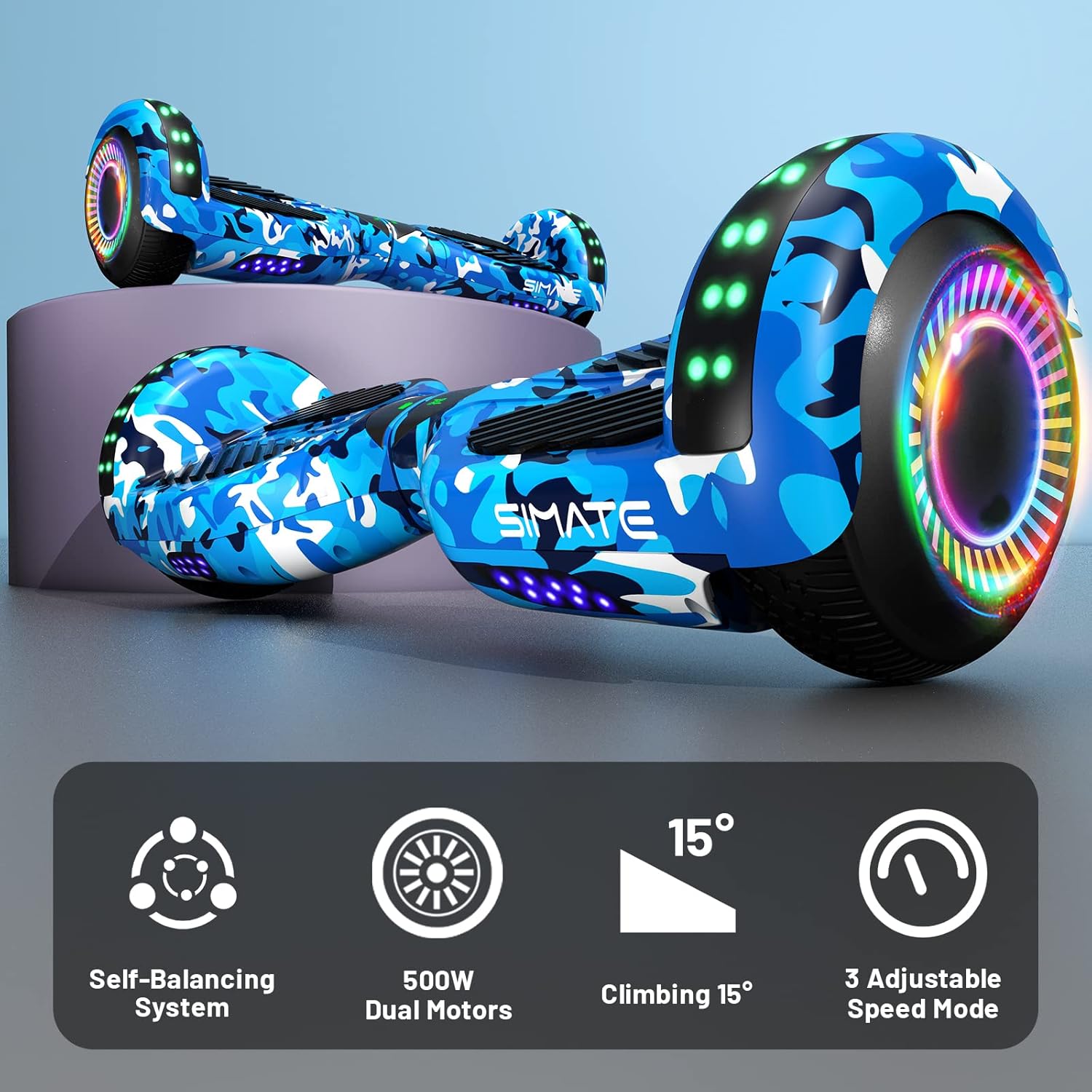
Image 4.2: Icons illustrating key features: Self-Balancing System, 500W Dual Motors, 15° Climbing capability, and 3 Adjustable Speed Modes.
5. സജ്ജീകരണം
5.1 പ്രാരംഭ ചാർജിംഗ്
- Ensure the hoverboard is powered off.
- Connect the charger to the charging port on the hoverboard.
- ഒരു സാധാരണ ഇലക്ട്രിക്കൽ ഔട്ട്ലെറ്റിലേക്ക് ചാർജർ പ്ലഗ് ചെയ്യുക.
- The battery indicator light will show charging status. Charge until the indicator shows a full charge (typically 2-3 hours).
- ബാറ്ററി അമിതമായി ചാർജ് ചെയ്യരുത്. പൂർണ്ണമായി ചാർജ് ചെയ്തുകഴിഞ്ഞാൽ ചാർജർ വിച്ഛേദിക്കുക.
5.2 Calibration (First Use)
For optimal performance, it is recommended to calibrate the hoverboard before its first use or if it seems unbalanced.
- Place the hoverboard on a flat, level surface.
- Ensure the hoverboard is powered off.
- Press and hold the power button for approximately 5-10 seconds until the indicator lights flash.
- Release the power button. The hoverboard is now calibrated.
- Power off and then power on the hoverboard normally before riding.
6. പ്രവർത്തന നിർദ്ദേശങ്ങൾ
6.1 ഹോവർബോർഡ് റൈഡിംഗ്
- Power on the hoverboard. The self-balancing system will activate.
- Place one foot on a footpad, ensuring the hoverboard remains level.
- Quickly step onto the other footpad with your second foot. Maintain a relaxed posture.
- മുന്നോട്ട് നീങ്ങാൻ അല്പം മുന്നോട്ട് ചായുക, വേഗത കുറയ്ക്കാനോ പിന്നോട്ട് പോകാനോ പിന്നിലേക്ക് ചായുക.
- To turn, apply gentle pressure with one foot (e.g., press left footpad down to turn right).
- To dismount, step off one foot at a time, ensuring the hoverboard remains stable.
6.2 ബ്ലൂടൂത്ത് സ്പീക്കർ പ്രവർത്തനം
The hoverboard features a built-in Bluetooth speaker for audio playback.
- Ensure the hoverboard is powered on.
- നിങ്ങളുടെ സ്മാർട്ട്ഫോണിലോ ഓഡിയോ ഉപകരണത്തിലോ ബ്ലൂടൂത്ത് സജീവമാക്കുക.
- ഇതിനായി തിരയുക available Bluetooth devices and select "SIMATE Hoverboard" (or similar name).
- Once paired, you can play audio through the hoverboard's speakers.

Image 6.1: The hoverboard's integrated Bluetooth speaker and LED lights, enhancing the riding experience.
6.3 LED ലൈറ്റുകൾ
The hoverboard is equipped with bright LED lights on the front and wheels. These lights activate automatically when the hoverboard is powered on, providing increased visibility and a dynamic appearance during use.
6.4 സ്പീഡ് മോഡുകൾ
The SIMATE hoverboard offers 3 adjustable speed modes. Consult the specific instructions provided with your hoverboard for details on how to switch between these modes, typically involving a sequence of power button presses or an associated mobile application if available.
7. പരിപാലനം
7.1 വൃത്തിയാക്കൽ
- Power off the hoverboard before cleaning.
- ഒരു സോഫ്റ്റ് ഉപയോഗിക്കുക, ഡിamp പുറംഭാഗം തുടയ്ക്കാൻ തുണി ഉപയോഗിക്കുക. കഠിനമായ രാസവസ്തുക്കളോ ഉരച്ചിലുകളുള്ള ക്ലീനറുകളോ ഉപയോഗിക്കുന്നത് ഒഴിവാക്കുക.
- Do not spray water directly onto the hoverboard, as this can damage electronic components.
7.2 ബാറ്ററി കെയർ
- ആദ്യ ഉപയോഗത്തിന് മുമ്പ് ബാറ്ററി പൂർണ്ണമായും ചാർജ് ചെയ്യുക.
- Avoid completely draining the battery. Recharge it regularly, even if not in frequent use.
- Store the hoverboard in a cool, dry place away from direct sunlight and extreme temperatures.
7.3 സംഭരണം
When storing the hoverboard for extended periods, ensure it is fully charged and stored in a dry environment. Periodically charge the battery (e.g., every 2-3 months) to maintain battery health.
8. പ്രശ്നപരിഹാരം
If you encounter issues with your SIMATE hoverboard, refer to the following common problems and solutions:
| പ്രശ്നം | സാധ്യമായ കാരണം | പരിഹാരം |
|---|---|---|
| ഹോവർബോർഡ് ഓണാകുന്നില്ല | ബാറ്ററി ചാർജ് കുറവാണ്; പവർ ബട്ടൺ ശരിയായി അമർത്തിയിട്ടില്ല. | Charge the hoverboard; Ensure power button is pressed firmly. |
| Hoverboard is unbalanced or beeping | Needs calibration; Sensor issue | Perform calibration as described in Section 5.2. If issue persists, contact support. |
| ലൈറ്റുകൾ പ്രവർത്തിക്കുന്നില്ല | Loose connection; LED malfunction | Ensure hoverboard is powered on. If issue persists, contact support. |
| ബ്ലൂടൂത്ത് കണക്റ്റ് ചെയ്യുന്നില്ല | Hoverboard not in pairing mode; Device Bluetooth off | Ensure hoverboard is on. Check device Bluetooth settings. Try re-pairing. |
| ചെറിയ ബാറ്ററി ലൈഫ് | Battery not fully charged; Old battery | Ensure full charge. Battery performance may degrade over time. |
For issues not listed here or if troubleshooting steps do not resolve the problem, please contact SIMATE customer support.
9 സ്പെസിഫിക്കേഷനുകൾ
Detailed technical specifications for the SIMATE 6.5-inch Self-Balancing Hoverboard:
| ഫീച്ചർ | സ്പെസിഫിക്കേഷൻ |
|---|---|
| മോഡലിൻ്റെ പേര് | SIMATE Hoverboard (P6) |
| ഉൽപ്പന്ന അളവുകൾ | 55.88 x 17.78 x 17.78 സെ.മീ |
| ഉൽപ്പന്ന ഭാരം | 6.35 കി.ഗ്രാം |
| ചക്രത്തിൻ്റെ വലിപ്പം | 6.5 inches (Solid Rubber Wheels) |
| മോട്ടോർ പവർ | Dual 250W motors (Total 500W) |
| പരമാവധി വേഗത | 7.5 Miles per Hour (approx. 12 km/h) |
| പരമാവധി പരിധി | 7.5 മൈൽ (ഏകദേശം 12 കി.മീ) |
| പരമാവധി ലോഡ് | 220 പൗണ്ട് (ഏകദേശം 100 കിലോഗ്രാം) |
| ക്ലൈംബിംഗ് ആംഗിൾ | 15 ഡിഗ്രി വരെ |
| ബാറ്ററി തരം | Lithium (1 A battery included) |
| സുരക്ഷാ സർട്ടിഫിക്കേഷൻ | UL2272 സാക്ഷ്യപ്പെടുത്തിയത് |
| പ്രത്യേക സവിശേഷതകൾ | Built-In Bluetooth speaker, LED Lights, Light Up Wheels, Self-Balancing System, 3 Adjustable Speed Modes |
| ശുപാർശ ചെയ്യുന്ന ഉപയോഗം | ഇൻഡോർ, ഔട്ട്ഡോർ |
| മെറ്റീരിയൽ | Aluminum frame and solid rubber wheels |
10. വാറൻ്റിയും പിന്തുണയും
For warranty information, please refer to the documentation included with your purchase or contact the retailer. For technical support, replacement parts, or any other inquiries, please reach out to SIMATE customer service through their official channels.