
1. ആമുഖം
Thank you for choosing the DELLA Umbra Series 9000 BTU WiFi Mini Split AC with Heat Pump. This manual provides essential information for the safe and efficient operation, installation, and maintenance of your unit. Please read this manual thoroughly before installation and use, and retain it for future reference.
പ്രധാനപ്പെട്ട സുരക്ഷാ വിവരങ്ങൾ
This appliance is designed for professional installation only. Attempting DIY installation without proper qualifications may result in injury, property damage, or voiding the warranty. Always consult a qualified HVAC technician for installation and complex maintenance tasks.
- പവർ സപ്ലൈ യൂണിറ്റിന്റെ സ്പെസിഫിക്കേഷനുകളുമായി പൊരുത്തപ്പെടുന്നുണ്ടെന്ന് ഉറപ്പാക്കുക.
- എയർ ഇൻലെറ്റുകളോ ഔട്ട്ലെറ്റുകളോ തടയരുത്.
- കുട്ടികളെയും വളർത്തുമൃഗങ്ങളെയും ഔട്ട്ഡോർ യൂണിറ്റിൽ നിന്ന് അകറ്റി നിർത്തുക.
- Turn off power before any maintenance or cleaning.
- Use only specified refrigerants (R32).
2. ഉൽപ്പന്നം കഴിഞ്ഞുview
The DELLA Umbra Series Mini Split AC is an energy-efficient system designed for cooling and heating spaces up to 450 sq.ft. It features WiFi connectivity, Alexa compatibility, and a heat pump for year-round comfort.
പ്രധാന സവിശേഷതകൾ:
- ഊർജ്ജ കാര്യക്ഷമത: 19 SEER2 rating with DC Inverter technology for up to 30% power savings.
- സ്മാർട്ട് ഫംഗ്ഷനുകൾ: 4D airflow (up-down, left-right), I Feel mode, 24-hour timer, sleep mode, eco energy-saving mode, multiple fan speeds, turbo function.
- സ്മാർട്ട് സെൻസർ: Remote control senses room temperature for optimal comfort and energy savings.
- ശാന്തമായ പ്രവർത്തനം: Operates at an ultra-silent 42 dBa.
- വിശാലമായ കവറേജ്: Cools and heats up to 450 sq.ft, operating in temperatures as low as 19°F.
- R32 റഫ്രിജറന്റ്: Uses environmentally friendly R32 refrigerant.
ഘടകങ്ങളുടെ രേഖാചിത്രം:

Figure 2.1: Main components included with the DELLA Umbra Series Mini Split AC.
ഉൽപ്പന്നം View:

Figure 2.2: DELLA Umbra Series 9000 BTU WiFi Mini Split AC.
3. സജ്ജീകരണവും ഇൻസ്റ്റാളേഷനും
Professional installation is mandatory for this system. This is not a DIY mini split AC. Line-set vacuuming is required during installation. Any alteration of line-set length requires adjusting freon levels. Please consult a qualified HVAC professional for proper installation to ensure safety and optimal performance.
ഇൻസ്റ്റലേഷൻ കഴിഞ്ഞുview വീഡിയോ:
Video 3.1: General guidance on installing your DELLA Mini Split AC unit. This video is for informational purposes only; professional installation is required.
പ്രധാന ഇൻസ്റ്റലേഷൻ ഘട്ടങ്ങൾ (സംഗ്രഹം):
- ലൊക്കേഷനുകൾ അടയാളപ്പെടുത്തുന്നു: Use the provided template to mark the locations for the line set wall hole and the mini split bracket.
- മൌണ്ടിംഗ് ബ്രാക്കറ്റ്: Securely attach the mini split bracket to the wall using the provided screws. Ensure the bracket is properly leveled.
- Routing Lines: Route the line set, drain hose, and electrical wiring through the wall opening.
- Mounting Indoor Unit: Securely mount the indoor mini split unit onto the bracket.
- Taping Lines: Tape the drain hose and line sets together for a neat and organized installation.
- Securing Electrical Wires: Use zip ties to secure the electrical wires around the taped line sets and drain hose.
- Positioning Outdoor Condenser: Place the outdoor condenser unit in its designated location.
- Connecting Line Set: Connect the unit line set to the condenser line set and tighten down firmly. Use a digital torque wrench if available to ensure proper tightening according to specifications.
- ഇലക്ട്രിക്കൽ കണക്ഷനുകൾ: Connect the electrical wires (red, black, green ground) to their corresponding terminals on the condenser unit. Each wire is designated with a specific letter and number.
- Vacuuming the System: Connect a vacuum pump to the system via a gauge. Open the valves on the gauge and activate the vacuum. Monitor the micron reading closely and close the valves once it reaches 350 microns. Turn off the vacuum pump.
- പവർ പുനഃസ്ഥാപിക്കൽ: Restore power to the outdoor unit.
- Initiating Cooling: Turn on the mini split unit and set it to the lowest cold setting. Allow a few minutes for the outdoor condenser fan to initiate.
- തുറക്കുന്ന വാൽവുകൾ: Gradually open the high side (top) valve using a service wrench. Monitor the gauge as readings will decrease into the negative range. After the high side valve is open, promptly open the low side (bottom) valve. Monitor the gauge closely as the readings will increase, which is expected.
Your DELLA mini split unit installation is complete once these steps are followed and the unit is operating correctly.
ഇൻസ്റ്റലേഷൻ പ്രീview വീഡിയോ:
വീഡിയോ 3.2: ഒരു ചെറിയ പ്രീview of the DELLA Mini Split AC installation process, highlighting key steps.
4. പ്രവർത്തന നിർദ്ദേശങ്ങൾ
Your DELLA Umbra Series Mini Split AC can be controlled via the included remote control, the Della+ mobile app, or voice commands through Alexa.
റിമോട്ട് കൺട്രോൾ:

Figure 4.1: DELLA Mini Split AC Remote Control.
Use the remote control to adjust temperature, select operating modes, set fan speed, and activate special functions like Sleep Mode or Turbo. Refer to the remote control's specific instructions for detailed button functions.
Della+ Mobile App:
The Della+ app allows you to control your unit remotely, set schedules, and utilize smart features like Geo-Location.
Video 4.2: Learn how to set up and customize Geo-Location using the Della+ App for smart AC controls.
വീഡിയോ 4.3: ഒരു ചെറിയ പ്രീview demonstrating the features and interface of the Della+ App.

Figure 4.2: Della+ App Interface.
- ഡൗൺലോഡ്: ഇതിനായി തിരയുക "Della+" in your mobile app store.
- ജോടിയാക്കൽ: Follow the in-app instructions to pair your device with the AC unit.
- മോഡുകൾ: Select from Cool, Heat, Dry (dehumidify), Fan Only, or ECO mode.
- ഫാൻ വേഗത: Adjust fan speed from Quiet, Low, Mid, High, to Turbo.
- എയർ ഫ്ലോ: Control vertical and horizontal oscillation for optimal air distribution.
- ഷെഡ്യൂളിംഗും ടൈമറും: Set weekly schedules or countdown timers for automatic operation.
- Geo-Location: Configure automatic AC control based on your location.
വോയ്സ് കൺട്രോൾ (അലക്സ):
The unit seamlessly integrates with Amazon Alexa for convenient voice control. Ensure your Della+ app is linked to your Alexa account.

Figure 4.3: Voice Control Compatibility with Alexa.
5. പരിപാലനം
Regular maintenance ensures optimal performance and longevity of your DELLA Mini Split AC unit. Always disconnect power before performing any maintenance.
ഫിൽട്ടർ വൃത്തിയാക്കൽ:
The indoor unit features washable air filters. Clean them every two weeks or more frequently depending on usage and air quality.
- ഇൻഡോർ യൂണിറ്റിൻ്റെ മുൻ പാനൽ തുറക്കുക.
- എയർ ഫിൽട്ടറുകൾ നീക്കം ചെയ്യുക.
- ഫിൽട്ടറുകൾ ചെറുചൂടുള്ള വെള്ളവും നേരിയ ഡിറ്റർജന്റും ഉപയോഗിച്ച് കഴുകുക.
- വീണ്ടും ഇടുന്നതിനുമുമ്പ് അവ നന്നായി കഴുകിക്കളയുക, വായുവിൽ പൂർണ്ണമായും ഉണങ്ങാൻ അനുവദിക്കുക.
- മുൻ പാനൽ അടയ്ക്കുക.
ഇൻഡോർ യൂണിറ്റ് വൃത്തിയാക്കൽ:
ഇൻഡോർ യൂണിറ്റിന്റെ പ്രതലം മൃദുവായ, ഡി-ടച്ച് ഉപയോഗിച്ച് തുടയ്ക്കുക.amp cloth. Do not use harsh chemicals or abrasive cleaners. The unit also features PureClean tech to prevent dust buildup and defrost the indoor unit, contributing to cleaner air.
ചിത്രം 5.1: ആന്തരിക view of the indoor unit highlighting PureClean technology.
ഔട്ട്ഡോർ യൂണിറ്റ് വൃത്തിയാക്കൽ:
Periodically clean the outdoor unit's coils and fins to remove dirt, leaves, and debris. Use a soft brush or vacuum cleaner. Ensure the area around the outdoor unit is clear of obstructions for proper airflow.

Figure 5.2: Outdoor unit with gold-plated fins for corrosion prevention.
6. പ്രശ്നപരിഹാരം
ഉപഭോക്തൃ പിന്തുണയുമായി ബന്ധപ്പെടുന്നതിന് മുമ്പ്, ദയവായി വീണ്ടും ബന്ധപ്പെടുകview ഇനിപ്പറയുന്ന പൊതുവായ പ്രശ്നങ്ങളും പരിഹാരങ്ങളും:
| പ്രശ്നം | സാധ്യമായ കാരണം | പരിഹാരം |
|---|---|---|
| യൂണിറ്റ് ആരംഭിക്കുന്നില്ല. | No power, circuit breaker tripped, remote control batteries low. | പവർ സപ്ലൈ പരിശോധിക്കുക, സർക്യൂട്ട് ബ്രേക്കർ പുനഃസജ്ജമാക്കുക, റിമോട്ട് ബാറ്ററികൾ മാറ്റിസ്ഥാപിക്കുക. |
| ആവശ്യത്തിന് തണുപ്പിക്കൽ/താപനം ഇല്ല. | Dirty air filters, blocked outdoor unit, incorrect mode setting, low refrigerant. | Clean air filters, clear obstructions from outdoor unit, select correct mode, contact professional for refrigerant check. |
| യൂണിറ്റിൽ നിന്ന് അസാധാരണമായ ശബ്ദം. | അയഞ്ഞ ഭാഗങ്ങൾ, ഫാൻ തടസ്സം, സാധാരണ പ്രവർത്തന ശബ്ദങ്ങൾ (ഉദാ: റഫ്രിജറന്റ് പ്രവാഹം). | Check for loose parts or obstructions. If noise persists or is unusual, contact support. |
| ഇൻഡോർ യൂണിറ്റിൽ നിന്നുള്ള വെള്ളം ചോർച്ച. | അടഞ്ഞ ഡ്രെയിൻ ഹോസ്, തെറ്റായ ഇൻസ്റ്റലേഷൻ ആംഗിൾ. | ഡ്രെയിൻ ഹോസ് പരിശോധിച്ച് വൃത്തിയാക്കുക. പ്രശ്നം നിലനിൽക്കുകയാണെങ്കിൽ, പ്രൊഫഷണൽ റീ-ഇൻസ്റ്റാളേഷൻ ആവശ്യമായി വന്നേക്കാം. |
| റിമോട്ട് കൺട്രോൾ പ്രവർത്തിക്കുന്നില്ല. | Batteries dead, remote out of range, signal obstruction. | Replace batteries, ensure clear line of sight to indoor unit, operate within range. |
For issues not listed here or if solutions do not resolve the problem, please contact DELLA customer support.
7 സ്പെസിഫിക്കേഷനുകൾ
| ഫീച്ചർ | വിശദാംശങ്ങൾ |
|---|---|
| മോഡൽ നമ്പർ | 9K1VR-19S-JPB-I+O |
| വലിപ്പം | 9,000 BTU - 115V -- 19 SEER2 |
| തണുപ്പിക്കൽ ശേഷി | 9000 BTU/h |
| ചൂടാക്കൽ ശേഷി | 10000 BTU/h |
| വൈദ്യുതി വിതരണം | 115V~/60Hz/1PH |
| പരമാവധി ഇൻപുട്ട് പവർ | 1200 W |
| എയർ ഫ്ലോ വോളിയം | 560 m³/h |
| പരമാവധി. ഫ്യൂസ് വലുപ്പം | 20എ |
| ശബ്ദ നില | 42 ഡെസിബെൽ |
| ഉൽപ്പന്ന അളവുകൾ | 31.18 x 7.91 x 11.5 ഇഞ്ച് |
| ഇനത്തിൻ്റെ ഭാരം | 58.6 പൗണ്ട് |
| പ്രത്യേക സവിശേഷതകൾ | Alexa and WiFi Enabled, DeHumidifier, Fast Cooling and Heating, Remote Control |
| ശീതീകരണ തരം | R32 |

ചിത്രം 7.1: ഉൽപ്പന്ന അളവുകൾ.
8. വാറൻ്റിയും പിന്തുണയും
DELLA is committed to providing high-quality products and excellent customer service.
പരിമിതമായ ആജീവനാന്ത വാറൻ്റി:
Your DELLA Umbra Series Mini Split AC comes with a limited lifetime warranty, offering peace of mind against manufacturing defects. This warranty is designed to cover the product for its expected lifespan under normal use and service. Please refer to the warranty card included with your product for full terms and conditions.

Figure 8.1: DELLA Lifetime Coverage.
ഉപഭോക്തൃ പിന്തുണ:
Our dedicated customer support team is available to assist you with any questions or concerns regarding your DELLA product.
- ഫോൺ പിന്തുണ: Available Monday - Friday, 6 AM - 4 PM PST.
- തത്സമയ ചാറ്റ്: 24/7 support for immediate assistance.
Please have your model number (9K1VR-19S-JPB-I+O) and purchase information ready when contacting support.
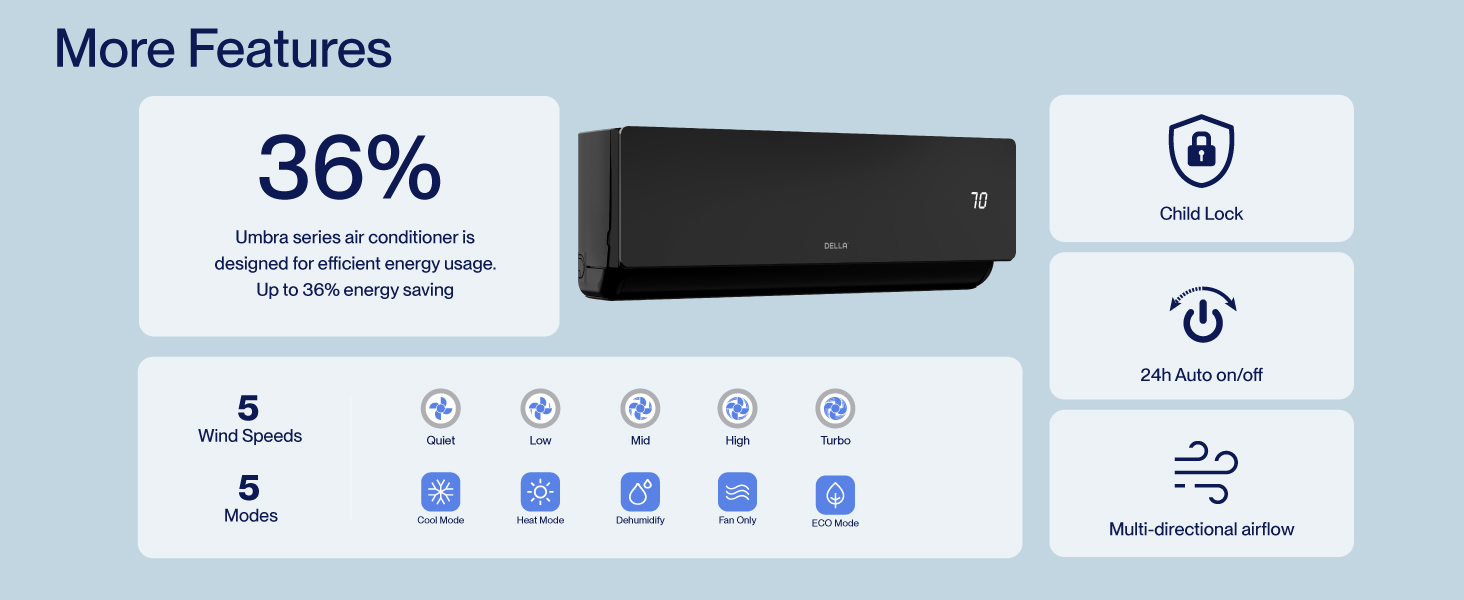
Figure 8.2: DELLA Customer Support Options.