
1. ആമുഖം
Thank you for choosing the FOREVER Setty Webcam. നിങ്ങളുടെ ഉപകരണം സജ്ജീകരിക്കുന്നതിനും പ്രവർത്തിപ്പിക്കുന്നതിനും പരിപാലിക്കുന്നതിനും ആവശ്യമായ വിവരങ്ങൾ ഈ മാനുവൽ നൽകുന്നു. webcam. Designed for remote work, conferences, online teaching, and video calls, this webcam offers clear image quality, an integrated microphone, and versatile 360-degree rotation.
2. ബോക്സിൽ എന്താണുള്ളത്?
- FOREVER Setty Webക്യാമറ
- USB കേബിൾ
- ഓഡിയോ കേബിൾ

Image 2.1: FOREVER Setty Webcam and its retail packaging, showing the webcam, USB cable, and audio cable.
3. സജ്ജീകരണ നിർദ്ദേശങ്ങൾ
3.1 ബന്ധിപ്പിക്കുന്നു Webക്യാമറ
- സ്ഥാനനിർണ്ണയം: The Setty webcam features an adjustable clip. You can securely attach it to any type of screen (PC monitor, laptop, TV) or place it stably on a desk, monitor stand, TV cabinet, or a circular lamp with a tripod.
- USB കണക്ഷൻ: ബന്ധിപ്പിക്കുക webcam directly to your computer using the provided USB cable. The computer will automatically detect the webcam without requiring additional drivers. The 140 cm cable length allows for flexible placement.
- ഓഡിയോ കണക്ഷൻ: If your computer does not automatically detect the microphone or you prefer a separate audio input, connect the audio cable from the webcam to your computer's microphone input.

Image 3.1: The FOREVER Setty Webcam showing its integrated clip and the attached USB and audio cables, ready for connection to a computer.

Image 3.2: The FOREVER Setty Webcam securely mounted on top of a laptop screen, demonstrating its adjustable clip mechanism.
4. പ്രവർത്തിപ്പിക്കുന്നത് Webക്യാമറ
4.1 ഇമേജ്, വീഡിയോ നിലവാരം
The Setty webcam features a CMOS sensor that delivers a clear image with a constant high resolution of 16 MPX. The dynamic resolution is 640 x 480 pixels. This ensures good visual quality for various applications.
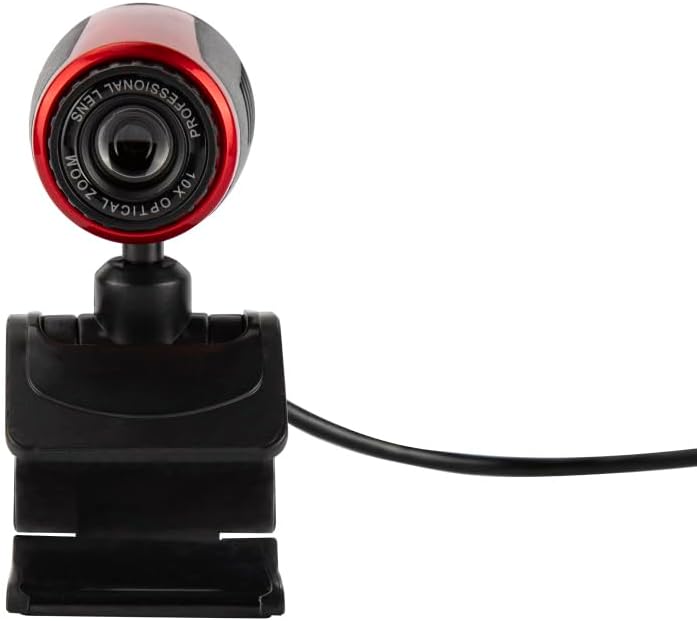
Image 4.1: A close-up front view of the FOREVER Setty Webcam, highlighting the lens and its compact design.
4.2 Integrated Microphone
ദി webcam includes an integrated microphone for clear and fluid video communications. This allows for natural audio recording, making it suitable for online classes, business meetings, and connecting with family and friends. You can also use the camera with wireless headsets, gaming headsets, or computer speakers.
4.3 360-Degree Rotation
ദി webcam's design allows for 360-degree rotation, enabling you to adjust the angle as needed. The stable clip ensures the camera remains in your desired position without damaging your screen.

ചിത്രം 4.2: ഒരു വശം view of the FOREVER Setty Webcam, illustrating its adjustable stand and the ability to change the camera's angle.
4.4 ആപ്ലിക്കേഷനുകളുടെ വിശാലമായ ശ്രേണി
The Setty Webcam is compatible with various operating systems, including Windows (Win10/Vista/Win7), Mac, and Android TV. It provides excellent video quality for popular communication platforms such as Skype, WhatsApp, Facetime, Zoom, Teams, Facebook, YouTube, and Twitch.
5. പരിപാലനം
നിങ്ങളുടെ ഒപ്റ്റിമൽ പ്രകടനവും ദീർഘായുസ്സും ഉറപ്പാക്കാൻ webcam, ഈ പരിപാലന മാർഗ്ഗനിർദ്ദേശങ്ങൾ പാലിക്കുക:
- വൃത്തിയാക്കൽ: Gently wipe the lens and body of the webcam with a soft, dry, lint-free cloth. Avoid using harsh chemicals or abrasive materials that could scratch the lens or damage the surface.
- സംഭരണം: ഉപയോഗത്തിലില്ലാത്തപ്പോൾ, സംഭരിക്കുക webനേരിട്ടുള്ള സൂര്യപ്രകാശത്തിൽ നിന്നും ഉയർന്ന താപനിലയിൽ നിന്നും മാറി തണുത്തതും വരണ്ടതുമായ സ്ഥലത്ത് ക്യാം വയ്ക്കുക.
- കേബിൾ കെയർ: Avoid bending or twisting the USB and audio cables excessively to prevent internal damage.
6. പ്രശ്നപരിഹാരം
If you encounter issues with your FOREVER Setty Webcam, ഇനിപ്പറയുന്ന പരിഹാരങ്ങൾ പരീക്ഷിച്ചുനോക്കൂ:
- Webക്യാമറ കണ്ടെത്തിയില്ല:
- യുഎസ്ബി കേബിൾ രണ്ടിലേക്കും സുരക്ഷിതമായി ബന്ധിപ്പിച്ചിട്ടുണ്ടെന്ന് ഉറപ്പാക്കുക webകാമും നിങ്ങളുടെ കമ്പ്യൂട്ടറും.
- ബന്ധിപ്പിക്കാൻ ശ്രമിക്കുക webനിങ്ങളുടെ കമ്പ്യൂട്ടറിലെ മറ്റൊരു USB പോർട്ടിലേക്ക് cam ബന്ധിപ്പിക്കുക.
- നിങ്ങളുടെ കമ്പ്യൂട്ടർ പുനരാരംഭിക്കുക.
- Check your computer's device manager (Windows) or System Information (Mac) to see if the webകാം ലിസ്റ്റ് ചെയ്തിട്ടുണ്ട്.
- ചിത്രം ഇല്ല/മോശം ചിത്രം നിലവാരം:
- ലെൻസ് വൃത്തിയുള്ളതാണെന്നും പൊടിയോ അഴുക്കോ ഇല്ലാത്തതാണെന്നും ഉറപ്പാക്കുക.
- Check the lighting conditions in your environment. Adequate lighting is crucial for good image quality.
- ശരിയാണോ എന്ന് പരിശോധിക്കുക webനിങ്ങളുടെ വീഡിയോ കോൺഫറൻസിംഗ് ആപ്ലിക്കേഷന്റെ ക്രമീകരണങ്ങളിൽ cam തിരഞ്ഞെടുത്തിരിക്കുന്നു.
- Microphone Not Working/Poor Audio Quality:
- Ensure the audio cable (if used) is properly connected.
- ഉറപ്പാക്കാൻ നിങ്ങളുടെ കമ്പ്യൂട്ടറിന്റെ ശബ്ദ ക്രമീകരണങ്ങൾ പരിശോധിക്കുക webcam's microphone is selected as the input device and its volume is not muted.
- Verify the microphone settings within your video conferencing application.
7 സ്പെസിഫിക്കേഷനുകൾ
| ഫീച്ചർ | വിശദാംശങ്ങൾ |
|---|---|
| ബ്രാൻഡ് | എന്നേക്കും |
| മോഡൽ നമ്പർ | 5900495902092 |
| നിറം | കറുപ്പ് |
| ഉൽപ്പന്ന അളവുകൾ (L x W x H) | 3.2 x 3.1 x 3.2 സെ.മീ |
| ഇനത്തിൻ്റെ ഭാരം | 90 ഗ്രാം |
| കണക്റ്റിവിറ്റി ടെക്നോളജി | USB |
| ഫലപ്രദമായ സ്റ്റിൽ റെസല്യൂഷൻ | 16 മെഗാപിക്സലുകൾ |
| വീഡിയോ റെസല്യൂഷൻ | 480p |
| ഇമേജ് സെൻസർ ടെക്നോളജി | CMOS |
| പരമാവധി ഫോക്കൽ ദൂരം | 3.5 മില്ലിമീറ്റർ |
| മാക്സ് അപ്പർച്ചർ | 2.8 എഫ് |
| ഡിജിറ്റൽ സൂം | 3.6 x |
| ഫോക്കസ് തരം | മാനുവൽ ഫോക്കസ് |
| പ്രത്യേക സവിശേഷതകൾ | Adjustable, Wireless (Note: 'Wireless' might be a mistranslation or refer to compatibility with wireless headsets, as the primary connection is USB) |
| അനുയോജ്യമായ ഉപകരണങ്ങൾ | ലാപ്ടോപ്പ്, പേഴ്സണൽ കമ്പ്യൂട്ടർ, ടാബ്ലെറ്റ് |
8. വാറൻ്റിയും പിന്തുണയും
For warranty information and technical support, please refer to the documentation provided with your purchase or contact FOREVER customer service. Keep your proof of purchase for any warranty claims.