
1 സുരക്ഷാ വിവരങ്ങൾ
Please read all safety instructions carefully before using this appliance.
- Always unplug the hair clipper before cleaning or replacing parts.
- വെള്ളത്തിനടുത്തോ നനഞ്ഞ അന്തരീക്ഷത്തിലോ ഉപയോഗിക്കരുത്.
- കുട്ടികൾക്ക് ലഭ്യമാകാതെ സൂക്ഷിക്കുക.
- Use with caution around the face and eyes.
- Avoid contact with skin if the blades are damaged or misaligned.
- Clean and store properly after each use to ensure hygiene and longevity.
- കോർഡിനോ പ്ലഗ്ഗിനോ കേടുപാടുകൾ സംഭവിച്ചാൽ ഉപകരണം ഉപയോഗിക്കരുത്.
- Do not attempt to repair the appliance yourself; contact qualified service personnel.
2. പാക്കേജ് ഉള്ളടക്കം
താഴെ ലിസ്റ്റ് ചെയ്തിരിക്കുന്ന എല്ലാ ഇനങ്ങളും നിങ്ങളുടെ പാക്കേജിൽ ഉൾപ്പെടുത്തിയിട്ടുണ്ടെന്ന് ഉറപ്പാക്കുക:

Image: Haokry Hair Clipper with full accessory kit.
- ഇലക്ട്രിക് ഹെയർ ക്ലിപ്പർ
- 6 Guide Combs (3mm, 6mm, 10mm, 13mm, 16mm, 19mm)
- ഹെയർ കട്ടിംഗ് കേപ്പ്
- ലൂബ്രിക്കറ്റിംഗ് ഓയിൽ
- ക്ലീനിംഗ് ബ്രഷ്
- ചീപ്പ്
- കത്രിക
- യുഎസ്ബി ചാർജിംഗ് കേബിൾ
3. ഉൽപ്പന്നം കഴിഞ്ഞുview
3.1 Cordless & Corded Operation
The Haokry Hair Clipper supports both cordless and corded operation, offering flexibility for use. It can be used while plugged in and charging, or wirelessly after a full charge.

Image: Clipper illustrating cordless and corded functionality with USB charging.
3.2 Adjustable Blade Length
The clipper features an adjustable blade lever, allowing for fine-tuning of cutting lengths from 0.5mm to 2.5mm without a guide comb.

Image: Clipper highlighting the adjustable blade and LED display.
3.3 LED Power Indicator & Gear Display
An intelligent LED display shows the current battery percentage (10%, 20%, 40%, 70%, 100%) and the selected cutting speed (gear 1, 2, or 3).
3.4 R-Type Acute Angle Cutter Blade
The clipper is equipped with an R-type acute angle cutter blade designed for self-sharpening, providing a comfortable and skin-friendly cutting experience.

Image: Detail of the R-Type acute angle cutter blade.
3.5 Powerful Rotary Motor
A strong 3.7V rotary motor ensures efficient cutting through various hair types without snagging or pulling.

Image: Illustration of the clipper's internal motor.
4. സജ്ജീകരണം
4.1 Charging the Clipper
- Connect the USB charging cable to the clipper's charging port.
- USB കേബിളിന്റെ മറ്റേ അറ്റം അനുയോജ്യമായ ഒരു USB പവർ അഡാപ്റ്ററിലേക്ക് (ഉൾപ്പെടുത്തിയിട്ടില്ല) അല്ലെങ്കിൽ ഒരു USB പോർട്ടിലേക്ക് പ്ലഗ് ചെയ്യുക.
- During charging, the five indicators on the LED display will light up sequentially from bottom to top.
- When all five indicators remain steadily lit, the clipper is fully charged. A full charge provides up to 200 minutes of use.
- പൂർണ്ണമായും ചാർജ് ചെയ്തുകഴിഞ്ഞാൽ ചാർജിംഗ് കേബിൾ വിച്ഛേദിക്കുക.
4.2 ഗൈഡ് ചീപ്പുകൾ അറ്റാച്ചുചെയ്യൽ
To achieve desired hair lengths, attach one of the six provided guide combs.

Image: Step 1 - Aligning the comb.
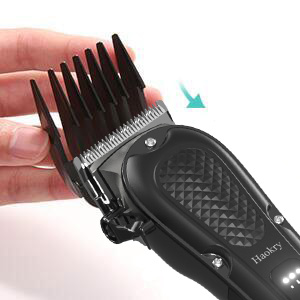
Image: Step 2 - Sliding the comb into place.
- Select the desired guide comb (3mm, 6mm, 10mm, 13mm, 16mm, or 19mm).
- Align the comb with the clipper blade.
- Slide the comb firmly onto the blade until it clicks securely into place.
5. പ്രവർത്തന നിർദ്ദേശങ്ങൾ
5.1 പവർ ഓൺ/ഓഫ്
- To turn on: Gently press the side power button. The indicator above the short symbol (first gear) will light up.
- ഓഫാക്കാൻ: പവർ ബട്ടൺ 3 സെക്കൻഡ് അമർത്തിപ്പിടിക്കുക.
5.2 Adjusting Cutting Speed (Gear)
The clipper has three adjustable cutting speeds.
- After powering on (first gear), press the power button once again to switch to the second gear. The indicator above the medium length symbol will light up.
- Press the power button once more to switch to the third gear. The indicator above the longest symbol will light up.
- Press the power button again to return to the first (slow) gear.
5.3 Adjusting Blade Length (without Guide Comb)
Use the adjustable lever on the side of the clipper to change the cutting length from 0.5mm to 2.5mm.
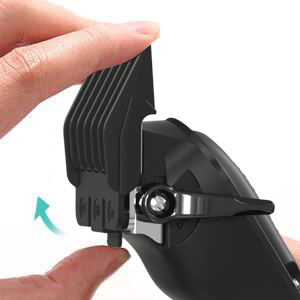
Image: Adjusting the blade lever.
- Move the lever up for a shorter cut (closer to 0.5mm).
- Move the lever down for a longer cut (closer to 2.5mm).
6. പരിപാലനം
6.1 ബ്ലേഡുകൾ വൃത്തിയാക്കൽ

Image: Removing a guide comb.
- Ensure the clipper is turned off and unplugged.
- Remove any attached guide comb.
- Use the provided cleaning brush to remove loose hair from the blades and the clipper body.
- For a more thorough cleaning, the blades can be carefully detached (refer to specific instructions if provided in a detailed diagram, otherwise proceed with caution).
- Do not rinse the clipper under water unless explicitly stated as waterproof.
6.2 ബ്ലേഡുകളിൽ എണ്ണ പുരട്ടൽ
Regular oiling ensures optimal performance and extends blade life.
- After cleaning, apply a few drops of the lubricating oil (provided) to the blades.
- എണ്ണ തുല്യമായി വിതരണം ചെയ്യാൻ ക്ലിപ്പർ കുറച്ച് സെക്കൻഡ് ഓണാക്കുക.
- ഏതെങ്കിലും അധിക എണ്ണ മൃദുവായ തുണി ഉപയോഗിച്ച് തുടയ്ക്കുക.
7. പ്രശ്നപരിഹാരം
| പ്രശ്നം | സാധ്യമായ കാരണം | പരിഹാരം |
|---|---|---|
| ക്ലിപ്പർ ഓണാകുന്നില്ല. | ബാറ്ററി തീർന്നു. | ക്ലിപ്പർ പൂർണ്ണമായും ചാർജ് ചെയ്യുക. |
| ക്ലിപ്പർ ഓണാകുന്നില്ല. | പവർ ബട്ടൺ ശരിയായി അമർത്തിയിട്ടില്ല. | Press and hold the power button for 3 seconds to turn off, then gently press to turn on. |
| Clipper pulls hair or cuts poorly. | ബ്ലേഡുകൾ മങ്ങിയതോ വൃത്തികെട്ടതോ ആണ്. | Clean and oil the blades. If blades are dull, consider replacement. |
| Clipper pulls hair or cuts poorly. | ബാറ്ററി കുറവാണ്. | Charge the clipper. |
| Clipper is unusually noisy. | ബ്ലേഡുകൾക്ക് എണ്ണ തേയ്ക്കേണ്ടതുണ്ട്. | ബ്ലേഡുകളിൽ ലൂബ്രിക്കറ്റിംഗ് ഓയിൽ പുരട്ടുക. |
8 സ്പെസിഫിക്കേഷനുകൾ
| ഫീച്ചർ | വിശദാംശങ്ങൾ |
|---|---|
| ബ്രാൻഡ് | ഹക്രി |
| മോഡൽ നമ്പർ | 1 |
| ബാറ്ററി തരം | ലിഥിയം അയോൺ |
| ചാർജിംഗ് സമയം | ഏകദേശം 200 മിനിറ്റ് |
| പ്രവർത്തന സമയം | ഫുൾ ചാർജിൽ 200 മിനിറ്റ് വരെ |
| ബ്ലേഡ് മെറ്റീരിയൽ | ഉയർന്ന കാർബൺ സ്റ്റീൽ |
| ക്രമീകരിക്കാവുന്ന ബ്ലേഡ് നീളം | 0.5mm - 2.5mm |
| ഇൻപുട്ട് വോളിയംtagഇ കറന്റ് | 5V/1A |
| ഔട്ട്പുട്ട് പവർ | 5W |
| പാക്കേജ് അളവുകൾ | 8.19 x 5.39 x 2.52 ഇഞ്ച് |
| ഇനത്തിൻ്റെ ഭാരം | 1.01 പൗണ്ട് |
9. വാറൻ്റിയും പിന്തുണയും
This Haokry product is covered by a manufacturer's warranty. For specific warranty details, claims, or technical support, please refer to the documentation included with your purchase or contact Haokry customer service directly.
Contact information for the manufacturer may be found on the product packaging or their official webസൈറ്റ്.