
zelotes C12
zelotes C12 Wired Gaming Mouse User Manual
മോഡൽ: C12
1. ആമുഖം
വാങ്ങിയതിന് നന്ദി.asing the zelotes C12 Wired Gaming Mouse. This manual provides detailed instructions for setting up, operating, and maintaining your new gaming mouse. Please read this manual thoroughly before use to ensure optimal performance and longevity of your device.
സുരക്ഷാ വിവരങ്ങൾ
- ഉപകരണം വെള്ളത്തിൽ നിന്നും മറ്റ് ദ്രാവകങ്ങളിൽ നിന്നും അകറ്റി നിർത്തുക.
- ശക്തമായ ആഘാതങ്ങൾക്ക് മൗസ് വീഴ്ത്തുകയോ വിധേയമാക്കുകയോ ചെയ്യരുത്.
- Do not attempt to disassemble or repair the mouse yourself. Contact customer support if issues arise.
- Use the mouse in a clean, dry environment.
2. പാക്കേജ് ഉള്ളടക്കം
നിങ്ങളുടെ പാക്കേജിൽ എല്ലാ ഇനങ്ങളും ഉണ്ടെന്ന് ഉറപ്പാക്കുക:
- 1x zelotes C12 Gaming Mouse
- 1x CD (for driver/software)
- 1x ഇൻസ്ട്രക്ഷൻ മാനുവൽ
- 1x കാൽ പാഡ് സെറ്റ്
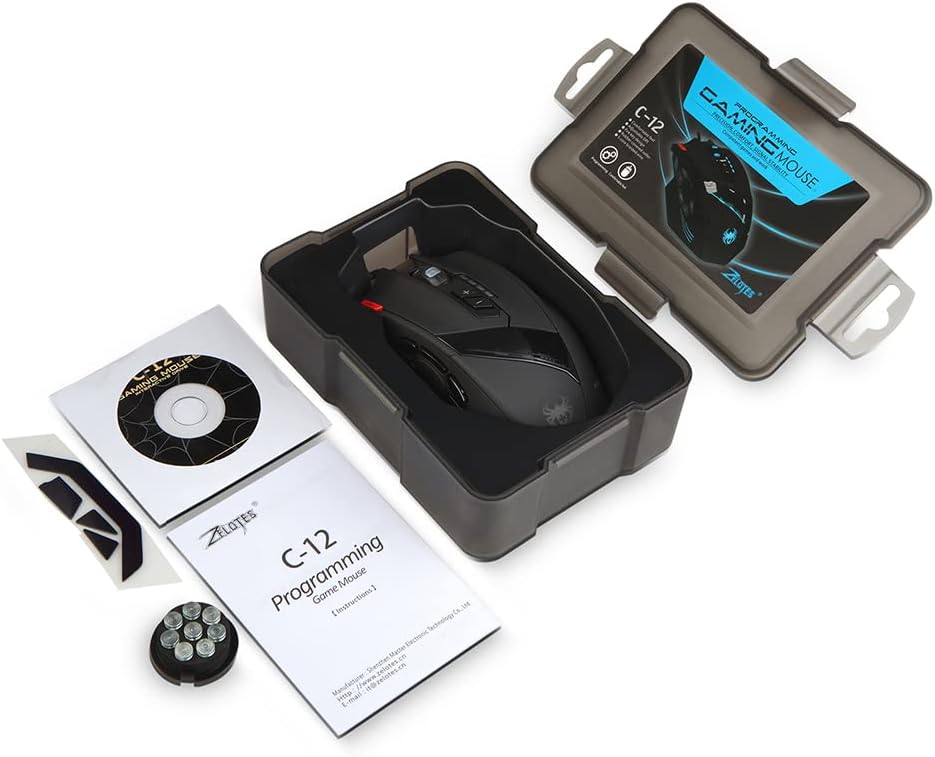
Image: Contents of the zelotes C12 Gaming Mouse package.
3. ഉൽപ്പന്നം കഴിഞ്ഞുview
The zelotes C12 Gaming Mouse features 12 programmable buttons and an ergonomic design for comfortable use. Refer to the diagram below for button identification.
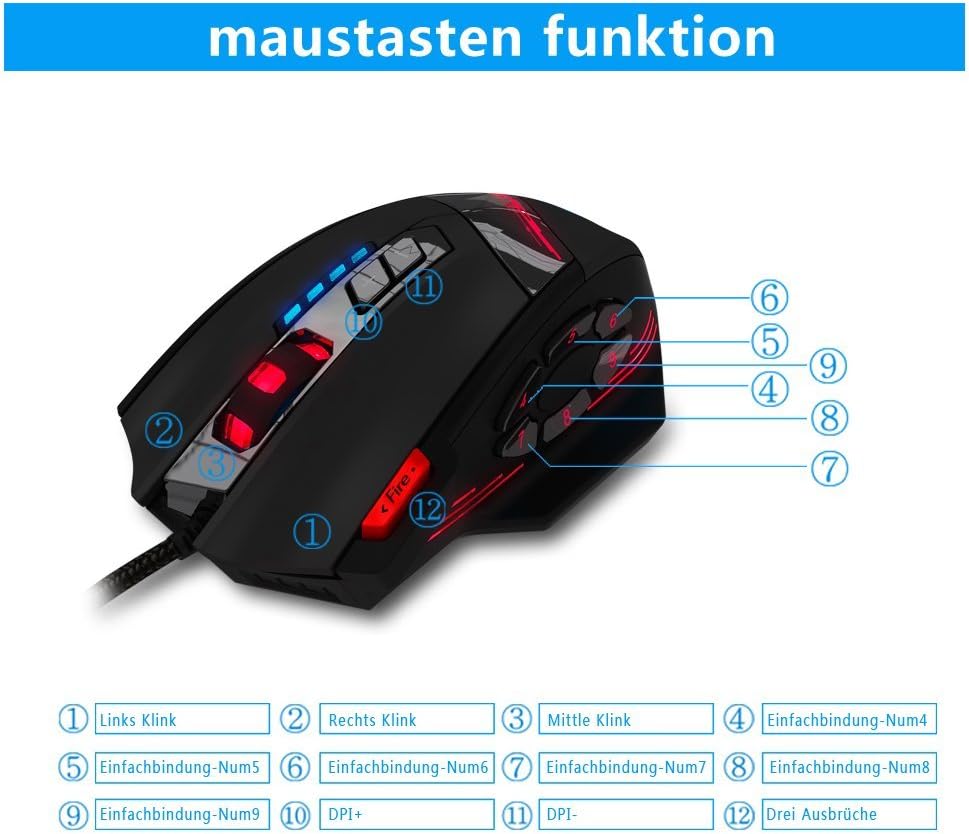
Image: zelotes C12 Gaming Mouse button layout.
ബട്ടൺ പ്രവർത്തനങ്ങൾ:
- ഇടത് ക്ലിക്ക്
- റൈറ്റ് ക്ലിക്ക് ചെയ്യുക
- Middle Click (Scroll Wheel)
- പ്രോഗ്രാം ചെയ്യാവുന്ന ബട്ടൺ 4
- പ്രോഗ്രാം ചെയ്യാവുന്ന ബട്ടൺ 5
- പ്രോഗ്രാം ചെയ്യാവുന്ന ബട്ടൺ 6
- പ്രോഗ്രാം ചെയ്യാവുന്ന ബട്ടൺ 7
- പ്രോഗ്രാം ചെയ്യാവുന്ന ബട്ടൺ 8
- പ്രോഗ്രാം ചെയ്യാവുന്ന ബട്ടൺ 9
- DPI+ ബട്ടൺ
- DPI- ബട്ടൺ
- Fire Key (Triple Click)

Image: Ergonomic design of the zelotes C12 Gaming Mouse.
4. സജ്ജീകരണം
The zelotes C12 Gaming Mouse is designed for simple plug-and-play functionality.
മൗസിനെ ബന്ധിപ്പിക്കുന്നു
- നിങ്ങളുടെ കമ്പ്യൂട്ടറിൽ (PC അല്ലെങ്കിൽ Mac) ലഭ്യമായ ഒരു USB പോർട്ട് കണ്ടെത്തുക.
- Plug the USB connector of the zelotes C12 mouse into the USB port.
- Your operating system should automatically detect and install the necessary basic drivers. The mouse will be ready for use.
Video: Demonstration of the zelotes C12 Gaming Mouse features, including its design and button functionality.
5. പ്രവർത്തന നിർദ്ദേശങ്ങൾ
Adjusting DPI (Dots Per Inch)
The mouse features adjustable DPI settings to change cursor sensitivity. You can cycle through preset DPI levels using the DPI+ (Button 10) and DPI- (Button 11) buttons located on the top of the mouse.
- Default DPI settings: 1000/1500/2000/4000 DPI.
- DPI can be adjusted up to 8000 DPI through the dedicated software.
പ്രോഗ്രാം ചെയ്യാവുന്ന ബട്ടണുകൾ
The zelotes C12 mouse includes 12 programmable buttons (Buttons 4-9, Fire Key, etc.) that can be customized to perform specific functions according to your gaming or work requirements. Customization is performed using the provided software.

Image: Shortcut key function and lighting modes.
Weight Adjustment System
The mouse is equipped with 8 removable weight blocks, each weighing 2.5g (0.1oz). You can add or remove these weights from the bottom of the mouse to achieve your preferred balance and feel.
- മൗസ് തിരിക്കുക.
- Locate the circular weight compartment cover on the underside.
- Twist the cover counter-clockwise to open and remove it.
- Add or remove the 2.5g weights as desired.
- Replace the cover and twist clockwise to secure it.
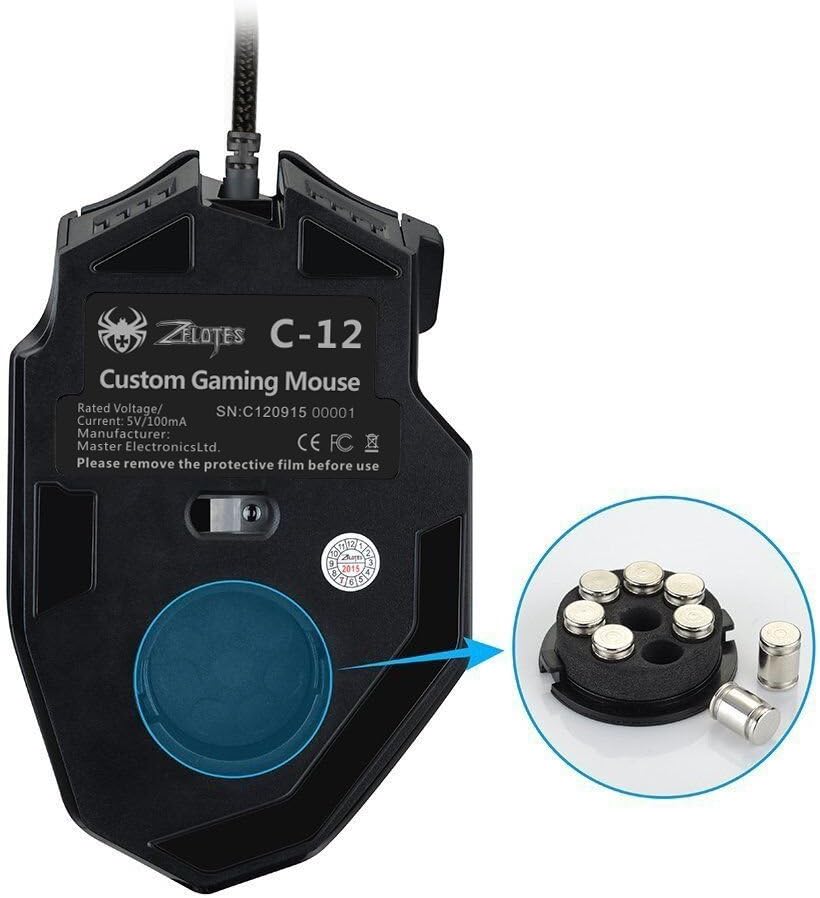
Image: Weight adjustment system on the zelotes C12 Gaming Mouse.
LED ലൈറ്റിംഗ് മോഡുകൾ
The mouse features customizable LED lighting. The lighting modes, including 7-color cycle breathing and monochromatic constant bright, can be adjusted through the software.
6. സോഫ്റ്റ്വെയർ ഇൻസ്റ്റാളേഷനും ഇഷ്ടാനുസൃതമാക്കലും
To unlock the full potential of your zelotes C12 Gaming Mouse, including button programming, advanced DPI settings (up to 8000 DPI), and LED customization, install the dedicated driver software.
- Insert the included CD into your computer's optical drive.
- Follow the on-screen instructions to install the software. If your computer does not have an optical drive, please visit the zelotes official website to download the latest driver software.
- Once installed, launch the software to access customization options for button assignments, DPI profiles, polling rate, and LED effects.
Note: Programming software is not fully available for Mac operating systems.
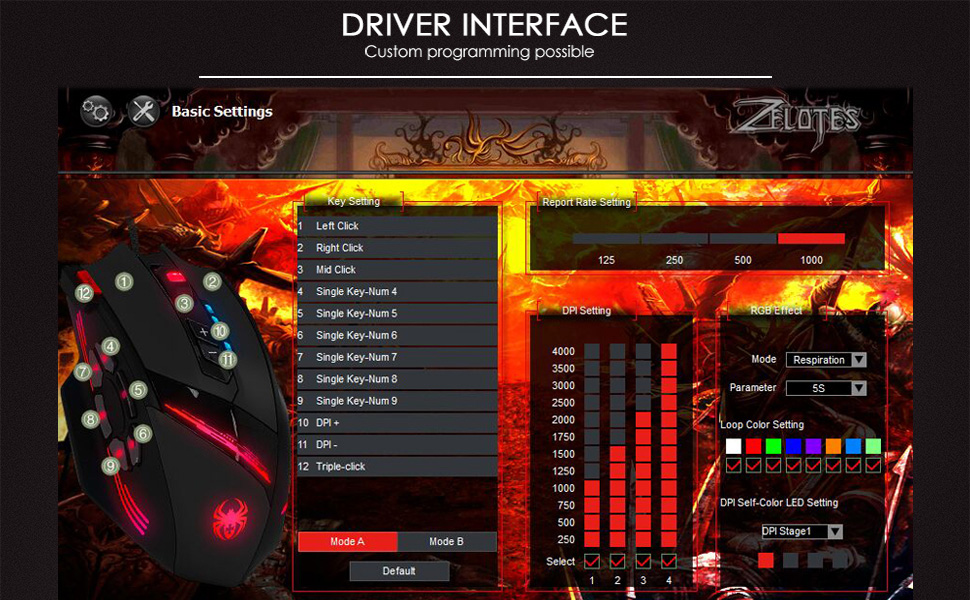
Image: Driver interface for custom programming.
7. പരിപാലനം
Proper care will extend the life of your gaming mouse.
- വൃത്തിയാക്കൽ: മൗസിന്റെ പ്രതലം തുടയ്ക്കാൻ മൃദുവായതും ഉണങ്ങിയതുമായ ഒരു തുണി ഉപയോഗിക്കുക. കഠിനമായ അഴുക്കിന്, അല്പം ഡി.amp തുണി ഉപയോഗിക്കാം, പക്ഷേ ഉപകരണത്തിനുള്ളിൽ ഈർപ്പം കയറുന്നില്ലെന്ന് ഉറപ്പാക്കുക.
- സംഭരണം: Store the mouse in a cool, dry place when not in use. Avoid extreme temperatures.
- കേബിൾ കെയർ: Do not excessively bend or pull the USB cable.
8. പ്രശ്നപരിഹാരം
If you encounter issues with your zelotes C12 Gaming Mouse, try the following solutions:
- മൗസ് പ്രതികരിക്കുന്നില്ല:
- പ്രവർത്തിക്കുന്ന ഒരു USB പോർട്ടിലേക്ക് USB കേബിൾ സുരക്ഷിതമായി പ്ലഗ് ചെയ്തിട്ടുണ്ടെന്ന് ഉറപ്പാക്കുക.
- Try plugging the mouse into a different USB port or another computer to rule out port or system issues.
- നിങ്ങളുടെ കമ്പ്യൂട്ടർ പുനരാരംഭിക്കുക.
- Cursor movement is erratic or lagging:
- മൗസിന്റെ അടിവശത്തുള്ള ഒപ്റ്റിക്കൽ സെൻസർ മൃദുവായതും ഉണങ്ങിയതുമായ തുണി ഉപയോഗിച്ച് വൃത്തിയാക്കുക.
- മൗസ് അനുയോജ്യമായ ഒരു പ്രതലത്തിലാണ് ഉപയോഗിക്കുന്നതെന്ന് ഉറപ്പാക്കുക (ഉദാ. ഒരു മൗസ് പാഡ്). ഉയർന്ന പ്രതിഫലനമുള്ളതോ സുതാര്യമായതോ ആയ പ്രതലങ്ങൾ ഒഴിവാക്കുക.
- Adjust the DPI settings to a lower value if the cursor is too sensitive.
- Buttons not working or programmable features not functioning:
- Ensure the driver software is correctly installed and updated.
- സോഫ്റ്റ്വെയറിനുള്ളിലെ ബട്ടൺ അസൈൻമെന്റുകൾ പരിശോധിക്കുക.
- സോഫ്റ്റ്വെയർ കൂടാതെ/അല്ലെങ്കിൽ നിങ്ങളുടെ കമ്പ്യൂട്ടർ പുനരാരംഭിക്കുക.
If the problem persists after trying these steps, please contact zelotes customer support for further assistance.
9 സ്പെസിഫിക്കേഷനുകൾ

Image: Dimensions of the zelotes C12 Gaming Mouse.
| ഫീച്ചർ | വിവരണം |
|---|---|
| ബ്രാൻഡ് | zelotes |
| മോഡലിൻ്റെ പേര് | C12 |
| കണക്റ്റിവിറ്റി ടെക്നോളജി | USB (വയർഡ്) |
| മൂവ്മെന്റ് ഡിറ്റക്ഷൻ ടെക്നോളജി | ഒപ്റ്റിക്കൽ |
| ഡിപിഐ ക്രമീകരണങ്ങൾ | 1000/1500/2000/4000 DPI (Adjustable up to 8000 DPI via software) |
| ബട്ടണുകൾ | 12 (പ്രോഗ്രാം ചെയ്യാവുന്നത്) |
| കൈ ഓറിയൻ്റേഷൻ | ശരിയാണ് |
| ഭാരം | 160 Grams (Adjustable with 8x 2.5g weights) |
| കേബിൾ നീളം | 1.8 മീറ്റർ |
| പോളിംഗ് നിരക്ക് | 125-1000Hz |
| ത്വരണം | 24G |
| പ്രധാന ജീവിതം | 12 ദശലക്ഷം ക്ലിക്കുകൾ |
| അനുയോജ്യമായ ഓപ്പറേറ്റിംഗ് സിസ്റ്റങ്ങൾ | Win11, Win10, Win8, Win7, Mac OS (Programming software limited on Mac) |
| അളവുകൾ (L x W x H) | 130mm x 81.5mm x 39.8mm |
10. വാറൻ്റിയും പിന്തുണയും
Your zelotes C12 Gaming Mouse comes with a standard manufacturer's warranty. Please refer to the warranty card included in your package or visit the official zelotes webവിശദമായ വാറന്റി നിബന്ധനകൾക്കും വ്യവസ്ഥകൾക്കും സൈറ്റ്.
For technical support, troubleshooting assistance, or warranty claims, please contact zelotes customer service through their official webസൈറ്റ് അല്ലെങ്കിൽ നിങ്ങളുടെ ഉൽപ്പന്ന ഡോക്യുമെന്റേഷനിൽ നൽകിയിരിക്കുന്ന ബന്ധപ്പെടാനുള്ള വിവരങ്ങൾ.
Ask a question about this manual
Ask about setup, troubleshooting, compatibility, parts, safety, or missing instructions. Manuals+ will review the question and use this page’s manual context to help answer it.