
1. ആമുഖം
This manual provides essential information for the safe and efficient use of your Getac V110 Rugged Convertible Laptop/Tablet PC. Please read this manual thoroughly before operating the device and retain it for future reference. The Getac V110 is designed for durability and performance in challenging environments, offering versatility as both a laptop and a tablet.
2 സുരക്ഷാ വിവരങ്ങൾ
ഉപകരണത്തിന് കേടുപാടുകൾ സംഭവിക്കാതിരിക്കാനോ സ്വയം പരിക്കേൽക്കാതിരിക്കാനോ ഇനിപ്പറയുന്ന സുരക്ഷാ മുൻകരുതലുകൾ പാലിക്കുക:
- ഉപകരണത്തെ തീവ്രമായ താപനില, നേരിട്ടുള്ള സൂര്യപ്രകാശം അല്ലെങ്കിൽ അമിതമായ ഈർപ്പം എന്നിവയ്ക്ക് വിധേയമാക്കരുത്.
- Use only Getac-approved power adapters and accessories.
- Avoid dropping or subjecting the device to severe impacts, despite its rugged design.
- ഉപകരണം സ്വയം വേർപെടുത്താനോ നന്നാക്കാനോ ശ്രമിക്കരുത്. യോഗ്യതയുള്ള സേവന ഉദ്യോഗസ്ഥരെ ബന്ധപ്പെടുക.
- അമിതമായി ചൂടാകുന്നത് തടയാൻ വെൻ്റിലേഷൻ ഓപ്പണിംഗുകൾ വ്യക്തമായി സൂക്ഷിക്കുക.
3. ഫിസിക്കൽ ഓവർview
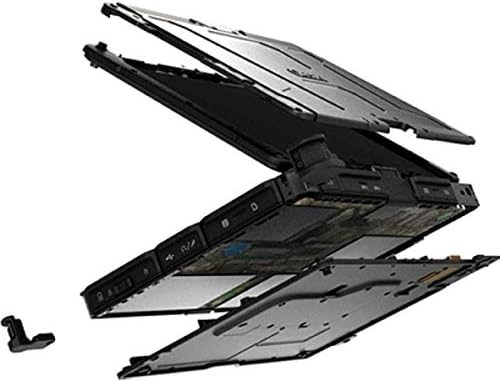
The Getac V110 is a versatile device designed for rugged use. It features a convertible design, allowing it to function as both a traditional laptop and a tablet. Key components include a durable chassis, an 11.6-inch touchscreen display, a full-sized keyboard, and various ports for connectivity.

ചിത്രം 3.1: പൊട്ടിത്തെറിച്ചു view illustrating the internal structure and ruggedized layers of the Getac V110.
3.1. കീബോർഡും ടച്ച്പാഡും
The device includes a backlit keyboard for typing in various lighting conditions and a precision touchpad for navigation.
ചിത്രം 3.2: മുകളിൽ നിന്ന് താഴേക്ക് view of the Getac V110 keyboard and integrated touchpad.
3.2. Convertible Design
The V110 can be easily converted between laptop and tablet modes by rotating the screen. This flexibility allows for optimal use in different scenarios.

Figure 3.3: The Getac V110 configured in laptop mode, displaying the screen and keyboard.

Figure 3.4: The Getac V110 in tablet mode, showcasing the touchscreen interface.
4. സജ്ജീകരണം
4.1. പ്രാരംഭ പവർ ഓൺ
- ഉപകരണത്തിലേക്കും പവർ ഔട്ട്ലെറ്റിലേക്കും പവർ അഡാപ്റ്റർ ബന്ധിപ്പിക്കുക.
- Press the power button located on the side or front of the device.
- Follow the on-screen prompts to complete the initial Windows 8.1 setup, including language, region, and user account creation.
4.2. നെറ്റ്വർക്ക് കണക്റ്റിവിറ്റി
The Getac V110 supports both Wi-Fi and Ethernet for internet access.
- വൈഫൈ: Access the network settings in Windows 8.1, select your desired Wi-Fi network, and enter the password if required.
- ഇഥർനെറ്റ്: Connect an Ethernet cable from your network router or switch to the Ethernet port on the device.
4.3. ബ്ലൂടൂത്ത് ജോടിയാക്കൽ
ബ്ലൂടൂത്ത് ഉപകരണങ്ങൾ ബന്ധിപ്പിക്കുന്നതിന്:
- ബ്ലൂടൂത്ത് ഉപകരണം ജോടിയാക്കൽ മോഡിലാണെന്ന് ഉറപ്പാക്കുക.
- On the Getac V110, navigate to PC Settings > PC and devices > Bluetooth.
- Turn Bluetooth on and select the device from the list to pair.
5. ഉപകരണം പ്രവർത്തിപ്പിക്കുന്നു
5.1. ലാപ്ടോപ്പ്, ടാബ്ലെറ്റ് മോഡുകൾക്കിടയിൽ മാറൽ
To convert the device:
- Gently rotate the screen 180 degrees clockwise or counter-clockwise.
- Fold the screen back over the keyboard to enter tablet mode.
- Unfold the screen and rotate it back to the original position for laptop mode.
5.2. ടച്ച്സ്ക്രീൻ ഉപയോഗം
The 11.6-inch LED touchscreen supports multi-touch gestures. Use your fingers or a compatible stylus for navigation, selection, and input.
5.3. പവർ മാനേജ്മെന്റ്
To conserve battery life, adjust power settings in Windows 8.1. You can configure sleep mode, display brightness, and other power-saving options.
- സ്ലീപ്പ് മോഡ്: Briefly press the power button to put the device into sleep mode.
- ഷട്ട് ഡൗൺ: Go to the Charms bar (swipe from right edge or move mouse to top-right corner), select Settings > Power > Shut down.
- പുനരാരംഭിക്കുക: Go to the Charms bar, select Settings > Power > Restart.
6. പരിപാലനം
6.1. ഉപകരണം വൃത്തിയാക്കൽ
Regular cleaning helps maintain performance and appearance.
- മൃദുവായ, ലിൻ്റ് രഹിത തുണി ഉപയോഗിക്കുകampened with water or a mild, non-abrasive cleaner for the screen and exterior.
- ഉപകരണത്തിലേക്ക് നേരിട്ട് ദ്രാവകങ്ങൾ സ്പ്രേ ചെയ്യുന്നത് ഒഴിവാക്കുക.
- Do not use harsh chemicals, solvents, or abrasive materials.
6.2. ബാറ്ററി പരിചരണം
ബാറ്ററി ആയുസ്സ് പരമാവധിയാക്കാൻ:
- ബാറ്ററി ഇടയ്ക്കിടെ പൂർണ്ണമായും ഡിസ്ചാർജ് ചെയ്യുന്നത് ഒഴിവാക്കുക.
- ദീർഘനേരം ഉപയോഗിച്ചില്ലെങ്കിൽ ഉപകരണം തണുത്തതും വരണ്ടതുമായ സ്ഥലത്ത് സൂക്ഷിക്കുക.
- If the device has removable batteries, ensure they are properly seated.
6.3. സോഫ്റ്റ്വെയർ അപ്ഡേറ്റുകൾ
Regularly check for and install operating system and driver updates to ensure optimal performance and security. Access Windows Update through PC Settings.
7. പ്രശ്നപരിഹാരം
This section addresses common issues you might encounter with your Getac V110.
7.1. ഉപകരണം ഓണാകുന്നില്ല
- പവർ അഡാപ്റ്റർ സുരക്ഷിതമായി ബന്ധിപ്പിച്ചിട്ടുണ്ടെന്നും ഔട്ട്ലെറ്റ് പ്രവർത്തനക്ഷമമാണെന്നും ഉറപ്പാക്കുക.
- Check if the battery is charged. If not, allow it to charge for at least 30 minutes before attempting to power on again.
- If the battery is removable, ensure it is correctly installed.
7.2. വൈഫൈ കണക്റ്റിവിറ്റി പ്രശ്നങ്ങൾ
- Verify that Wi-Fi is enabled in Windows settings.
- Restart your router and the Getac V110.
- Ensure you are within range of the Wi-Fi network and have the correct password.
- അപ്ഡേറ്റ് ചെയ്ത Wi-Fi ഡ്രൈവറുകൾക്കായി പരിശോധിക്കുക.
7.3. Touchscreen Unresponsive
- ഉപകരണം പുനരാരംഭിക്കുക.
- സ്ക്രീൻ വൃത്തിയുള്ളതും അവശിഷ്ടങ്ങൾ ഇല്ലാത്തതുമാണെന്ന് ഉറപ്പാക്കുക.
- Check for any recent software updates or driver issues.
7.4. മന്ദഗതിയിലുള്ള പ്രകടനം
- പശ്ചാത്തലത്തിൽ പ്രവർത്തിക്കുന്ന അനാവശ്യ ആപ്ലിക്കേഷനുകൾ അടയ്ക്കുക.
- ലഭ്യമായ സംഭരണ സ്ഥലം പരിശോധിക്കുക.
- ഒരു വൈറസ് സ്കാൻ പ്രവർത്തിപ്പിക്കുക.
- വിൻഡോസും ഡ്രൈവറുകളും കാലികമാണെന്ന് ഉറപ്പാക്കുക.
8 സ്പെസിഫിക്കേഷനുകൾ
| ഫീച്ചർ | വിശദാംശങ്ങൾ |
|---|---|
| ബ്രാൻഡ് | ഗെറ്റാക് |
| മോഡൽ നമ്പർ | V110 |
| പ്രോസസ്സർ | ഇന്റൽ കോർ i5-6300U (2.6 GHz) |
| റാം മെമ്മറി | 8 ജിബി ഡിഡിആർ4 എസ്ഡിആർഎഎം |
| സംഭരണ ശേഷി | 128 ജിബി |
| സ്ക്രീൻ വലിപ്പം | 11.6 ഇഞ്ച് |
| ഡിസ്പ്ലേ റെസല്യൂഷൻ | 1366 x 768 പിക്സലുകൾ |
| ഡിസ്പ്ലേ തരം | എൽഇഡി |
| മനുഷ്യ-ഇൻ്റർഫേസ് ഇൻപുട്ട് | ടച്ച് സ്ക്രീൻ |
| ഓപ്പറേറ്റിംഗ് സിസ്റ്റം | വിൻഡോസ് 8.1 |
| ഗ്രാഫിക്സ് കോപ്രൊസസർ | ഇൻ്റൽ എച്ച്ഡി ഗ്രാഫിക്സ് 520 |
| കണക്റ്റിവിറ്റി ടെക്നോളജി | ബ്ലൂടൂത്ത്, ഇതർനെറ്റ്, HDMI, USB, വൈ-ഫൈ |
| ഇനത്തിൻ്റെ ഭാരം | 4.4 പൗണ്ട് |
| Item Dimensions (L x W x Th) | 11.99" x 18.9" x 3.9" |
| ബാറ്ററി സെൽ തരം | Lithium Ion (23 Watt Hours) |
9. വാറൻ്റി വിവരങ്ങൾ
The Getac V110 Rugged Convertible Laptop/Tablet PC comes with a 90 ദിവസത്തെ പരിമിത വാറൻ്റി. This warranty covers manufacturing defects and malfunctions under normal use. It does not cover damage caused by misuse, accidents, unauthorized repairs, or modifications. Please retain your proof of purchase for warranty claims.
For detailed terms and conditions, refer to the warranty documentation provided with your device or contact Getac customer support.
10. പിന്തുണ
If you require further assistance or encounter issues not covered in this manual, please contact Getac customer support. You can typically find support contact information on the manufacturer's official website or within the device's pre-installed documentation.
When contacting support, please have your device's model number (V110) and serial number ready.