
1. ആമുഖം
Thank you for choosing the MEIHUA SWL-FL01 Rechargeable LED Work Light. This manual provides essential information for the safe and efficient operation, maintenance, and troubleshooting of your device. Please read it thoroughly before use and retain it for future reference.
This portable LED work light is designed for various applications, including camping, construction sites, garage work, fishing, and emergency situations. It features multiple lighting modes, adjustable brightness, and versatile charging options.
2. ഉൽപ്പന്ന ഘടകങ്ങൾ
Familiarize yourself with the different parts of your MEIHUA LED Work Light:

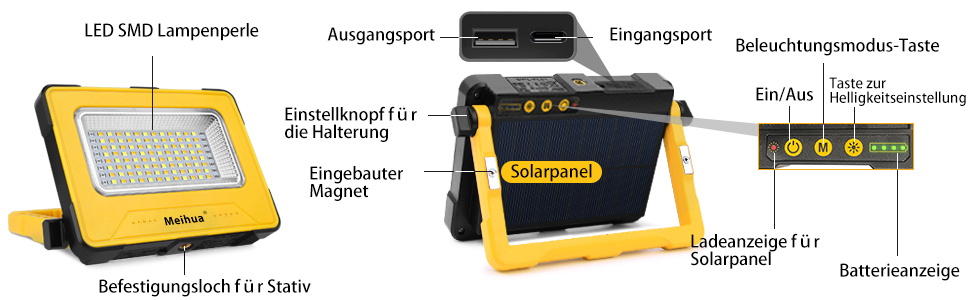
ചിത്രം 2.1: വിശദമായി view of the MEIHUA SWL-FL01 LED Work Light, highlighting its components. Key parts include the LED SMD lamp beads, output port (USB-A), input port (USB-C), lighting mode button, on/off button, adjustment knob for the stand, built-in magnet, solar panel, solar panel charging indicator, and battery indicator.
- LED SMD Lamp മുത്തുകൾ: പ്രാഥമിക പ്രകാശ സ്രോതസ്സ്.
- Output Port (USB-A): ബാഹ്യ ഉപകരണങ്ങൾ ചാർജ് ചെയ്യുന്നതിന് (പവർ ബാങ്ക് പ്രവർത്തനം).
- Input Port (USB-C): For charging the work light via USB cable.
- Lighting Mode Button: Cycles through different light modes.
- On/Off & Brightness Adjustment Button: Powers the device and adjusts brightness levels.
- Adjustment Knob for Stand: Allows 180-degree rotation of the stand for various angles.
- ബിൽറ്റ്-ഇൻ മാഗ്നെറ്റ്: For attaching the light to metallic surfaces.
- സോളാർ പാനൽ: സോളാർ ചാർജിംഗിനായി.
- Solar Panel Charging Indicator: Shows charging status when using solar power.
- ബാറ്ററി സൂചകം: Displays the remaining battery level.
- Mounting Hole for Tripod: For securing the light to a tripod (tripod not included).
3. സവിശേഷതകൾ
The MEIHUA SWL-FL01 LED Work Light offers a range of features for versatile use:
ചിത്രം 3.1: കഴിഞ്ഞുview of the MEIHUA work light's key features, including a 12000mAh battery, 2A fast charge, solar power capability, suitability for tripods, and magnetic design.
- Constant Current Lighting: Maintains consistent brightness (e.g., 3000 lumens for 10 hours) without dimming as the battery discharges, unlike constant voltagഇ സംവിധാനങ്ങൾ.
- ഒന്നിലധികം ലൈറ്റിംഗ് മോഡുകൾ: Features 4 distinct lighting modes:
- Light ഷ്മള വെളിച്ചം (2700 കെ)
- പ്രകൃതിദത്ത വെളിച്ചം (4000K)
- Cold Light (6000K)
- SOS Flash Mode (Red and Blue flashing for emergencies)
- ക്രമീകരിക്കാവുന്ന തെളിച്ചം: Offers 5 levels of brightness (100%, 75%, 50%, 25%, 10%) to suit various needs.
- ഇരട്ട ചാർജിംഗ് ഓപ്ഷനുകൾ: Can be charged via the integrated solar panel or a USB-C cable.
- പവർ ബാങ്ക് പ്രവർത്തനം: Equipped with a 12000mAh battery, allowing it to charge other devices like smartphones or tablets via its USB-A output port.
- കാന്തിക അടിത്തറ: Strong built-in magnets on both sides enable secure attachment to metallic surfaces.
- 180-Degree Adjustable Stand: The integrated stand can be rotated 180 degrees for flexible positioning and illumination angles.
- IP44 വാട്ടർപ്രൂഫ് റേറ്റിംഗ്: Provides protection against splashing water from any direction, making it suitable for outdoor use in light rain.
- പോർട്ടബിൾ ഡിസൈൻ: Compact and lightweight (490g) with a comfortable handle for easy transport.
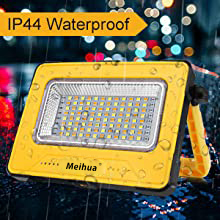
ചിത്രം 3.2: The work light is rated IP44 waterproof, indicating its resistance to splashing water.
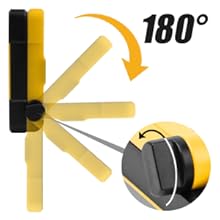
ചിത്രം 3.3: The integrated stand allows for 180-degree adjustment, providing flexible lighting angles.
4. സജ്ജീകരണം
The MEIHUA LED Work Light requires minimal setup before first use.
4.1 പ്രാരംഭ ചാർജ്
Before initial use, it is recommended to fully charge the work light using the USB-C cable. This ensures the internal battery is conditioned and ready for optimal performance.
- Connect the provided USB-C cable to the input port on the work light.
- USB കേബിളിന്റെ മറ്റേ അറ്റം അനുയോജ്യമായ ഒരു USB പവർ അഡാപ്റ്ററുമായി (ഉൾപ്പെടുത്തിയിട്ടില്ല) അല്ലെങ്കിൽ ഒരു കമ്പ്യൂട്ടർ USB പോർട്ടുമായി ബന്ധിപ്പിക്കുക.
- The battery indicator lights will illuminate, showing the charging progress. All lights will be solid when fully charged.
4.2 Positioning the Work Light
The work light offers several positioning options:
- ഫ്രീസ്റ്റാൻഡിംഗ്: Use the adjustable stand to place the light on a flat surface. Adjust the stand to achieve the desired angle.
- കാന്തിക അറ്റാച്ച്മെൻ്റ്: Attach the light to any suitable metallic surface using the built-in magnets. Ensure the surface is clean and strong enough to hold the light securely.
- ട്രൈപോഡ് മൗണ്ടിംഗ്: Secure the light to a compatible tripod using the mounting hole.

ചിത്രം 4.1: The work light can be positioned using its 180-degree adjustable stand, attached to metal surfaces via magnets, or mounted on a tripod.
5. പ്രവർത്തന നിർദ്ദേശങ്ങൾ
5.1 Powering On/Off and Brightness Adjustment
- അമർത്തുക On/Off & Brightness Adjustment Button once to turn on the light at its last used brightness setting.
- While the light is on, press the On/Off & Brightness Adjustment Button repeatedly to cycle through the 5 brightness levels (100% > 75% > 50% > 25% > 10%).
- അമർത്തിപ്പിടിക്കുക On/Off & Brightness Adjustment Button for approximately 2 seconds to turn off the light.
5.2 Adjusting Light Modes
The work light features 4 distinct light modes:

ചിത്രം 5.1: Illustration of the four light modes (Warm, Natural, Cold, SOS) and five brightness levels available on the MEIHUA work light.
- With the light on, press the ലൈറ്റിംഗ് മോഡ് ബട്ടൺ once to switch to the next light mode.
- The modes cycle in the following order: Warm Light > Natural Light > Cold Light > SOS Flash Mode.
- To exit SOS Flash Mode, press the ലൈറ്റിംഗ് മോഡ് ബട്ടൺ again to return to Warm Light, or turn off the device.
5.3 Charging the Work Light
Your work light can be charged using two methods:

ചിത്രം 5.2: The work light supports both USB-C cable charging and solar panel charging. The solar panel automatically charges when exposed to sunlight.
- USB-C ചാർജിംഗ്: Connect the provided USB-C cable to the input port and a power source. This is the fastest charging method.
- സോളാർ ചാർജിംഗ്: Place the work light with the solar panel facing direct sunlight. The solar panel charging indicator will flash during charging. Solar charging is slower and dependent on sunlight intensity.
The battery indicator lights will show the current charge level. Ensure timely charging when the battery level is low.
5.4 പവർ ബാങ്ക് പ്രവർത്തനം
The work light can serve as a power bank to charge other devices:

ചിത്രം 5.3: The MEIHUA work light can charge external devices like tablets, functioning as a 12000mAh power bank.
- Connect your device's charging cable to the USB-A output port on the work light.
- The work light will begin charging your device.
- Monitor the battery indicator lights on the work light to ensure sufficient power for both the light and your external device.
6. പരിപാലനം
Proper maintenance ensures the longevity and optimal performance of your MEIHUA LED Work Light.
- വൃത്തിയാക്കൽ: ഒരു സോഫ്റ്റ് ഉപയോഗിച്ച് ലൈറ്റ് തുടയ്ക്കുക, ഡിamp cloth. Do not use abrasive cleaners or solvents. Ensure the solar panel is clean for efficient charging.
- സംഭരണം: Store the work light in a cool, dry place when not in use. If storing for extended periods, charge the battery every 3-6 months to maintain battery health.
- വാട്ടർ എക്സ്പോഷർ: While IP44 rated, avoid submerging the light in water. Dry thoroughly if exposed to rain.
- ബാറ്ററി കെയർ: Do not attempt to replace the internal lithium-polymer battery. Dispose of the product responsibly according to local regulations when it reaches its end of life.
7. പ്രശ്നപരിഹാരം
If you encounter issues with your MEIHUA LED Work Light, refer to the following common problems and solutions:
| പ്രശ്നം | സാധ്യമായ കാരണം | പരിഹാരം |
|---|---|---|
| ലൈറ്റ് ഓണാക്കില്ല. | ബാറ്ററി തീർന്നു. | Charge the work light using the USB-C cable or solar panel. |
| വെളിച്ചം മങ്ങുന്നു അല്ലെങ്കിൽ മിന്നിമറയുന്നു. | കുറഞ്ഞ ബാറ്ററി നില. | Recharge the work light. |
| സോളാർ ചാർജിംഗ് മന്ദഗതിയിലാണ് അല്ലെങ്കിൽ പ്രവർത്തിക്കുന്നില്ല. | Insufficient sunlight or dirty solar panel. | Ensure the solar panel is in direct sunlight and clean its surface. Solar charging is slower than USB charging. |
| External device not charging via power bank function. | Work light battery is low or cable is faulty. | Ensure the work light has sufficient charge. Try a different USB cable. |
| ബട്ടണുകൾ പ്രതികരിക്കുന്നില്ല. | താൽക്കാലിക സോഫ്റ്റ്വെയർ തകരാർ. | Try turning the device off and on again. If unresponsive, allow the battery to fully deplete and then recharge. |
8 സ്പെസിഫിക്കേഷനുകൾ
Technical specifications for the MEIHUA SWL-FL01 LED Work Light:

ചിത്രം 8.1: Dimensions of the MEIHUA SWL-FL01 work light: 15.4 cm (6.1 in) length, 11.4 cm (4.5 in) width, and 3.2 cm (1.26 in) thickness.
| ഫീച്ചർ | വിശദാംശങ്ങൾ |
|---|---|
| ബ്രാൻഡ് | MEIHUA |
| മോഡൽ നമ്പർ | SWL-FL01 |
| ശക്തി | 60 വാട്ട്സ് |
| ബാറ്ററി ശേഷി | 12000mAh (Lithium-polymer) |
| വാല്യംtage | 5 വോൾട്ട് |
| LED- കളുടെ എണ്ണം | 96 |
| പ്രകാശ സ്രോതസ്സ് തരം | LED (ലൈറ്റ് എമിറ്റിംഗ് ഡയോഡ്) |
| തിളങ്ങുന്ന ഫ്ലക്സ് | Up to 3000 lumens (at 100% brightness) |
| വർണ്ണ താപനില മോഡുകൾ | Warm Light (2700K), Natural Light (4000K), Cold Light (6000K), SOS Flash Mode |
| തെളിച്ച നിലകൾ | 5 (100%, 75%, 50%, 25%, 10%) |
| ചാർജിംഗ് രീതികൾ | USB-C, Solar Panel |
| മെറ്റീരിയൽ | Metal, Alloy Steel (lampതണല്) |
| ഫിനിഷ് തരം | പരുക്കൻ |
| നിറം | മഞ്ഞ |
| അളവുകൾ (L x W x H) | 15.4 x 11.4 x 3.2 സെ.മീ (6.1 x 4.5 x 1.26 ഇഞ്ച്) |
| ഭാരം | 490 ഗ്രാം |
| വാട്ടർപ്രൂഫ് റേറ്റിംഗ് | IP44 |
| പ്രത്യേക സവിശേഷതകൾ | Adjustable brightness, multiple lighting modes, SOS mode, Power Bank function, Magnetic, 180-degree adjustable stand |
For detailed energy efficiency information, please refer to the EPREL database: https://eprel.ec.europa.eu/qr/979543
9. വാറൻ്റിയും പിന്തുണയും
Your MEIHUA SWL-FL01 Rechargeable LED Work Light comes with a 12 മാസ വാറൻ്റി വാങ്ങിയ തീയതി മുതൽ. ഈ വാറന്റി നിർമ്മാണ വൈകല്യങ്ങൾ ഉൾക്കൊള്ളുന്നു, കൂടാതെ സാധാരണ ഉപയോഗത്തിൽ ഉൽപ്പന്നത്തിന്റെ മെറ്റീരിയലിലും വർക്ക്മാൻഷിപ്പിലും വൈകല്യങ്ങളില്ലെന്ന് ഉറപ്പാക്കുന്നു.
കൂടാതെ, എ 30 ദിവസത്തെ റിട്ടേൺ പോളിസി is offered, allowing you to return the product within 30 days of receipt if you are not satisfied.
ഉപഭോക്തൃ പിന്തുണ
If you have any questions, require assistance, or need to claim warranty service, please do not hesitate to contact our customer support team. Please have your purchase details and model number (SWL-FL01) ready when contacting support.
Contact information for customer support can typically be found on the retailer's webസൈറ്റ് അല്ലെങ്കിൽ നിങ്ങളുടെ വാങ്ങൽ ഇൻവോയ്സ്.