
1. ഉൽപ്പന്നം കഴിഞ്ഞുview
The Yamaha MG12X CV is a 12-input unpowered mixing console designed for professional audio applications. It features a rugged steel chassis, D-PRE discrete Class-A microphone preamplifiers, and built-in SPX digital effects with 24 programs. This mixer provides versatile channel options and pristine audio quality for various sound reinforcement and recording needs.
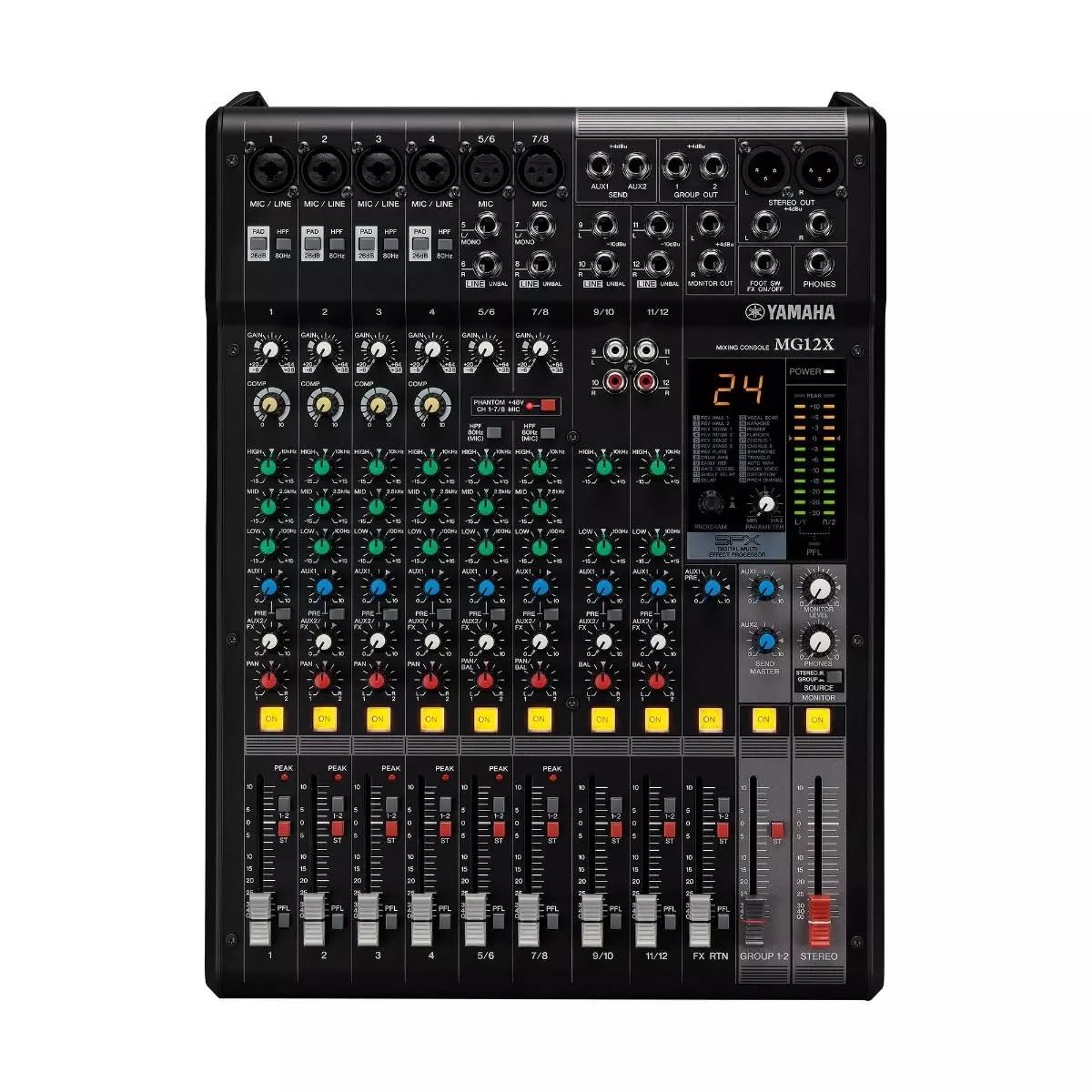
ചിത്രം 1: മുകളിൽ നിന്ന് താഴേക്ക് view of the Yamaha MG12X CV 12-Input Mixer, showing all controls and input/output jacks.
പ്രധാന സവിശേഷതകൾ:
- 12-Input, 2-Bus Plus Stereo Mixer with Effects
- Rugged, powder-coated steel chassis for superior durability
- Discrete Class-A microphone preamps
- Built-in SPX digital effects with 24 programs
- Switchable +48V Phantom power
2. സജ്ജീകരണ ഗൈഡ്
Follow these steps to set up your Yamaha MG12X CV mixer:
- അൺപാക്ക് ചെയ്യുന്നു: Carefully remove the mixer from its packaging. Retain all packaging materials for future transport or storage.
- പ്ലേസ്മെൻ്റ്: Place the mixer on a stable, flat surface. Ensure adequate ventilation around the unit. The MG12X CV can also be rack-mounted using the optional RK-MG12 Rack Mount Kit.
- പവർ കണക്ഷൻ: Connect the supplied AC power cord to the mixer's AC IN jack on the rear panel and then to a suitable power outlet. Do not power on the unit yet.
- ഇൻപുട്ട് കണക്ഷനുകൾ: Connect your microphones, instruments, and other audio sources to the appropriate input jacks (XLR, 1/4" Phone, RCA) on the mixer.
- ഔട്ട്പുട്ട് കണക്ഷനുകൾ: Connect your powered speakers, amplifiers, or recording devices to the mixer's XLR or Phone output jacks.
- ഹെഡ്ഫോണുകൾ: നിരീക്ഷണത്തിനായി ഹെഡ്ഫോണുകൾ PHONES ജാക്കുമായി ബന്ധിപ്പിക്കുക.
- പ്രാരംഭ പവർ ഓൺ: Ensure all volume controls (GAIN, LEVEL, MASTER) are set to their minimum positions before powering on the mixer. Power on the mixer, then power on any connected ampലൈഫറുകൾ അല്ലെങ്കിൽ പവർ സ്പീക്കറുകൾ.

Figure 2: Rear panel of the Yamaha MG12X CV Mixer, highlighting the power input and output connections.
3. പ്രവർത്തന നിർദ്ദേശങ്ങൾ
This section provides basic operating guidelines for your MG12X CV mixer.
3.1. ഗെയിൻ എസ്taging
- ക്രമീകരിക്കുക നേട്ടം knob for each input channel to achieve an optimal input level. The PEAK LED should flash only occasionally.
- For condenser microphones, activate the +48V ഫാൻ്റം power switch if required.
3.2. സമീകരണം (EQ)
- ഉപയോഗിക്കുക ഉയർന്നത്, MID, ഒപ്പം കുറവ് EQ knobs on each channel to shape the tone of your audio source.
3.3. Effects (SPX)
- The MG12X CV features 24 built-in SPX digital effects. Use the പ്രോഗ്രാം knob to select an effect.
- ക്രമീകരിക്കുക എഫ് എക്സ് അയയ്ക്കുക knob on each channel to send a desired amount of signal to the effects processor.
- The overall effect level is controlled by the FX റിട്ടേൺ level fader.
- A footswitch can be connected to the കാൽ SW input for hands-free effect muting.
3.4. കംപ്രഷൻ
- Four channels are equipped with a single-knob compressor. Turn the COMP knob clockwise to increase the compression amount.
3.5. Output Levels
- Adjust individual channel levels using the channel faders.
- Control the overall output level with the മാസ്റ്റർ stereo fader.
- Monitor output levels using the LED meters.
4. സവിശേഷതകളും നിയന്ത്രണങ്ങളും
The Yamaha MG12X CV mixer offers a comprehensive set of features and controls for precise audio mixing.
4.1. Input Channels
Each input channel (1-12) includes:
- XLR and 1/4" TRS inputs for microphones and line-level devices.
- GAIN control for input sensitivity adjustment.
- HIGH-PASS FILTER (HPF) switch to cut unwanted low frequencies.
- 3-band EQ (HIGH, MID, LOW) for tonal shaping.
- AUX send for external effects or monitoring.
- FX send for internal digital effects.
- PAN control for stereo positioning.
- Channel ON switch.
- PEAK LED indicator.
- Channel fader for level control.
Channels 1-4 also feature a COMP (compressor) knob.
4.2. മാസ്റ്റർ വിഭാഗം
The master section includes:
- MASTER stereo fader.
- PHONES level control.
- STEREO OUT (XLR/TRS) and MONITOR OUT (TRS) jacks.
- LED level meters.

ചിത്രം 3: വിശദമായി view of the mixer's controls, including gain, EQ, and effects knobs.
5. കണക്ഷനുകൾ
The MG12X CV offers a variety of input and output connectors to integrate with your audio system.
5.1. Input Connectors
- MIC/LINE (XLR/TRS Combo Jacks): Channels 1-4 for microphones and line-level signals.
- LINE (TRS Jacks): Channels 5/6, 7/8, 9/10, 11/12 for stereo line-level signals.
- RCA Pin Jacks: Channels 9/10, 11/12 for stereo line-level signals.
5.2. ഔട്ട്പുട്ട് കണക്ടറുകൾ
- STEREO OUT (XLR/TRS): പവറുമായി ബന്ധിപ്പിക്കുന്നതിനുള്ള പ്രധാന സ്റ്റീരിയോ ഔട്ട്പുട്ട് ampലൈഫയറുകൾ അല്ലെങ്കിൽ റെക്കോർഡിംഗ് ഉപകരണങ്ങൾ.
- MONITOR OUT (TRS): Output for connecting to monitor speakers.
- PHONES (Stereo Phone Jack): ഹെഡ്ഫോണുകൾ ബന്ധിപ്പിക്കുന്നതിന്.
- AUX SEND (TRS): Output for external effects or monitor mixes.
- FX SEND (TRS): Output for sending signal to external effects processors.

ചിത്രം 4: വശം view of the mixer, illustrating its compact and durable construction.
6. പരിപാലനം
ശരിയായ അറ്റകുറ്റപ്പണി നിങ്ങളുടെ മിക്സറിന്റെ ദീർഘായുസ്സും മികച്ച പ്രകടനവും ഉറപ്പാക്കുന്നു.
- വൃത്തിയാക്കൽ: മിക്സറിന്റെ പുറംഭാഗം വൃത്തിയാക്കാൻ മൃദുവായതും ഉണങ്ങിയതുമായ തുണി ഉപയോഗിക്കുക. ഉരച്ചിലുകൾ ഉള്ള ക്ലീനറുകളോ ലായകങ്ങളോ ഉപയോഗിക്കുന്നത് ഒഴിവാക്കുക.
- പൊടി സംരക്ഷണം: മിക്സർ ഉപയോഗിക്കാത്തപ്പോൾ പൊടി അടിഞ്ഞുകൂടുന്നത് തടയാൻ, പ്രത്യേകിച്ച് ഫേഡറുകളിലും നോബുകളിലും മിക്സർ മൂടി വയ്ക്കുക.
- വെൻ്റിലേഷൻ: Ensure ventilation openings are clear and unobstructed to prevent overheating.
- കേബിൾ മാനേജുമെന്റ്: കണക്ടറുകളിലെ ആയാസവും ആകസ്മികമായ വിച്ഛേദങ്ങളും തടയുന്നതിന് കേബിളുകൾ വൃത്തിയായി ക്രമീകരിക്കുക.
7. പ്രശ്നപരിഹാരം
If you encounter issues with your MG12X CV, refer to the following common troubleshooting tips:
- ശബ്ദമില്ല:
- എല്ലാ പവർ കണക്ഷനുകളും പരിശോധിച്ച് മിക്സർ ഓണാക്കിയിട്ടുണ്ടെന്ന് ഉറപ്പാക്കുക.
- Verify that input sources are connected correctly and active.
- Ensure channel GAIN, LEVEL faders, and MASTER fader are not at minimum.
- സ്പീക്കർ പരിശോധിക്കുക/ampലിഫയർ കണക്ഷനുകളും പവറും.
- വികലമായ ശബ്ദം:
- Reduce input GAIN if the PEAK LED is constantly lit.
- Check for proper impedance matching between sources and inputs.
- Ensure connected devices are not overdriving the mixer's inputs or outputs.
- ഇഫക്റ്റുകളൊന്നുമില്ല:
- Verify that an effect program is selected.
- Check the FX SEND knob on the channel and the FX RETURN fader are turned up.
- Ensure no footswitch is muting the effects.
8 സ്പെസിഫിക്കേഷനുകൾ
| മോഡൽ | MG12X CV |
| ബ്രാൻഡ് | യമഹ |
| ഇൻപുട്ട് ചാനലുകൾ | 12 |
| മൈക്രോഫോൺ പ്രീamps | Discrete Class-A D-PRE |
| അന്തർനിർമ്മിത ഇഫക്റ്റുകൾ | SPX Digital Effects (24 Programs) |
| കംപ്രഷൻ | 4 channels with 1-knob compressor |
| ഫാന്റം പവർ | +48V (സ്വിച്ചബിൾ) |
| Output Connector Types | എക്സ്എൽആർ, ടിആർഎസ് |
| പവർ ഉറവിടം | കോർഡഡ് ഇലക്ട്രിക് |
| ഇനത്തിൻ്റെ ഭാരം | 12.8 പൗണ്ട് |
| യു.പി.സി | 889025142687 |
9. വാറൻ്റിയും പിന്തുണയും
The Yamaha MG12X CV comes with a 1 വർഷത്തെ നിർമ്മാതാവിൻ്റെ വാറൻ്റി. Yamaha Corporation of America is committed to the quality and craftsmanship of its products. The limited warranty applies only to products purchased from authorized Yamaha retailers within the fifty United States (including the District of Columbia) and used in this area.
For detailed warranty information and support, please refer to the official Yamaha website or contact an authorized Yamaha service center. Authorized retailers are equipped with sales and service support materials and training not readily available to non-authorized retailers.
10. ഉൽപ്പന്ന വീഡിയോകൾ
ഔദ്യോഗിക ഉൽപ്പന്നം കാണുകview video for the Yamaha MG Series Mixing Consoles:
Video 1: Yamaha MG Mixing Console Series Overview. ഈ വീഡിയോയിൽ ഒരു പൊതുവായ വിവരണം നൽകുന്നു.view of the MG series, including key features and applications.