
ARCADE1UP PAC-D-10182
Arcade1Up Super PAC-MAN Partycade Instruction Manual
Model: PAC-D-10182
ആമുഖം
The Arcade1Up Super PAC-MAN Partycade is a portable and versatile arcade machine designed for easy setup and enjoyment in various environments. It comes fully assembled and offers multiple display options, including tabletop, door hanging, and wall mounting. This Partycade features a 17-inch color LCD display and authentic controls, providing a classic arcade experience. It includes 10 iconic games: PAC-MAN, PAC-LAND, PAC-MANIA, DIG DUG, DIG DUG II, MAPPY, ROMPERS, ROLLING THUNDER, and NEW RALLY-X.

ചിത്രം 1: മുൻഭാഗം view of the Arcade1Up Super PAC-MAN Partycade.
പ്രധാന സവിശേഷതകൾ
- 10 ക്ലാസിക് ഗെയിമുകൾ: Enjoy a collection of 10 pre-installed arcade games, including Super PAC-MAN, PAC-MAN, PAC-LAND, MAPPY, DIG DUG, DIG DUG II, ROMPERS, ROLLING THUNDER, and NEW RALLY-X.
- Light-Up Marquee: Features an illuminated marquee displaying the "Super PAC-MAN" logo, enhancing the authentic arcade aesthetic.
- ബഹുമുഖ മൗണ്ടിംഗ് ഓപ്ഷനുകൾ: Includes hardware for door hanging, wall mounting, and detachable legs for tabletop play, offering flexible placement.
- Clear Deck Protector: A durable clear protector covers the control panel, safeguarding the joystick and buttons from wear.
- കോംപാക്റ്റ് ഡിസൈൻ: With dimensions of 19.45” D x 14.49” W x 28.74” H, the Partycade is designed to fit easily in various spaces.

ചിത്രം 2: ക്ലോസപ്പ് view of the control panel and light-up marquee.
സജ്ജമാക്കുക
മൗണ്ടിംഗ് ഓപ്ഷനുകൾ
The Arcade1Up Partycade offers three primary setup configurations:
- Tabletop Play: Attach the included detachable legs to the base of the unit for stable placement on any flat surface, such as a table or counter.
- Door Hanging: Utilize the provided door hanging hardware to suspend the Partycade securely over a standard door. Ensure the door frame is sturdy enough to support the unit's weight (approximately 32.4 pounds).
- മതിൽ മൗണ്ടിംഗ്: For a more permanent installation, use the wall mounting hardware to affix the Partycade directly to a wall. It is crucial to mount the unit into wall studs for maximum stability and safety. Consult a professional if unsure about wall mounting procedures.

Figure 3: The Partycade unit displayed in a wall-mounted configuration.
പ്രാരംഭ പവർ-അപ്പ്
Once the unit is securely placed or mounted, connect the power adapter to the designated port on the back of the Partycade and plug it into a standard electrical outlet. Locate the ON/OFF switch on the control panel and toggle it to the 'ON' position. The screen will illuminate, and the Arcade1Up logo will appear, indicating the unit is powering on.
പ്രവർത്തന നിർദ്ദേശങ്ങൾ
ഗെയിം തിരഞ്ഞെടുക്കൽ
Upon powering on, the main game selection menu will be displayed. Use the joystick to navigate through the list of 10 available games. Press the 'A' button (typically the primary action button) to select your desired game. To return to the main menu from a game, hold the 'A' button for 5 seconds.
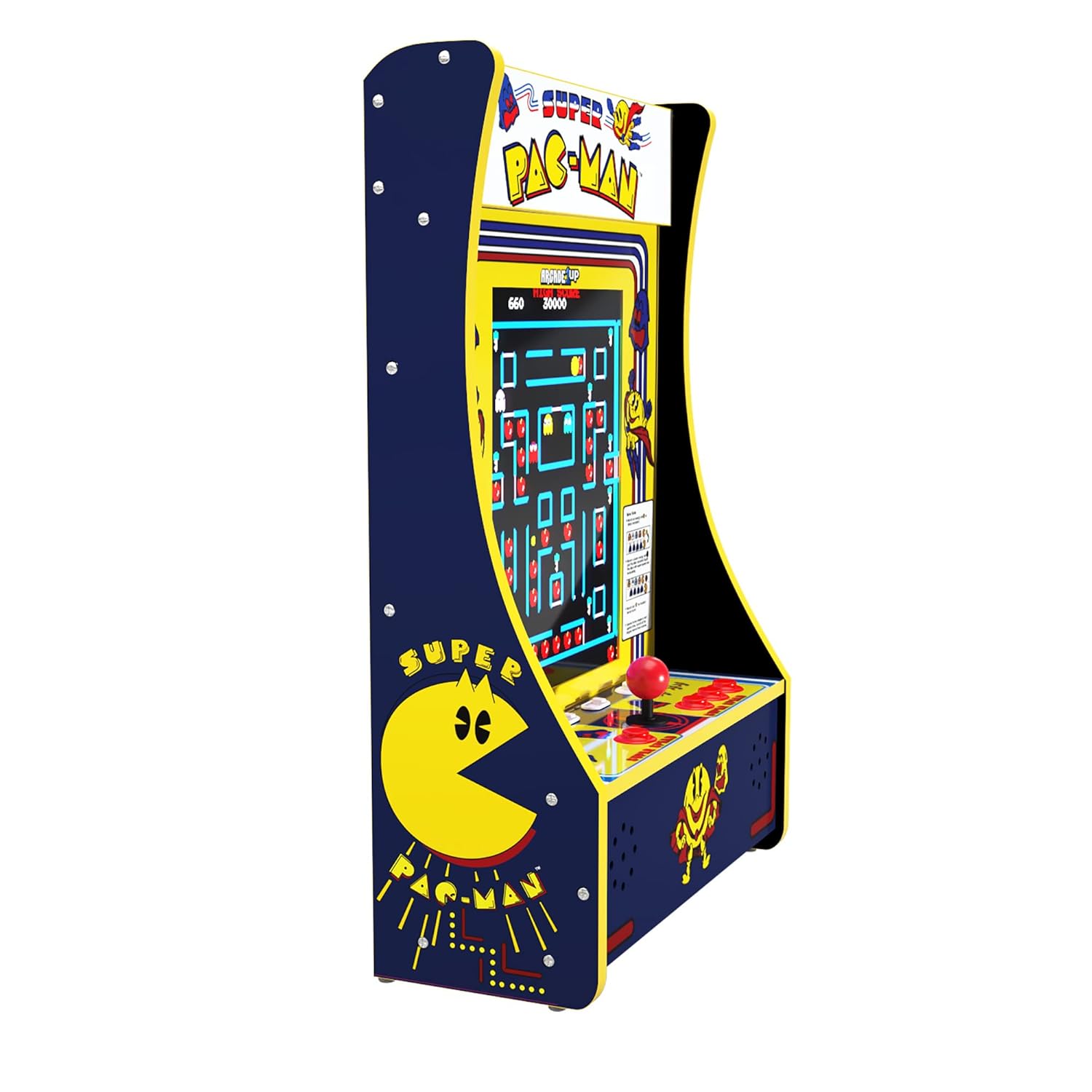
Figure 4: The game selection screen showing the 10 available titles.
ഗെയിംപ്ലേ
Each game utilizes the joystick for directional input and the various buttons for actions such as firing, jumping, or special abilities. Refer to the on-screen instructions or in-game tutorials for specific controls for each title. The unit supports both single-player and two-player modes, depending on the selected game. Press the 'Player 1' or 'Player 2' buttons to initiate a game.
നിയന്ത്രണങ്ങൾ
The control panel features a classic arcade joystick for directional input and multiple action buttons. The layout is designed to replicate the feel of original arcade machines. A clear deck protector is installed over the control panel to ensure longevity and protect the components during intense gameplay.

ചിത്രം 5: വിശദമായി view of the joystick and action buttons on the control panel.
വോളിയം ക്രമീകരണം
The volume can be adjusted using the dedicated volume buttons located on the control panel, typically labeled 'VOL+' and 'VOL-'. Adjust the volume to a comfortable level for your playing environment.
മെയിൻ്റനൻസ്
To ensure the longevity and optimal performance of your Arcade1Up Partycade, follow these simple maintenance guidelines:
- വൃത്തിയാക്കൽ: Use a soft, dry cloth to wipe down the exterior surfaces, including the screen and control panel. For stubborn smudges, a slightly damp cloth with mild, non-abrasive cleaner can be used, ensuring no liquid seeps into the unit.
- പൊടി തടയൽ: Keep the unit in a clean, dust-free environment. Regularly dust the vents and openings to prevent accumulation that could affect performance.
- സംഭരണം: യൂണിറ്റ് ദീർഘനേരം സൂക്ഷിക്കുകയാണെങ്കിൽ, വൈദ്യുതിയിൽ നിന്ന് വിച്ഛേദിച്ച് നേരിട്ടുള്ള സൂര്യപ്രകാശത്തിൽ നിന്നും കടുത്ത താപനിലയിൽ നിന്നും അകന്ന് തണുത്തതും വരണ്ടതുമായ സ്ഥലത്ത് സൂക്ഷിക്കുക.
ട്രബിൾഷൂട്ടിംഗ്
No Power / Screen Blank
If the unit does not power on or the screen remains blank after turning it on:
- പവർ അഡാപ്റ്റർ യൂണിറ്റിലേക്കും പ്രവർത്തിക്കുന്ന ഒരു ഇലക്ട്രിക്കൽ ഔട്ട്ലെറ്റിലേക്കും സുരക്ഷിതമായി പ്ലഗ് ചെയ്തിട്ടുണ്ടെന്ന് ഉറപ്പാക്കുക.
- മറ്റൊരു ഉപകരണം ഉപയോഗിച്ച് പരീക്ഷിച്ചുകൊണ്ട് പവർ ഔട്ട്ലെറ്റ് സജീവമാണെന്ന് ഉറപ്പാക്കുക.
- Check the ON/OFF switch on the control panel to ensure it is fully engaged.
Joystick or Button Unresponsive
If the joystick or buttons are not responding correctly during gameplay:
- Restart the unit by turning it off and then on again.
- Ensure the control panel is clean and free of debris that might obstruct button movement.
- While rare, if a joystick feels loose, it may require tightening. This typically involves removing the clear deck protector and gently tightening the base of the joystick. If uncomfortable performing this, contact customer support.
Game Freezes or Crashes
If a game freezes or the unit becomes unresponsive:
- Hold the 'Player 1' button for 5 seconds to reset the current game.
- If the issue persists, power cycle the unit by turning it off, waiting 10 seconds, and then turning it back on.
സ്പെസിഫിക്കേഷനുകൾ
| ഫീച്ചർ | വിശദാംശങ്ങൾ |
|---|---|
| ബ്രാൻഡ് | ARCADE1UP |
| മോഡൽ നമ്പർ | PAC-D-10182 |
| പ്ലാറ്റ്ഫോം | മെഷീൻ നിർദ്ദിഷ്ടമല്ല |
| കൺട്രോളർ തരം | Joystick, Button Control |
| സ്ക്രീൻ വലിപ്പം | 17 ഇഞ്ച് |
| ഹാർഡ്വെയർ ഇന്റർഫേസ് | മിന്നൽ |
| ഉൽപ്പന്ന അളവുകൾ (L x W x H) | 19.45 x 14.49 x 28.74 ഇഞ്ച് |
| ഇനത്തിൻ്റെ ഭാരം | 32.4 പൗണ്ട് |
| മെറ്റീരിയൽ | പ്ലാസ്റ്റിക് |
| ഡിസ്പ്ലേ തരം | എൽസിഡി |
വാറൻ്റിയും പിന്തുണയും
For detailed warranty information, product registration, or technical support, please refer to the official Arcade1Up webസൈറ്റിൽ ബന്ധപ്പെടുകയോ അവരുടെ ഉപഭോക്തൃ സേവന വിഭാഗവുമായി ബന്ധപ്പെടുകയോ ചെയ്യുക. ഏതെങ്കിലും വാറന്റി ക്ലെയിമുകൾക്കായി നിങ്ങളുടെ വാങ്ങലിന്റെ തെളിവ് സൂക്ഷിക്കുക.
കൂടുതൽ ഉറവിടങ്ങൾക്കും പതിവ് ചോദ്യങ്ങൾക്കും, സന്ദർശിക്കുക ARCADE1UP Store on Amazon.
അനുബന്ധ രേഖകൾ - PAC-D-10182
 |
ആർക്കേഡ്1അപ്പ് പാർട്ടികേഡ് പ്ലസ് സൂപ്പർ പാക്-മാൻ ഓണേഴ്സ് മാനുവൽ സുരക്ഷാ മുൻകരുതലുകൾ, ഇൻസ്റ്റാളേഷൻ, ട്രബിൾഷൂട്ടിംഗ്, ഗെയിം ക്രമീകരണങ്ങൾ, നിയന്ത്രണങ്ങൾ എന്നിവയുൾപ്പെടെയുള്ള Arcade1Up Partycade Plus സൂപ്പർ Pac-Man പതിപ്പിനായുള്ള ഓണേഴ്സ് മാനുവൽ. മോഡൽ #PAC-D-10182. |
 |
1981 ലെ ആർക്കേഡ്1അപ്പ് ഡീലക്സ് ക്ലാസ് ഓണേഴ്സ് മാനുവൽ 1981 ലെ ആർക്കേഡ് മെഷീനിലെ ആർക്കേഡ്1അപ്പ് ഡീലക്സ് ക്ലാസിനായുള്ള ഉടമയുടെ മാനുവൽ, സുരക്ഷാ മുൻകരുതലുകൾ, ഇൻസ്റ്റാളേഷൻ നിർദ്ദേശങ്ങൾ, സ്പെസിഫിക്കേഷനുകൾ, ഗെയിം നിയന്ത്രണങ്ങൾ, ട്രബിൾഷൂട്ടിംഗ് എന്നിവ ഇതിൽ ഉൾപ്പെടുന്നു. |
 |
Arcade1Up Pac-Man Deluxe Owner's Manual - Safety, Setup, and Troubleshooting This official owner's manual provides essential safety instructions, installation guidance, game control details, and troubleshooting tips for the Arcade1Up Pac-Man Deluxe arcade machine. |
 |
Arcade1Up ലെഗസി പതിപ്പ് ഓണേഴ്സ് മാനുവൽ - സുരക്ഷ, നിയന്ത്രണങ്ങൾ, ട്രബിൾഷൂട്ടിംഗ് Arcade1Up ലെഗസി എഡിഷൻ ഹോം ആർക്കേഡ് മെഷീനിനായുള്ള ഔദ്യോഗിക ഉടമയുടെ മാനുവൽ. അത്യാവശ്യ സുരക്ഷാ മുൻകരുതലുകൾ, ഗെയിം നിയന്ത്രണ വിശദീകരണങ്ങൾ, ട്രബിൾഷൂട്ടിംഗ് നുറുങ്ങുകൾ, ഇൻസ്റ്റാളേഷൻ മാർഗ്ഗനിർദ്ദേശങ്ങൾ, സാങ്കേതിക സവിശേഷതകൾ എന്നിവ നൽകുന്നു. |
 |
Arcade1Up Class of 81 Owner's Manual - MSP-A-10171 Comprehensive owner's manual for the Arcade1Up Class of 81 (MSP-A-10171) featuring safety instructions, troubleshooting, game settings, and control layouts for classic arcade games. |
 |
Arcade1Up Class of 81 Owner's Manual - Setup, Troubleshooting, and Game Controls Comprehensive owner's manual for the Arcade1Up Class of 81 home arcade machine. Includes safety instructions, installation guide, troubleshooting tips, game control layouts, and specifications. |
Ask a question about this manual
Ask about setup, troubleshooting, compatibility, parts, safety, or missing instructions. Manuals+ will review the question and use this page’s manual context to help answer it.