
1. ആമുഖം
The Phomemo Q31 Mini Label Maker is a portable, Bluetooth-enabled thermal label printer designed for ease of use and versatility. It allows users to create and print custom labels for various organizational needs, including kitchen, school, office, and home applications. This manual provides detailed instructions for setting up, operating, and maintaining your Q31 label maker.

Figure 1.1: Phomemo Q31 Mini Label Maker and label roll.
2. ഉൽപ്പന്ന സവിശേഷതകൾ
- ഒതുക്കമുള്ളതും പോർട്ടബിൾ ഡിസൈൻ: Small footprint (approximately 8cm x 8cm) for easy carrying and storage.
- വയർലെസ് ബ്ലൂടൂത്ത് കണക്റ്റിവിറ്റി: Connects to your smartphone or tablet via the Print Master APP for convenient label creation.
- തെർമൽ പ്രിന്റിംഗ് ടെക്നോളജി: Inkless printing, providing clear and smudge-proof labels.
- Versatile Label Creation: Supports multi-line printing, various fonts (35+), icons (660+), and frames (85+).
- Continuous and Pre-cut Label Support: Compatible with both continuous and pre-cut label tapes for diverse labeling needs.
- നീണ്ടുനിൽക്കുന്ന ലേബലുകൾ: Labels are water-proof, oil-proof, scratch-resistant, and feature strong adhesion with no residue glue upon removal.
- ഇരട്ട പവർ സപ്ലൈ ഓപ്ഷനുകൾ: Can be powered by 4 AAA batteries or via a Type-C USB cable.

Figure 2.1: Compact design and internal view of the Phomemo Q31.

Figure 2.2: Versatile applications of labels created with the Q31.

Figure 2.3: Key durability features of Phomemo labels.
3. സജ്ജീകരണം
3.1. Power Supply and Label Tape Installation
The Phomemo Q31 can be powered by 4 AAA batteries or directly via a Type-C USB cable.
- Open the top cover of the machine by pressing the release button.
- Insert 4 No.7 (AAA) batteries into the battery compartment, ensuring correct polarity, or plug in the Type-C USB cable.
- Insert the label tape roll with the printed side facing towards the batteries.
- Pull approximately 5mm of the label tape out through the slot.
- Align the long column of the upper cover with the notch and close it securely.
- Long press the power button to turn on the device. The indicator light will turn green.
Video 3.1: Installation of batteries and label tape in the Phomemo Q31 label maker.
3.2. ആപ്പ് ഇൻസ്റ്റാളേഷനും ബ്ലൂടൂത്ത് കണക്ഷനും
The Phomemo Q31 operates via the 'Print Master' application, available for both iOS and Android devices.
- Download the 'Print Master' APP from the App Store (iOS) or Google Play Store (Android).
- നിങ്ങളുടെ സ്മാർട്ട്ഫോണിലോ ടാബ്ലെറ്റിലോ ബ്ലൂടൂത്ത് പ്രവർത്തനക്ഷമമാക്കിയിട്ടുണ്ടെന്ന് ഉറപ്പാക്കുക.
- Open the 'Print Master' APP. The app will search for available printers.
- Select 'Q31' from the list of found devices to connect. The app will indicate a successful connection.
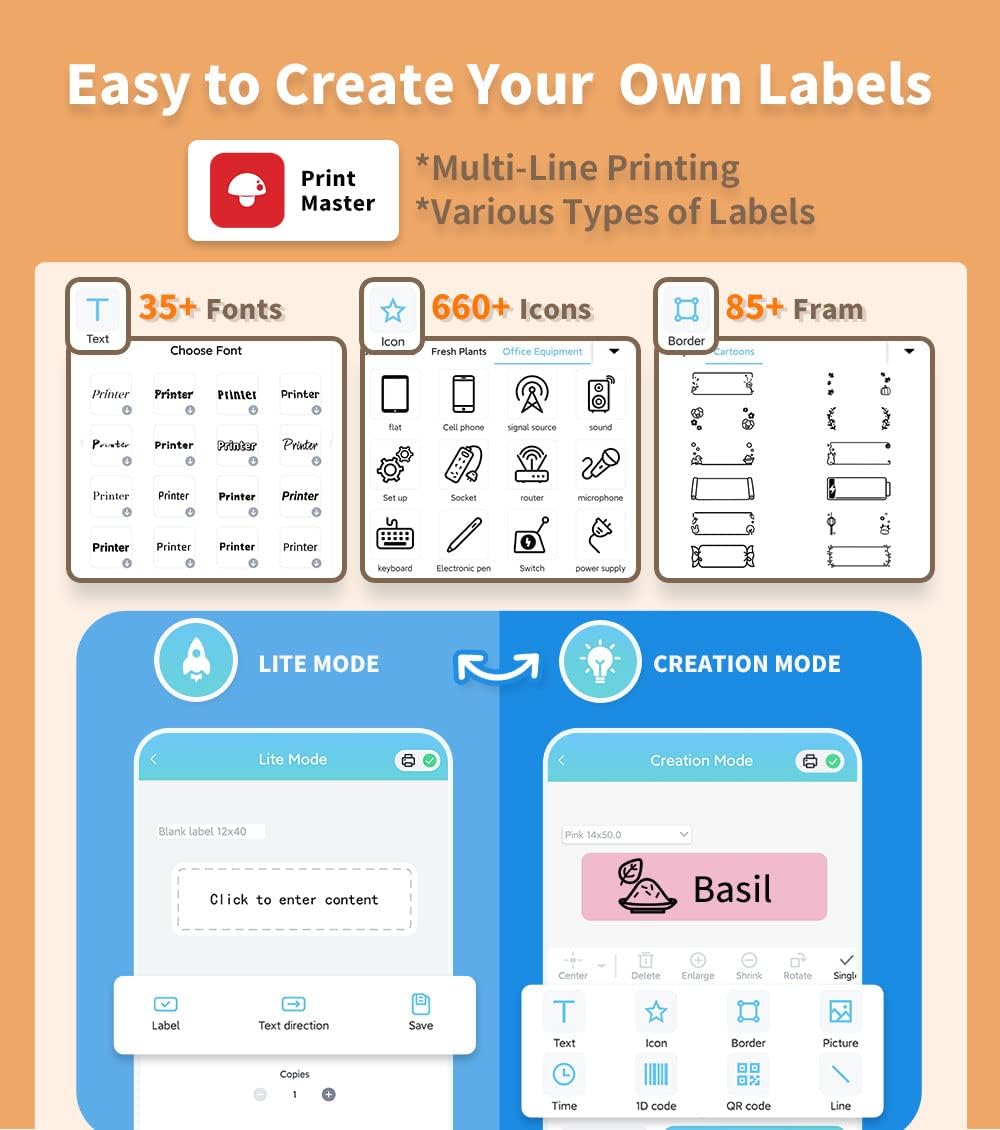
Figure 3.1: Print Master APP interface and download options.
Video 3.2: Connecting the Phomemo Q31 label maker to the Print Master APP via Bluetooth.
4. പ്രവർത്തന നിർദ്ദേശങ്ങൾ
4.1. ലേബലുകൾ സൃഷ്ടിക്കലും അച്ചടിക്കലും
The Print Master APP offers two modes for label creation: Lite Mode for quick labels and Creation Mode for advanced customization.
- Open the Print Master APP and ensure your Q31 is connected.
- ഇടയിൽ തിരഞ്ഞെടുക്കുക ലൈറ്റ് മോഡ് for simple text labels or സൃഷ്ടിക്കൽ മോഡ് for advanced design options.
- In Creation Mode, select the desired label size and pattern.
- Enter your desired text. You can customize font, size, style (bold, italic), alignment, and add icons, borders, 1D/QR codes, and images.
- പ്രീview your label to ensure it meets your requirements.
- Tap the 'Print' button. The label maker will quickly print your design.

Figure 4.1: Easy label creation with various customization options in the Print Master APP.
Video 4.2: Demonstration of creating and printing a label using the Phomemo Q31.
വീഡിയോ 4.3: ഉദാample of creating labels for various items with the Phomemo D30/Q31.
4.2. Continuous vs. Pre-cut Labels
The Q31 supports both continuous and pre-cut label tapes. The Print Master APP allows you to select the appropriate label type and adjust settings accordingly.
- തുടർച്ചയായ ലേബലുകൾ: Ideal for custom lengths. The app will guide you on setting the desired length before printing.
- Pre-cut Labels: Perfect for standardized labels. The app automatically recognizes the pre-cut size.
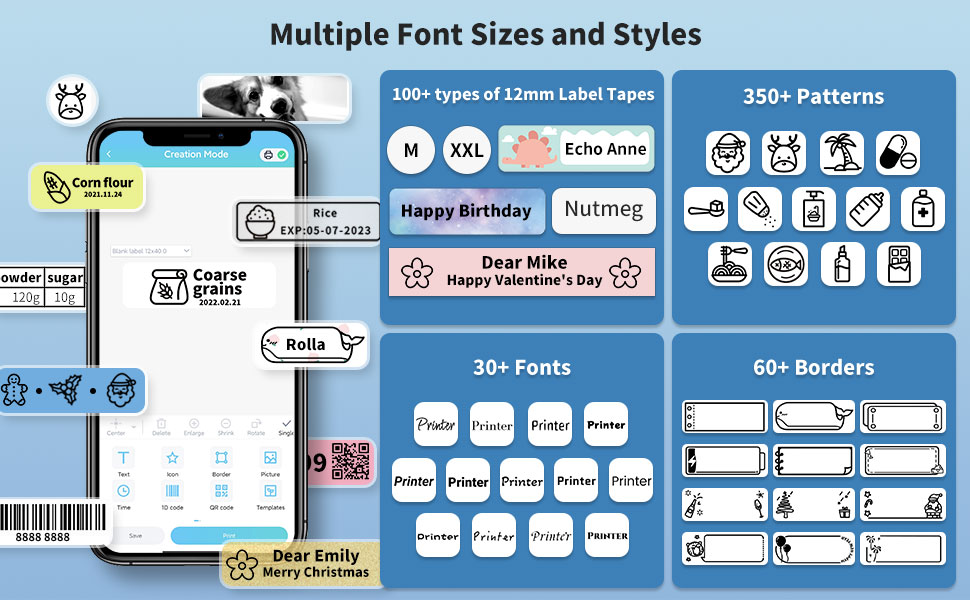
Figure 4.2: The Q31 supports both continuous and pre-cut label types.
5. പരിപാലനം
5.1. പ്രിന്റ് ഹെഡ് വൃത്തിയാക്കൽ
To ensure optimal print quality, regularly clean the print head.
- Turn off the label maker and open the top cover.
- പ്രിന്റ് ഹെഡ് ഒരു കോട്ടൺ സ്വാബ് ഉപയോഗിച്ച് മൃദുവായി തുടയ്ക്കുക dampഐസോപ്രോപൈൽ ആൽക്കഹോൾ ഉപയോഗിച്ചാണ് നിർവഹിച്ചത്.
- Allow the print head to dry completely before closing the cover and resuming use.
5.2. സംഭരണം
Store the label maker in a cool, dry place away from direct sunlight and extreme temperatures. Remove batteries if the device will not be used for an extended period to prevent leakage.
6. പ്രശ്നപരിഹാരം
6.1. പൊതുവായ പ്രശ്നങ്ങളും പരിഹാരങ്ങളും
| ഇഷ്യൂ | സാധ്യമായ കാരണം | പരിഹാരം |
|---|---|---|
| ഉപകരണം ഓണാക്കുന്നില്ല | Low or no battery power; incorrect battery insertion. | Replace batteries or connect via USB-C. Ensure batteries are inserted correctly. |
| ബ്ലൂടൂത്ത് വഴി കണക്റ്റ് ചെയ്യാനാവുന്നില്ല | Bluetooth off; device too far; app not recognizing. | Ensure Bluetooth is on. Move device closer. Restart app and label maker. |
| മോശം പ്രിന്റ് നിലവാരം (മങ്ങിയത്, വരകൾ) | Dirty print head; low battery; incorrect label type. | Clean print head. Replace batteries. Ensure correct label type is selected in app. |
| Label jam or misfeed | Improper label tape installation. | Open cover, clear jam, re-install label tape correctly. |
7 സ്പെസിഫിക്കേഷനുകൾ
| ഫീച്ചർ | വിശദാംശങ്ങൾ |
|---|---|
| ബ്രാൻഡ് | ഫേമോമോ |
| മോഡലിൻ്റെ പേര് | Q31-wh (D30) |
| പ്രിൻ്റിംഗ് ടെക്നോളജി | തെർമൽ |
| കണക്റ്റിവിറ്റി ടെക്നോളജി | ബ്ലൂടൂത്ത് |
| റെസലൂഷൻ | 203 x 203 ബിപിഐ |
| പരമാവധി പ്രിന്റ് വേഗത (മോണോക്രോം) | 15 Pages per second |
| അനുയോജ്യമായ ഉപകരണങ്ങൾ | iOS/Android Smartphones, Laptops (via USB) |
| ഇനത്തിൻ്റെ ഭാരം | 3.17 ഔൺസ് (90 ഗ്രാം) |
| വൈദ്യുതി വിതരണം | 4 x AAA Batteries or USB-C |
| പരമാവധി ഇൻപുട്ട് ഷീറ്റ് ശേഷി | 34 |
| ഔട്ട്പുട്ട് ഷീറ്റ് ശേഷി | 34 |
| മെമ്മറി സ്റ്റോറേജ് കപ്പാസിറ്റി | 64 MB |
| ആദ്യ തീയതി ലഭ്യമാണ് | മെയ് 25, 2022 |
8. വാറൻ്റിയും പിന്തുണയും
For warranty information, technical support, or any inquiries regarding your Phomemo Q31 Mini Label Maker, please refer to the official Phomemo webസൈറ്റിൽ ബന്ധപ്പെടുക അല്ലെങ്കിൽ അവരുടെ ഉപഭോക്തൃ സേവനവുമായി നേരിട്ട് ബന്ധപ്പെടുക. വാറന്റി ക്ലെയിമുകൾക്കായി നിങ്ങളുടെ വാങ്ങൽ രസീത് സൂക്ഷിക്കുക.