
1. ആമുഖം
This manual provides detailed instructions for the safe and proper installation, operation, and maintenance of your Barkan M121T Monitor Desk Mount. Please read this manual thoroughly before installation and retain it for future reference. This mount is designed for flat and curved screens ranging from 13 to 34 inches, supporting a maximum weight of 17.6 lbs (8 kg).
2 സുരക്ഷാ വിവരങ്ങൾ
മുന്നറിയിപ്പ്: Failure to read and follow all instructions may result in personal injury or damage to the product. Ensure all components are securely fastened as described in this manual. Do not exceed the maximum weight capacity of 17.6 lbs (8 kg).
- Verify that the mounting surface can safely support the combined weight of the mount and the monitor.
- Use only the provided hardware. If any parts are missing or defective, contact Barkan customer support.
- Do not install on a vibrating surface or a surface prone to movement.
- Keep children away during installation. Small parts may be a choking hazard.
- മൌണ്ട് സുരക്ഷിതമാണെന്നും എല്ലാ ഫാസ്റ്റനറുകളും ഇറുകിയതാണെന്നും ഇടയ്ക്കിടെ പരിശോധിക്കുക.
3. പാക്കേജ് ഉള്ളടക്കം
Before installation, ensure all parts are present and undamaged. Refer to the image below for a visual representation of the included components.
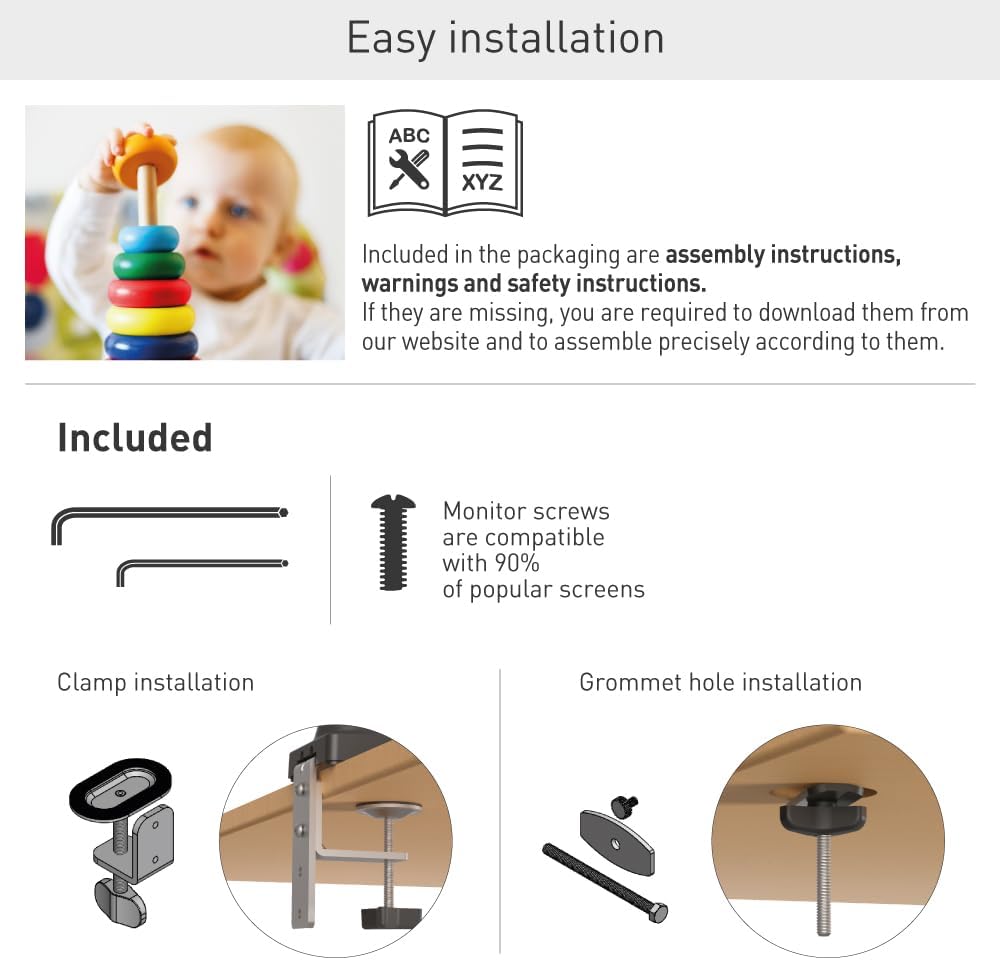
Figure 1: Included components for the Barkan M121T Monitor Desk Mount. This includes various screws, washers, and parts for both clamp ഒപ്പം ഗ്രോമെറ്റ് ഇൻസ്റ്റാളേഷനും.
- Monitor Mount Arm Assembly
- ഡെസ്ക് Clamp അസംബ്ലി
- ഗ്രോമെറ്റ് അടിസ്ഥാന ഘടകങ്ങൾ
- Monitor Mounting Screws (compatible with most screens)
- Hex Keys for adjustment
- നിർദ്ദേശ മാനുവൽ (ഈ പ്രമാണം)
4 സ്പെസിഫിക്കേഷനുകൾ
The Barkan M121T Monitor Desk Mount offers robust support and flexibility. Review the detailed specifications below.
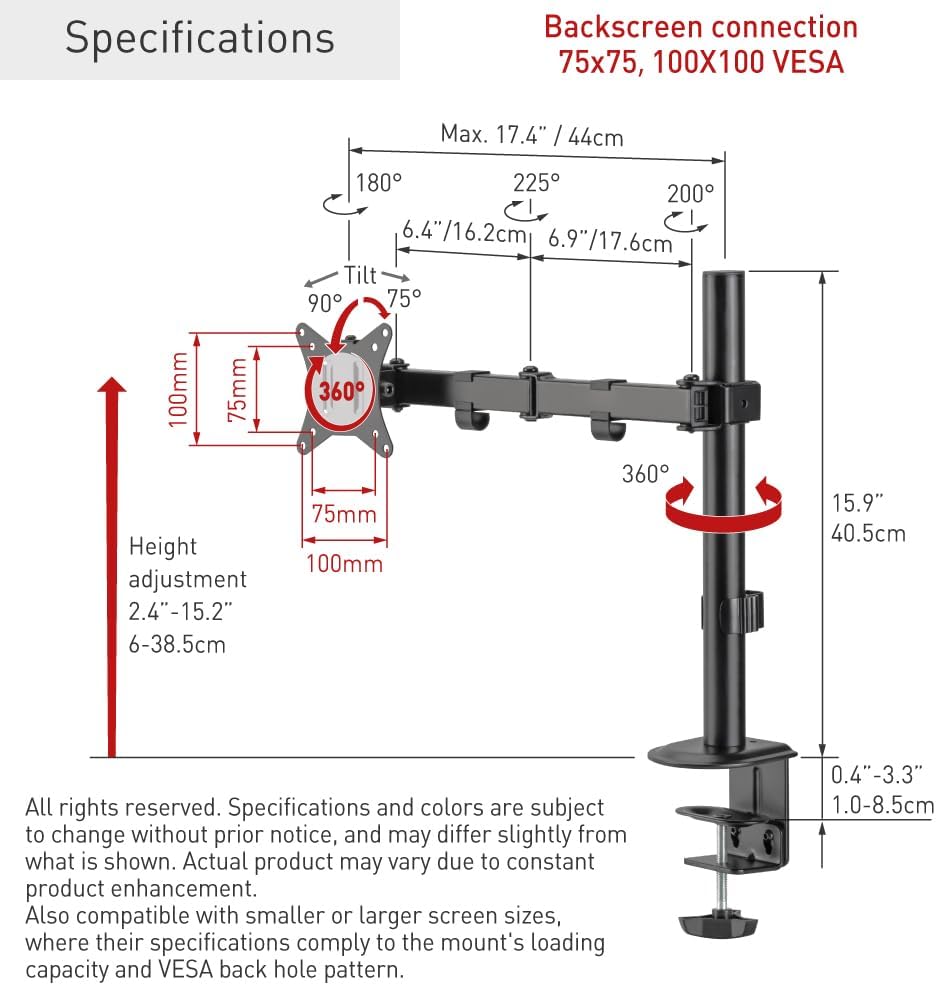
Figure 2: Technical specifications and dimensions of the Barkan M121T Monitor Desk Mount.
| ഫീച്ചർ | സ്പെസിഫിക്കേഷൻ |
|---|---|
| സ്ക്രീൻ വലിപ്പം അനുയോജ്യത | 13 - 34 ഇഞ്ച് |
| പരമാവധി ലോഡ് കപ്പാസിറ്റി | 17.6 പൗണ്ട് (8 കി.ഗ്രാം) |
| VESA അനുയോജ്യത | 75x75 മി.മീ., 100x100 മി.മീ. |
| ടിൽറ്റ് ആംഗിൾ | Up to 165° (tool-free) |
| സ്വിവൽ ആംഗിൾ | 180° (near screen connection plate) |
| ഭ്രമണം | 360° (portrait/landscape) |
| ഉയരം ക്രമീകരിക്കൽ ശ്രേണി | 2.4 - 15.2 ഇഞ്ച് (6 - 38.5 സെ.മീ) |
| മൗണ്ടിംഗ് ഓപ്ഷനുകൾ | ഡെസ്ക് Clamp, Grommet Hole |
| മെറ്റീരിയൽ | ഇരുമ്പ് |
| നിറം | കറുപ്പ് |
5. സജ്ജീകരണവും ഇൻസ്റ്റാളേഷനും
The Barkan M121T offers two installation methods: desk clamp or grommet hole. Choose the method suitable for your desk.
5.1 ഡെസ്ക് Clamp ഇൻസ്റ്റലേഷൻ
- ഡെസ്ക് അറ്റാച്ചുചെയ്യുക clamp പ്രധാന ധ്രുവത്തിലേക്കുള്ള അസംബ്ലി.
- cl സ്ഥാനംamp on the edge of your desk and tighten the screw until the mount is secure. Ensure the clamp is firmly attached to prevent movement.
5.2 Grommet Hole Installation
- Insert the grommet bolt through the grommet hole in your desk.
- Attach the grommet base components to the bolt from underneath the desk and tighten securely.
- പ്രധാന തൂൺ ഗ്രോമെറ്റ് ബേസിൽ ഘടിപ്പിക്കുക.
5.3 മോണിറ്റർ ഘടിപ്പിക്കൽ

Figure 3: Monitor attached to the Barkan M121T mount, demonstrating its adjustable features.
- Carefully attach the VESA plate from the mount to the back of your monitor using the appropriate monitor screws. Ensure the screws are tightened securely but do not overtighten.
- Slide the monitor with the attached VESA plate onto the arm assembly.
- Secure the monitor to the arm using the provided locking mechanism or screw.
6. പ്രവർത്തന നിർദ്ദേശങ്ങൾ
The Barkan M121T mount allows for various adjustments to achieve an ergonomic viewഅനുഭവം.
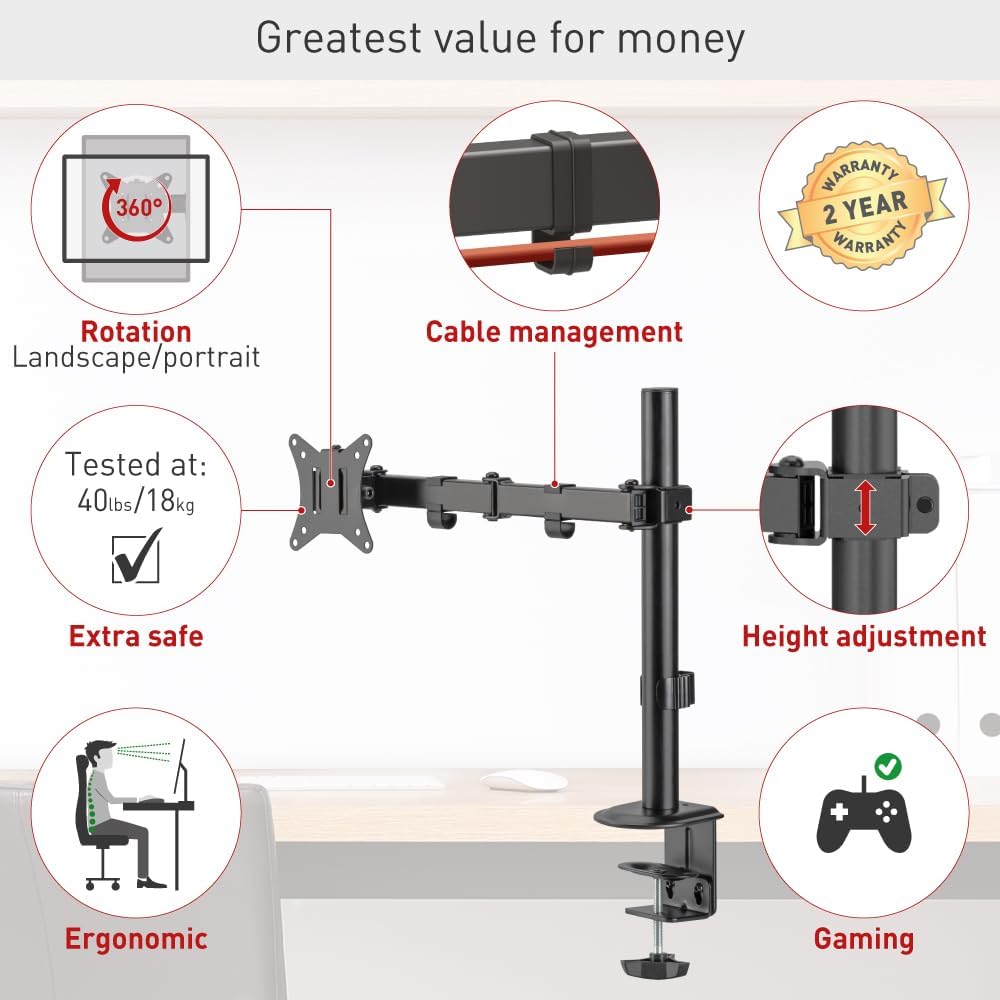
ചിത്രം 4: ഓവർview of the Barkan M121T mount's adjustable features.
- ഉയരം ക്രമീകരിക്കൽ: Loosen the collar on the main pole, adjust the arm to the desired height, and then re-tighten the collar.
- ടിൽറ്റ്: Gently push or pull the top or bottom of your monitor to adjust the tilt angle up to 165°. This adjustment is tool-free.
- സ്വിവൽ: Rotate the monitor horizontally up to 180° at the screen connection plate.
- റൊട്ടേഷൻ: ലാൻഡ്സ്കേപ്പ്, പോർട്രെയ്റ്റ് ഓറിയന്റേഷനുകൾക്കിടയിൽ മാറാൻ മോണിറ്റർ 360° തിരിക്കുക.
- കേബിൾ മാനേജുമെന്റ്: Utilize the integrated cable management clips on the arm to route and organize your monitor cables for a tidy workspace.
7. പരിപാലനം
Regular maintenance ensures the longevity and safe operation of your monitor mount.
- വൃത്തിയാക്കൽ: മൗണ്ട് ഒരു സോഫ്റ്റ്, ഡി ക്ലീനർ ഉപയോഗിച്ച് തുടയ്ക്കുക.amp തുണി. ഉരച്ചിലുകൾ ഉണ്ടാക്കുന്ന ക്ലീനറുകളോ ലായകങ്ങളോ ഒഴിവാക്കുക.
- ആനുകാലിക പരിശോധനകൾ: Every 3-6 months, check all screws and connections to ensure they are tight and secure. Re-tighten if necessary.
- ലൂബ്രിക്കേഷൻ: ചലിക്കുന്ന ഭാഗങ്ങൾക്ക് ലൂബ്രിക്കേഷൻ ആവശ്യമില്ല.
8. പ്രശ്നപരിഹാരം
If you encounter any issues, refer to the following common problems and solutions.
| പ്രശ്നം | സാധ്യമായ കാരണം | പരിഹാരം |
|---|---|---|
| Monitor sags or does not hold position. | Mounting screws are loose; monitor weight exceeds capacity. | Ensure all screws are tightened. Verify monitor weight is within 17.6 lbs (8 kg). |
| മൗണ്ട് അസ്ഥിരമായി തോന്നുന്നു. | ഡെസ്ക് clamp or grommet base is not securely fastened. | ഡെസ്ക് cl വീണ്ടും മുറുക്കുകamp or grommet base. Ensure the desk surface is stable. |
| ടിൽറ്റ്/സ്വിവൽ ക്രമീകരിക്കുന്നതിൽ ബുദ്ധിമുട്ട്. | Joints may be stiff. | Apply gentle, consistent force. Do not force adjustments. |
If the problem persists, please contact Barkan customer support.
9. വാറൻ്റി വിവരങ്ങൾ
The Barkan M121T Monitor Desk Mount comes with a 2 വർഷത്തെ വാറൻ്റി. This warranty covers defects in materials and workmanship under normal use. It does not cover damage caused by improper installation, misuse, accidents, or unauthorized modifications. Please retain your proof of purchase for warranty claims.
10. ഉപഭോക്തൃ പിന്തുണ
For further assistance, technical support, or warranty inquiries, please visit the official Barkan website. Our customer service experts are available to help with any questions you may have regarding your Barkan M121T Monitor Desk Mount.
നിർമ്മാതാവ്: ബാർക്കൻ പർവതങ്ങൾ
Webസൈറ്റ്: www.barkanmounts.com