
ആമുഖം
The ARCTIC P9 PWM PST is a 92mm PC case fan designed for efficient cooling, particularly in applications requiring high static pressure. This fan features a wide RPM range, PWM control for precise speed adjustment, and a 0dB mode for silent operation at low loads. Its high-quality bearing ensures an extended lifespan and quiet performance.

Image: The ARCTIC P9 PWM PST 92mm PC fan, showcasing അതിന്റെ കറുത്ത ഫ്രെയിമും ഫാൻ ബ്ലേഡുകളും.
സജ്ജീകരണവും ഇൻസ്റ്റാളേഷനും
This section provides instructions for installing your ARCTIC P9 PWM PST fan into your computer case or onto a heatsink/radiator.
ഫാൻ ബന്ധിപ്പിക്കുന്നു
The ARCTIC P9 PWM PST fan utilizes a 4-pin connector for power and PWM control. It also features a 4-pin socket for daisy-chaining additional fans, thanks to its PWM Sharing Technology (PST).
- Identify a suitable mounting location: Determine where the fan will be installed (e.g., case fan mount, CPU heatsink, radiator). Ensure proper airflow direction for optimal cooling.
- Secure the fan: Use the provided screws to firmly attach the fan to the desired mounting point. Avoid overtightening.
- Connect to motherboard: Plug the fan's 4-pin connector into an available 4-pin fan header on your motherboard. If daisy-chaining, connect the first fan to the motherboard, then connect subsequent PST-compatible fans to the 4-pin socket on the previous fan.

Image: The 4-pin PWM PST connector and socket, illustrating the daisy-chaining capability for multiple fans.
പ്രവർത്തന നിർദ്ദേശങ്ങൾ
The ARCTIC P9 PWM PST fan offers flexible operation modes controlled via its 4-pin PWM connection.
PWM Control and RPM Range
- The fan speed can be precisely controlled via a Pulse Width Modulation (PWM) signal from your motherboard or fan controller.
- The fan operates within a wide RPM range of 200 to 3000 RPM, allowing for a balance between cooling performance and noise levels.
- 0dB Mode: When the PWM signal is below 5%, the fan will stop spinning completely, providing a 0dB noise level for silent operation during low system loads. Above 5% PWM, the fan will spin up and adjust its speed infinitely within its specified range.
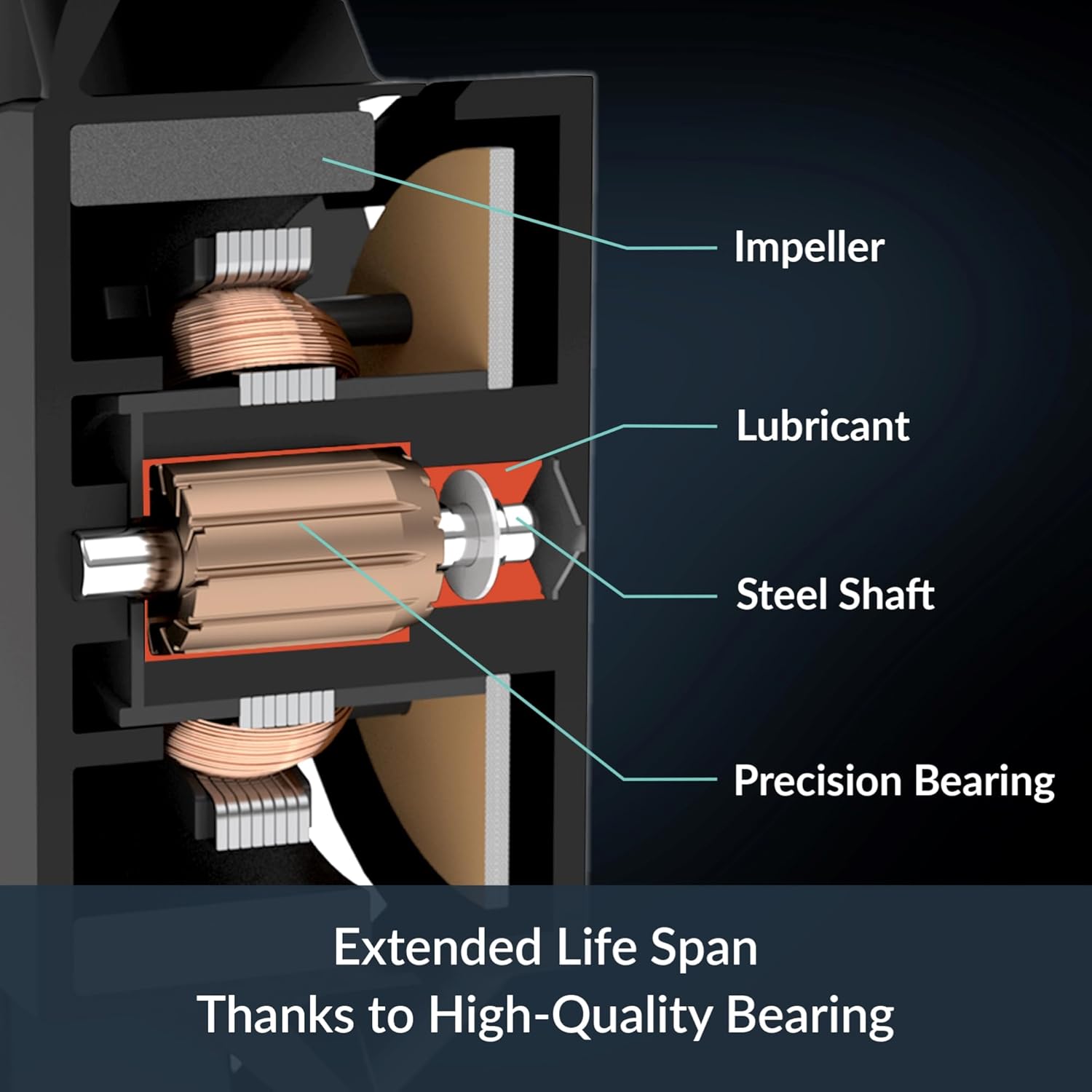
Image: Illustration of the 0dB mode, indicating the fan stops below 5% PWM signal for silent operation.
സ്റ്റാറ്റിക് പ്രഷർ ഒപ്റ്റിമൈസ് ചെയ്തു
The fan's design is optimized for high static pressure, making it particularly effective for use on heatsinks and radiators where air resistance is higher. This ensures efficient heat dissipation even through dense fins.

Image: Diagram showing airflow through a fan optimized for static pressure, suitable for radiators and heatsinks.
മെയിൻ്റനൻസ്
Regular maintenance helps ensure the longevity and optimal performance of your ARCTIC P9 PWM PST fan.
- പൊടി വൃത്തിയാക്കൽ: Periodically inspect the fan blades and housing for dust accumulation. Use compressed air or a soft brush to gently remove dust. Ensure the fan is powered off before cleaning.
- ദീർഘായുസ്സ്: The fan features a high-quality bearing with a combination of alloy and lubricant designed to reduce friction and prevent excessive heat build-up, contributing to an extended lifespan. No user maintenance is required for the bearing itself.

Image: Cross-section diagram of the fan's internal components, highlighting the impeller, lubricant, steel shaft, and precision bearing, which contribute to its extended lifespan.
ട്രബിൾഷൂട്ടിംഗ്
If you encounter issues with your ARCTIC P9 PWM PST fan, refer to the following common troubleshooting steps:
| പ്രശ്നം | സാധ്യമായ കാരണം | പരിഹാരം |
|---|---|---|
| ഫാൻ കറങ്ങുന്നില്ല |
|
|
| Fan is too loud |
|
|
| മോശം തണുപ്പിക്കൽ പ്രകടനം |
|
|
സ്പെസിഫിക്കേഷനുകൾ
Detailed technical specifications for the ARCTIC P9 PWM PST fan.
| ഫീച്ചർ | മൂല്യം |
|---|---|
| മോഡൽ | P9 PWM PST |
| ഫാൻ വലിപ്പം | 92 മി.മീ |
| ഫാൻ വേഗത | 200 - 3000 RPM (PWM നിയന്ത്രിതം) |
| എയർ ഫ്ലോ | 38.83 CFM | 65.97 m³/h |
| സ്റ്റാറ്റിക് പ്രഷർ | 3.12 mmH₂O |
| പവർ കണക്റ്റർ | 4-pin fan connector + 4-pin socket (PST) |
| വാല്യംtage | 12 വോൾട്ട് |
| വാട്ട്tage | 1.44 വാട്ട്സ് |
| നിലവിലുള്ളത് | 0.12 എ |
| ബെയറിംഗ് തരം | High Quality Fluid Dynamic Bearing |
| അളവുകൾ (L x W x H) | 3.6" x 3.6" x 1" (92mm x 92mm x 25mm) |
| ഭാരം | 106 ഗ്രാം |
| മെറ്റീരിയൽ | പ്ലാസ്റ്റിക് |

Image: Visual representation of key technical data including fan speed, static pressure, airflow, current, and voltage.
വാറൻ്റി വിവരങ്ങൾ
ARCTIC products are manufactured to high quality standards. For specific warranty terms and conditions applicable to your ARCTIC P9 PWM PST fan, please refer to the official ARCTIC website or the warranty card included with your product. Typically, ARCTIC offers a limited warranty against defects in materials and workmanship.
പിന്തുണയും കോൺടാക്റ്റും
For further assistance, technical support, or inquiries regarding your ARCTIC P9 PWM PST fan, please visit the official ARCTIC webസൈറ്റ്:
You may also find helpful resources, FAQs, and driver downloads on their support pages.