
1. ആമുഖം
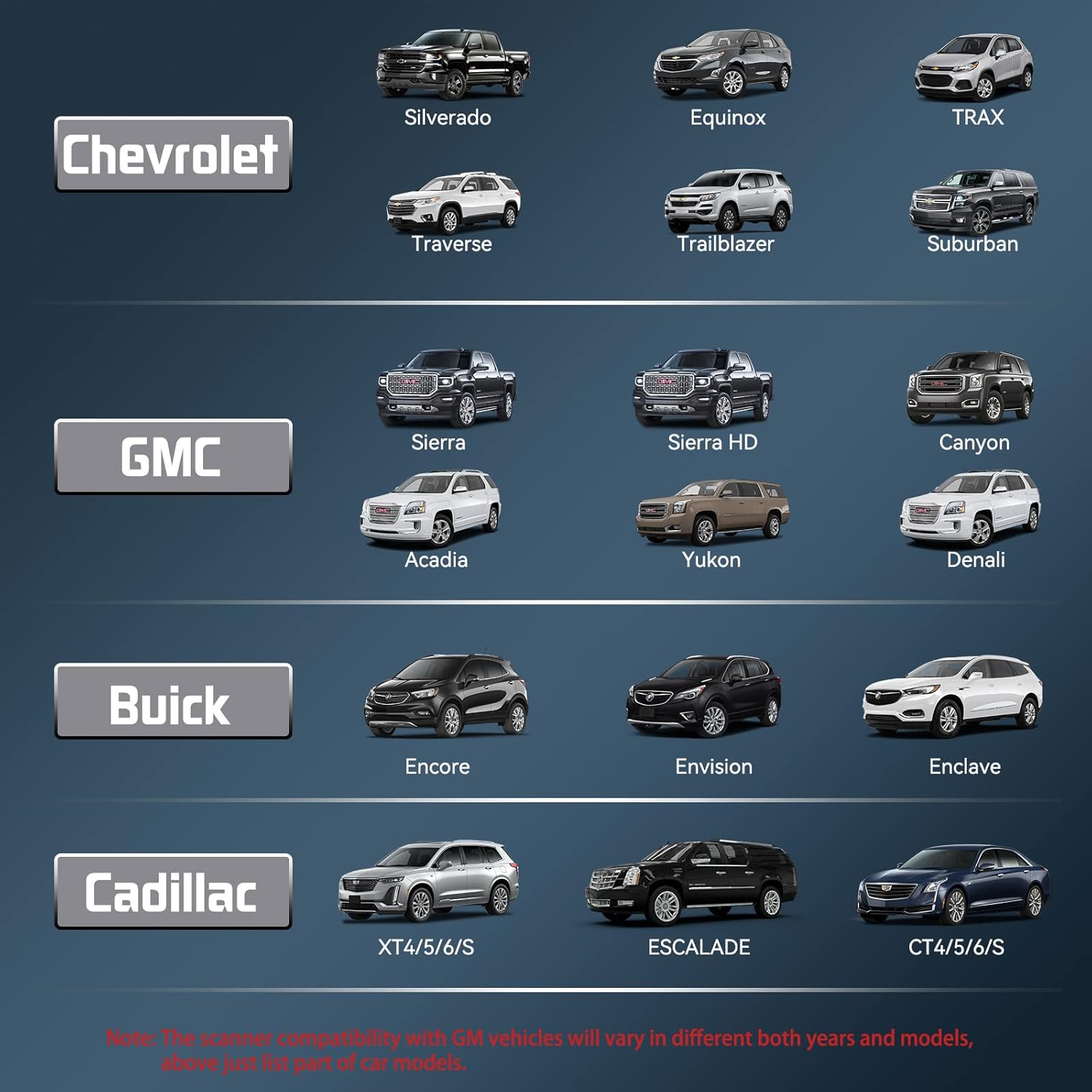
The CGSULIT SC530 is a professional full-system diagnostic scan tool designed primarily for Chevy/GMC vehicles (including Chevrolet, GMC, Buick, Cadillac, etc.) and offers comprehensive OBD2 functions for all car brands. This device provides OE-level diagnostics, covering all major vehicle systems such as Engine, Transmission, ABS, Airbag, Immobilizer, Fuel Injection Module, Body Module, HVAC, Seat Module, and Theft Deterrent. It also includes over 30 special functions and maintenance services, along with bi-directional control capabilities to assist in troubleshooting and component relearning.

Figure 1: CGSULIT SC530 OBD2 Scanner Main Unit
The SC530 is a powerful and user-friendly tool, suitable for both DIY enthusiasts and professional mechanics, offering a cost-effective solution for vehicle maintenance and repair.
2. ബോക്സിൽ എന്താണുള്ളത്?
- SC530 OBD2 Scanner x1
- OBD Cable x1
- USB കേബിൾ x1
- ഉപയോക്തൃ മാനുവൽ x1
- സ്റ്റോറേജ് ബാഗ് x1
3. സജ്ജീകരണവും പ്രാരംഭ ഉപയോഗവും
- പവർ ഓൺ: Connect the SC530 scanner to your vehicle's OBD2 port. The device will power on automatically.
- ഭാഷ തിരഞ്ഞെടുക്കൽ: Navigate to the 'Settings' menu to select your preferred language (English is default).
- വാഹന കണക്ഷൻ: Once powered on, the scanner will automatically detect your vehicle's VIN (Vehicle Identification Number) for quick and accurate diagnosis.
- സോഫ്റ്റ്വെയർ അപ്ഡേറ്റുകൾ: The SC530 offers lifetime free software updates. Connect the device to a computer via the provided USB cable and visit the CGSULIT official website to download the update tool and latest software.

Figure 2: Connecting the SC530 to your vehicle's OBD2 port
4. ഉപകരണം പ്രവർത്തിപ്പിക്കുന്നു
4.1 Full System Diagnosis (GM Series)
The SC530 is specifically designed for comprehensive diagnosis of GM series vehicles (Chevy, GMC, Buick, Cadillac, etc.). It can access and diagnose all electronic control modules within the vehicle, including:
- എഞ്ചിൻ കൺട്രോൾ മൊഡ്യൂൾ (ECM)
- ട്രാൻസ്മിഷൻ കൺട്രോൾ മൊഡ്യൂൾ (TCM)
- ആൻ്റി ലോക്ക് ബ്രേക്കിംഗ് സിസ്റ്റം (എബിഎസ്)
- സപ്ലിമെന്റൽ റെസ്ട്രയിന്റ് സിസ്റ്റം (SRS/എയർബാഗ്)
- ഇലക്ട്രോണിക് പാർക്കിംഗ് ബ്രേക്ക് (EPB)
- ബോഡി കൺട്രോൾ മൊഡ്യൂൾ (BCM)
- HVAC നിയന്ത്രണ മൊഡ്യൂൾ
- കൂടാതെ മറ്റു പലതും...
This allows for reading and clearing fault codes, viewing live data streams, and performing active tests across all supported systems.

ചിത്രം 3: ഓവർview of Full System Diagnosis Capabilities
4.2 Special Functions & Maintenance Services
The SC530 offers over 30 special functions to assist in various maintenance and reset procedures. These functions help reset system statuses after repairs, saving time and costs associated with dealership visits. Key functions include:
- Oil Reset: Resets the Engine Oil Life system after an oil change.
- EPB Reset: Resets the electronic parking brake system.
- SAS Calibration: Calibrates the steering angle sensor.
- ABS Bleeding: Performs ABS brake bleeding.
- Battery Registration: Registers a new battery with the vehicle's system.
- Injector Coding: Codes new injector numbers to the ECU.
- TPMS Reset: Resets the Tire Pressure Monitoring System.
- Crankshaft Position (CKP) Variation Learn: Performs crankshaft relearn after sensor replacement.

ചിത്രം 4: ഉദാamples of 30+ Special Functions
4.3 Bi-Directional Control / Active Test
This advanced feature allows the SC530 to send commands to vehicle components and monitor their operation, helping to identify hardware failures. Examples ഉൾപ്പെടുന്നു:
- Controlling windows/doors
- Activating wipers
- ഇന്ധന പമ്പിന്റെ പ്രവർത്തനം പരിശോധിക്കുന്നു
- Performing throttle body relearn
ചിത്രം 5: ദ്വിദിശ നിയന്ത്രണ ശേഷികൾ
4.4 Full OBD2 Functions (for All Cars)
Beyond GM-specific diagnostics, the SC530 provides standard OBD2 functions compatible with all vehicles manufactured after 1996. These include:
- കോഡുകൾ വായിക്കുക: Displays Diagnostic Trouble Codes (DTCs) from all available systems.
- മായ്ക്കൽ കോഡുകൾ: Clears DTCs after a malfunction has been repaired.
- തത്സമയ ഡാറ്റ: Views and records real-time PID data from various modules.
- ഫ്രീസ് ഫ്രെയിം: Shows vehicle parameters recorded by the ECU when a fault occurs.
- I/M സന്നദ്ധത: Checks if the vehicle is ready for emissions testing.
- O2 മോണിറ്റർ ടെസ്റ്റ്: O2 സെൻസർ മോണിറ്റർ പരിശോധനാ ഫലങ്ങൾ വീണ്ടെടുത്ത് പ്രദർശിപ്പിക്കുന്നു.
- ഓൺ-ബോർഡ് മോണിറ്റർ ടെസ്റ്റ്: Reads results of onboard diagnostic monitoring for specific systems.
- ഘടക പരിശോധന: വീണ്ടെടുക്കുന്നു ഒപ്പം views O2 സെൻസർ മോണിറ്റർ പരിശോധനാ ഫലങ്ങൾ.
- വാഹന വിവരം: Displays vehicle year, model, and VIN information.
- DTC ലുക്ക്അപ്പ്: Built-in DTC library for detailed code explanations.

Figure 6: Full OBD2 Functionality

Figure 7: Live Data Stream Display
5. പരിപാലനം
The CGSULIT SC530 is designed for durability and ease of use. To ensure optimal performance:
- ഉപകരണം വൃത്തിയായും പൊടിയിൽ നിന്നും ഈർപ്പത്തിൽ നിന്നും മുക്തമായും സൂക്ഷിക്കുക.
- Store in the provided storage bag when not in use.
- Regularly check for and install software updates via the CGSULIT website to ensure compatibility with the latest vehicle models and access to new functions. All function updates are lifetime free.

Figure 8: Lifetime Free Use and Updates
6. പ്രശ്നപരിഹാരം
If you encounter issues with your CGSULIT SC530, consider the following common troubleshooting steps:
- ശക്തിയില്ല: Ensure the OBD cable is securely connected to both the scanner and the vehicle's OBD2 port. Check the vehicle's battery status.
- ആശയവിനിമയ പിശക്: Verify the vehicle's ignition is on. Ensure the OBD2 port is functioning correctly. Try connecting to a different vehicle to rule out scanner issues.
- Incorrect Vehicle Selected: If the scanner displays 'Possible wrong vehicle selected', return to the main menu and ensure the correct vehicle make/model is chosen, or use the SmartVIN feature for automatic detection.
- ഫംഗ്ഷൻ പ്രവർത്തിക്കുന്നില്ല: Not all functions are compatible with all vehicle models or years. Refer to the product compatibility list or contact customer support for specific function availability for your vehicle.
- സോഫ്റ്റ്വെയർ അപ്ഡേറ്റ് പ്രശ്നങ്ങൾ: Ensure a stable internet connection and that the update tool is running with administrator privileges on your computer.
For persistent issues, refer to the 'Warranty & Support' section for contact information.
7 സ്പെസിഫിക്കേഷനുകൾ
| ഫീച്ചർ | വിശദാംശങ്ങൾ |
|---|---|
| മോഡൽ | SC530 |
| ബ്രാൻഡ് | CGSULIT |
| ഇനത്തിൻ്റെ ഭാരം | 1.48 പൗണ്ട് |
| ഉൽപ്പന്ന അളവുകൾ | 3 x 1 x 7 ഇഞ്ച് |
| ഓപ്പറേറ്റിംഗ് സിസ്റ്റം | Windows 7 (for PC software) |
| ഭാഷ | English (and other supported languages) |
8. വാറണ്ടിയും പിന്തുണയും
CGSULIT is committed to providing quality products and excellent customer service. The SC530 comes with lifetime free use of all functions and updates, ensuring your device remains current and effective.
For any product support or inquiries, please do not hesitate to contact CGSULIT customer service. They aim to reply within 24 hours and provide timely solutions.
Contact information can typically be found on the official CGSULIT webസൈറ്റ് അല്ലെങ്കിൽ നിങ്ങളുടെ വാങ്ങൽ പ്ലാറ്റ്ഫോം വഴി.