
1. ആമുഖം
This manual provides essential information for the safe and efficient operation of your Auna Silver Star Mini Internet Radio. Please read it thoroughly before using the device and retain it for future reference.
2 സുരക്ഷാ വിവരങ്ങൾ
ഉപകരണത്തിന് കേടുപാടുകൾ സംഭവിക്കാതിരിക്കാനോ സ്വയം പരിക്കേൽക്കാതിരിക്കാനോ ഇനിപ്പറയുന്ന സുരക്ഷാ മാർഗ്ഗനിർദ്ദേശങ്ങൾ പാലിക്കുക:
- വൈദ്യുതി വിതരണം വോളിയം ഉറപ്പാക്കുകtage ഉപകരണത്തിലെ റേറ്റിംഗ് ലേബലുമായി പൊരുത്തപ്പെടുന്നു.
- മഴ, ഈർപ്പം, അല്ലെങ്കിൽ തീവ്രമായ താപനില എന്നിവയിൽ ഉപകരണം തുറന്നുകാട്ടരുത്.
- താപ സ്രോതസ്സുകൾക്ക് സമീപം അല്ലെങ്കിൽ നേരിട്ട് സൂര്യപ്രകാശത്തിൽ ഉപകരണം സ്ഥാപിക്കുന്നത് ഒഴിവാക്കുക.
- സി തുറക്കരുത്.asing; എല്ലാ സേവനങ്ങളും യോഗ്യതയുള്ള ഉദ്യോഗസ്ഥർക്ക് റഫർ ചെയ്യുക.
- ശക്തമായ കാന്തിക മണ്ഡലങ്ങളിൽ നിന്ന് ഉപകരണം അകറ്റി നിർത്തുക.
- Disconnect the power plug during thunderstorms or when not in use for extended periods.
3. പാക്കേജ് ഉള്ളടക്കം
പാക്കേജിംഗിൽ എല്ലാ ഇനങ്ങളും ഉണ്ടെന്ന് ഉറപ്പാക്കുക:
- 1 x Auna Silver Star Mini Internet DAB+/FM Radio
- 1 x റിമോട്ട് കൺട്രോൾ
- 1 x പവർ സപ്ലൈ യൂണിറ്റ്
- 1 x ഉപയോക്തൃ മാനുവൽ (ഈ പ്രമാണം)
4. ഉൽപ്പന്നം കഴിഞ്ഞുview
The Auna Silver Star Mini is a versatile internet radio featuring DAB+, FM, Wi-Fi, Bluetooth, and USB connectivity. It combines powerful audio performance with an elegant design.

ചിത്രം 4.1: ഫ്രണ്ട് view of the Auna Silver Star Mini Internet Radio, showcasing its speaker, display, and control buttons. The unit features a wooden frame and a black aluminum control surface.
4.1 പ്രധാന സവിശേഷതകൾ
- കണക്റ്റിവിറ്റി: AUX input, Line output, USB port, Wi-Fi, Bluetooth.
- ഓഡിയോ ഔട്ട്പുട്ട്: 8 watts RMS.
- ഡിസ്പ്ലേ: 2.8" (7 cm) HCC (High Contrast and Color) display.
- ട്യൂണറുകൾ: DAB+ and FM tuners.
- നിയന്ത്രണം: App control (Air Music Control), remote control included.
- മാനദണ്ഡങ്ങൾ: UPnP/DLNA support.
- ഡിസൈൻ: Aluminum control surface with a wooden frame.
- അധിക പ്രവർത്തനങ്ങൾ: അലാറം പ്രവർത്തനം.

ചിത്രം 4.2: Close-up of the 2.8-inch HCC display and control buttons, including Standby, Dimmer, Alarm, Sleep, Menu, Fav, and Navigation knob. The display shows icons for Wi-Fi, time, and "Internet Radio" mode.
4.2. പിൻ പാനൽ കണക്ഷനുകൾ
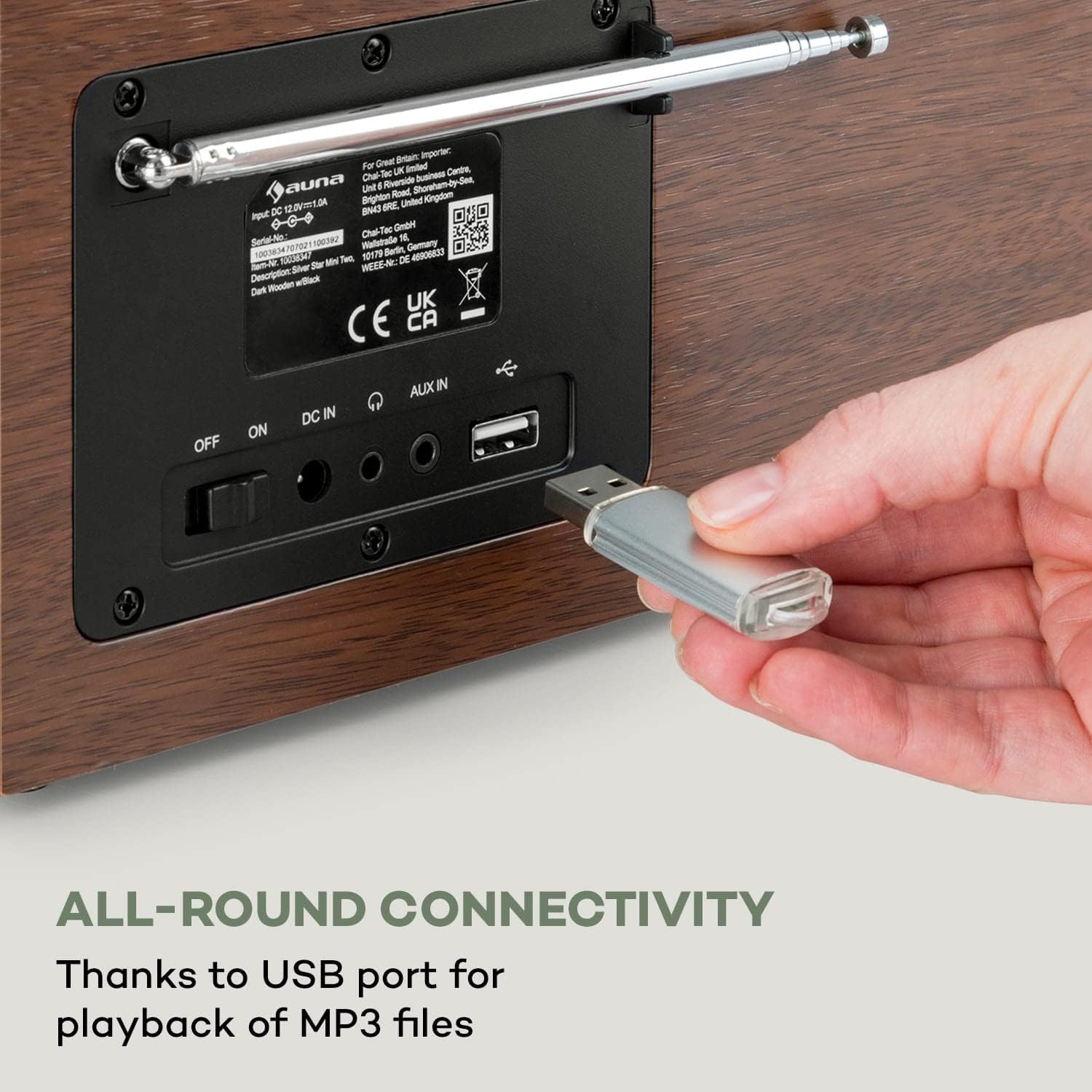
ചിത്രം 4.3: The rear panel of the radio, illustrating the power switch (OFF/ON), DC IN port, AUX IN, Line Out, and a USB port for MP3 file playback. An antenna is also visible.
- ഓഫ്/ഓൺ സ്വിച്ച്: പ്രധാന പവർ സ്വിച്ച്.
- DC IN: പവർ അഡാപ്റ്റർ കണക്ഷൻ.
- ഓക്സ് ഇൻ: ബാഹ്യ ഓഡിയോ ഉപകരണങ്ങൾ ബന്ധിപ്പിക്കുന്നതിനുള്ള 3.5mm ജാക്ക്.
- ലൈൻ: ട്ട്: 3.5mm jack for connecting to external ampലൈഫയർമാർ അല്ലെങ്കിൽ സ്പീക്കറുകൾ.
- USB പോർട്ട്: MP3 പ്ലേ ചെയ്യുന്നതിന് fileഒരു USB സ്റ്റോറേജ് ഉപകരണത്തിൽ നിന്ന് s.
- ആൻ്റിന: Extendable antenna for FM and DAB+ reception.
5. സജ്ജീകരണം
5.1. പ്രാരംഭ കണക്ഷൻ
- Connect the power supply unit to the DC IN port on the rear of the radio.
- Plug the power supply unit into a wall outlet (220-240 V~ | 50/60 Hz).
- Switch the main power switch on the rear panel to the "ON" position.
- The radio will power on and display the startup screen.
5.2. Network Configuration (Wi-Fi)
To access internet radio stations and app control, connect the device to your Wi-Fi network:
- On the radio's display, navigate to the "Settings" menu.
- Select "Network" or "Wi-Fi Setup".
- ലഭ്യമായ വൈഫൈ നെറ്റ്വർക്കുകൾക്കായി റേഡിയോ സ്കാൻ ചെയ്യും. ലിസ്റ്റിൽ നിന്ന് നിങ്ങളുടെ നെറ്റ്വർക്ക് തിരഞ്ഞെടുക്കുക.
- Enter your Wi-Fi password using the navigation knob and buttons. Confirm your selection.
- Once connected, a Wi-Fi icon will appear on the display.
6. പ്രവർത്തന നിർദ്ദേശങ്ങൾ
6.1. അടിസ്ഥാന പ്രവർത്തനം
- പവർ ഓൺ/ഓഫ്: Use the main switch on the rear or the Standby button on the front panel/remote.
- വോളിയം നിയന്ത്രണം: Use the "Vol +" and "Vol -" buttons or the navigation knob on the front, or the volume buttons on the remote control.
- നാവിഗേഷൻ: Use the navigation knob to scroll through menus and lists. Press the knob to confirm selections.
- മെനു ബട്ടൺ: പ്രധാന മെനു ആക്സസ് ചെയ്യുക.
- പ്രിയപ്പെട്ട ബട്ടൺ: Access your favorite stations/presets.
- ഡിമ്മർ: ഡിസ്പ്ലേ തെളിച്ചം ക്രമീകരിക്കുക.
- അലാറം: അലാറങ്ങൾ സജ്ജമാക്കുക.
- ഉറക്കം: ഒരു സ്ലീപ്പ് ടൈമർ സജ്ജീകരിക്കുക.
6.2. റിമോട്ട് കൺട്രോൾ
The included remote control provides convenient access to all functions.

ചിത്രം 6.1: The Auna Silver Star Mini radio displayed alongside its remote control, highlighting the convenience of app and remote operation.
Refer to the remote control diagram in the quick start guide for specific button functions.
7. കണക്റ്റിവിറ്റി
7.1. Internet Radio (Wi-Fi)
Once connected to Wi-Fi, you can access thousands of internet radio stations worldwide. Navigate to the "Internet Radio" option in the main menu to browse stations by genre, location, or search.
7.2. ബ്ലൂടൂത്ത് പ്രവർത്തനം
The radio features built-in Bluetooth for wireless audio streaming from compatible devices.
- Select "Bluetooth" mode on the radio.
- നിങ്ങളുടെ സ്മാർട്ട്ഫോണിലോ, ടാബ്ലെറ്റിലോ, ലാപ്ടോപ്പിലോ ബ്ലൂടൂത്ത് പ്രവർത്തനക്ഷമമാക്കുക.
- ഇതിനായി തിരയുക "Auna Silver Star Mini" in your device's Bluetooth settings and pair.
- Once paired, you can stream audio wirelessly to the radio.

ചിത്രം 7.1: A hand holding a smartphone, illustrating the wireless and practical Bluetooth function for streaming audio from mobile devices.
7.3. USB പ്ലേബാക്ക്
Insert a USB storage device containing MP3 files into the USB port on the rear panel. The radio will automatically detect the device and allow you to browse and play your music files.
7.4. AUX ഇൻപുട്ട്
Connect external audio sources (e.g., MP3 players, CD players) to the AUX IN port using a 3.5mm audio cable. Select "AUX" mode on the radio to play audio from the connected device.
8. DAB+ and FM Radio
8.1. DAB+ Radio
DAB+ (Digital Audio Broadcasting Plus) offers digital radio with improved sound quality and additional information. Extend the antenna for optimal reception.
- Select "DAB+" mode from the main menu.
- ലഭ്യമായ DAB+ സ്റ്റേഷനുകൾക്കായി റേഡിയോ യാന്ത്രികമായി സ്കാൻ ചെയ്യും.
- Use the navigation knob to select a station from the list.
8.2. എഫ്എം റേഡിയോ
For traditional FM radio reception, extend the antenna fully.
- Select "FM" mode from the main menu.
- Use the navigation controls to tune to a desired frequency or initiate an auto-scan for stations.
- Save your favorite FM stations as presets using the "Fav" button.
9. App Control (Air Music Control)
The Auna Silver Star Mini can be controlled via the "Air Music Control" app, available for smartphones and tablets. This app allows for comprehensive control and music streaming via UPnP/DLNA standards.
- Ensure your radio is connected to your Wi-Fi network.
- Download the "Air Music Control" app from your device's app store (e.g., Apple App Store, Google Play Store).
- Launch the app and follow the on-screen instructions to connect to your radio.
- Once connected, you can control playback, browse stations, and manage settings from your mobile device.

ചിത്രം 9.1: A user interacting with the Air Music Control app on a smartphone, demonstrating the maximum control options available through the application.
10. പരിപാലനം
10.1. വൃത്തിയാക്കൽ
- വൃത്തിയാക്കുന്നതിന് മുമ്പ് എല്ലായ്പ്പോഴും വൈദ്യുതി വിച്ഛേദിക്കുക.
- മൃദുവായതും ഉണങ്ങിയതുമായ തുണി ഉപയോഗിച്ച് പുറംഭാഗങ്ങൾ തുടയ്ക്കുക.
- അബ്രാസീവ് ക്ലീനറുകൾ, മെഴുക്, ലായകങ്ങൾ എന്നിവ ഉപയോഗിക്കരുത്.
10.2. സംഭരണം
ഉപകരണം ദീർഘനേരം സൂക്ഷിക്കുകയാണെങ്കിൽ, വൈദ്യുതിയിൽ നിന്ന് വിച്ഛേദിച്ച്, നേരിട്ടുള്ള സൂര്യപ്രകാശത്തിൽ നിന്നും കടുത്ത താപനിലയിൽ നിന്നും അകന്ന്, തണുത്തതും വരണ്ടതുമായ സ്ഥലത്ത് സൂക്ഷിക്കുക.
11. പ്രശ്നപരിഹാരം
| പ്രശ്നം | സാധ്യമായ കാരണം | പരിഹാരം |
|---|---|---|
| ശക്തിയില്ല | Power cable not connected; main switch off. | Check power cable connection; ensure main switch is ON. |
| ശബ്ദമില്ല | Volume too low; incorrect source selected. | Increase volume; select the correct input source (e.g., Internet Radio, DAB+, FM, Bluetooth, USB, AUX). |
| Wi-Fi-യിലേക്ക് കണക്റ്റുചെയ്യാൻ കഴിയില്ല | Incorrect password; network out of range; router issue. | Verify password; move radio closer to router; restart router. |
| മോശം DAB+/FM റിസപ്ഷൻ | ആന്റിന നീട്ടിയിട്ടില്ല; ദുർബലമായ സിഗ്നൽ. | Fully extend the antenna; reposition the radio for better signal. |
| ബ്ലൂടൂത്ത് ജോടിയാക്കൽ പരാജയപ്പെടുന്നു | Device not in pairing mode; radio not discoverable. | Ensure both devices are in pairing mode; check device list on radio. |
12 സ്പെസിഫിക്കേഷനുകൾ
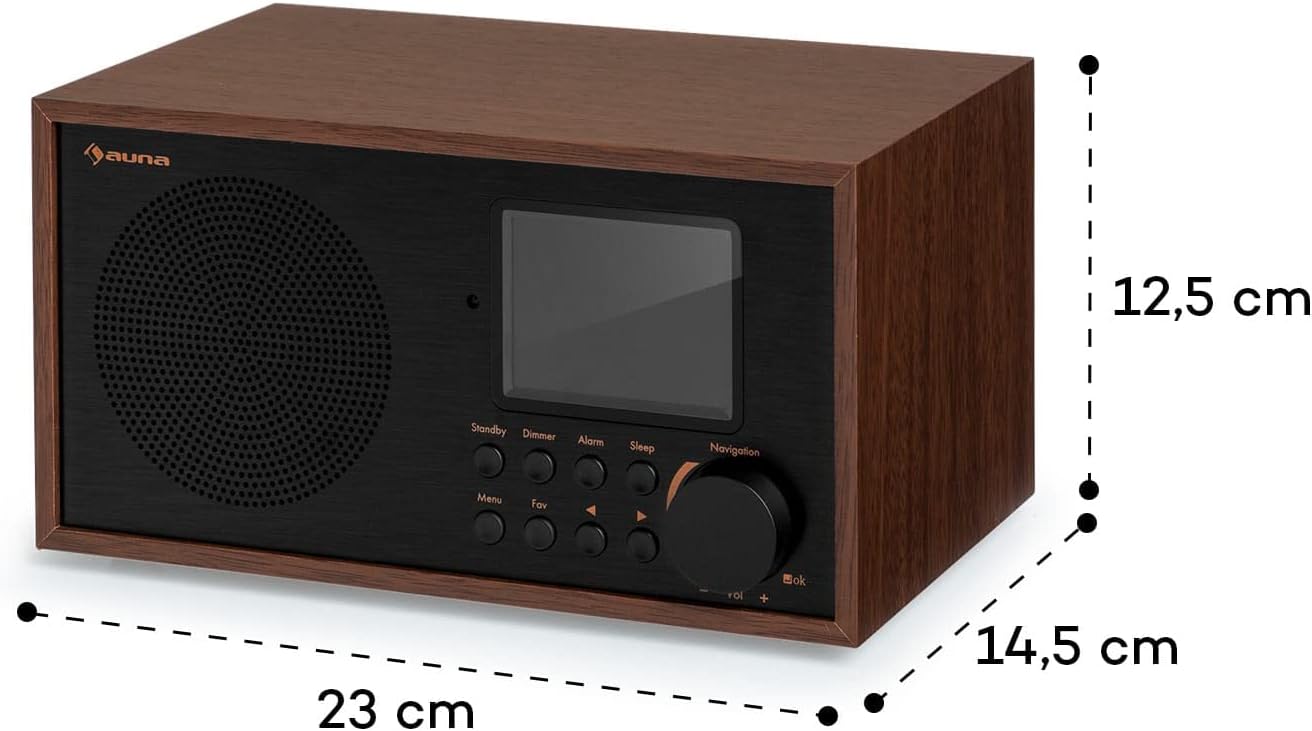
ചിത്രം 12.1: Diagram illustrating the dimensions of the Auna Silver Star Mini Internet Radio: 23 cm (width), 12.5 cm (height), and 14.5 cm (depth).
| ഫീച്ചർ | വിശദാംശങ്ങൾ |
|---|---|
| ബ്രാൻഡ് | ഔന |
| മോഡൽ നമ്പർ | 10038350 |
| ഭാഗം നമ്പർ | WD778B |
| അളവുകൾ (WxHxD) | 23 x 12.5 x 15.5 സെ.മീ |
| ഭാരം | 1.6 കി.ഗ്രാം |
| പവർ ഔട്ട്പുട്ട് | 8 watts RMS (Max 10 Watt) |
| വൈദ്യുതി വിതരണം | 220-240 V~ | 50/60 ഹെർട്സ് |
| പ്രദർശിപ്പിക്കുക | 2.8" (7 cm) HCC (High Contrast and Color) |
| ട്യൂണർ ടെക്നോളജി | Digital (DAB+, FM) |
| റേഡിയോ ബാൻഡുകൾ പിന്തുണയ്ക്കുന്നു | FM (87.5 MHz), DAB+ |
| കണക്റ്റിവിറ്റി | Wi-Fi, Bluetooth, USB, AUX-in, Line-out |
| പ്രത്യേക സവിശേഷതകൾ | Built-in clock, Alarm function, App control (Air Music Control), UPnP/DLNA standard |
| മെറ്റീരിയൽ | Aluminum control surface with wooden frame |
13. വാറൻ്റിയും പിന്തുണയും
Auna products are designed and manufactured to the highest quality standards. For warranty information and technical support, please refer to the warranty card included with your product or visit the official Auna webസൈറ്റ്. ഏതെങ്കിലും വാറന്റി ക്ലെയിമുകൾക്ക് നിങ്ങളുടെ വാങ്ങലിന്റെ തെളിവ് സൂക്ഷിക്കുക.