
1. ആമുഖം
വാങ്ങിയതിന് നന്ദി.asing the Greadio Portable CD Player. This versatile audio device is designed to provide high-fidelity sound and multiple playback options, including CD, Bluetooth, FM radio, AUX, and USB. It features a convenient remote control, a protective dust cover for CDs, and a sleep timer function, making it ideal for various home audio needs. Please read this manual carefully before use to ensure proper operation and to maximize your listening experience.
2. പാക്കേജ് ഉള്ളടക്കം
പാക്കേജിൽ ഇനിപ്പറയുന്ന ഇനങ്ങൾ ഉണ്ടോ എന്ന് പരിശോധിക്കുക:
- Greadio Portable CD Player Unit
- റിമോട്ട് കൺട്രോൾ
- USB-C പവർ കേബിൾ
- USB Power Adapter (Wall Plug)
- AUX കേബിൾ
- ഉപയോക്തൃ മാനുവൽ (ഈ പ്രമാണം)
3. ഉൽപ്പന്നം കഴിഞ്ഞുview
Familiarize yourself with the main components and controls of your Greadio Portable CD Player.
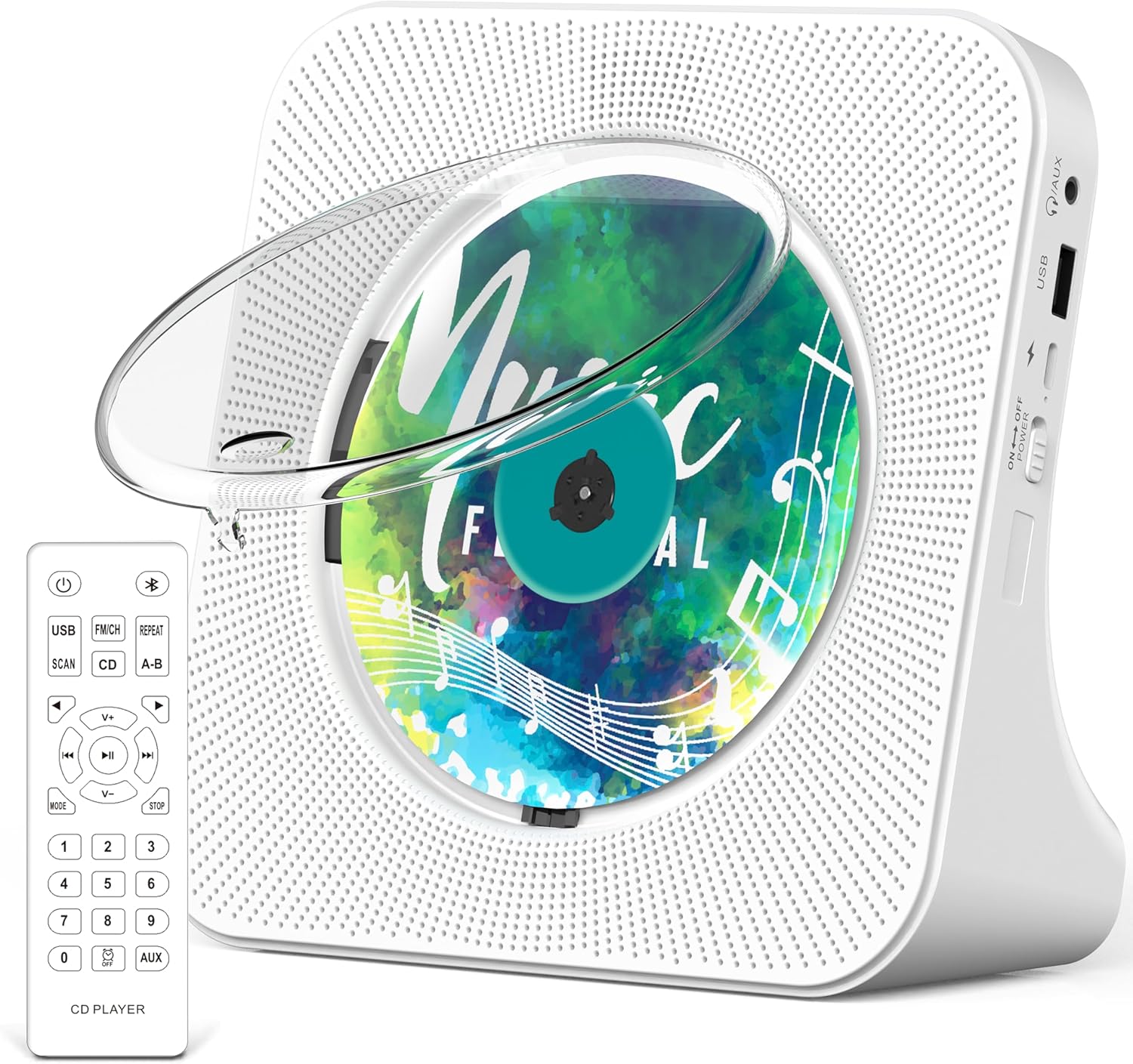
ചിത്രം: മുൻഭാഗം view of the Greadio Portable CD Player in white, showcasing the transparent dust cover over a CD, and the included remote control. The player features a perforated speaker grille design on both sides of the CD compartment.
3.1. നിയന്ത്രണങ്ങളും പോർട്ടുകളും
- വൈദ്യുതി സ്വിച്ച്: Located on the side, to turn the unit On/Off.
- മോഡ് ബട്ടൺ: Cycles through CD, Bluetooth, FM, AUX, and USB modes.
- പ്ലേ/താൽക്കാലികമായി നിർത്തുക ബട്ടൺ: Starts or pauses playback. Long press to turn off CD backlight.
- മുമ്പത്തെ/അടുത്ത ബട്ടണുകൾ: Skips tracks or adjusts FM frequency.
- വോളിയം മുകളിലേക്കും താഴേക്കും ബട്ടണുകൾ: ഓഡിയോ വോളിയം ക്രമീകരിക്കുന്നു.
- ആവർത്തിക്കുക ബട്ടൺ: Repeats current track or album.
- സ്കാൻ ബട്ടൺ: (FM mode) Automatically scans and saves FM stations.
- USB പോർട്ട്: യുഎസ്ബി ഫ്ലാഷ് ഡ്രൈവ് പ്ലേബാക്കിനായി.
- AUX ഇൻപുട്ട്: AUX കേബിൾ വഴി ബാഹ്യ ഓഡിയോ ഉപകരണങ്ങൾ ബന്ധിപ്പിക്കുന്നതിന്.
- ഹെഡ്ഫോൺ ജാക്ക്: For private listening with wired headphones (not included).
- DC 5V ഇൻപുട്ട്: For power connection using the provided USB-C cable and adapter.
- LED സ്ക്രീൻ: Displays current mode, track number, volume, and other information.
4. സജ്ജീകരണം
4.1. പവർ കണക്ഷൻ
- Connect the USB-C end of the power cable to the DC 5V input port on the CD player.
- നൽകിയിരിക്കുന്ന USB പവർ അഡാപ്റ്ററിലേക്ക് പവർ കേബിളിന്റെ USB-A അറ്റം പ്ലഗ് ചെയ്യുക.
- Insert the USB power adapter into a standard wall outlet.
- Flip the power switch on the side of the unit to the "ON" position. The LED screen will light up.
4.2. റിമോട്ട് കൺട്രോൾ ബാറ്ററി ഇൻസ്റ്റാളേഷൻ
The remote control requires 2 x AAA batteries (not included).
- വിദൂര നിയന്ത്രണത്തിന്റെ പിൻഭാഗത്ത് ബാറ്ററി കമ്പാർട്ട്മെന്റ് കവർ തുറക്കുക.
- ശരിയായ പോളാരിറ്റി (+ ഉം - ഉം) ഉറപ്പാക്കിക്കൊണ്ട് രണ്ട് AAA ബാറ്ററികൾ ഇടുക.
- ബാറ്ററി കമ്പാർട്ട്മെൻ്റ് കവർ സുരക്ഷിതമായി അടയ്ക്കുക.
5. പ്രവർത്തന നിർദ്ദേശങ്ങൾ
5.1. പൊതു പ്രവർത്തനം
- പവർ ഓൺ/ഓഫ്: Use the power switch on the side of the unit.
- മോഡ് തിരഞ്ഞെടുക്കൽ: Press the "MODE" button on the unit or remote to switch between CD, Bluetooth, FM, AUX, and USB modes. The current mode will be displayed on the LED screen.
- വോളിയം ക്രമീകരണം: Use the "V+" or "V-" buttons on the unit or remote.
5.2. സിഡി പ്ലേബാക്ക്
- Gently lift the transparent dust cover.
- Place a CD (CD, CD-R, CD-RW, MP3, WMA format) onto the spindle, ensuring it clicks into place.
- Close the dust cover. The player will automatically detect the CD and begin playback.
- Use the Play/Pause, Previous, and Next buttons to control playback.
- Press the "REPEAT" button to cycle through repeat modes (e.g., repeat one, repeat all).
5.3. Bluetooth Mode (BT)
The CD player supports both Bluetooth transmitting and receiving.
5.3.1. Bluetooth Receiving (Connect your phone/tablet to the CD player)
- Switch the CD player to "BT" mode using the "MODE" button. The LED screen will show "BT" and the unit will enter pairing mode.
- നിങ്ങളുടെ ബ്ലൂടൂത്ത് ഉപകരണത്തിൽ (ഉദാ, സ്മാർട്ട്ഫോൺ), ബ്ലൂടൂത്ത് പ്രവർത്തനക്ഷമമാക്കി ലഭ്യമായ ഉപകരണങ്ങൾക്കായി തിരയുക.
- Select "Greadio KC-806" from the list to pair. Once connected, you can play audio from your device through the CD player's speakers.
5.3.2. Bluetooth Transmitting (Connect the CD player to a Bluetooth headphone/speaker)
- നിങ്ങളുടെ ബ്ലൂടൂത്ത് ഹെഡ്ഫോണുകളോ സ്പീക്കറോ പെയറിംഗ് മോഡിലാണെന്ന് ഉറപ്പാക്കുക.
- Switch the CD player to "BT" mode. It will automatically search for nearby Bluetooth receiving devices.
- Once connected, audio from the CD player (CD, USB, FM, AUX) will be transmitted to your Bluetooth headphones/speaker.
5.4. എഫ്എം റേഡിയോ
- Switch the CD player to "FM" mode using the "MODE" button.
- Press the "SCAN" button on the remote or unit to automatically scan and save available FM stations.
- Use the Previous/Next buttons to navigate through the saved stations.
5.5. ഓക്സ് മോഡ്
- Connect one end of the provided AUX cable to the AUX input port on the CD player.
- Connect the other end of the AUX cable to the audio output (e.g., headphone jack) of your external device.
- Switch the CD player to "AUX" mode using the "MODE" button. Audio from your external device will now play through the CD player.
5.6. യുഎസ്ബി മോഡ്
- MP3/WMA ഓഡിയോ അടങ്ങിയ ഒരു USB ഫ്ലാഷ് ഡ്രൈവ് ഇടുക. fileയുഎസ്ബി പോർട്ടിലേക്ക് എസ്.
- Switch the CD player to "USB" mode using the "MODE" button. The player will automatically detect and begin playing audio fileയുഎസ്ബി ഡ്രൈവിൽ നിന്നുള്ള ങ്ങൾ.
- Use the Play/Pause, Previous, and Next buttons to control playback.
5.7. സ്ലീപ്പ് ടൈമർ ഫംഗ്ഷൻ
ഒരു നിശ്ചിത കാലയളവിനുശേഷം യൂണിറ്റ് യാന്ത്രികമായി ഓഫാക്കാൻ സ്ലീപ്പ് ടൈമർ അനുവദിക്കുന്നു.

Image: A Greadio Portable CD Player on a nightstand next to a sleeping person, with digital clock displays showing various sleep timer settings (0:30, 0:60, 0:90, 1:20, 1:50, 1:80 minutes).
- While the player is on, press the "SLEEP" button on the remote control.
- Each press will cycle through available sleep timer settings (e.g., 30, 60, 90, 120, 150, 180 minutes).
- The unit will automatically power off after the selected time duration.
6. പരിപാലനം
6.1. വൃത്തിയാക്കൽ
- മൃദുവായതും ഉണങ്ങിയതുമായ തുണി ഉപയോഗിച്ച് യൂണിറ്റ് തുടയ്ക്കുക. അബ്രാസീവ് ക്ലീനറുകളോ ലായകങ്ങളോ ഉപയോഗിക്കരുത്.
- സിഡി കമ്പാർട്ടുമെന്റ് പൊടിയും അവശിഷ്ടങ്ങളും ഇല്ലാതെ സൂക്ഷിക്കുക.
6.2. CD Handling
- Handle CDs by their edges to avoid fingerprints and scratches.
- ഉപയോഗത്തിലില്ലാത്തപ്പോൾ സിഡികൾ അവയുടെ കെയ്സുകളിൽ സൂക്ഷിക്കുക.
- Do not expose CDs to direct sunlight or extreme temperatures.
7. പ്രശ്നപരിഹാരം
| പ്രശ്നം | സാധ്യമായ കാരണം | പരിഹാരം |
|---|---|---|
| ശക്തിയില്ല | Power cable not connected; Power switch off. | Ensure power cable is securely connected and power switch is ON. |
| CD not playing / "NO DISC" displayed | CD inserted incorrectly; CD is dirty or scratched; Unsupported CD format. | Re-insert CD correctly; Clean CD with a soft cloth; Ensure CD format is supported (CD, CD-R, CD-RW, MP3, WMA). |
| ശബ്ദമില്ല | Volume too low; Incorrect mode selected; AUX cable not fully inserted. | Increase volume; Select correct mode; Ensure AUX cable is fully inserted. |
| ബ്ലൂടൂത്ത് കണക്ഷൻ പ്രശ്നങ്ങൾ | ഉപകരണം വളരെ അകലെയാണ്; ജോടിയാക്കൽ മോഡിൽ അല്ല; ഇടപെടൽ. | Ensure devices are within 10 meters; Put both devices in pairing mode; Reduce interference from other electronic devices. |
| റിമോട്ട് കൺട്രോൾ പ്രവർത്തിക്കുന്നില്ല | Batteries low or incorrectly inserted; Obstruction between remote and player. | Replace batteries (2 x AAA); Ensure correct polarity; Remove any obstructions. |
8 സ്പെസിഫിക്കേഷനുകൾ
| ഫീച്ചർ | വിശദാംശങ്ങൾ |
|---|---|
| മോഡലിൻ്റെ പേര് | കെസി -806 |
| ബ്രാൻഡ് | ഗ്രേഡിയോ |
| ഉൽപ്പന്ന അളവുകൾ | 5.67 x 5.67 x 2.07 ഇഞ്ച് |
| ഇനത്തിൻ്റെ ഭാരം | 2.16 പൗണ്ട് |
| നിറം | വെള്ള |
| കണക്റ്റിവിറ്റി ടെക്നോളജി | ഓക്സിലറി, ബ്ലൂടൂത്ത്, യുഎസ്ബി |
| ബ്ലൂടൂത്ത് പതിപ്പ് | 5.0 |
| പിന്തുണയ്ക്കുന്ന സിഡി ഫോർമാറ്റുകൾ | CD, CD-R, CD-RW, MP3, WMA |
| പവർ ഇൻപുട്ട് | DC 5V (via USB-C) |
| റിമോട്ട് കൺട്രോൾ ബാറ്ററികൾ | 2 x AAA (ഉൾപ്പെടുത്തിയിട്ടില്ല) |
| സ്ലീപ്പ് ടൈമർ ക്രമീകരണങ്ങൾ | 30-180 മിനിറ്റ് |
9. വാറൻ്റിയും പിന്തുണയും
Greadio provides a 12-month warranty and a 30-day money-back guarantee for this product. For any questions or assistance, please contact our 24/7 customer service. Your satisfaction is our priority.
For more information about Greadio products, please visit the official Greadio Store on Amazon.