
1. ഉൽപ്പന്നം കഴിഞ്ഞുview
The Monster N-Lite 200 AirLinks are lightweight, in-ear wireless earbuds designed for comfort and high-quality stereo sound. They feature touch controls, deep bass, a built-in microphone for noise reduction during calls, and an IPX5 waterproof rating, making them suitable for sports and daily use. The earbuds come with a portable charging case that supports both USB-C and wireless charging.

Image: Monster N-Lite 200 AirLinks earbuds and their charging case, showcasinഅവയുടെ ഒതുക്കമുള്ള ഡിസൈൻ.
2. ബോക്സിൽ എന്താണുള്ളത്?
- Monster N-Lite 200 AirLinks Earbuds (Left and Right)
- പോർട്ടബിൾ ചാർജിംഗ് കേസ്
- USB-C ചാർജിംഗ് കേബിൾ
- 3 Pairs of Ear Tips (Small, Medium, Large - Medium size pre-installed)
- ഉപയോക്തൃ മാനുവൽ (ഈ പ്രമാണം)
3. സജ്ജീകരണം
3.1. Fitting the Ear Tips
For optimal sound quality and comfort, select the ear tips that best fit your ears. The Monster N-Lite 200 AirLinks come with three sizes: Small (S), Medium (M), and Large (L). The medium size is pre-installed.
- Gently remove the pre-installed ear tips by pulling them off the earbud nozzle.
- Select a different size ear tip and align it with the earbud nozzle.
- Push the ear tip onto the nozzle until it is securely attached.
- Test the fit by inserting the earbuds into your ears. A good fit should feel snug and create a seal that blocks out most ambient noise.

Image: Illustration showing the three sizes of ear tips (S, M, L) and a person fitting an earbud for comfortable wear.
3.2. പ്രാരംഭ ജോടിയാക്കൽ
The Monster N-Lite 200 AirLinks feature one-step pairing for convenience.
- നിങ്ങളുടെ മൊബൈൽ ഉപകരണത്തിന്റെ ബ്ലൂടൂത്ത് ഓണാക്കിയിട്ടുണ്ടെന്ന് ഉറപ്പാക്കുക.
- ചാർജിംഗ് കേസ് തുറന്ന് രണ്ട് ഇയർബഡുകളും നീക്കം ചെയ്യുക. അവ സ്വയമേവ ജോടിയാക്കൽ മോഡിലേക്ക് പ്രവേശിക്കും.
- On your mobile device, go to Bluetooth settings and select "Monster N-Lite 200 AirLinks" from the list of available devices.
- കണക്റ്റ് ചെയ്തുകഴിഞ്ഞാൽ, ഇയർബഡുകളിൽ നിന്ന് കേൾക്കാവുന്ന "കണക്റ്റഡ്" എന്ന നിർദ്ദേശം നിങ്ങൾ കേൾക്കും.

Image: A hand holding the open earbud case next to a smartphone displaying a successful Bluetooth connection to "Monster N-Lite 200 AirLinks".
പ്രാരംഭ ജോടിയാക്കലിന് ശേഷം, ചാർജിംഗ് കേസിൽ നിന്ന് നീക്കം ചെയ്യുമ്പോൾ ഇയർബഡുകൾ അവസാന ജോടിയാക്കിയ ഉപകരണത്തിലേക്ക് യാന്ത്രികമായി കണക്റ്റ് ചെയ്യും.
4. പ്രവർത്തന നിർദ്ദേശങ്ങൾ
The Monster N-Lite 200 AirLinks feature high-sensitivity touch controls on each earbud for easy management of calls and music playback.

Image: A visual representation of the earbud's touch-sensitive area and the various functions it controls, including play/pause, skip tracks, volume, and voice assistant activation.
4.1. Touch Control Functions
| ആക്ഷൻ | ഫംഗ്ഷൻ |
|---|---|
| Tap (either earbud) | ഒരു കോളിന് ഉത്തരം നൽകുക / അവസാനിപ്പിക്കുക |
| Short Press (either earbud) | സംഗീതം പ്ലേ ചെയ്യുക/താൽക്കാലികമായി നിർത്തുക |
| Double-tap (Left earbud) | വോളിയം കുറയ്ക്കുക |
| Double-tap (Right earbud) | വോളിയം കൂട്ടുക |
| Long Press for 2 seconds (Left earbud) | മുൻ ഗാനം |
| Long Press for 2 seconds (Right earbud) | അടുത്ത ഗാനം |
| ട്രിപ്പിൾ-ടാപ്പ് (ഏതെങ്കിലും ഇയർബഡ്) | വോയ്സ് അസിസ്റ്റന്റ് (സിരി, ഗൂഗിൾ അസിസ്റ്റന്റ്) സജീവമാക്കുക |
4.2. Mono/Stereo Mode
The earbuds support both stereo and mono modes. You can use both earbuds together for a stereo experience or use a single earbud (left or right) independently for mono audio, which is useful for calls or when you need to be aware of your surroundings.

Image: Depicts various usage scenarios including sharing earbuds, using one for calls, and both for stereo music, highlighting the versatility of mono and stereo modes.
5. ചാർജിംഗ്
The Monster N-Lite 200 AirLinks charging case supports both USB-C wired charging and wireless charging.
5.1. ഇയർബഡുകൾ ചാർജ് ചെയ്യുന്നു
- ഇയർബഡുകൾ ചാർജിംഗ് കേസിൽ വയ്ക്കുക. അവ അവയുടെ സ്ലോട്ടുകളിൽ ശരിയായി സ്ഥാപിച്ചിട്ടുണ്ടെന്ന് ഉറപ്പാക്കുക.
- കേസിലെ ഇൻഡിക്കേറ്റർ ലൈറ്റ് ചാർജിംഗ് സ്റ്റാറ്റസ് കാണിക്കും.
- A single charge provides over 4.5 hours of playtime.
5.2. Charging the Case
- USB-C ചാർജിംഗ്: Connect the provided USB-C cable to the charging port on the case and the other end to a USB power source (e.g., wall adapter, computer USB port).
- വയർലെസ് ചാർജിംഗ്: Place the charging case on a compatible wireless charging pad. Ensure the case is centered on the pad for efficient charging.
- The charging case provides a total of 21 hours of playtime for the earbuds.
- Fast charging allows for quick power replenishment.
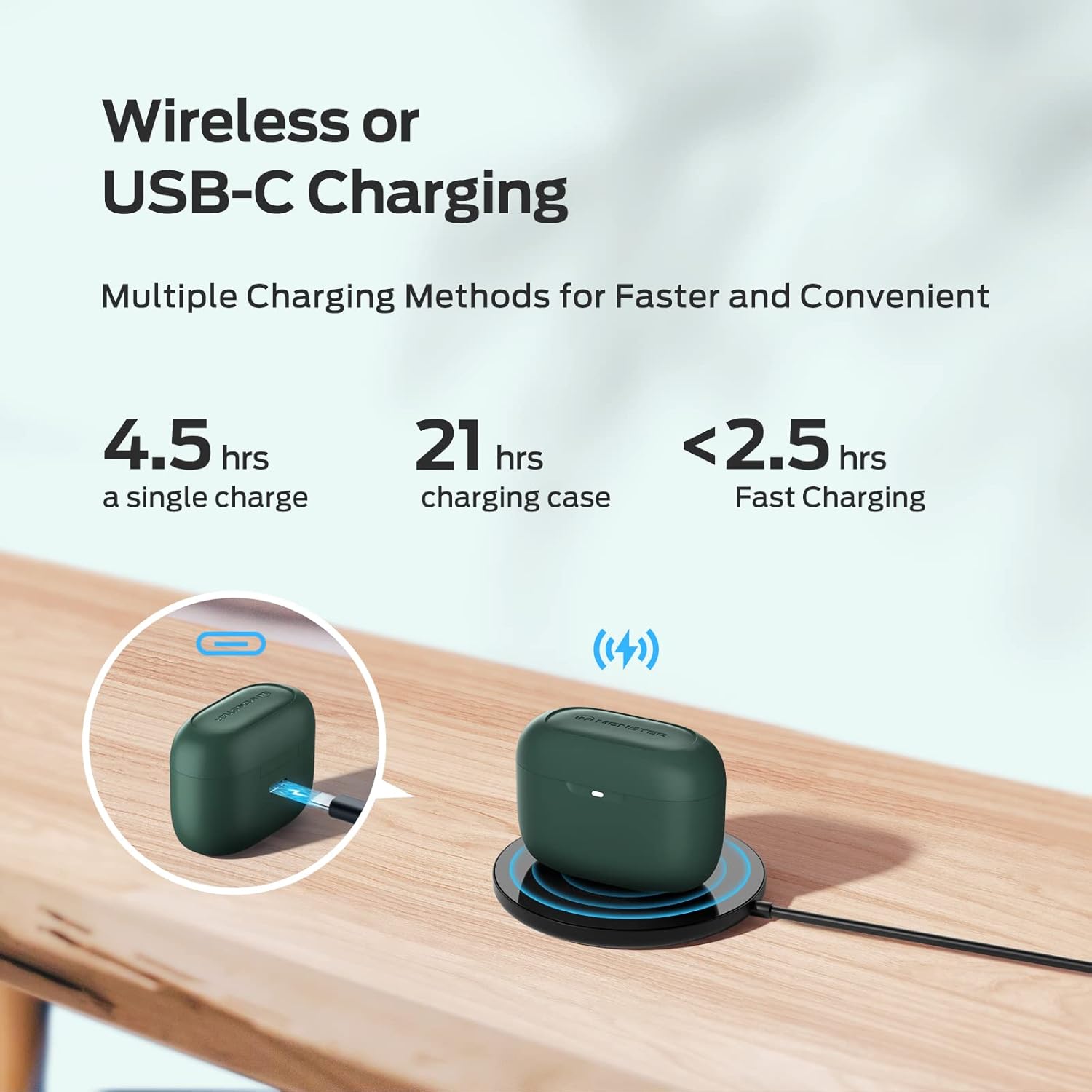
Image: Demonstrates the two charging methods for the earbud case: wired USB-C charging and wireless charging on a pad, along with battery life indicators.
6. പരിപാലനം
Proper maintenance ensures the longevity and optimal performance of your Monster N-Lite 200 AirLinks earbuds.
6.1. വൃത്തിയാക്കൽ
- ഇയർബഡുകളും ചാർജിംഗ് കെയ്സും മൃദുവായതും ഉണങ്ങിയതും ലിന്റ് രഹിതവുമായ തുണി ഉപയോഗിച്ച് പതിവായി വൃത്തിയാക്കുക.
- ചെവിയുടെ അറ്റം നീക്കം ചെയ്ത് ആവശ്യമെങ്കിൽ നേരിയ സോപ്പും വെള്ളവും ഉപയോഗിച്ച് പ്രത്യേകം വൃത്തിയാക്കുക. വീണ്ടും ഘടിപ്പിക്കുന്നതിന് മുമ്പ് അവ പൂർണ്ണമായും ഉണങ്ങിയെന്ന് ഉറപ്പാക്കുക.
- Gently clean the mesh and charging contacts on the earbuds and inside the case using a dry cotton swab. Avoid using sharp objects.
6.2. ജല പ്രതിരോധം (IPX5)
The earbuds are rated IPX5 waterproof, meaning they are resistant to splashes and sweat. This makes them suitable for workouts and outdoor activities. However, they are not designed for submersion in water or for use during swimming.

Image: An illustration showing water splashing on the earbuds, signifying their IPX5 waterproof capability.
6.3. സംഭരണം
ഉപയോഗത്തിലില്ലാത്തപ്പോൾ, ഇയർബഡുകൾ ചാർജിംഗ് കേസിൽ സൂക്ഷിക്കുക, അതുവഴി അവയെ സംരക്ഷിക്കുകയും ചാർജ്ജ് ആയി നിലനിർത്തുകയും ചെയ്യുക. ഉയർന്ന താപനിലയിൽ നിന്ന് മാറി തണുത്തതും വരണ്ടതുമായ സ്ഥലത്ത് കേസ് സൂക്ഷിക്കുക.
7. പ്രശ്നപരിഹാരം
If you encounter issues with your Monster N-Lite 200 AirLinks earbuds, try the following troubleshooting steps:
| പ്രശ്നം | പരിഹാരം |
|---|---|
| ഇയർബഡുകൾ ജോടിയാക്കുന്നില്ല/കണക്റ്റ് ചെയ്യുന്നില്ല. |
|
| ശബ്ദമില്ല അല്ലെങ്കിൽ കുറഞ്ഞ ശബ്ദമില്ല. |
|
| ഇയർബഡുകൾ ചാർജ് ചെയ്യുന്നില്ല. |
|
| മോശം കോൾ നിലവാരം. |
|
പ്രശ്നം നിലനിൽക്കുകയാണെങ്കിൽ, കൂടുതൽ സഹായത്തിനായി ഉപഭോക്തൃ പിന്തുണയുമായി ബന്ധപ്പെടുക.
8 സ്പെസിഫിക്കേഷനുകൾ
| ഫീച്ചർ | വിശദാംശങ്ങൾ |
|---|---|
| മോഡലിൻ്റെ പേര് | N-Lite 200 AirLinks |
| മോഡൽ നമ്പർ | MH12003 |
| ബ്രാൻഡ് | രാക്ഷസൻ |
| കണക്റ്റിവിറ്റി ടെക്നോളജി | ബ്ലൂടൂത്ത് 5.0 |
| ഓഡിയോ ഡ്രൈവർ തരം | 6mm Composite Diaphragm Drivers |
| പ്ലേടൈം (സിംഗിൾ ചാർജ്) | 4.5 മണിക്കൂറിലധികം |
| ആകെ പ്ലേടൈം (ചാർജിംഗ് കേസിനൊപ്പം) | 21 മണിക്കൂർ വരെ |
| ചാർജിംഗ് ഇൻ്റർഫേസ് | യുഎസ്ബി-സി, വയർലെസ് ചാർജിംഗ് |
| നിയന്ത്രണ തരം | ടച്ച് നിയന്ത്രണം |
| ജല പ്രതിരോധ നില | IPX5 (Splash and Sweatproof) |
| ഭാരം | 5.9 ഔൺസ് (ഇനത്തിന്റെ ഭാരം) |
| നിറം | Green (as per product data, though video shows pink) |
9. ഔദ്യോഗിക ഉൽപ്പന്ന വീഡിയോ
Watch this official video from the seller for a closer look at the Monster N-Lite 200 AirLinks earbuds, including their design and features.
Video: A demonstration of the Monster N-Lite 200 AirLinks earbuds, showing the charging case, earbuds, and how to change ear tips. Note: The video shows a pink version of the earbuds.
10. വാറൻ്റിയും പിന്തുണയും
For warranty information and customer support, please refer to the product packaging or contact the manufacturer directly. Keep your proof of purchase for any warranty claims.
നിർമ്മാതാവ്: രാക്ഷസൻ