
മോൺസ്റ്റർ MH12003
മോൺസ്റ്റർ എൻ-ലൈറ്റ് 200 എയർലിങ്ക്സ് വയർലെസ് ഇയർബഡ്സ് യൂസർ മാനുവൽ
മോഡൽ: MH12003
1. ആമുഖം
Thank you for choosing the Monster N-Lite 200 AirLinks Wireless Earbuds. This manual provides essential information to help you set up, operate, and maintain your earbuds, ensuring a high-quality audio experience. Please read this manual thoroughly before using the product and retain it for future reference.
2 സുരക്ഷാ വിവരങ്ങൾ
- ഇയർബഡുകളോ ചാർജിംഗ് കേസോ ഉയർന്ന താപനിലയിലോ ഈർപ്പത്തിലോ ദ്രാവകങ്ങളിലോ തുറന്നുകാട്ടരുത്.
- ഉപകരണം താഴെയിടുകയോ, അടിക്കുകയോ, വേർപെടുത്തുകയോ ചെയ്യുന്നത് ഒഴിവാക്കുക.
- അംഗീകൃത ചാർജറുകളും കേബിളുകളും മാത്രം ഉപയോഗിക്കുക.
- ഉച്ചത്തിലുള്ള ശബ്ദങ്ങൾ ദീർഘനേരം കേൾക്കുന്നത് കേൾവിക്ക് കേടുപാടുകൾ വരുത്തിയേക്കാം. ശബ്ദം മിതമായ അളവിൽ ക്രമീകരിക്കുക.
- കുട്ടികൾക്കും വളർത്തുമൃഗങ്ങൾക്കും ലഭ്യമാകാതെ സൂക്ഷിക്കുക.
3. പാക്കേജ് ഉള്ളടക്കം
- Monster N-Lite 200 AirLinks Wireless Earbuds (L/R)
- ചാർജിംഗ് കേസ്
- USB-C ചാർജിംഗ് കേബിൾ
- Ear Tips (S, M, L sizes - M size pre-installed)
- ഉപയോക്തൃ മാനുവൽ
4. ഉൽപ്പന്നം കഴിഞ്ഞുview
The Monster N-Lite 200 AirLinks feature a compact and ergonomic design, providing a comfortable fit and intuitive touch controls. The charging case ensures extended battery life and convenient portability.

Image: Monster N-Lite 200 AirLinks Earbuds and Charging Case. The image displays both earbuds removed from their open charging case, showcasinഅവയുടെ ഒതുക്കമുള്ള ഡിസൈൻ.
5. സജ്ജീകരണം
5.1 പ്രാരംഭ ചാർജിംഗ്
Before first use, fully charge the earbuds and the charging case. The charging case supports both USB-C cable charging and wireless charging.
- USB-C ചാർജിംഗ്: നൽകിയിരിക്കുന്ന USB-C കേബിൾ കേസിലെ ചാർജിംഗ് പോർട്ടിലേക്കും ഒരു പവർ സ്രോതസ്സിലേക്കും ബന്ധിപ്പിക്കുക.
- വയർലെസ് ചാർജിംഗ്: ചാർജിംഗ് കേസ് അനുയോജ്യമായ ഒരു വയർലെസ് ചാർജിംഗ് പാഡിൽ വയ്ക്കുക.
The indicator light on the case will show charging status. A full charge provides over 4.5 hours of playtime for the earbuds and a total of 21 hours with the charging case.

Image: Illustration of wireless and USB-C charging methods for the earbud case, showing charging times.

Image: Close-up of the charging case on a wireless charging pad, indicating fast charging.
5.2 ഇയർ ടിപ്പ് സെലക്ഷനും ഫിറ്റും
For optimal sound quality and comfort, choose the ear tips that best fit your ears. The earbuds come with three sizes (S, M, L) of polyurethane foam ear tips. The M size is pre-installed.
- Gently insert the earbud into your ear canal and twist slightly to secure a snug fit.
- Experiment with different sizes to find the best seal for passive noise reduction and bass response.
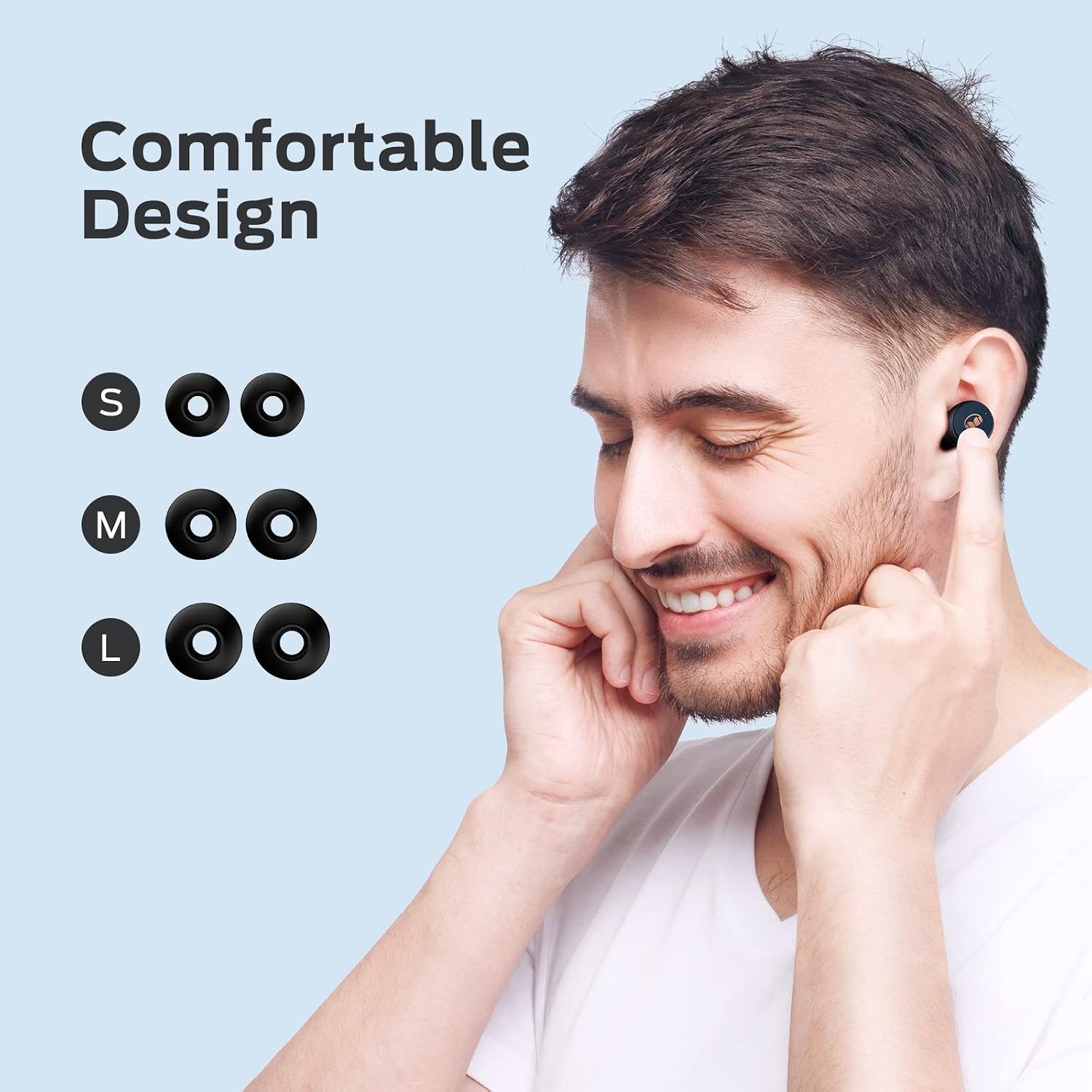
Image: A person wearing an earbud, with diagrams showing S, M, and L ear tip sizes for comfortable design.

Image: Left side shows an earbud with a mesh design for safe wear. Right side shows the easy pairing process with a phone screen.
5.3 വൺ-സ്റ്റെപ്പ് ജോടിയാക്കൽ
നിങ്ങളുടെ ഉപകരണത്തിലേക്ക് വേഗത്തിലും എളുപ്പത്തിലും കണക്റ്റ് ചെയ്യുന്നതിനായി ഇയർബഡുകളിൽ വൺ-സ്റ്റെപ്പ് ജോടിയാക്കൽ സവിശേഷതയുണ്ട്.
- ചാർജിംഗ് കേസ് തുറക്കുക. ഇയർബഡുകൾ സ്വയമേവ ഓണാകുകയും ജോടിയാക്കൽ മോഡിലേക്ക് പ്രവേശിക്കുകയും ചെയ്യും.
- നിങ്ങളുടെ മൊബൈൽ ഉപകരണത്തിൽ, ബ്ലൂടൂത്ത് ക്രമീകരണങ്ങളിലേക്ക് പോകുക.
- ലഭ്യമായ ഉപകരണങ്ങളുടെ പട്ടികയിൽ നിന്ന് "മോൺസ്റ്റർ എൻ-ലൈറ്റ് 200 എയർലിങ്കുകൾ" തിരഞ്ഞെടുക്കുക.
- Once connected, you will hear an audible confirmation "Connected."
പ്രാരംഭ ജോടിയാക്കലിന് ശേഷം, കേസിൽ നിന്ന് നീക്കം ചെയ്യുമ്പോൾ ഇയർബഡുകൾ അവസാന ജോടിയാക്കിയ ഉപകരണത്തിലേക്ക് യാന്ത്രികമായി കണക്റ്റ് ചെയ്യും.

Image: A hand holding the earbud case next to a smartphone displaying Bluetooth settings, showing "Monster N-Lite 200 AirLinks" as connected.
6. പ്രവർത്തന നിർദ്ദേശങ്ങൾ
6.1 ടച്ച് നിയന്ത്രണങ്ങൾ
The Monster N-Lite 200 AirLinks earbuds feature high-sensitivity touch controls for easy management of calls and music playback.
| ആക്ഷൻ | ഫംഗ്ഷൻ |
|---|---|
| Tap (single press) | Answer/End a call, Play/Pause music |
| Double-tap (Left Earbud) | വോളിയം കുറയ്ക്കുക |
| Double-tap (Right Earbud) | വോളിയം കൂട്ടുക |
| ട്രിപ്പിൾ-ടാപ്പ് | സിരി/വോയ്സ് അസിസ്റ്റന്റ് സജീവമാക്കുക |
| Long press (2 seconds, Left Earbud) | മുൻ ഗാനം |
| Long press (2 seconds, Right Earbud) | അടുത്ത പാട്ട് |
| Long press (2 seconds, during incoming call) | കോൾ നിരസിക്കുക |
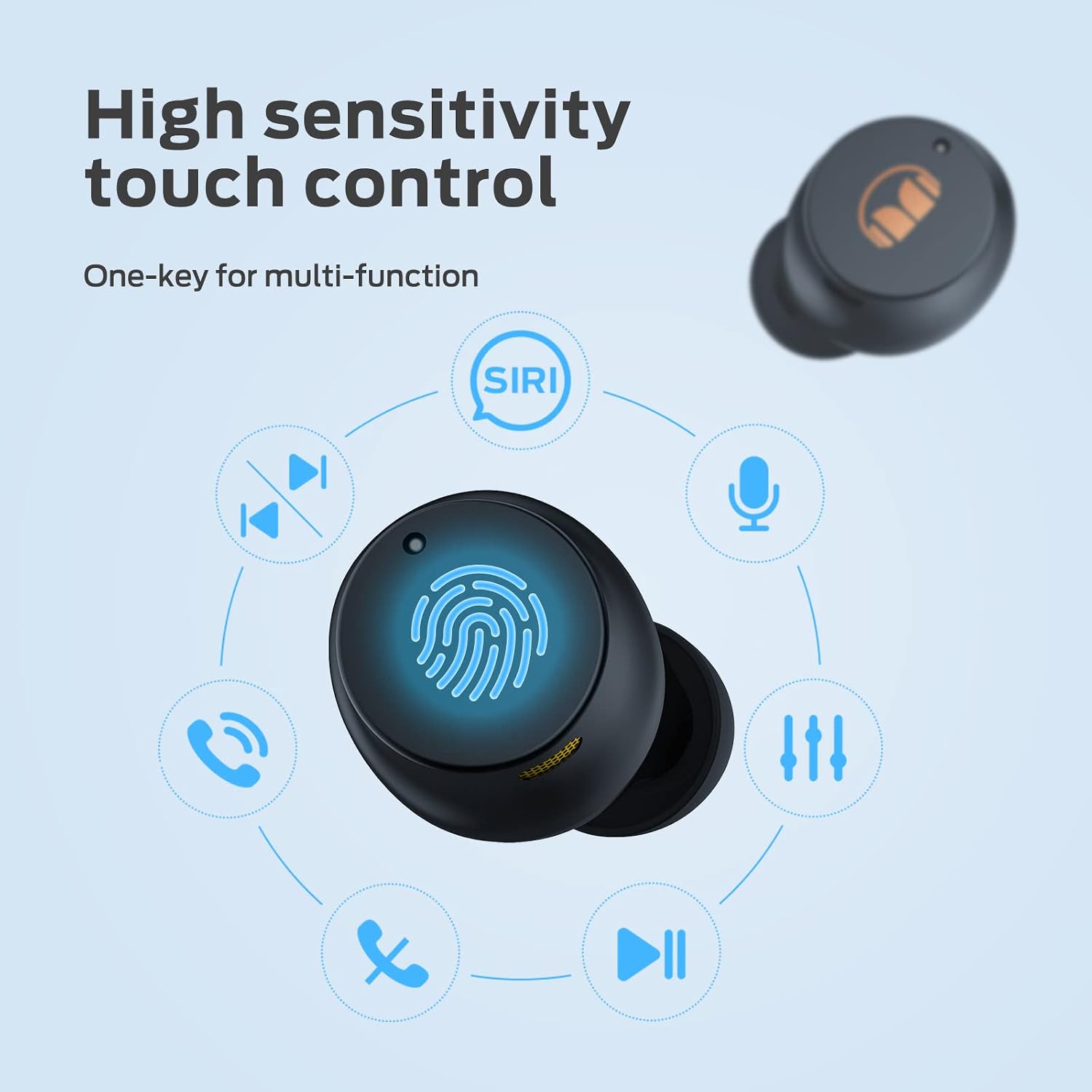
Image: Diagram illustrating the various touch control functions on the earbud, including calls, music, volume, and Siri activation.

Image: A visual guide detailing the touch control functions for answering/rejecting calls, playing/pausing music, skipping tracks, and adjusting volume.
6.2 ഓഡിയോ സവിശേഷതകൾ
The earbuds are equipped with 6mm composite diaphragm drivers, delivering high-quality stereo sound with deep bass. Bluetooth 5.0 ensures a stable connection with low latency, allowing sound to be transmitted to both ears simultaneously.

Image: An illustration of an earbud with sound waves emanating, representing Monster Stereo Sound.
7. പരിപാലനം
7.1 വൃത്തിയാക്കൽ
- ഇയർബഡുകളും ചാർജിംഗ് കെയ്സും മൃദുവായതും ഉണങ്ങിയതും ലിന്റ് രഹിതവുമായ തുണി ഉപയോഗിച്ച് പതിവായി വൃത്തിയാക്കുക.
- ചെവിയുടെ അറ്റം നീക്കം ചെയ്ത് നേരിയ സോപ്പും വെള്ളവും ഉപയോഗിച്ച് വൃത്തിയാക്കുക, തുടർന്ന് വീണ്ടും ഘടിപ്പിക്കുന്നതിന് മുമ്പ് നന്നായി ഉണക്കുക.
- ഉരച്ചിലുകളുള്ള ക്ലീനറുകളോ ലായകങ്ങളോ ഉപയോഗിക്കരുത്.
7.2 ജല പ്രതിരോധം (IPX5)
The Monster N-Lite 200 AirLinks earbuds are IPX5 waterproof, meaning they are resistant to splashes and sweat. This makes them suitable for sports and outdoor activities.
- ഇയർബഡുകൾ വെള്ളത്തിൽ മുക്കരുത്.
- ചാർജ് ചെയ്യുന്നതിനുമുമ്പ് ചാർജിംഗ് പോർട്ട് ഡ്രൈ ആണെന്ന് ഉറപ്പാക്കുക.

Image: Earbuds shown with water splashes, indicating their IPX5 waterproof rating.
7.3 സംഭരണം
ഉപയോഗത്തിലില്ലാത്തപ്പോൾ, ഇയർബഡുകൾ സംരക്ഷിക്കുന്നതിനും അവ ചാർജ് ചെയ്തിട്ടുണ്ടെന്ന് ഉറപ്പാക്കുന്നതിനും ചാർജിംഗ് കേസിൽ സൂക്ഷിക്കുക.
8. പ്രശ്നപരിഹാരം
| പ്രശ്നം | സാധ്യമായ പരിഹാരം |
|---|---|
| ഇയർബഡുകൾ ജോടിയാക്കുന്നില്ല |
|
| ശബ്ദമോ കുറഞ്ഞ വോളിയമോ ഇല്ല |
|
| ചാർജിംഗ് കേസ് ചാർജുചെയ്യുന്നില്ല |
|
| ടച്ച് നിയന്ത്രണങ്ങൾ പ്രതികരിക്കുന്നില്ല |
|
9 സ്പെസിഫിക്കേഷനുകൾ
| ഫീച്ചർ | വിശദാംശങ്ങൾ |
|---|---|
| മോഡലിൻ്റെ പേര് | N-Lite 200 AirLinks |
| മോഡൽ നമ്പർ | MH12003 |
| കണക്റ്റിവിറ്റി ടെക്നോളജി | ബ്ലൂടൂത്ത് 5.0 |
| ചെവി പ്ലേസ്മെൻ്റ് | ചെവിയിൽ |
| നിയന്ത്രണ തരം | ടച്ച് നിയന്ത്രണം |
| ജല പ്രതിരോധ നില | IPX5 (വാട്ടർപ്രൂഫ്) |
| മെറ്റീരിയൽ | പോളിയുറീൻ (PU) |
| പ്ലേടൈം (സിംഗിൾ ചാർജ്) | 4.5 മണിക്കൂറിലധികം |
| ആകെ പ്ലേടൈം (ചാർജിംഗ് കേസിനൊപ്പം) | 21 മണിക്കൂർ വരെ |
| ചാർജിംഗ് രീതികൾ | യുഎസ്ബി-സി, വയർലെസ് ചാർജിംഗ് |
| ഇനത്തിൻ്റെ ഭാരം | 5.9 ഔൺസ് |
| നിർമ്മാതാവ് | രാക്ഷസൻ |
10. വാറൻ്റി വിവരങ്ങൾ
Monster products are designed and manufactured to the highest quality standards. For specific warranty details, please refer to the warranty card included with your product or visit the official Monster webസൈറ്റ്. വാറന്റി ക്ലെയിമുകൾക്കായി നിങ്ങളുടെ വാങ്ങലിന്റെ തെളിവ് സൂക്ഷിക്കുക.
11. ഉപഭോക്തൃ പിന്തുണ
For further assistance, technical support, or product inquiries, please visit the official Monster support website or contact their customer service team. Contact information can typically be found on the product packaging or the brand's official webസൈറ്റ്.
Ask a question about this manual
Ask about setup, troubleshooting, compatibility, parts, safety, or missing instructions. Manuals+ will review the question and use this page’s manual context to help answer it.