
1. ഓവർview
The 30-watt Yamaha THR30II Wireless amplifier delivers realistic tube-amp tones and feel to your desktop. This amplifier takes the desktop amplifier concept to new heights with new amp models for electric guitar and bass, mic models for acoustic-electrics, and flat voicings for various instruments. It offers full wireless functionality, including Bluetooth support, a Line 6 wireless receiver, a built-in rechargeable battery, and stereo line outputs for enhanced flexibility. The redesigned enclosure provides increased bass response and a refreshed aesthetic.
പ്രധാന സവിശേഷതകൾ:
- Realistic tube-amp tones and feel with essential effects.
- 15 ഗിറ്റാർ amps, 3 bass amps, 3 mic models for acoustic-electrics, and flat modes for other instruments.
- Bluetooth support for audio playback and editing via the THR Remote app.
- Built-in wireless receiver compatible with the optional Line 6 Relay G10T transmitter.
- Built-in rechargeable battery for portable use.
2. ഉൽപ്പന്ന ഘടകങ്ങൾ

ചിത്രം 2.1: ഫ്രണ്ട് view of the Yamaha THR30II Wireless Desktop Guitar Amplifier. This image displays the speaker grille and the overall compact design.
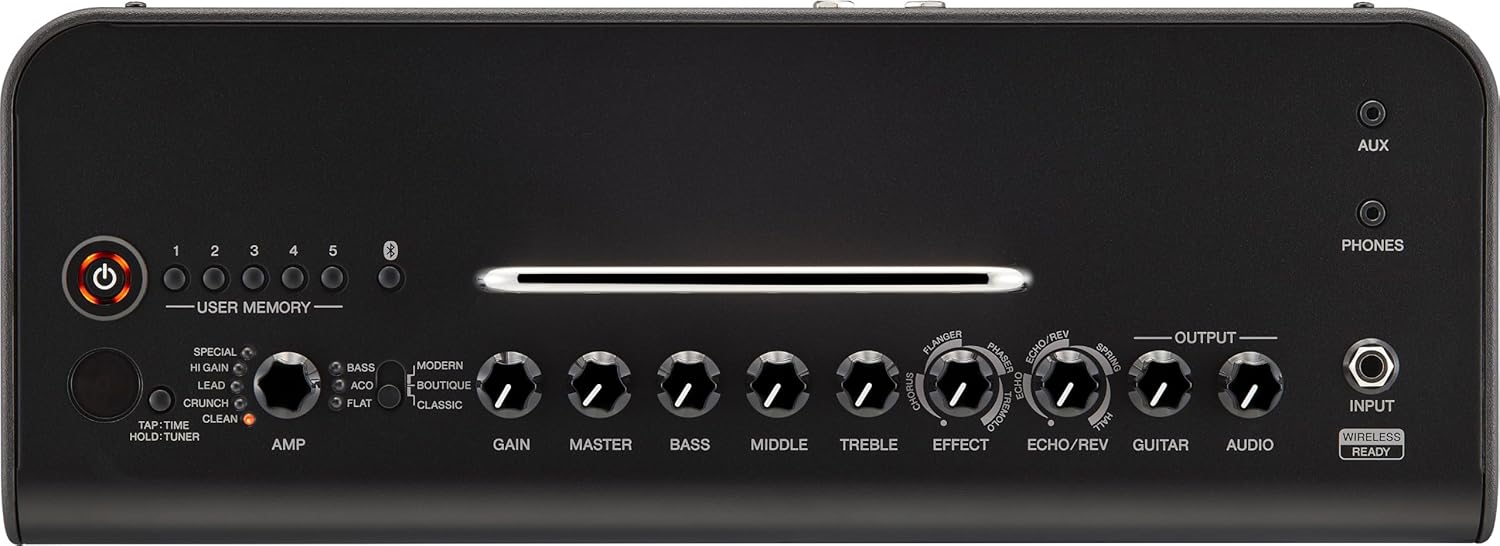
ചിത്രം 2.2: Top control panel of the Yamaha THR30II. This view highlights the various knobs and buttons for amp selection, gain, master volume, EQ, effects, and user memory presets.

ചിത്രം 2.3: Rear panel of the Yamaha THR30II. This image shows the line output jacks, USB port, and power input for the ampജീവൻ.

ചിത്രം 2.4: Dimensions of the Yamaha THR30II Wireless Desktop Guitar Amplifier. The image indicates the width, depth, and height of the unit.
3. സജ്ജീകരണം
3.1 പവർ ഓൺ/ഓഫ്
- Connect the included AC adapter to the 15V power input on the rear panel of the THR30II.
- ഒരു സാധാരണ വാൾ ഔട്ട്ലെറ്റിലേക്ക് എസി അഡാപ്റ്റർ പ്ലഗ് ചെയ്യുക.
- Press and hold the power button on the top panel until the indicator light illuminates.
- To power off, press and hold the power button again until the light turns off.
3.2 നിങ്ങളുടെ ഉപകരണം ബന്ധിപ്പിക്കുന്നു
- വയർഡ് കണക്ഷൻ: Plug your guitar or bass into the INPUT jack on the top panel using a standard 1/4-inch instrument cable.
- വയർലെസ് കണക്ഷൻ: The THR30II features a built-in wireless receiver. Insert a compatible Line 6 Relay G10T transmitter (sold separately) into the INPUT jack. The transmitter will automatically pair and charge.
3.3 ബ്ലൂടൂത്ത് ഓഡിയോ പ്ലേബാക്ക്
- നിങ്ങളുടെ മൊബൈൽ ഉപകരണത്തിൽ (സ്മാർട്ട്ഫോൺ, ടാബ്ലെറ്റ് മുതലായവ) ബ്ലൂടൂത്ത് സജീവമാക്കുക.
- On the THR30II, press the Bluetooth button (usually indicated by a Bluetooth icon) to enter pairing mode. The indicator will blink.
- Select "THR30II" from the list of available devices on your mobile device.
- Once paired, the Bluetooth indicator on the THR30II will glow steadily. You can now play audio from your device through the ampജീവൻ.
3.4 THR Remote App Installation
For advanced control and editing of amp models and effects, download the dedicated THR Remote app from your device's app store (iOS/Android). Connect your device via Bluetooth to access additional settings and features.
4. പ്രവർത്തന നിർദ്ദേശങ്ങൾ
4.1 ഫ്രണ്ട് പാനൽ നിയന്ത്രണങ്ങൾ
The THR30II's top panel features intuitive controls for quick sound adjustments:
- AMP നോബ്: തിരഞ്ഞെടുക്കുന്നു amplifier type (CLEAN, CRUNCH, LEAD, HI GAIN, SPECIAL, BASS, ACO, FLAT).
- AMP മോഡ് സ്വിച്ച്: Toggles between MODERN, BOUTIQUE, and CLASSIC modes for each amp തരം.
- ഗെയിൻ: Adjusts the input gain and distortion level.
- മാസ്റ്റർ: യുടെ മൊത്തത്തിലുള്ള ഔട്ട്പുട്ട് വോളിയം നിയന്ത്രിക്കുന്നു ampജീവൻ.
- ബാസ്, മിഡിൽ, ട്രെബിൾ: ടോൺ ഷേപ്പിംഗിനായി 3-ബാൻഡ് ഇക്വലൈസർ.
- പ്രഭാവം: Selects and adjusts modulation effects (Chorus, Flanger, Phaser, Tremolo).
- ECHO/REV: Selects and adjusts delay and reverb effects (Echo, Echo/Reverb, Spring, Hall).
- ഗിറ്റാർ: ബന്ധിപ്പിച്ച ഉപകരണത്തിന്റെ വോളിയം ക്രമീകരിക്കുന്നു.
- ഓഡിയോ: Adjusts the volume of the Bluetooth or AUX input audio.
- USER MEMORY (1-5): Stores and recalls up to five custom settings. Press and hold to save, tap to recall.
- TAP/TIME/HOLD TUNER: Tap for tempo, hold for tuner function.
4.2 Using the Tuner
To activate the built-in tuner, press and hold the TAP/TIME/HOLD TUNER button. The display will show the note being played, and indicators will guide you to proper tuning. Press the button again to exit tuner mode.
4.3 Advanced Control with THR Remote App
The THR Remote app provides a graphical interface for deeper customization:
- Access additional amplifier models and effects.
- Fine-tune parameters not available on the physical controls.
- Manage and backup user memory presets.
- Adjust Bluetooth audio levels independently.
5. മീഡിയ ഇന്റഗ്രേഷൻ
5.1 ഔദ്യോഗിക ഉൽപ്പന്ന വീഡിയോ
വീഡിയോ 5.1: An official product video from Yamaha Musical Instruments showcasing the features and benefits of the THR II Desktop Amp series, including the THR30II Wireless model. This video highlights the portability, sound quality, and wireless capabilities of the ampജീവൻ.
6. പരിപാലനം
6.1 വൃത്തിയാക്കൽ
യുടെ പുറംഭാഗം തുടയ്ക്കുക amplifier with a soft, dry cloth. Avoid using abrasive cleaners, solvents, or waxes, as these can damage the finish. Do not spray liquids directly onto the unit.
6.2 ബാറ്ററി കെയർ
The THR30II features a built-in rechargeable battery. For optimal battery life, avoid fully discharging the battery frequently. Recharge the unit regularly, especially if it will be stored for an extended period. Store the unit in a cool, dry place.
6.3 സോഫ്റ്റ്വെയർ അപ്ഡേറ്റുകൾ
Periodically check the Yamaha website or the THR Remote app for firmware updates. Keeping your amplifier's software up-to-date ensures optimal performance and access to new features.
7. പ്രശ്നപരിഹാരം
7.1 ശബ്ദ ഔട്ട്പുട്ട് ഇല്ല
- ഉറപ്പാക്കുക amplifier is powered on and the power indicator is lit.
- Check that your instrument is properly connected to the INPUT jack (wired or wireless).
- Verify that the GUITAR volume knob is turned up.
- Confirm that the MASTER volume knob is turned up.
- If using headphones, ensure they are properly connected to the PHONES jack and the volume is adjusted.
- If using Bluetooth audio, ensure your device is paired and the AUDIO volume knob is turned up.
7.2 ബ്ലൂടൂത്ത് കണക്ഷൻ പ്രശ്നങ്ങൾ
- Ensure Bluetooth is enabled on both the THR30II and your mobile device.
- നിങ്ങളുടെ മൊബൈൽ ഉപകരണം അടുത്തേക്ക് നീക്കുക amplifier to ensure a strong signal.
- ഉപകരണം ജോടി മാറ്റി വീണ്ടും ജോടിയാക്കാൻ ശ്രമിക്കുക.
- രണ്ടും പുനരാരംഭിക്കുക ampലൈഫയറും നിങ്ങളുടെ മൊബൈൽ ഉപകരണവും.
7.3 വൈദ്യുതി പ്രശ്നങ്ങൾ
- Ensure the AC adapter is securely connected to both the ampലൈഫയറും പ്രവർത്തിക്കുന്ന ഒരു പവർ ഔട്ട്ലെറ്റും.
- If operating on battery power, check the battery level. Recharge if necessary.
- If the unit does not power on, try a different power outlet or AC adapter (if available and compatible).
8 സ്പെസിഫിക്കേഷനുകൾ
| സ്പെസിഫിക്കേഷൻ | മൂല്യം |
|---|---|
| ബ്രാൻഡ് | യമഹ |
| മോഡലിൻ്റെ പേര് | THR30II |
| മോഡൽ നമ്പർ | (THR30II WL BL) |
| നിറം | കറുപ്പ് |
| ഔട്ട്പുട്ട് വാട്ട്tage | 30 വാട്ട്സ് |
| Ampജീവിത തരം | സോളിഡ് സ്റ്റേറ്റ് |
| ഔട്ട്പുട്ട് ചാനൽ അളവ് | 2 |
| സ്പീക്കർ വലിപ്പം | 15.49 സെൻ്റീമീറ്റർ |
| പവർ ഉറവിടം | ബാറ്ററി പവർ |
| കണക്റ്റർ തരം | വയർലെസ് |
| ഇനത്തിൻ്റെ അളവുകൾ (D x W x H) | 6.1"D x 16.4"W x 7.68"H |
| ഇനത്തിൻ്റെ ഭാരം | 4.3 കിലോഗ്രാം |
| യു.പി.സി | 889025141093 |
9. വാറൻ്റിയും പിന്തുണയും
9.1 നിർമ്മാതാവിന്റെ വാറന്റി
The Yamaha THR30II Wireless Desktop Guitar Amplifier comes with a 1-year manufacturer warranty. Yamaha Corporation of America (Yamaha) is proud of the experience and craftsmanship that goes into every product we represent. Yamaha sells its products through a network of authorized Yamaha retailers. Only these authorized retailers are equipped with sales and service support materials and training that are not readily available to non-authorized retailers. The Yamaha Limited Warranty applies only to products that have been purchased from an authorized Yamaha retailer in the fifty United States (including the District of Columbia) and used in this area. For more information, please review the Yamaha Limited Warranty for this product on our official webസൈറ്റ്.
9.2 ഉപഭോക്തൃ പിന്തുണ
For further assistance, technical support, or warranty claims, please visit the official Yamaha Musical Instruments webസൈറ്റിൽ ബന്ധപ്പെടുക അല്ലെങ്കിൽ അവരുടെ ഉപഭോക്തൃ സേവന വിഭാഗവുമായി ബന്ധപ്പെടുക. വാറന്റി സാധൂകരണത്തിനായി നിങ്ങളുടെ വാങ്ങിയതിന്റെ തെളിവ് സൂക്ഷിക്കുക.