
1. ആമുഖം
Thank you for choosing the AWEI TWS T12 Dual Dynamic Driver Earbuds. This manual provides detailed instructions on how to set up, operate, maintain, and troubleshoot your new earbuds. Please read this manual carefully before use to ensure optimal performance and longevity of your device.
The AWEI TWS T12 earbuds feature advanced Bluetooth 5.1 technology for stable and fast connections, dual dynamic drivers for superior audio fidelity, and a portable charging case for extended listening. Enjoy up to 9 hours of talk time and 8 hours of music playback on a single charge, with a transmission distance of up to 10 meters.
2 സുരക്ഷാ വിവരങ്ങൾ
To prevent damage to your device or injury to yourself and others, please observe the following safety precautions:
- ഇയർബഡുകളോ ചാർജിംഗ് കേസോ തീവ്രമായ താപനിലയിലോ നേരിട്ടുള്ള സൂര്യപ്രകാശത്തിലോ ഉയർന്ന ആർദ്രതയിലോ തുറന്നുകാട്ടരുത്.
- Avoid dropping, impacting, or disassembling the device. This may void the warranty.
- Keep the device away from water and other liquids. If it gets wet, dry it thoroughly before use.
- Do not use harsh chemicals or detergents to clean the earbuds. Use a soft, dry cloth.
- കേൾവിക്ക് കേടുപാടുകൾ സംഭവിക്കുന്നത് തടയാൻ മിതമായ ശബ്ദത്തിൽ കേൾക്കുക. ഉച്ചത്തിലുള്ള ശബ്ദങ്ങൾ ദീർഘനേരം കേൾക്കുന്നത് സ്ഥിരമായ കേൾവിക്കുറവിന് കാരണമാകും.
- കുട്ടികൾക്കും വളർത്തുമൃഗങ്ങൾക്കും എത്താൻ പറ്റാത്ത വിധത്തിൽ സൂക്ഷിക്കുക. ചെറിയ ഭാഗങ്ങൾ ശ്വാസംമുട്ടലിന് കാരണമായേക്കാം.
- Use only the provided or certified charging cable and adapter.
3. പാക്കേജ് ഉള്ളടക്കം
പാക്കേജിൽ ഇനിപ്പറയുന്ന ഇനങ്ങൾ ഉണ്ടോ എന്ന് പരിശോധിക്കുക:
- AWEI TWS T12 Earbuds (Left and Right)
- ചാർജിംഗ് കേസ്
- യുഎസ്ബി ടൈപ്പ്-സി ചാർജിംഗ് കേബിൾ
- ഉപയോക്തൃ മാനുവൽ
- ഇയർടിപ്പുകൾ (വിവിധ വലുപ്പങ്ങൾ)
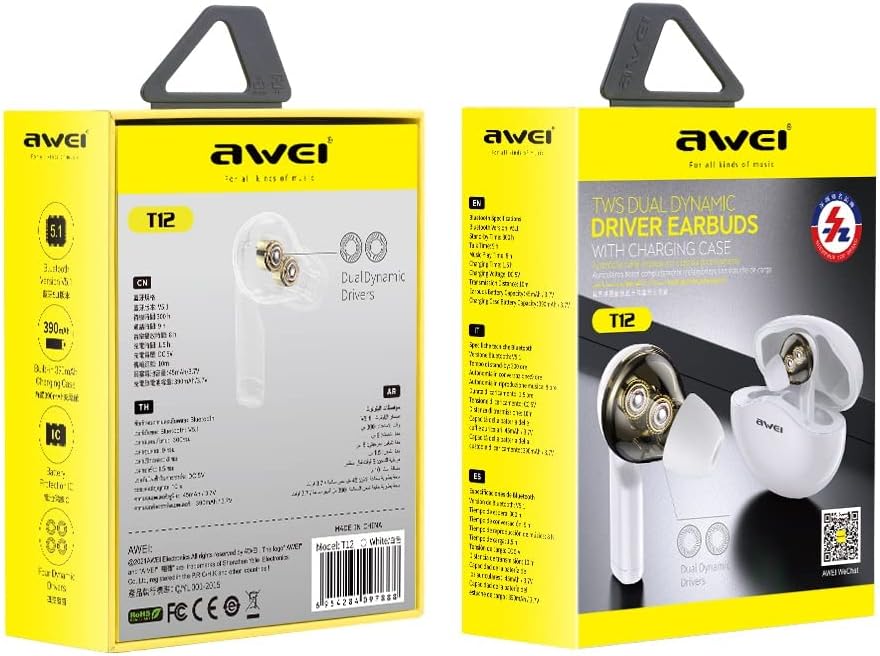
Image: AWEI TWS T12 Earbuds product packaging. The packaging displays the earbuds and charging case, along with some key features and branding.
4. ഉൽപ്പന്നം കഴിഞ്ഞുview
The AWEI TWS T12 earbuds are designed for comfort and high-quality audio. Each earbud features dual dynamic drivers for rich, clear sound. The compact charging case provides protection and recharges the earbuds on the go.
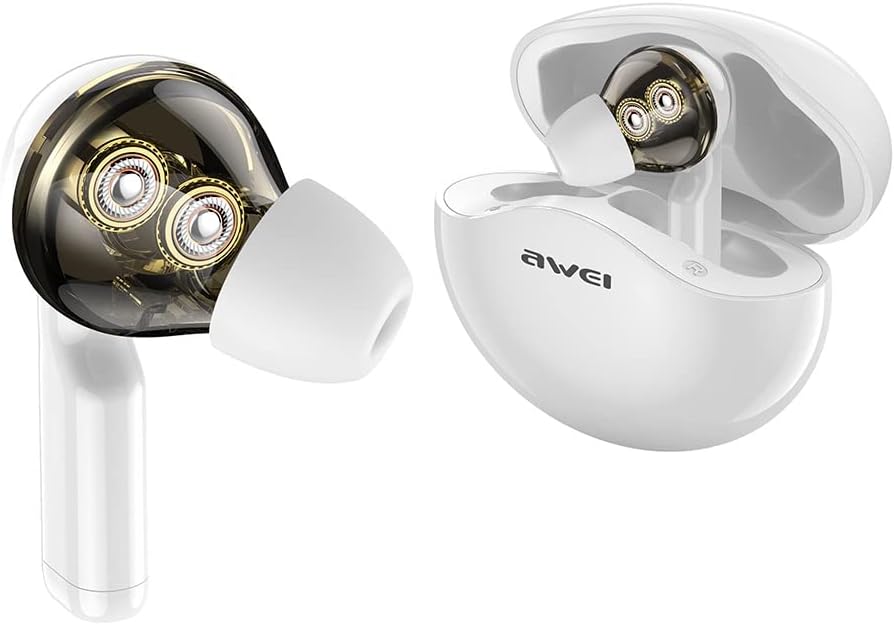
Image: AWEI TWS T12 Earbuds shown outside of their open charging case. The transparent design of the earbud highlights the dual dynamic drivers inside.

ചിത്രം: വിശദമായ ഒരു ഡയഗ്രം ഷോasing the internal structure of an AWEI TWS T12 earbud, specifically highlighting the two distinct dynamic drivers responsible for audio output.
5. സജ്ജീകരണം
5.1 ഇയർബഡുകളും കേസും ചാർജ് ചെയ്യുന്നു
ആദ്യമായി ഉപയോഗിക്കുന്നതിന് മുമ്പ്, ഇയർബഡുകളും ചാർജിംഗ് കേസും പൂർണ്ണമായും ചാർജ് ചെയ്യുക.
- കേസിലെ ചാർജിംഗ് പോർട്ടിലേക്ക് യുഎസ്ബി ടൈപ്പ്-സി ചാർജിംഗ് കേബിൾ ബന്ധിപ്പിക്കുക.
- കേബിളിന്റെ മറ്റേ അറ്റം ഒരു USB പവർ അഡാപ്റ്ററുമായി (ഉൾപ്പെടുത്തിയിട്ടില്ല) അല്ലെങ്കിൽ ഒരു കമ്പ്യൂട്ടറിന്റെ USB പോർട്ടുമായി ബന്ധിപ്പിക്കുക.
- കേസിലെ ഇൻഡിക്കേറ്റർ ലൈറ്റുകൾ ചാർജിംഗ് സ്റ്റാറ്റസ് കാണിക്കും. പൂർണ്ണമായി ചാർജ് ചെയ്തുകഴിഞ്ഞാൽ, ലൈറ്റുകൾ പൂർത്തിയായി അല്ലെങ്കിൽ ഓഫായി എന്ന് സൂചിപ്പിക്കും.
- Place the earbuds into the charging case. They will automatically begin charging. The earbuds also have fast charging capability.
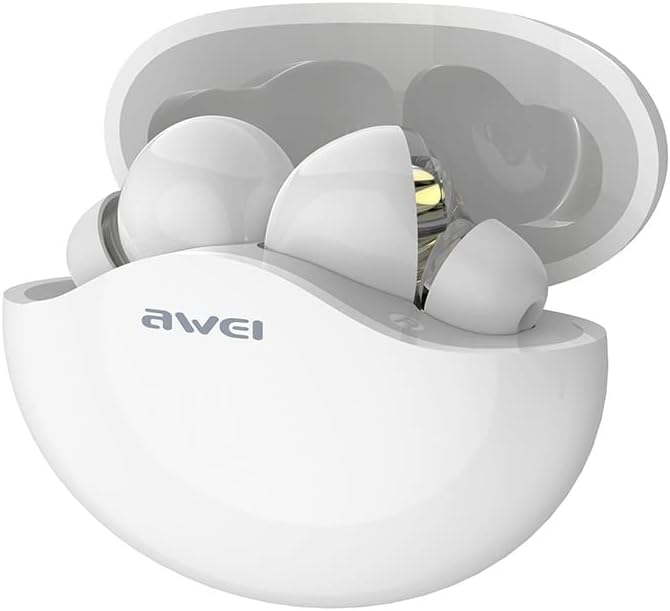
Image: The AWEI TWS T12 Earbuds securely placed within their open charging case, ready for charging or storage.
5.2 ഒരു ഉപകരണവുമായി ജോടിയാക്കൽ
The AWEI TWS T12 earbuds use Bluetooth 5.1 for a stable and efficient wireless connection.
- ഇയർബഡുകൾ ചാർജ്ജ് ചെയ്തിട്ടുണ്ടെന്ന് ഉറപ്പാക്കുക.
- ചാർജിംഗ് കേസ് തുറക്കുക. ഇയർബഡുകൾ സ്വയമേവ ഓണാകുകയും ജോടിയാക്കൽ മോഡിലേക്ക് പ്രവേശിക്കുകയും ചെയ്യും. ഇയർബഡുകളിലെ ഇൻഡിക്കേറ്റർ ലൈറ്റുകൾ മിന്നിമറയും, അവ ജോടിയാക്കാൻ തയ്യാറാണെന്ന് സൂചിപ്പിക്കുന്നു.
- നിങ്ങളുടെ ഉപകരണത്തിൽ (സ്മാർട്ട്ഫോൺ, ടാബ്ലെറ്റ്, കമ്പ്യൂട്ടർ), ബ്ലൂടൂത്ത് പ്രവർത്തനക്ഷമമാക്കുക.
- ഇതിനായി തിരയുക available Bluetooth devices and select "AWEI T12" from the list.
- കണക്റ്റ് ചെയ്തുകഴിഞ്ഞാൽ, ഇയർബഡ് ഇൻഡിക്കേറ്റർ ലൈറ്റുകൾ മിന്നുന്നത് നിർത്തും, നിങ്ങൾ ഒരു സ്ഥിരീകരണ ടോൺ കേൾക്കും.
- ഉപകരണത്തിൽ ബ്ലൂടൂത്ത് പ്രവർത്തനക്ഷമമാക്കിയിട്ടുണ്ടെങ്കിൽ, കേസിൽ നിന്ന് പുറത്തെടുക്കുമ്പോൾ ഇയർബഡുകൾ അവസാനം ജോടിയാക്കിയ ഉപകരണവുമായി യാന്ത്രികമായി വീണ്ടും കണക്റ്റുചെയ്യും.

Image: A close-up diagram illustrating the Bluetooth 5.1 chip, emphasizing its features for fast transmission, stable connection, and low power consumption.
6. പ്രവർത്തന നിർദ്ദേശങ്ങൾ
6.1 പവർ ഓൺ/ഓഫ്
- പവർ ഓൺ: ചാർജിംഗ് കേസ് തുറക്കുക, ഇയർബഡുകൾ സ്വയമേവ പവർ ഓൺ ആകും. പകരമായി, രണ്ട് ഇയർബഡുകളിലെയും ടച്ച് കൺട്രോൾ ഏരിയ 3 സെക്കൻഡ് അമർത്തിപ്പിടിക്കുക.
- പവർ ഓഫ്: Place the earbuds back into the charging case and close the lid. They will automatically power off. Alternatively, press and hold the touch control area on both earbuds for 5 seconds.
6.2 ഇയർബഡുകൾ ധരിക്കൽ
Gently insert the earbuds into your ears and rotate them slightly to find a comfortable and secure fit. Choose the appropriate eartip size for optimal sound quality and noise isolation.
6.3 ടച്ച് നിയന്ത്രണങ്ങൾ
The AWEI TWS T12 earbuds feature intuitive touch controls. The specific functions may vary slightly depending on your device and application.
- പ്ലേ/താൽക്കാലികമായി നിർത്തുക: ഇയർബഡുകളിൽ ഏതെങ്കിലുമൊന്നിൽ ഒറ്റ ടാപ്പ് ചെയ്യുക.
- അടുത്ത ട്രാക്ക്: വലതുവശത്തെ ഇയർബഡിൽ രണ്ടുതവണ ടാപ്പ് ചെയ്യുക.
- മുമ്പത്തെ ട്രാക്ക്: ഇടതുവശത്തെ ഇയർബഡിൽ രണ്ടുതവണ ടാപ്പ് ചെയ്യുക.
- വോളിയം കൂട്ടുക: വലതുവശത്തെ ഇയർബഡിൽ മൂന്ന് തവണ ടാപ്പ് ചെയ്യുക.
- വോളിയം താഴേക്ക്: ഇടതുവശത്തെ ഇയർബഡിൽ മൂന്ന് തവണ ടാപ്പ് ചെയ്യുക.
- ഉത്തരം/അവസാന കോൾ: ഇൻകമിംഗ് കോളിലോ സജീവ കോളിലോ ഇയർബഡിൽ ഒറ്റ ടാപ്പ് ചെയ്യുക.
- കോൾ നിരസിക്കുക: ഇൻകമിംഗ് കോൾ വരുമ്പോൾ, ഇയർബഡുകളിൽ ഏതെങ്കിലുമൊന്ന് 2 സെക്കൻഡ് അമർത്തിപ്പിടിക്കുക.
- വോയ്സ് അസിസ്റ്റന്റിനെ സജീവമാക്കുക: (കോൾ ചെയ്യാത്തപ്പോൾ) ഇയർബഡുകളിൽ ഏതെങ്കിലുമൊന്ന് 2 സെക്കൻഡ് അമർത്തിപ്പിടിക്കുക.
7. പരിപാലനം
7.1 വൃത്തിയാക്കൽ
- ഇയർബഡുകളും ചാർജിംഗ് കെയ്സും മൃദുവായതും ഉണങ്ങിയതും ലിന്റ് രഹിതവുമായ തുണി ഉപയോഗിച്ച് പതിവായി വൃത്തിയാക്കുക.
- അബ്രാസീവ് ക്ലീനറുകൾ, ആൽക്കഹോൾ, കെമിക്കൽ ലായകങ്ങൾ എന്നിവ ഉപയോഗിക്കരുത്.
- ഇയർടിപ്പുകളിൽ നിന്നും സ്പീക്കർ മെഷിൽ നിന്നും ഇയർവാക്സ് അല്ലെങ്കിൽ അവശിഷ്ടങ്ങൾ ഉണ്ടെങ്കിൽ, ചെറുതും മൃദുവായതുമായ ഒരു ബ്രഷ് അല്ലെങ്കിൽ കോട്ടൺ സ്വാബ് ഉപയോഗിച്ച് സൌമ്യമായി നീക്കം ചെയ്യുക.
7.2 സംഭരണം
- ഉപയോഗത്തിലില്ലാത്തപ്പോൾ, പൊടിയിൽ നിന്നും കേടുപാടുകളിൽ നിന്നും സംരക്ഷിക്കാൻ ഇയർബഡുകൾ അവയുടെ ചാർജിംഗ് കേസിൽ സൂക്ഷിക്കുക.
- Store the device in a cool, dry place, away from extreme temperatures.
7.3 ബാറ്ററി കെയർ
- ബാറ്ററി ലൈഫ് വർദ്ധിപ്പിക്കാൻ, ഇയർബഡുകൾ പൂർണ്ണമായും ഡിസ്ചാർജ് ചെയ്യുന്നതും കേസ് ഇടയ്ക്കിടെ ചാർജ് ചെയ്യുന്നതും ഒഴിവാക്കുക.
- ബാറ്ററിയുടെ ആരോഗ്യം നിലനിർത്താൻ, പതിവായി ഉപയോഗിക്കുന്നില്ലെങ്കിലും, ഉപകരണം പതിവായി ചാർജ് ചെയ്യുക.
8. പ്രശ്നപരിഹാരം
If you encounter any issues with your AWEI TWS T12 earbuds, please refer to the following common solutions:
| പ്രശ്നം | സാധ്യമായ പരിഹാരം |
|---|---|
| ഇയർബഡുകൾ ജോടിയാക്കുന്നില്ല |
|
| No sound from one or both earbuds |
|
| ചാർജിംഗ് കേസ് ചാർജുചെയ്യുന്നില്ല |
|
| ഇയർബഡുകൾ ചാർജ് ചെയ്യുന്നില്ല, എന്തെങ്കിലും കാരണത്താൽ |
|
9 സ്പെസിഫിക്കേഷനുകൾ
| ഫീച്ചർ | സ്പെസിഫിക്കേഷൻ |
|---|---|
| ബ്രാൻഡ് | AWEI |
| മോഡലിൻ്റെ പേര് | T12 |
| ഇനം മോഡൽ നമ്പർ | KM0657 |
| കണക്റ്റിവിറ്റി ടെക്നോളജി | വയർലെസ്സ് (ബ്ലൂടൂത്ത് 5.1) |
| വയർലെസ് കമ്മ്യൂണിക്കേഷൻ ടെക്നോളജി | ബ്ലൂടൂത്ത് |
| ചെവി പ്ലേസ്മെൻ്റ് | ഇൻ-ഇയർ |
| ഫോം ഫാക്ടർ | ഇൻ-ഇയർ |
| നിയന്ത്രണ രീതി | സ്പർശിക്കുക |
| പ്രത്യേക സവിശേഷതകൾ | ഫാസ്റ്റ് ചാർജ്ജ് |
| ചാർജിംഗ് പോർട്ട് | യുഎസ്ബി ടൈപ്പ്-സി |
| നോയ്സ് റദ്ദാക്കൽ | സജീവമായ ശബ്ദം അടിച്ചമർത്തൽ |
| സംസാര സമയം | 9 മണിക്കൂർ വരെ |
| സംഗീത പ്ലേബാക്ക് സമയം | 8 മണിക്കൂർ വരെ |
| ട്രാൻസ്മിഷൻ ദൂരം | 10 മീറ്റർ |
| ഫ്രീക്വൻസി റേഞ്ച് | 20 ഹെർട്സ് - 20,000 ഹെർട്സ് |
| മെറ്റീരിയൽ | പ്ലാസ്റ്റിക് |
| നിറം | വെള്ള |
| അനുയോജ്യമായ ഉപകരണങ്ങൾ | Cell Phone, Tablet, Computer |
| നിർദ്ദിഷ്ട ഉൽപ്പന്ന ഉപയോഗങ്ങൾ | Gaming, Music |
| പ്രായപരിധി (വിവരണം) | മുതിർന്നവർ |
10. വാറൻ്റിയും പിന്തുണയും
AWEI products are designed with quality and performance in mind. For specific warranty information, please refer to the warranty card included with your purchase or visit the official AWEI website. The return policy mentioned in the product details refers to the retailer's return period, not the manufacturer's warranty.
If you experience any issues that cannot be resolved using the troubleshooting guide, please contact AWEI customer support or your retailer for assistance. Please have your model number (T12 / KM0657) and proof of purchase ready.