
1. ആമുഖം
This manual provides essential information for operating your DOOGEE S98 rugged smartphone. Please read it carefully to ensure proper use and to maximize the device's features and longevity.

ചിത്രം 1.1: മുന്നിലും പിന്നിലും view of the DOOGEE S98 Rugged Smartphone. The front features a display, while the rear showcases the camera module with a circular secondary display and rugged design elements.
2. ഡിവൈസ് ഓവർview
The DOOGEE S98 is a rugged smartphone designed for durability and performance. Key features include:
- പ്രോസസ്സർ: MediaTek Helio G96 Octa-core chipset.
- മെമ്മറിയും സംഭരണവും: 8GB RAM + 256GB ROM (expandable up to 512GB).
- ഓപ്പറേറ്റിംഗ് സിസ്റ്റം: ആൻഡ്രോയിഡ് 12.
- ഡിസ്പ്ലേ: 6.3-inch FHD+ with Corning Gorilla Glass.
- ക്യാമറകൾ: 64MP main camera, 20MP night vision camera (with 4 infrared lights), 8MP wide-angle camera.
- ബാറ്ററി: 6000mAh with 33W fast charging and 15W wireless charging.
- ഈട്: IP68/IP69K and MIL-STD-810G certified for water, dust, and shock resistance.
- കണക്റ്റിവിറ്റി: Dual 4G SIM, NFC, OTG, GPS, Glonass, Beidou, Galileo.
- അദ്വിതീയ സവിശേഷത: Circular rear display for quick access to time, notifications, music control, and alarms.
3. സജ്ജീകരണം
3.1. Inserting SIM Cards and SD Card
- ഉപകരണത്തിന്റെ വശത്ത് സിം കാർഡ് ട്രേ കണ്ടെത്തുക.
- ട്രേ തുറക്കാൻ നൽകിയിരിക്കുന്ന സിം എജക്റ്റർ ഉപകരണം ഉപയോഗിക്കുക.
- നിങ്ങളുടെ നാനോ-സിം കാർഡുകളും മൈക്രോ എസ്ഡി കാർഡും നിയുക്ത സ്ലോട്ടുകളിൽ ശ്രദ്ധാപൂർവ്വം വയ്ക്കുക. സ്വർണ്ണ കോൺടാക്റ്റുകൾ താഴേക്ക് അഭിമുഖീകരിക്കുന്നുണ്ടെന്ന് ഉറപ്പാക്കുക.
- ട്രേ ഫ്ലഷ് ആകുന്നതുവരെ ഉപകരണത്തിലേക്ക് പതുക്കെ തിരികെ തള്ളുക.
3.2. പ്രാരംഭ പവർ ഓണും സജ്ജീകരണ വിസാർഡും
- Press and hold the Power button (located on the side) until the DOOGEE logo appears.
- Follow the on-screen instructions to complete the initial setup, including language selection, Wi-Fi connection, Google account login, and security settings.
4. പ്രവർത്തന നിർദ്ദേശങ്ങൾ
4.1. അടിസ്ഥാന നാവിഗേഷൻ
- പവർ ബട്ടൺ: സ്ക്രീൻ ഉണർത്താൻ/നിദ്രയിലാക്കാൻ അമർത്തുക. പവർ ഓഫ് ചെയ്യാനോ പുനരാരംഭിക്കാനോ അമർത്തിപ്പിടിക്കുക.
- വോളിയം ബട്ടണുകൾ: മീഡിയ വോളിയം, കോൾ വോളിയം, അറിയിപ്പ് വോളിയം എന്നിവ ക്രമീകരിക്കുക.
- ഇഷ്ടാനുസൃത ബട്ടൺ: A programmable button for quick access to specific functions or apps. Configure this in Settings.
- ഫിംഗർപ്രിന്റ് സെൻസർ: Integrated for secure unlocking. Register your fingerprints in Settings > Security.
4.2. Smart Rear Display
The circular rear display provides quick information and controls without needing to activate the main screen.
- സമയം: നിലവിലെ സമയം പ്രദർശിപ്പിക്കുന്നു.
- അലാറം: Snooze or cancel active alarms.
- സംഗീത നിയന്ത്രണം: പ്ലേ ചെയ്യുക, താൽക്കാലികമായി നിർത്തുക, ട്രാക്കുകൾ ഒഴിവാക്കുക.
- ഇൻകമിംഗ് കോൾ: View caller ID and manage calls.
- അറിയിപ്പുകൾ: Receive alerts for messages and other app notifications.

ചിത്രം 4.1: Illustration of the smart rear display showing its various functions like time, alarm, music control, incoming call, and notifications.
4.3. ക്യാമറ പ്രവർത്തനം
The DOOGEE S98 features a versatile camera system:
- 64MP പ്രധാന ക്യാമറ: വ്യത്യസ്ത ലൈറ്റിംഗ് സാഹചര്യങ്ങളിൽ ഉയർന്ന റെസല്യൂഷനുള്ള ഫോട്ടോകൾക്കായി.
- 20MP നൈറ്റ് വിഷൻ ക്യാമറ: Equipped with 4 infrared lights, allowing clear photography up to 20 meters in complete darkness. Activate this mode in the camera app.
- 8MP Wide-Angle Camera: വിശാലമായ ദൃശ്യങ്ങൾ പകർത്തുക.
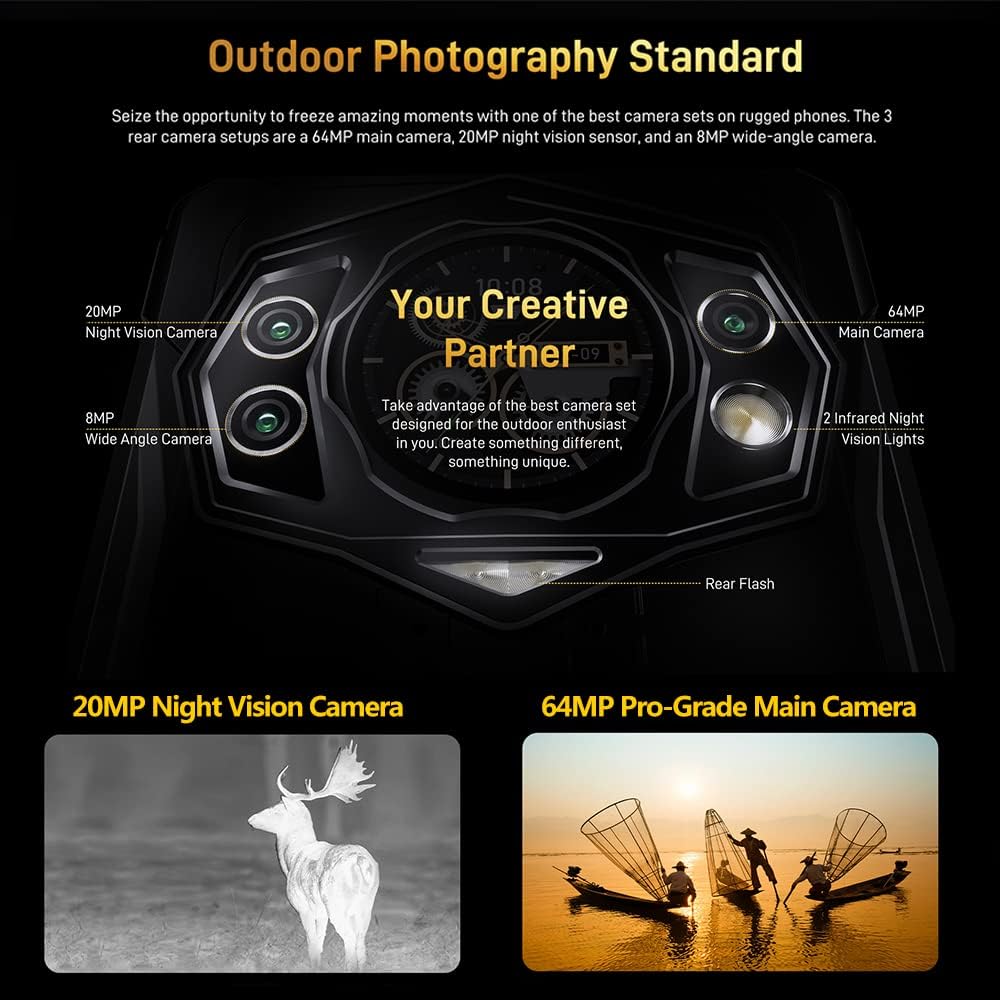
ചിത്രം 4.2: വിശദമായി view of the DOOGEE S98 camera module, highlighting the 64MP main camera, 20MP night vision camera, 8MP wide-angle camera, and infrared lights.

ചിത്രം 4.3: Examples of photos taken with the DOOGEE S98 camera, demonstrating both standard and night vision capabilities.
4.4. കണക്റ്റിവിറ്റി
- ഡ്യുവൽ 4G സിം: Supports two 4G SIM cards simultaneously for flexible network usage.
- NFC: For contactless payments and quick pairing with other NFC-enabled devices.
- OTG: Connect USB peripherals like flash drives or keyboards.
- ജിപിഎസ്: Integrated with GPS, Glonass, Beidou, and Galileo for accurate positioning.
5. ബാറ്ററിയും ചാർജിംഗും
The DOOGEE S98 is equipped with a 6000mAh battery for extended usage.
- വയർഡ് ചാർജിംഗ്: Supports 33W fast charging. A 33W charger can replenish 55% of the battery in approximately 1 hour.
- വയർലെസ് ചാർജിംഗ്: Supports 15W wireless charging. Place the device on a compatible wireless charging pad.

ചിത്രം 5.1: Visual representation of the 6000mAh battery capacity and the 33W turbo charging feature of the DOOGEE S98.
6. ഈടുനിൽപ്പും സംരക്ഷണവും
The DOOGEE S98 is built to withstand harsh environments, certified with IP68, IP69K, and MIL-STD-810G standards.
- വാട്ടർപ്രൂഫ്: Can withstand immersion in water up to 1.5 meters for 30 minutes. Features an underwater mode for photography.
- പൊടിപടലം: പൊടിപടലത്തിൽ നിന്ന് പൂർണ്ണമായും സംരക്ഷിക്കപ്പെടുന്നു.
- ഷോക്ക് പ്രൂഫ്: Designed to endure drops from a height of 1.5 meters.
- താപനില പ്രതിരോധം: Operates in extreme temperatures between 70°C (158°F) and -55°C (-67°F).

ചിത്രം 6.1: Image demonstrating the DOOGEE S98's waterproof, dustproof, and shockproof capabilities, showing the phone submerged in water and covered in sand.
7 സ്പെസിഫിക്കേഷനുകൾ
| ഫീച്ചർ | വിശദാംശങ്ങൾ |
|---|---|
| മോഡലിൻ്റെ പേര് | DOOGEE S98 |
| ഓപ്പറേറ്റിംഗ് സിസ്റ്റം | ആൻഡ്രോയിഡ് 12.0 |
| പ്രോസസ്സർ | മീഡിയടെക് ഹീലിയോ G96 ഒക്ടാ-കോർ |
| റാം | 8 ജിബി |
| ആന്തരിക സംഭരണം | 256 ജിബി |
| വികസിപ്പിക്കാവുന്ന സംഭരണം | 512GB വരെ (മൈക്രോഎസ്ഡി) |
| സ്ക്രീൻ വലിപ്പം | 6.3 ഇഞ്ച് |
| റെസലൂഷൻ | 1080 x 2340 (FHD+) |
| പ്രധാന ക്യാമറ | 64 എം.പി |
| നൈറ്റ് വിഷൻ ക്യാമറ | 20 MP (with 4 IR lights) |
| മുൻ ക്യാമറ | 16 MP (Common for this model, inferred) |
| ബാറ്ററി ശേഷി | 6000 mAh |
| വയർഡ് ചാർജിംഗ് | 33W ഫാസ്റ്റ് ചാർജിംഗ് |
| വയർലെസ് ചാർജിംഗ് | 15W |
| ഈട് റേറ്റിംഗുകൾ | IP68, IP69K, MIL-STD-810G |
| കണക്റ്റിവിറ്റി | 4G LTE, Wi-Fi, Bluetooth, NFC, USB, OTG |
| നാവിഗേഷൻ | ജിപിഎസ്, ഗ്ലോനാസ്, ബീഡോ, ഗലീലിയോ |
| അളവുകൾ | 8.19 x 7.6 x 1.85 ഇഞ്ച് (പാക്കേജ്) |
| ഭാരം | 11.3 ഔൺസ് (320 ഗ്രാം) |
| ഓഡിയോ ജാക്ക് | 3.5 മി.മീ |
8. പരിപാലനവും പരിചരണവും
- വൃത്തിയാക്കൽ: ഒരു സോഫ്റ്റ് ഉപയോഗിക്കുക, ഡിamp cloth to clean the device. Avoid harsh chemicals.
- വാട്ടർ എക്സ്പോഷർ: While waterproof, ensure all ports are securely closed before exposing the device to water. After water exposure, dry the device thoroughly, especially the charging port, before charging.
- താപനില: Avoid prolonged exposure to extreme heat or cold to prevent battery degradation and component damage.
- സോഫ്റ്റ്വെയർ അപ്ഡേറ്റുകൾ: മികച്ച പ്രകടനവും സുരക്ഷയും ഉറപ്പാക്കാൻ സിസ്റ്റം അപ്ഡേറ്റുകൾ പതിവായി പരിശോധിച്ച് ഇൻസ്റ്റാൾ ചെയ്യുക.
9. പ്രശ്നപരിഹാരം
| പ്രശ്നം | സാധ്യമായ പരിഹാരം |
|---|---|
| ഉപകരണം ഓണാക്കുന്നില്ല | ബാറ്ററി ചാർജ് ചെയ്തിട്ടുണ്ടെന്ന് ഉറപ്പാക്കുക. കുറഞ്ഞത് 10 മിനിറ്റെങ്കിലും ചാർജറുമായി കണക്റ്റ് ചെയ്യുക, തുടർന്ന് പവർ ഓൺ ചെയ്യാൻ ശ്രമിക്കുക. |
| സ്ക്രീൻ പ്രതികരിക്കുന്നില്ല | Perform a forced restart by holding the Power button for 10-15 seconds. If the issue persists, contact support. |
| നെറ്റ്വർക്ക് കണക്റ്റിവിറ്റി പ്രശ്നങ്ങൾ | Check SIM card insertion. Toggle Airplane Mode on/off. Restart the device. Verify network settings. |
| ബാറ്ററി പെട്ടെന്ന് തീരുന്നു | Close unused apps. Reduce screen brightness. Disable unnecessary features like GPS or Bluetooth when not in use. Check for background app activity. |
| Night Vision Camera not working | Ensure you are in a sufficiently dark environment. Check camera app settings for night vision mode activation. |
10. വാറൻ്റിയും പിന്തുണയും
The DOOGEE S98 comes with a 12-month US warranty. For any questions or issues regarding your device, please contact DOOGEE customer support. Ensure you confirm SIM compatibility with your carrier before purchase, as the device is not compatible with AT&T, Cricket, Verizon, Sprint, Boost Mobile, or other CDMA networks.
For further assistance, please refer to the official DOOGEE webഅവരുടെ ഉപഭോക്തൃ സേവന ചാനലുകൾ സൈറ്റ് ചെയ്യുകയോ ബന്ധപ്പെടുകയോ ചെയ്യുക.