
1. ആമുഖം
This manual provides essential information for the safe and efficient operation of your Dual DL-32HD-008 LED TV. Please read these instructions carefully before using the television and retain them for future reference. This 32-inch (81 cm) HD LED TV features a 1366 x 768 resolution, multiple connectivity options including HDMI and USB, and an integrated DVB-T/C/S2 tuner.

Image 1.1: The Dual DL-32HD-008 LED TV.
2 സുരക്ഷാ വിവരങ്ങൾ
തീ, വൈദ്യുതാഘാതം, പരിക്കുകൾ എന്നിവ കുറയ്ക്കുന്നതിന് ഈ ടെലിവിഷൻ ഉപയോഗിക്കുമ്പോൾ എല്ലായ്പ്പോഴും അടിസ്ഥാന സുരക്ഷാ മുൻകരുതലുകൾ പാലിക്കുക.
- മഴയോ ഈർപ്പമോ ടിവിയെ തുറന്നുകാട്ടരുത്.
- ടിവി തുറക്കരുത് casing; എല്ലാ സേവനങ്ങളും യോഗ്യതയുള്ള ഉദ്യോഗസ്ഥർക്ക് റഫർ ചെയ്യുക.
- ടിവിക്ക് ചുറ്റും ശരിയായ വായുസഞ്ചാരം ഉറപ്പാക്കുക.
- ടിവി നേരിട്ട് സൂര്യപ്രകാശം, താപ സ്രോതസ്സുകൾ, ശക്തമായ കാന്തികക്ഷേത്രങ്ങൾ എന്നിവയിൽ നിന്ന് അകറ്റി നിർത്തുക.
- ഇടിമിന്നൽ ഉണ്ടാകുമ്പോഴോ ദീർഘനേരം ഉപയോഗിക്കാതിരിക്കുമ്പോഴോ ടിവി പ്ലഗ് ഊരിവയ്ക്കുക.
3. പാക്കേജ് ഉള്ളടക്കം
ബോക്സിൽ എല്ലാ ഇനങ്ങളും ഉണ്ടെന്ന് ഉറപ്പാക്കുക:
- Dual DL-32HD-008 LED TV
- Stand Feet (2 pieces)
- റിമോട്ട് കൺട്രോൾ
- ഉപയോക്തൃ മാനുവൽ (ഈ പ്രമാണം)
4. സജ്ജീകരണം
4.1. സ്റ്റാൻഡ് ഇൻസ്റ്റലേഷൻ
To install the stand feet:
- സ്ക്രീൻ കേടുപാടുകൾ സംഭവിക്കാതിരിക്കാൻ ടിവി മുഖം മൃദുവായതും പരന്നതുമായ പ്രതലത്തിൽ ശ്രദ്ധാപൂർവ്വം വയ്ക്കുക.
- Align each stand foot with the corresponding slots on the bottom of the TV.
- നൽകിയിരിക്കുന്ന സ്ക്രൂകൾ ഉപയോഗിച്ച് പാദങ്ങൾ ഉറപ്പിക്കുക.

Image 4.1: TV with stand feet installed.
4.2. വാൾ മൗണ്ടിംഗ്
The TV supports VESA 100 x 100 mm wall mounts. A wall mount kit is not supplied. Please consult a professional for wall mounting to ensure safety and proper installation.
4.3. ബാഹ്യ ഉപകരണങ്ങൾ ബന്ധിപ്പിക്കുന്നു
ബാഹ്യ ഉപകരണങ്ങൾ ബന്ധിപ്പിക്കുന്നതിന് ടിവി വിവിധ പോർട്ടുകൾ വാഗ്ദാനം ചെയ്യുന്നു:
- HDMI പോർട്ടുകൾ: Connect Blu-ray players, game consoles, or set-top boxes. This model includes 1 HDMI 1.4 port and 1 HDMI ARC port.
- യുഎസ്ബി 2.0 പോർട്ട്: For media playback or PVR (Personal Video Recorder) functionality.
- ആന്റിന ഇൻപുട്ട്: Connect your terrestrial, cable, or satellite antenna for DVB-T/C/S2 reception.
- CI+ സ്ലോട്ട്: എൻക്രിപ്റ്റ് ചെയ്ത ചാനലുകൾ ഡീക്രിപ്റ്റ് ചെയ്യുന്നതിനുള്ള കണ്ടീഷണൽ ആക്സസ് മൊഡ്യൂളുകൾക്ക് (CAM).

Image 4.2: Rear panel with connectivity ports.
4.4. Power Connection and First-Time Setup
- പവർ കോർഡ് ടിവിയിലേക്കും തുടർന്ന് ഒരു വാൾ ഔട്ട്ലെറ്റിലേക്കും ബന്ധിപ്പിക്കുക.
- റിമോട്ട് കൺട്രോളിലോ ടിവിയിലോ പവർ ബട്ടൺ അമർത്തുക.
- Follow the on-screen instructions for the initial setup, including language selection, channel scanning, and network configuration (if applicable).
5. പ്രവർത്തിക്കുന്നു
5.1 റിമോട്ട് കൺട്രോൾ ഓവർview
Familiarize yourself with the remote control buttons for optimal TV operation.

Image 5.1: Remote Control.
5.2. അടിസ്ഥാന ടിവി പ്രവർത്തനങ്ങൾ
- ശക്തി: അമർത്തുക പവർ ടിവി ഓണാക്കാനോ ഓഫാക്കാനോ ഉള്ള ബട്ടൺ.
- വോളിയം: ഉപയോഗിക്കുക വോൾ +/- വോളിയം ക്രമീകരിക്കാനുള്ള ബട്ടണുകൾ.
- ചാനൽ: ഉപയോഗിക്കുക CH +/- ചാനലുകൾ മാറ്റാനുള്ള ബട്ടണുകൾ.
- ഇൻപുട്ട്: അമർത്തുക ഇൻപുട്ട് button to select different input sources (HDMI, USB, TV).
- മെനു: അമർത്തുക മെനു button to access the main menu for settings adjustments.
5.3. ട്യൂണർ പ്രവർത്തനം
Your TV supports DVB-T (terrestrial), DVB-C (cable), and DVB-S2 (satellite) signal formats. After initial setup, channels will be scanned and stored. Use the ഇ.പി.ജി എന്നതിലേക്കുള്ള ബട്ടൺ view ഇലക്ട്രോണിക് പ്രോഗ്രാം ഗൈഡ്.
5.4. USB PVR Function
Connect a USB storage device to the USB 2.0 port to record TV programs. Refer to the on-screen menu for PVR setup and operation instructions.
6. പരിപാലനം
6.1. സ്ക്രീൻ വൃത്തിയാക്കൽ
മൃദുവായ, ലിന്റ് രഹിത തുണി ഉപയോഗിച്ച് സ്ക്രീൻ സൌമ്യമായി തുടയ്ക്കുക. കഠിനമായ പാടുകൾക്ക്, ചെറുതായി dampതുണിയിൽ വെള്ളം അല്ലെങ്കിൽ ഒരു പ്രത്യേക സ്ക്രീൻ ക്ലീനർ ഉപയോഗിക്കുക. ഒരിക്കലും സ്ക്രീനിൽ നേരിട്ട് ദ്രാവകം തളിക്കരുത്.
6.2. സി വൃത്തിയാക്കൽasing
ടിവി വൃത്തിയാക്കാൻ മൃദുവായതും ഉണങ്ങിയതുമായ തുണി ഉപയോഗിക്കുക casing. അബ്രാസീവ് ക്ലീനറുകളോ ലായകങ്ങളോ ഉപയോഗിക്കുന്നത് ഒഴിവാക്കുക.
7. പ്രശ്നപരിഹാരം
നിങ്ങൾക്ക് പ്രശ്നങ്ങൾ നേരിടുകയാണെങ്കിൽ, ഇനിപ്പറയുന്ന പൊതുവായ പ്രശ്നങ്ങളും പരിഹാരങ്ങളും പരിശോധിക്കുക:
| പ്രശ്നം | സാധ്യമായ കാരണം | പരിഹാരം |
|---|---|---|
| ശക്തിയില്ല | പവർ കോർഡ് വിച്ഛേദിക്കപ്പെട്ടു; ഔട്ട്ലെറ്റിൽ നിന്ന് വൈദ്യുതിയില്ല. | പവർ കോർഡ് കണക്ഷൻ പരിശോധിക്കുക; മറ്റൊരു ഉപകരണം ഉപയോഗിച്ച് ഔട്ട്ലെറ്റ് പരിശോധിക്കുക. |
| ചിത്രമില്ല, പക്ഷേ ശബ്ദം ഉണ്ട് | Incorrect input source selected; faulty cable. | അമർത്തുക ഇൻപുട്ട് to select correct source; check HDMI/AV cable connections. |
| ശബ്ദമില്ല, പക്ഷേ ചിത്രം ഉണ്ട് | ശബ്ദം മ്യൂട്ട് ചെയ്തിരിക്കുന്നു അല്ലെങ്കിൽ വളരെ കുറവാണ്; ബാഹ്യ ഓഡിയോ സിസ്റ്റത്തിലെ പ്രശ്നം. | Unmute or increase volume; check external audio connections. |
| റിമോട്ട് കൺട്രോൾ പ്രവർത്തിക്കുന്നില്ല | ബാറ്ററികൾ തീർന്നു അല്ലെങ്കിൽ തെറ്റായി ചേർത്തു; തടസ്സം. | Replace batteries (CR2032 type); ensure clear path to TV's IR sensor. |
| മോശം ചിത്ര നിലവാരം | Weak signal; incorrect picture settings. | Check antenna connection; adjust picture settings in the menu. |
8 സ്പെസിഫിക്കേഷനുകൾ
Detailed technical specifications for the Dual DL-32HD-008 LED TV:
| ഫീച്ചർ | സ്പെസിഫിക്കേഷൻ |
|---|---|
| മോഡലിൻ്റെ പേര് | DL-32HD |
| സ്ക്രീൻ വലിപ്പം | 32 ഇഞ്ച് (81 സെ.മീ) |
| ഡിസ്പ്ലേ ടെക്നോളജി | എൽഇഡി |
| റെസലൂഷൻ | 720p (1366 x 768) |
| പുതുക്കിയ നിരക്ക് | 60 Hz |
| വീക്ഷണാനുപാതം | 16:9 |
| കോൺട്രാസ്റ്റ് റേഷ്യോ | 1200:1 |
| പരമാവധി തെളിച്ചം | 180 Candelas per square meter |
| പ്രതികരണ സമയം | 8 മില്ലിസെക്കൻഡ് |
| Viewing ആംഗിൾ | 178 ഡിഗ്രി |
| ഓഡിയോ put ട്ട്പുട്ട് മോഡ് | ചുറ്റുക |
| സ്പീക്കർ വിവരണം | 2 x 8 Watts Speakers |
| ആകെ HDMI പോർട്ടുകൾ | 2 (1x HDMI 1.4, 1x HDMI ARC) |
| മൊത്തം USB പോർട്ടുകൾ | 2 (USB 2.0) |
| ട്യൂണർ തരം | DVB-T, DVB-C, DVB-S2 |
| VESA മൗണ്ട് സ്റ്റാൻഡേർഡ് | 100 x 100 മി.മീ |
| വൈദ്യുതി ഉപഭോഗം | 65 Watts (On), 0.5 Watts (Standby) |
| ലൈൻ വോളിയംtage | 100-240 V AC 50-60 Hz |
| ഇനത്തിൻ്റെ അളവുകൾ (D x W x H) | 19P x 73.2W x 47.8H സെ.മീ |
| ഇനത്തിന്റെ ഭാരം (സ്റ്റാൻഡ് ഇല്ലാതെ) | 3.5 കിലോഗ്രാം |
| ഇനത്തിന്റെ ഭാരം (സ്റ്റാൻഡിനൊപ്പം) | 4.5 കിലോഗ്രാം |
| റിമോട്ട് കൺട്രോൾ ബാറ്ററി തരം | CR2032 |
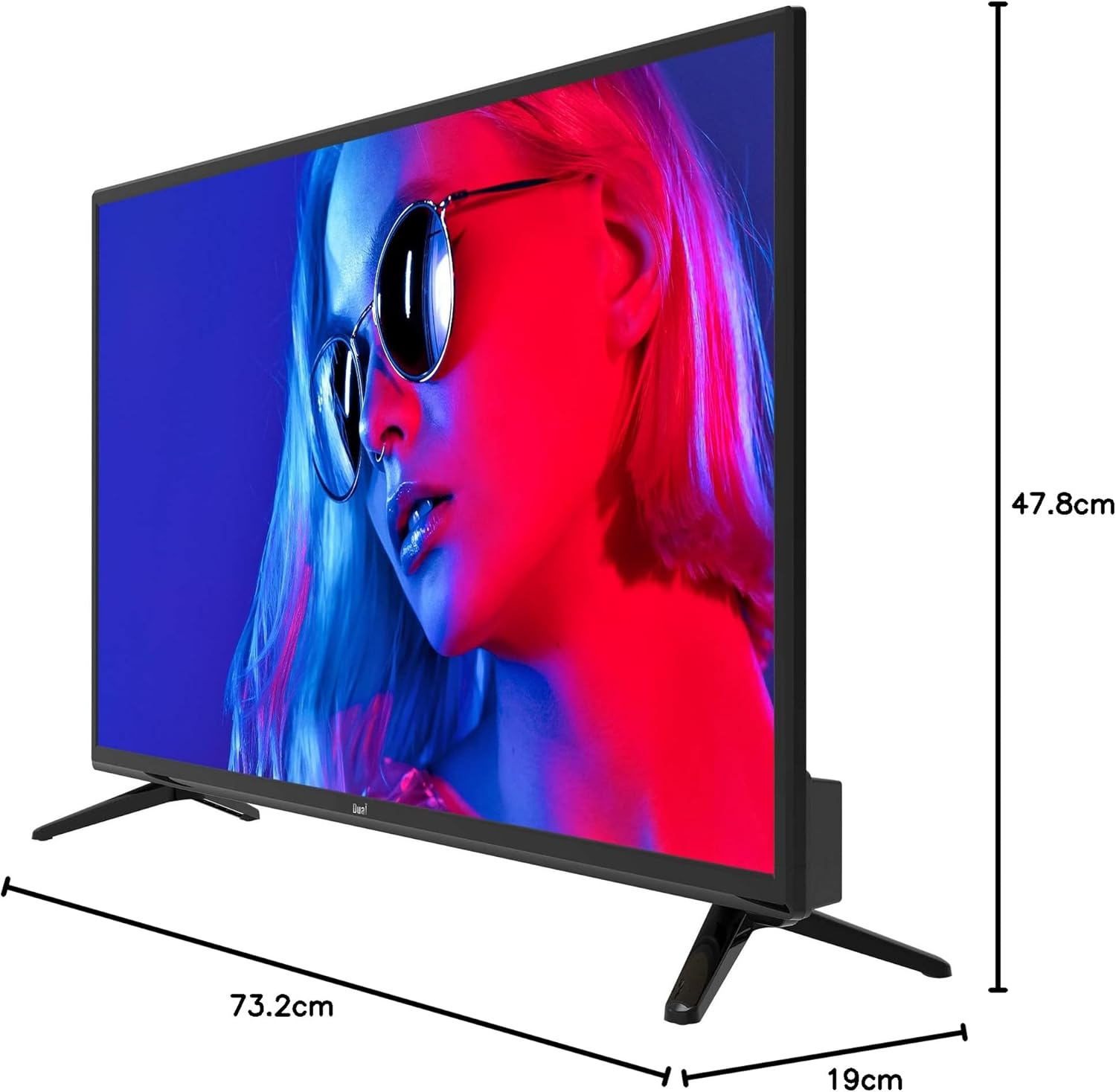
Image 8.1: TV dimensions.
8.1. Energy Label

Image 8.2: EU Energy Label. For more details, visit the official EPREL database: EPREL ഉൽപ്പന്ന പേജ്
9. വാറൻ്റിയും പിന്തുണയും
9.1. വാറൻ്റി വിവരങ്ങൾ
This product comes with a Limited Warranty. Please refer to the warranty card included in your package for specific terms and conditions.
9.2. Spare Parts and Software Updates
Information regarding the availability of spare parts and guaranteed software updates for this model is currently not available. Please contact your retailer or the manufacturer for further inquiries.
9.3. ഉപഭോക്തൃ പിന്തുണ
For technical assistance or customer service, please contact your point of purchase or visit the official Dual webപിന്തുണാ ഉറവിടങ്ങൾക്കായുള്ള സൈറ്റ്.