
ആമുഖം
This manual provides detailed instructions for the safe and efficient use of your Westcott Compact Electric Pencil Sharpener. Please read this manual thoroughly before operating the device and retain it for future reference.

ചിത്രം 1: മുൻഭാഗം view of the Westcott Compact Electric Pencil Sharpener.
സുരക്ഷാ വിവരങ്ങൾ
സുരക്ഷിതമായ പ്രവർത്തനം ഉറപ്പാക്കുന്നതിനും കേടുപാടുകൾ തടയുന്നതിനും, ദയവായി ഇനിപ്പറയുന്ന സുരക്ഷാ മുൻകരുതലുകൾ പാലിക്കുക:
- Keep the sharpener away from water or other liquids.
- Do not insert fingers or foreign objects into the sharpening holes.
- Unplug the sharpener before cleaning or when not in use.
- Ensure the shavings reservoir is properly closed during operation.
- ഈ ഉപകരണം, അവരുടെ സുരക്ഷയ്ക്ക് ഉത്തരവാദിയായ ഒരു വ്യക്തി ഉപകരണത്തിൻ്റെ ഉപയോഗത്തെ സംബന്ധിച്ച മേൽനോട്ടമോ നിർദ്ദേശമോ നൽകിയിട്ടില്ലെങ്കിൽ, ശാരീരികമോ ഇന്ദ്രിയപരമോ മാനസികമോ ആയ കഴിവുകൾ കുറഞ്ഞതോ അനുഭവത്തിൻ്റെയും അറിവിൻ്റെയും അഭാവം ഉള്ള വ്യക്തികൾക്ക് (കുട്ടികൾ ഉൾപ്പെടെ) ഉപയോഗിക്കാൻ ഉദ്ദേശിച്ചുള്ളതല്ല.
പാക്കേജ് ഉള്ളടക്കം
പാക്കേജിൽ എല്ലാ ഇനങ്ങളും ഉണ്ടെന്ന് ഉറപ്പാക്കുക:
- Westcott Compact Electric Multi-Hole Horizontal Pencil Sharpener
- പവർ അഡാപ്റ്റർ
ഉൽപ്പന്ന സവിശേഷതകൾ
The Westcott Compact Electric Pencil Sharpener offers several features for efficient pencil sharpening:
- Multi-Hole Dial: Accommodates pencils of various diameters.
- വൈദ്യുതോർജ്ജം: Ensures consistent sharpening without battery concerns.
- വലിയ ഷേവിംഗ് റിസർവോയർ: ശൂന്യമാക്കലിന്റെ ആവൃത്തി കുറയ്ക്കുന്നു.
- ഹെവി ഡ്യൂട്ടി നിർമ്മാണം: Designed for durability and long-lasting performance.
- 8-Tooth Stainless Steel Helical Blade: Provides a sharp, precise point.
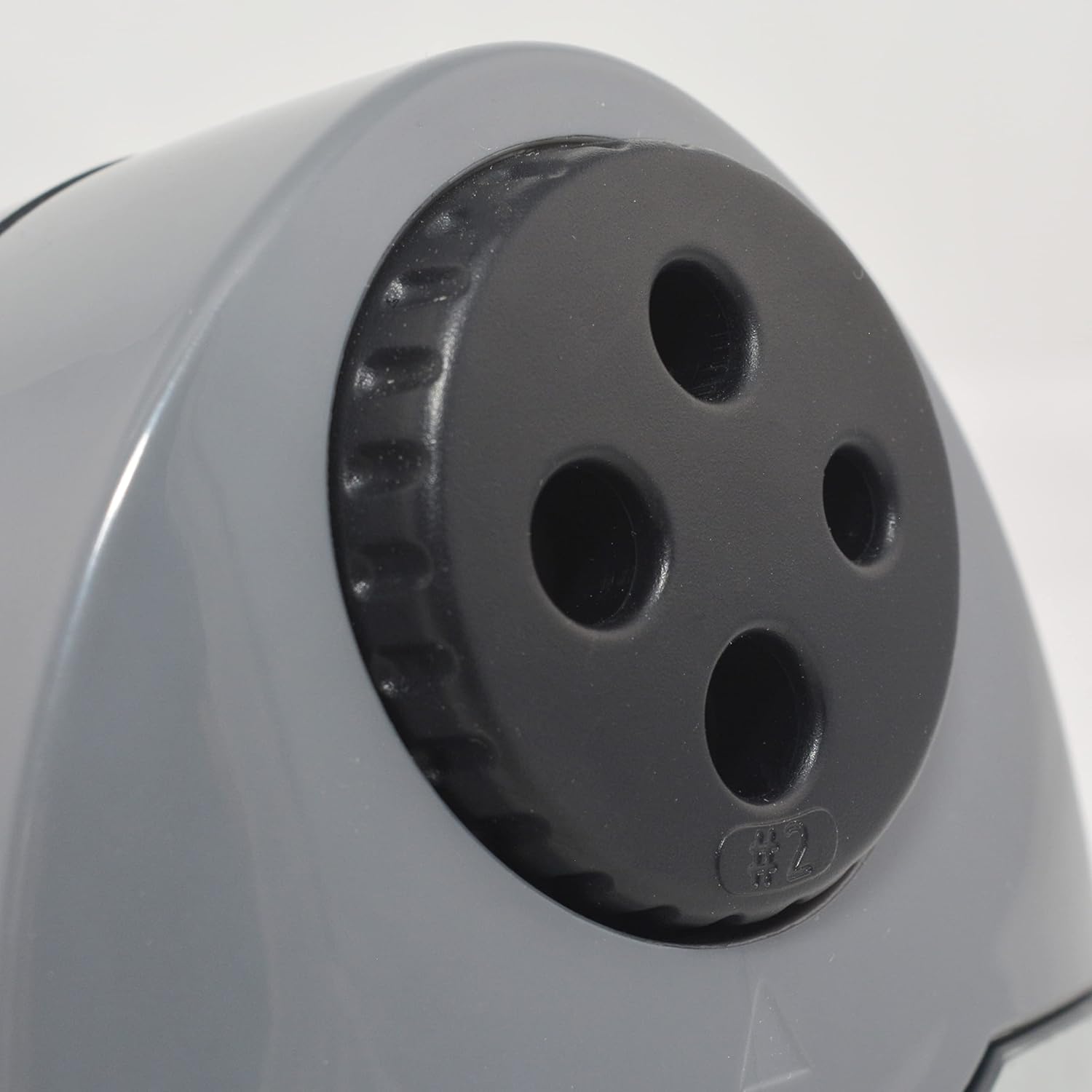
Figure 2: Multi-hole dial for different pencil sizes.
വീഡിയോ 1: കഴിഞ്ഞുview of the Westcott Compact Electric Horizontal Pencil Sharpener, demonstrating its features and design.
സജ്ജമാക്കുക
- Unpack the Sharpener: Carefully remove all packaging materials from the sharpener.
- സ്ഥിരതയുള്ള ഉപരിതലത്തിൽ സ്ഥാപിക്കുക: Position the sharpener on a flat, stable surface to prevent movement during use.
- പവർ ബന്ധിപ്പിക്കുക: Insert the power adapter into the designated port on the sharpener, then plug the adapter into a standard electrical outlet.

Figure 3: Connecting the power adapter to the sharpener.
പ്രവർത്തന നിർദ്ദേശങ്ങൾ
- Select the Correct Hole: Rotate the multi-hole dial on the top of the sharpener to align the appropriate size opening with the pencil you intend to sharpen. The sharpener can accommodate various pencil diameters.
- പെൻസിൽ തിരുകുക: Gently insert the pencil into the selected sharpening hole. The sharpener will automatically activate when the pencil is inserted correctly.
- Sharpen the Pencil: Apply light pressure to the pencil while the sharpener is running. The sharpener will stop automatically or reduce motor speed when the pencil reaches an optimal point, indicated by the #2 pencil sharpening indicator for standard pencils.
- Remove the Pencil: Once sharpened, carefully remove the pencil.

Figure 4: Inserting a pencil for sharpening.
Video 2: Demonstration of the Westcott Compact Pencil Sharpener in action, showing the sharpening process.
മെയിൻ്റനൻസ്
- Emptying Shavings Reservoir: Regularly check and empty the shavings reservoir to maintain optimal performance and prevent blockages. To empty, gently pull the transparent reservoir away from the main unit. Dispose of shavings and reattach the reservoir securely.

Figure 5: Emptying the shavings reservoir.
- ബ്ലേഡുകൾ വൃത്തിയാക്കൽ: If sharpening performance decreases, the blades may need cleaning. Unplug the sharpener. Use a soft brush or cotton swab to carefully remove any graphite or wood residue from the blades. Exercise caution as blades are sharp.
ട്രബിൾഷൂട്ടിംഗ്
If you encounter issues with your sharpener, refer to the following common problems and solutions:
- Sharpener not turning on:
- Ensure the power adapter is securely plugged into both the sharpener and the electrical outlet.
- മറ്റൊരു ഉപകരണം പ്ലഗ് ഇൻ ചെയ്ത് ഇലക്ട്രിക്കൽ ഔട്ട്ലെറ്റ് പ്രവർത്തനക്ഷമമാണോ എന്ന് പരിശോധിക്കുക.
- Verify the shavings reservoir is correctly installed and closed. The sharpener may have a safety switch that prevents operation if the reservoir is open.
- Pencil not sharpening properly (uneven or blunt point):
- Ensure you have selected the correct hole size for your pencil.
- Check the blades for any debris or damage. Clean as per the maintenance section.
- Avoid applying excessive pressure, which can cause uneven sharpening or lead breakage.
- Pencil breaking frequently:
- This can be a sign of dull blades or excessive pressure. Refer to cleaning instructions or consider blade replacement if available.
- Ensure the pencil is inserted straight and not at an angle.
സ്പെസിഫിക്കേഷനുകൾ
| ആട്രിബ്യൂട്ട് | മൂല്യം |
|---|---|
| ബ്രാൻഡ് | വെസ്റ്റ്കോട്ട് |
| മോഡൽ നമ്പർ | 00406 |
| ഉൽപ്പന്നത്തിൻ്റെ പ്രത്യേക ഉപയോഗങ്ങൾ | ഗ്രാഫൈറ്റ് പെൻസിൽ |
| നിറം | കറുപ്പ് |
| പവർ ഉറവിടം | കോർഡഡ് ഇലക്ട്രിക് |
| മെറ്റീരിയൽ | ലോഹം |
| ടാർഗെറ്റ് പ്രേക്ഷകർ | Artist, Student |
| ഇനത്തിൻ്റെ ഭാരം | 11.52 ഔൺസ് |
| അധിക സവിശേഷതകൾ | ഹെവി ഡ്യൂട്ടി |
വാറൻ്റി വിവരങ്ങൾ
This Westcott product comes with a 7 വർഷത്തെ വാറൻ്റി. For warranty claims or detailed information, please refer to the official Westcott webസൈറ്റ് അല്ലെങ്കിൽ ഉപഭോക്തൃ പിന്തുണയുമായി ബന്ധപ്പെടുക.
ഉപഭോക്തൃ പിന്തുണ
If you require further assistance or have questions not covered in this manual, please contact Westcott customer support through their official webനിങ്ങളുടെ വാങ്ങലിനൊപ്പം നൽകിയിരിക്കുന്ന സൈറ്റ് അല്ലെങ്കിൽ ബന്ധപ്പെടാനുള്ള വിവരങ്ങൾ.