
1. ആമുഖം
The SteelSeries Arctis Nova 1X Gaming Headset delivers an immersive audio experience across multiple platforms. Designed for comfort and clarity, it features the Signature Arctis Sound and a ClearCast Gen 2 Microphone, making it ideal for Xbox Series X|S, PC, PlayStation, Switch, and mobile gaming.
This manual provides detailed instructions for setting up, operating, and maintaining your Arctis Nova 1X headset to ensure optimal performance and longevity.
2. ബോക്സിൽ എന്താണുള്ളത്?
Upon unboxing your SteelSeries Arctis Nova 1X Gaming Headset, you should find the following components:
- Arctis Nova 1X ഹെഡ്സെറ്റ്
- Main Headset Cable (3.5mm)
- Headband (pre-installed or separate, as per packaging)
- ഉൽപ്പന്ന വിവര ഗൈഡ്

ചിത്രം: മുൻഭാഗം view of the SteelSeries Arctis Nova 1X Gaming Headset, showcasing its sleek design and microphone.
3. സജ്ജീകരണം
3.1 ഹെഡ്സെറ്റ് ബന്ധിപ്പിക്കുന്നു
The Arctis Nova 1X is a wired headset designed for universal compatibility. To connect your headset:
- Locate the 3.5mm main headset cable.
- Plug one end of the 3.5mm cable into the audio jack on the left earcup of your Arctis Nova 1X headset.
- Plug the other end of the 3.5mm cable into the corresponding audio port on your gaming device (Xbox Series X|S controller, PC, PlayStation controller, Nintendo Switch, or mobile device).
Note: Ensure the cable is securely connected to both the headset and your device for optimal audio and microphone performance.

Image: Diagram illustrating the multi-platform compatibility of the Arctis Nova 1X headset, showing connections to various gaming devices.
4. ഹെഡ്സെറ്റ് പ്രവർത്തിപ്പിക്കൽ
4.1 വോളിയം നിയന്ത്രണം
Adjust the audio volume directly from the headset:
- Locate the volume wheel on the left earcup.
- Roll the wheel up to increase the volume or down to decrease it.
4.2 മൈക്രോഫോൺ മ്യൂട്ട്
To mute or unmute your microphone:
- Find the microphone mute button on the left earcup, adjacent to the volume wheel.
- Press the button to toggle the microphone on or off. A red indicator will typically show when the microphone is muted.
4.3 Retractable ClearCast Gen 2 Microphone
The ClearCast Gen 2 microphone is retractable for convenience:
- To use the microphone, gently pull it out from the left earcup until it reaches your desired position.
- To store the microphone, push it back into the earcup until it is fully retracted.
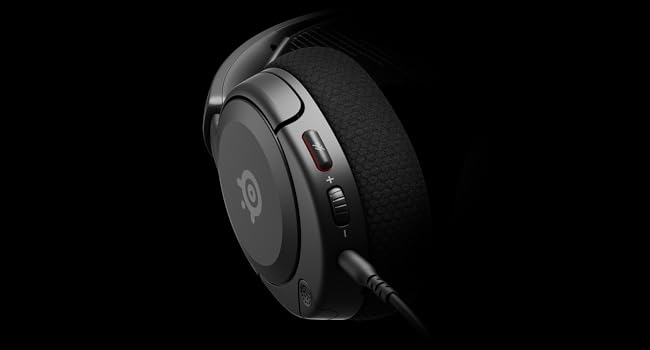
ചിത്രം: ക്ലോസ്-അപ്പ് view of the left earcup of the Arctis Nova 1X, highlighting the volume wheel and microphone mute button for easy access during gameplay.
Video: Official SteelSeries video demonstrating the features of the Arctis Nova 1 headset, including its audio capabilities and microphone design.
5. സുഖവും ഫിറ്റും
The Arctis Nova 1X is designed for extended gaming sessions with its ComfortMAX System:
- വളരെ ഭാരം കുറഞ്ഞ ഡിസൈൻ: Weighing only 236g, the headset minimizes pressure during long use.
- Height-Adjustable Earcups: The earcups can be adjusted vertically to fit various head sizes comfortably.
- Flexible Suspension Headband: The elastic headband conforms to your head for a secure yet gentle fit.

Image: The Arctis Nova 1X headset highlighting its ultra-lightweight and slim profile, designed for comfort.

Image: The Arctis Nova 1X headset demonstrating its height-adjustable earcups for a personalized and comfortable fit.
6. ഓഡിയോ സവിശേഷതകൾ
Experience superior sound with the Arctis Nova 1X:
- Almighty Audio: The Nova Acoustic System with High Fidelity Drivers delivers crystal-clear highs, precise mids, and deep bass.
- 360° സ്പേഷ്യൽ ഓഡിയോ: Immerse yourself in the game with surround sound that allows you to pinpoint enemy positions and environmental cues.
- Pro-grade Parametric EQ: നിങ്ങളുടെ സൗണ്ട് പ്രോ ഇഷ്ടാനുസൃതമാക്കുകfile with the SteelSeries Sonar Audio Software Suite for a competitive edge.

Image: The Arctis Nova 1X headset highlighting its "Almighty Audio" capabilities for a rich sound experience.
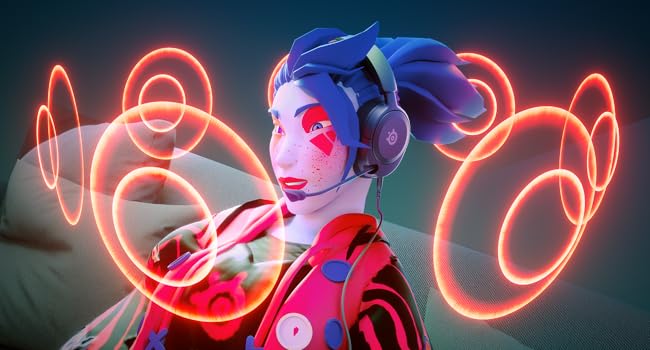
Image: Visual representation of 360° Spatial Audio, showing sound waves surrounding a gamer wearing the Arctis Nova 1X headset.
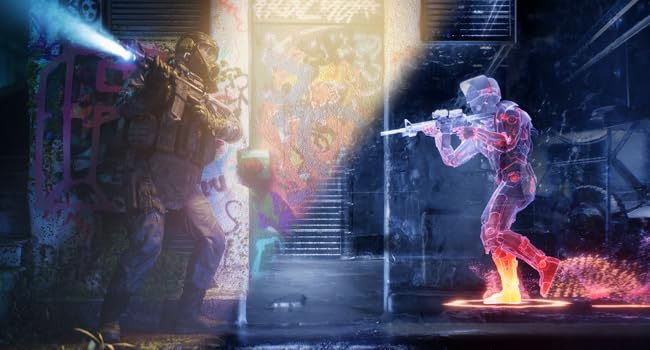
Image: Graphic illustrating the Pro-grade Parametric EQ, suggesting advanced audio customization options available with the headset.
7. മൈക്രോഫോൺ സവിശേഷതകൾ
The ClearCast Gen 2 Mic ensures clear communication:
- AI നോയ്സ് റദ്ദാക്കൽ: Advanced AI algorithms filter out background noise, ensuring your voice is heard clearly by teammates.
- പിൻവലിക്കാവുന്ന ഡിസൈൻ: The microphone can be fully retracted into the earcup when not in use, maintaining a sleek profile.

Image: The Nova 1 AI Microphone, emphasizing its noise-cancelling capabilities for clear voice communication.
8. പരിപാലനം
To ensure the longevity and optimal performance of your Arctis Nova 1X headset, follow these maintenance guidelines:
- വൃത്തിയാക്കൽ: ഇയർകപ്പുകളും ഹെഡ്ബാൻഡും തുടയ്ക്കാൻ മൃദുവായതും ഉണങ്ങിയതുമായ തുണി ഉപയോഗിക്കുക. കൂടുതൽ ആഴത്തിലുള്ള വൃത്തിയാക്കലിന്, അൽപ്പം ഡി.amp സ്പീക്കർ ഗ്രില്ലുകളിലോ പോർട്ടുകളിലോ ഈർപ്പം പ്രവേശിക്കുന്നില്ലെന്ന് ഉറപ്പാക്കാൻ വീര്യം കുറഞ്ഞ സോപ്പ് ഉള്ള തുണി ഉപയോഗിക്കാം.
- കേബിൾ കെയർ: Avoid sharp bends or excessive pulling on the headset cable to prevent internal damage. Store the cable neatly when not in use.
- സംഭരണം: ഹെഡ്സെറ്റ് നേരിട്ട് സൂര്യപ്രകാശം ഏൽക്കാത്തതും ഉയർന്ന താപനില ഏൽക്കാത്തതുമായ ഒരു തണുത്ത വരണ്ട സ്ഥലത്ത് സൂക്ഷിക്കുക.
- Earbud Tips: If applicable, ensure earbud tips (if using with mobile) fit snugly. Replace worn-out earbud tips to maintain sound quality and comfort.
9. പ്രശ്നപരിഹാരം
If you encounter issues with your Arctis Nova 1X headset, try the following solutions:
- ഓഡിയോ ഇല്ല/കുറഞ്ഞ വോളിയം:
- Ensure the 3.5mm cable is fully inserted into both the headset and your device.
- Check the volume wheel on the headset and your device's system volume.
- ഉപകരണ-നിർദ്ദിഷ്ട പ്രശ്നങ്ങൾ ഒഴിവാക്കാൻ മറ്റൊരു ഉപകരണം ഉപയോഗിച്ച് ഹെഡ്സെറ്റ് പരീക്ഷിക്കുക.
- മൈക്രോഫോൺ പ്രവർത്തിക്കുന്നില്ല:
- Ensure the microphone mute button is not activated (red indicator off).
- Verify the microphone is fully extended and positioned correctly.
- Check your device's audio settings to ensure the correct microphone input is selected and its volume is not muted.
- മോശം ശബ്ദ നിലവാരം:
- Ensure the 3.5mm cable is not damaged and is securely connected.
- Adjust your device's audio settings or equalizer settings.
10 സ്പെസിഫിക്കേഷനുകൾ
| ഫീച്ചർ | വിശദാംശങ്ങൾ |
|---|---|
| ബ്രാൻഡ് | സ്റ്റീൽ സീരീസ് |
| മോഡലിൻ്റെ പേര് | ആർക്റ്റിസ് നോവ 1X |
| മോഡൽ നമ്പർ | 61616 |
| കണക്റ്റിവിറ്റി ടെക്നോളജി | വയേർഡ് (3.5mm ജാക്ക്) |
| ചെവി പ്ലേസ്മെൻ്റ് | ചെവിക്ക് മുകളിൽ |
| ശബ്ദ നിയന്ത്രണം | ആക്ടീവ് നോയ്സ് റദ്ദാക്കൽ (മൈക്രോഫോൺ) |
| ഓഡിയോ ഡ്രൈവർ തരം | ഡൈനാമിക് ഡ്രൈവർ |
| ഫ്രീക്വൻസി റേഞ്ച് | 20 ഹെർട്സ് - 20,000 ഹെർട്സ് |
| മൈക്രോഫോൺ | ClearCast Gen 2 (Retractable, AI Noise Cancelling) |
| അനുയോജ്യമായ ഉപകരണങ്ങൾ | Xbox Series X|S, PC, PlayStation, Switch, Mobile |
| ഇനത്തിൻ്റെ ഭാരം | 1.1 പൗണ്ട് (ഏകദേശം 500 ഗ്രാം) |
| നിറം | കറുപ്പ് |
| യു.പി.സി | 850014119737 |
വീഡിയോ: ഒരു 360-ഡിഗ്രി view of the SteelSeries Arctis Nova 1X headset in black, showcasinഎല്ലാ കോണുകളിൽ നിന്നും അതിന്റെ ഡിസൈൻ.
11. വാറണ്ടിയും പിന്തുണയും
11.1 വാറൻ്റി വിവരങ്ങൾ
The SteelSeries Arctis Nova 1X Gaming Headset comes with a 1 വർഷത്തെ പരിമിത വാറൻ്റി വാങ്ങിയ തീയതി മുതൽ. ഈ വാറന്റി നിർമ്മാണ വൈകല്യങ്ങൾ ഉൾക്കൊള്ളുകയും സാധാരണ ഉപയോഗത്തിൽ നിങ്ങളുടെ ഉൽപ്പന്നം ഉദ്ദേശിച്ച രീതിയിൽ പ്രവർത്തിക്കുന്നുവെന്ന് ഉറപ്പാക്കുകയും ചെയ്യുന്നു. വാറന്റി ക്ലെയിമുകൾക്കായി നിങ്ങളുടെ വാങ്ങിയതിന്റെ തെളിവ് സൂക്ഷിക്കുക.
For detailed warranty terms and conditions, please refer to the official SteelSeries webസൈറ്റ് അല്ലെങ്കിൽ നിങ്ങളുടെ ഉൽപ്പന്ന പാക്കേജിംഗിൽ ഉൾപ്പെടുത്തിയിരിക്കുന്ന വാറന്റി കാർഡ്.
11.2 ഉപഭോക്തൃ പിന്തുണ
For further assistance, technical support, or warranty claims, please contact SteelSeries customer support through their official webസൈറ്റ്:
You may also find additional resources, FAQs, and software downloads on their support page.