
1. പ്രധാന സുരക്ഷാ നിർദ്ദേശങ്ങൾ
Please read all instructions carefully before operating this product. Retain this manual for future reference.
- ഈ ഉപകരണം മഴയിലോ ഈർപ്പത്തിലോ തുറന്നുകാട്ടരുത്.
- വെള്ളത്തിനടുത്ത് ഈ ഉപകരണം ഉപയോഗിക്കരുത്.
- ഉണങ്ങിയ തുണി ഉപയോഗിച്ച് മാത്രം വൃത്തിയാക്കുക.
- വെന്റിലേഷൻ തുറസ്സുകളൊന്നും തടയരുത്. നിർമ്മാതാവിന്റെ നിർദ്ദേശങ്ങൾക്കനുസൃതമായി ഇൻസ്റ്റാൾ ചെയ്യുക.
- റേഡിയറുകൾ, ഹീറ്റ് രജിസ്റ്ററുകൾ, സ്റ്റൗകൾ, അല്ലെങ്കിൽ മറ്റ് ഉപകരണങ്ങൾ (ഉൾപ്പെടെ) പോലെയുള്ള താപ സ്രോതസ്സുകൾക്ക് സമീപം ഇൻസ്റ്റാൾ ചെയ്യരുത്. ampലൈഫയറുകൾ) ചൂട് ഉത്പാദിപ്പിക്കുന്നത്.
- പ്രത്യേകിച്ച് പ്ലഗുകൾ, കൺവീനിയൻസ് റെസെപ്റ്റക്കിളുകൾ, ഉപകരണത്തിൽ നിന്ന് പുറത്തുകടക്കുന്ന ഇടം എന്നിവയിൽ നടക്കുകയോ നുള്ളുകയോ ചെയ്യുന്നതിൽ നിന്ന് പവർ കോർഡ് സംരക്ഷിക്കുക.
- നിർമ്മാതാവ് വ്യക്തമാക്കിയ അറ്റാച്ച്മെൻ്റുകൾ/ആക്സസറികൾ മാത്രം ഉപയോഗിക്കുക.
- മിന്നൽ കൊടുങ്കാറ്റുകളുടെ സമയത്തോ ദീർഘനേരം ഉപയോഗിക്കാത്ത സമയത്തോ ഈ ഉപകരണം അൺപ്ലഗ് ചെയ്യുക.
- എല്ലാ സേവനങ്ങളും യോഗ്യതയുള്ള സേവന ഉദ്യോഗസ്ഥർക്ക് റഫർ ചെയ്യുക. പവർ സപ്ലൈ കോർഡ് അല്ലെങ്കിൽ പ്ലഗ് കേടാകുക, ദ്രാവകം ഒഴുകുകയോ ഉപകരണങ്ങൾ ഉപകരണത്തിലേക്ക് വീഴുകയോ ചെയ്യുക, ഉപകരണം മഴയോ ഈർപ്പമോ സമ്പർക്കം പുലർത്തുക, സാധാരണയായി പ്രവർത്തിക്കാത്തത് എന്നിങ്ങനെയുള്ള ഏതെങ്കിലും വിധത്തിൽ ഉപകരണത്തിന് കേടുപാടുകൾ സംഭവിക്കുമ്പോൾ സേവനം ആവശ്യമാണ്. , അല്ലെങ്കിൽ ഉപേക്ഷിച്ചു.
2. പാക്കേജ് ഉള്ളടക്കം
നിങ്ങളുടെ പാക്കേജിൽ എല്ലാ ഇനങ്ങളും ഉണ്ടെന്ന് ഉറപ്പാക്കുക:
- Technical Pro TPPLIT8 Loudspeaker
- റിമോട്ട് കൺട്രോൾ
- യുഎസ്ബി ചാർജിംഗ് കേബിൾ
- ഉപയോക്തൃ മാനുവൽ

Image: Included accessories and user manual cover.
3. ഉൽപ്പന്നം കഴിഞ്ഞുview
3.1 ഫ്രണ്ട് പാനൽ
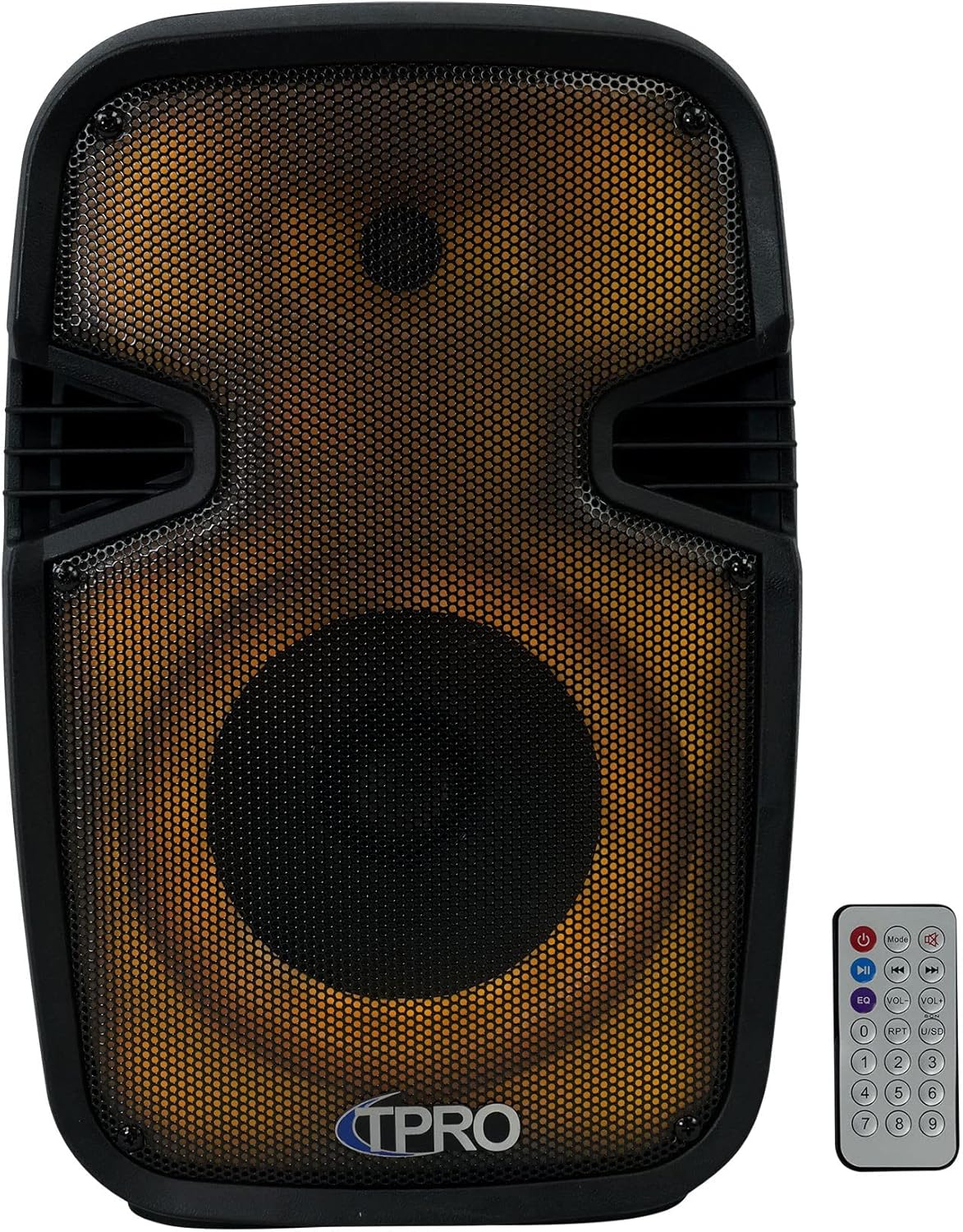
ചിത്രം: മുൻഭാഗം view of the loudspeaker, showcasing the speaker grille and integrated LED lighting. The remote control is also visible.
3.2 Rear Control Panel

ചിത്രം: പിൻഭാഗം view of the loudspeaker, detailing the control panel. This includes volume controls, input selectors, USB and SD card slots, microphone input, AUX input, and power switch.
3.3 വശം View and Portability

ചിത്രം: വശം view of the loudspeaker, illustrating the robust carry handle designed for easy transport.
3.4 Key Features Diagram

Image: A visual diagram highlighting the main functionalities of the loudspeaker, including various connectivity options and lighting effects.
3.5 അളവുകൾ

Image: A diagram providing the physical measurements of the loudspeaker for placement and transport planning.
4. സജ്ജീകരണം
4.1 പ്രാരംഭ ചാർജിംഗ്
Before first use, fully charge the loudspeaker's built-in rechargeable battery. Connect the provided USB charging cable to the speaker's charging port and a compatible USB power adapter (not included). The charging indicator light will typically show red while charging and turn off or change color when fully charged.
4.2 പവർ ഓൺ/ഓഫ്
Locate the power switch on the rear control panel. Flip the switch to the 'ON' position to power on the loudspeaker. Flip it to 'OFF' to power off the unit.
5. പ്രവർത്തന നിർദ്ദേശങ്ങൾ
5.1 ബ്ലൂടൂത്ത് ജോടിയാക്കൽ
- Power on the loudspeaker. It will automatically enter Bluetooth pairing mode, indicated by an audible prompt or flashing LED.
- നിങ്ങളുടെ മൊബൈൽ ഉപകരണത്തിൽ (സ്മാർട്ട്ഫോൺ, ടാബ്ലെറ്റ് മുതലായവ), ബ്ലൂടൂത്ത് പ്രവർത്തനക്ഷമമാക്കി ലഭ്യമായ ഉപകരണങ്ങൾക്കായി തിരയുക.
- Select 'TPRO PLIT8' from the list of devices.
- Once paired, the loudspeaker will confirm with an audible sound. You can now stream audio wirelessly.
5.2 യുഎസ്ബി/എസ്ഡി കാർഡ് പ്ലേബാക്ക്
- Insert a USB flash drive or SD card (with pre-loaded MP3 audio files) into the respective slot on the rear control panel.
- The loudspeaker should automatically detect the media and begin playback. If not, press the 'Mode' button to switch to USB/SD mode.
- Use the playback controls (Play/Pause, Next, Previous) on the loudspeaker or remote control to manage your music.
5.3 മൈക്രോഫോൺ ഇൻപുട്ട്
- Connect a wired microphone (not included) to the 'MIC IN' jack on the rear control panel.
- Adjust the 'MIC VOL' knob to control the microphone's volume.
- Use the 'ECHO' knob to add an echo effect to the microphone audio.
5.4 AUX ഇൻപുട്ട്
- Connect an external audio source (e.g., MP3 player, laptop) to the 'AUX IN' jack on the rear control panel using a 3.5mm audio cable (not included).
- Press the 'Mode' button to switch the loudspeaker to AUX input mode.
- Control the volume from both the external device and the loudspeaker's master volume knob.
5.5 TWS (ട്രൂ വയർലെസ് സ്റ്റീരിയോ) ജോടിയാക്കൽ
To achieve true wireless stereo sound, you can pair two TPPLIT8 loudspeakers together:
- Ensure both loudspeakers are powered on and in Bluetooth mode, but not yet paired to any device.
- On one of the loudspeakers, press and hold the 'TWS' button (or a designated TWS pairing button, refer to the remote control section).
- The two speakers will attempt to connect to each other. Once connected, an audible prompt will confirm the TWS pairing.
- Now, connect your mobile device to the primary loudspeaker via Bluetooth (as described in section 5.1). Audio will play through both speakers in stereo.

Image: Two loudspeakers demonstrating a True Wireless Stereo setup for enhanced audio experience.
5.6 എഫ്എം റേഡിയോ
- Press the 'Mode' button to switch to FM Radio mode.
- Press the 'Play/Pause' button to initiate an automatic scan for available FM stations. The speaker will save detected stations.
- Use the 'Next' and 'Previous' buttons to navigate through the saved stations.
5.7 LED ലൈറ്റ് കൺട്രോൾ
The loudspeaker features multi-color flashing disco LED party lights. Use the dedicated LED control button on the remote or the unit (if available) to cycle through different lighting modes or turn them off.
5.8 വിദൂര നിയന്ത്രണ പ്രവർത്തനങ്ങൾ
ഉൾപ്പെടുത്തിയിരിക്കുന്ന റിമോട്ട് കൺട്രോൾ വിവിധ ഫംഗ്ഷനുകളിലേക്ക് സൗകര്യപ്രദമായ ആക്സസ് നൽകുന്നു:

Image: The remote control unit, showing buttons for power, mode selection, playback, volume adjustment, equalizer presets, and a numeric keypad.
- പവർ ബട്ടൺ: യൂണിറ്റ് ഓൺ/ഓഫ് ചെയ്യുന്നു.
- മോഡ് ബട്ടൺ: Cycles through input modes (Bluetooth, USB, SD, FM, AUX).
- പ്ലേ/താൽക്കാലികമായി നിർത്തുക: നിലവിലെ ഓഡിയോ പ്ലേ ചെയ്യുകയോ താൽക്കാലികമായി നിർത്തുകയോ ചെയ്യുന്നു.
- മുമ്പത്തെ അടുത്തത്: Skips to the previous or next track/station.
- വോളിയം കൂട്ടുക/താഴ്ത്തുക: മാസ്റ്റർ വോളിയം ക്രമീകരിക്കുന്നു.
- EQ: ഇക്വലൈസർ പ്രീസെറ്റുകളിലൂടെ കടന്നുപോകുന്നു.
- ആർപിടി (ആവർത്തിക്കുക): നിലവിലുള്ള ട്രാക്ക് അല്ലെങ്കിൽ എല്ലാ ട്രാക്കുകളും ആവർത്തിക്കുന്നു.
- USB/SD: Directly selects USB or SD card mode.
- ന്യൂമെറിക് പാഡ് (0-9): For direct track selection in USB/SD mode or FM station input.
6. പരിപാലനം
6.1 വൃത്തിയാക്കൽ
Wipe the exterior of the loudspeaker with a soft, dry cloth. Do not use abrasive cleaners, waxes, or solvents as they may damage the finish. Ensure no liquids enter the unit.
6.2 സംഭരണം
When not in use for extended periods, store the loudspeaker in a cool, dry place, away from direct sunlight and extreme temperatures. It is recommended to charge the battery periodically to maintain its lifespan.
7. പ്രശ്നപരിഹാരം
| പ്രശ്നം | സാധ്യമായ കാരണം | പരിഹാരം |
|---|---|---|
| ശക്തിയില്ല | Battery discharged; Power switch off | Charge the battery; Turn the power switch to 'ON' |
| ശബ്ദമില്ല | Volume too low; Incorrect input mode; Device not connected | Increase volume; Select correct input mode; Ensure device is properly connected/paired |
| ബ്ലൂടൂത്ത് കണക്റ്റ് ചെയ്യുന്നില്ല | Speaker not in pairing mode; Device Bluetooth off; Too far from speaker | Ensure speaker is in Bluetooth pairing mode; Enable Bluetooth on device; Move device closer to speaker (within 30 feet) |
| TWS ജോടിയാക്കൽ പരാജയപ്പെട്ടു | Speakers already paired to a device; Incorrect pairing procedure | Ensure both speakers are unpaired from other devices; Follow TWS pairing steps carefully |
8 സ്പെസിഫിക്കേഷനുകൾ
| ഫീച്ചർ | സ്പെസിഫിക്കേഷൻ |
|---|---|
| മോഡലിൻ്റെ പേര് | PLIT8 |
| സ്പീക്കർ തരം | സ്പീക്കർ സിസ്റ്റങ്ങൾ |
| സ്പീക്കർ വലിപ്പം | 8 ഇഞ്ച് |
| വൂഫർ വ്യാസം | 8 ഇഞ്ച് |
| സ്പീക്കർ പരമാവധി ഔട്ട്പുട്ട് പവർ | 1200 വാട്ട്സ് (പീക്ക്) |
| കണക്റ്റിവിറ്റി ടെക്നോളജി | ബ്ലൂടൂത്ത് |
| വയർലെസ് കമ്മ്യൂണിക്കേഷൻ ടെക്നോളജി | ബ്ലൂടൂത്ത് |
| ബ്ലൂടൂത്ത് ശ്രേണി | 30 അടി |
| പവർ ഉറവിടം | ബാറ്ററി പവർ |
| പ്രതിരോധം | 3 ഓം |
| ഫ്രീക്വൻസി പ്രതികരണം | 18 KHz |
| ഓഡിയോ put ട്ട്പുട്ട് മോഡ് | സ്റ്റീരിയോ |
| ഉൽപ്പന്ന അളവുകൾ | 8"D x 9"W x 16"H |
| ഇനത്തിൻ്റെ ഭാരം | 6 പൗണ്ട് |
| മെറ്റീരിയൽ | പ്ലാസ്റ്റിക് |
| പ്രത്യേക ഫീച്ചർ | LED Power Switch, Dazzling LED Glow Wall |
| ഉൾപ്പെടുത്തിയ ഘടകങ്ങൾ | PA System, Remote Control, USB Cable, User Manual |
| യു.പി.സി | 817802018269 |
9. വാറൻ്റിയും പിന്തുണയും
This product comes with a Limited Warranty. For specific warranty details, please refer to the documentation included with your purchase or contact Technical Pro customer support.
For questions, comments, or technical support, please contact:
- ഫോൺ: 888-842-6277
- ഇമെയിൽ: info@tpro.com